Hello! Welcome to the first lesson in our module on Backtracking.
In our previous module on Dynamic Programming, you saw a specific kind of backtracking when we reconstructed the Longest Common Subsequence (LCS) string from our DP table. We started at the end and traced our steps backward to find the solution. Today, we're going to formalize that idea into a powerful, general problem-solving technique.
This lesson introduces the core concept of backtracking. By the end, you will be able to describe the general template for all backtracking algorithms: the "Choose, Explore, Un-choose" pattern. This template is the key to solving a wide range of problems in competitive programming that involve generating all possible solutions, such as finding all permutations, combinations, or solving puzzles like Sudoku.
1. What is Backtracking?
At its heart, backtracking is a methodical way of trying out all possible solutions to a problem. Imagine you're in a maze. You come to a fork in the road and pick a path. You follow it, and if it leads to a dead end, what do you do? You go back to the fork and try the other path.
Backtracking in algorithms works the same way. It incrementally builds candidates for a solution and abandons a candidate ("backtracks") as soon as it determines that it cannot possibly be completed to a valid solution. This process of trying choices and undoing them is often visualized as exploring a decision tree.
Let's watch a short clip that introduces this concept.
Solve ANY Backtracking Problem on Leetcode (Template + Explanation)
This video from Bitflip gives a great high-level introduction to backtracking, using the maze analogy and explaining how we can think of any backtracking problem as exploring a decision tree.
Watch from 00:18 to 01:15. Focus on the core idea: exploring paths step-by-step and undoing your last step when you hit a dead end.
2. The Core Pattern: Choose, Explore, Un-choose
Nearly every backtracking algorithm can be expressed with a simple, three-step recursive pattern. Understanding this template is the key to mastering backtracking.

Here’s what each step means:
- Choose: You make a decision. This involves picking an element or an option and adding it to your current partial solution. For example, you decide to include a number in a subset or place a queen on a chessboard square.
- Explore: After making a choice, you move forward. You recursively call your function to solve the rest of the problem based on the choice you just made. This takes you one level deeper into the decision tree.
- Un-choose: This is the "backtracking" step and it's the most crucial part. After the recursive call from the "Explore" step returns (meaning you've either found a solution down that path or hit a dead end), you must undo the choice you made in step 1. This cleans the slate, allowing you to explore different choices from the same decision point.
This pattern ensures that you systematically explore every single possibility without getting stuck on one path.
3. A Concrete Example: The Subsets Problem
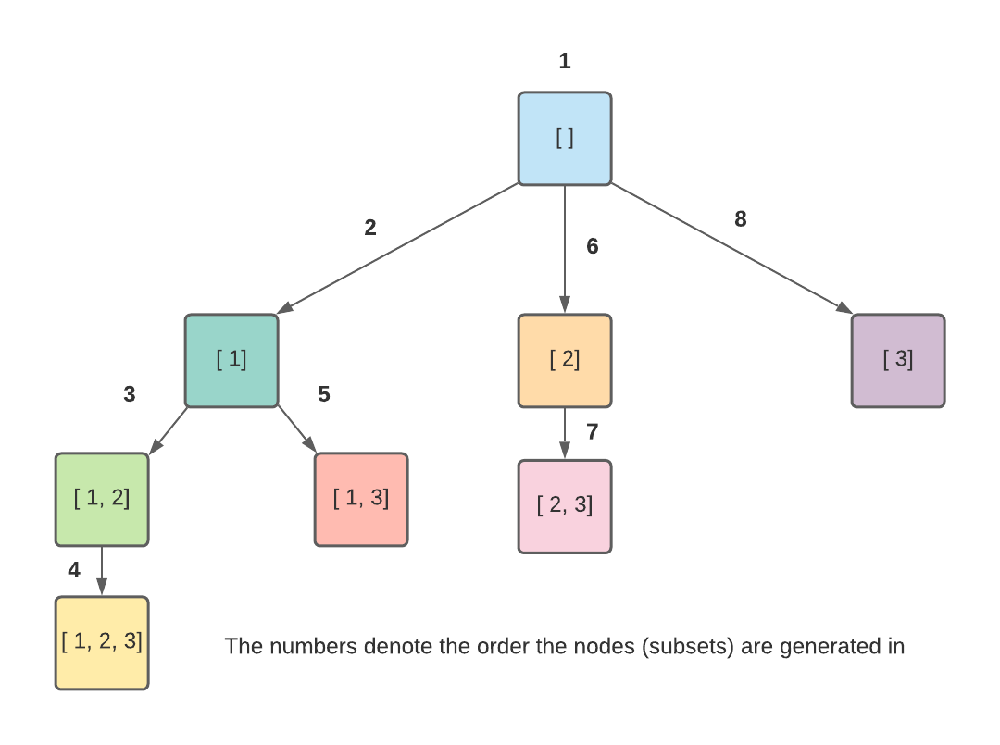
Let's make this abstract idea concrete with a classic problem: Given a set of unique numbers, find all possible subsets (the power set).
For an input like [1, 2, 3], our decision tree looks like this. For each number, we have two choices: either we include it in our current subset, or we don't.
To see how this works, the following video provides an excellent visualization.
Recursive Backtracking - DSA Course in Python Lecture 14
This video from Greg Hogg walks through the decision tree for the subsets problem. It clearly illustrates the two choices we have at each step.
Watch from 01:07 to 05:40. Focus on: How each number presents two choices: 'choose' it or 'don't choose' it. How these choices form the branches of a decision tree. How the algorithm explores this tree using a Depth-First Search (DFS) traversal.
Now, how do we translate this exploration into code using our "Choose, Explore, Un-choose" pattern? The next segment of the same video explains this perfectly.
Recursive Backtracking - DSA Course in Python Lecture 14
Let's connect the decision tree to the Python implementation. This part of the video shows how append and pop map directly to the 'Choose' and 'Un-choose' steps.
Watch from 05:40 to 11:11. Pay close attention to: The solution list, which holds the current subset being built. solution.append(num): This is the Choose step. backtrack(i + 1): The recursive call is the Explore step. solution.pop(): This is the crucial Un-choose step that enables backtracking.
Here is a clean implementation of the backtracking template for the subsets problem. Notice the comments labeling each part of our pattern.
def find_subsets(nums):
    result = []  # This will store all the final subsets
    current_subset = []  # This holds the subset we are currently building

    def backtrack(start_index):
        # First, add a copy of the current state as a valid solution
        result.append(list(current_subset))

        # Explore all possible choices from the current state
        for i in range(start_index, len(nums)):
            # 1. CHOOSE
            # Add the element to our current subset
            current_subset.append(nums[i])

            # 2. EXPLORE
            # Recursively call backtrack with the next starting index
            # This moves us deeper into the decision tree
            backtrack(i + 1)

            # 3. UN-CHOOSE
            # Remove the element we just added to backtrack
            # This allows us to explore other branches
            current_subset.pop()

    backtrack(0)
    return result

# Example
nums = [1, 2, 3]
print(find_subsets(nums))
# Output: [[], [1], [1, 2], [1, 2, 3], [1, 3], [2], [2, 3], [3]]
Test your understanding!
In the Python code above, what would happen if you forgot to include the current_subset.pop() line?
Show answer
Without current_subset.pop(), the "Un-choose" step is missing. The algorithm would never backtrack. It would keep adding elements to current_subset but never remove them. For the input [1, 2, 3], the output would be [[], [1], [1, 2], [1, 2, 3]]. It would explore only the single, left-most path of the decision tree and fail to generate all other subsets.
4. Generalizing the Template
This "Choose, Explore, Un-choose" pattern is remarkably versatile. To apply it to a new problem, you just need to define four components:
- Base Case: When does the recursion stop? This is usually when a complete solution is formed (e.g., the permutation has
nelements) or when you can go no further. - Choices: What are the possible options to choose from at the current step? (e.g., all unused numbers).
- Constraints: What rules must a choice follow to be valid? (e.g., a queen can't be placed in a threatened square).
- The Backtracking Logic: The
forloop that iterates through choices and applies thechoose -> explore -> un-choosepattern.
To see how this template applies to a different problem, let's look at how it solves the Permutations problem.
The Choose-Explore-Unchoose pattern for backtracking
This article demonstrates how the exact same 'Choose-Explore-Unchoose' pattern can be used to generate all permutations of a list. This will help you see how general and powerful the template is.
Read the section that introduces and solves the 'permutations problem'. Note how the Python code uses comments to explicitly label the 'CHOOSE', 'EXPLORE', and 'UNCHOOSE' steps. The structure is nearly identical to what we saw for subsets.
Conclusion
In this lesson, you've been introduced to the fundamental concepts of backtracking. This technique is a cornerstone of algorithmic problem-solving, especially for problems requiring you to generate all possible configurations or solutions.
Key Takeaways:
- Backtracking is an algorithmic technique for solving problems recursively by trying to build a solution incrementally, one piece at a time.
- The core of backtracking is the "Choose, Explore, Un-choose" pattern.
- Choose: Make a choice and add it to your partial solution.
- Explore: Recurse to solve the problem with the new choice included.
- Un-choose: Undo the choice so you can explore other options. This "backtracking" step is what allows for a complete, exhaustive search of the solution space.
Up Next:
You've now seen the template applied to both subsets and (briefly) permutations. In the next lesson, we will dive deep into the Permutations problem. You will implement it from scratch, reinforcing your understanding of the backtracking template and learning how to handle constraints within your recursive function.