Hello! Welcome to the final lesson in our first module, "Python Tools for Competitive Programming."
In our previous lessons, we've built a powerful toolkit of Python features that help write concise and efficient code. We started with comprehensions and lambda functions, then moved to specialized data structures from the collections module like Counter and, most recently, defaultdict, which elegantly simplifies data aggregation.
Today, we'll explore two more essential tools that align with this philosophy: the built-in map and filter functions. Your learning goal for this lesson is to apply the built-in map and filter functions for data transformation and selection. These functions are cornerstones of functional programming in Python and provide a clean, powerful alternative to traditional for loops for many common tasks in competitive programming.
1. The map() Function: Transforming Iterables
Often in programming challenges, you need to apply the same operation to every item in a list. For example, converting a list of string numbers to integers, or squaring every number in a list.
The traditional way involves a for loop:
numbers_str = ["1", "2", "3", "4", "5"]
numbers_int = []
for s in numbers_str:
    numbers_int.append(int(s))
print(numbers_int) # Output: [1, 2, 3, 4, 5]
The map() function allows you to do this more compactly. It applies a given function to each item of an iterable (like a list) and returns the results.
The basic syntax is: map(function, iterable)
The video below gives a great introduction to map(), comparing the for loop approach to the more elegant map() approach.
#4: Python map() & filter() | Python Best Practices
Watch this segment from the video "#4: Python map() & filter()" by Programiz. It clearly demonstrates the motivation for using map() and its basic syntax, including with a lambda function.
Watch from 01:16 to 05:44. Pay attention to how map replaces the loop and how it's combined with a lambda function for a one-line solution. Also, note the explanation of the 'map object' that is returned.
Key Points about map():
- The Map Object (Iterator): As the video mentioned,
map()in Python 3 does not return a list directly. It returns amapobject, which is an iterator. This is a memory-efficient design known as lazy evaluation. The transformations are computed one by one as you need them, not all at once. To get a list, you must explicitly convert it usinglist(), likelist(map(...)). - Using
mapwith Multiple Iterables: A powerful feature ofmap()is its ability to work on multiple lists at once. The function you provide must accept a corresponding number of arguments. For example, you can add two lists element-wise.
list_a = [1, 2, 3, 4]
list_b = [10, 20, 30, 40]

# The lambda function takes two arguments, x and y, from list_a and list_b respectively.
sums_list = list(map(lambda x, y: x + y, list_a, list_b))
print(sums_list)
# Output: [11, 22, 33, 44]
If the lists have different lengths, map() will stop as soon as the shortest list is exhausted.
The following reading provides more examples, including the useful case of mapping round() with two iterables.
Let's read the first section of the "Map, Filter, Reduce" article on learnpython.org. It reinforces the syntax and provides excellent examples of using map() with both one and multiple iterables.
Read the section titled "Map". Focus on the example that uses round() with two iterables (circle_areas and range(1, 7)). This is a great demonstration of map's flexibility.
2. The filter() Function: Selecting from Iterables
While map() transforms every element, filter() selects elements that meet a certain condition. It constructs an iterator from those elements of an iterable for which a function returns True.
The syntax is: filter(function, iterable)
The function passed to filter() must return a boolean value (True or False).
Let's see how filter() works in the same video from Programiz.
#4: Python map() & filter() | Python Best Practices
Now, let's watch the section on filter() from the Programiz video. It clearly distinguishes filter's purpose from map's.
Watch from 06:03 to 07:41. Notice how the lambda function here returns a boolean condition (n % 2 == 0), which filter uses to decide whether to keep an element.
Like map(), filter() also returns a memory-efficient iterator, which you need to convert to a list using list() if you want to see all the results at once.

Test your understanding!
You are given a list of strings. You need to produce a list of the lengths of only those strings that have more than 5 characters.
words = ["hello", "world", "a", "python", "is", "awesome"]
How can you achieve this by combining filter() and map()?
Show answer
You can first filter the words and then map the len function to the result.
words = ["hello", "world", "a", "python", "is", "awesome"]

# 1. Filter the words longer than 5 characters
long_words = filter(lambda word: len(word) > 5, words)

# 2. Map the len() function to the filtered words
lengths = map(len, long_words)

# 3. Convert the final result to a list
print(list(lengths))
# Output: [6, 7]
Because both filter and map use lazy evaluation, this process is very memory-efficient. No intermediate list of "long_words" is ever fully stored in memory.
3. map()/filter() vs. List Comprehensions
You might have noticed that the tasks performed by map() and filter() can also be done with list comprehensions, which we covered in our first lesson.
-
map()vs. List Comprehension:# Using map squares_map = list(map(lambda x: x*x, range(10))) # Using list comprehension squares_comp = [x*x for x in range(10)] -
filter()vs. List Comprehension:# Using filter evens_filter = list(filter(lambda x: x % 2 == 0, range(10))) # Using list comprehension evens_comp = [x for x in range(10) if x % 2 == 0]
So, which one should you use? Here are some guidelines for the context of competitive programming:
- Readability: For simple transformations and filters, list comprehensions are often considered more "Pythonic" and readable by the community. The logic is all in one place.
- Use of Existing Functions: If you already have a function defined (e.g.,
def my_complex_function(x): ...), usingmap(my_complex_function, data)can be cleaner and more direct than a list comprehension. - Performance: For simple operations, list comprehensions can sometimes be slightly faster than
map()orfilter()because they are highly optimized in CPython. The graph below shows an example where list comprehension outperformsfilter.
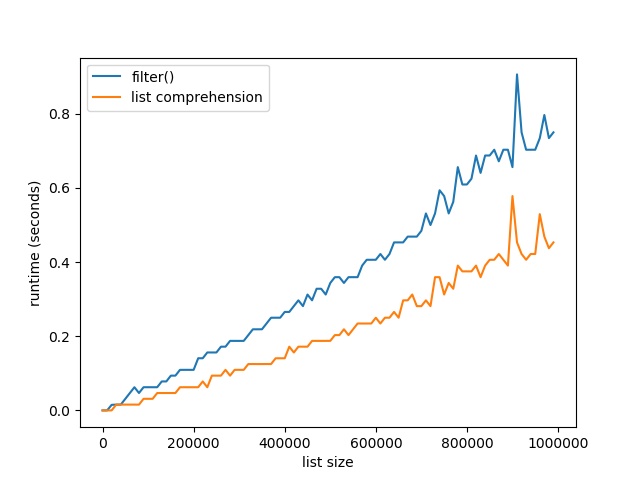
- Memory (Lazy Evaluation): The most significant difference is that
map()andfilter()are lazy. They return iterators and process elements one by one. List comprehensions are eager—they create the entire new list in memory immediately. For the typical constraints of competitive programming problems, this memory difference is often not critical, but for large-scale data analysis, the laziness ofmap/filteris a huge advantage.
The following resource provides a deep dive into these alternatives and offers practical advice on when to choose each one.
Python map() Function: A Complete Guide
To solidify your understanding of when to use map, filter, or list comprehensions, let's read a section of the "Python map() Function: A Complete Guide" from DataCamp.
Read the section titled "map() vs. List Comprehensions and Alternatives". Pay close attention to the summary table and the final recommendations on when to choose each method. This provides a balanced view of readability and performance.
Conclusion
Congratulations on completing the first module! You've added several powerful Python tools to your competitive programming arsenal. Today, we focused on map and filter, which allow for concise and efficient data processing.
Key Takeaways:
map(function, iterable)applies a function to every item in an iterable, returning a transforming iterator.filter(function, iterable)selects items from an iterable where a function returnsTrue, returning a filtering iterator.- Both
mapandfilterare lazy, meaning they return iterators and compute values on demand, which is memory-efficient. - For many simple cases, list comprehensions are a readable and often faster alternative, but
mapshines when applying an existing, named function.
Up Next:
You are now ready to move on to Module 2: Complexity Analysis and Core Data Structures. We will begin with a fundamental topic that underpins all of competitive programming: analyzing the time complexity of algorithms using Big-O notation. This will give you the theoretical framework to understand why one algorithm is better than another, a critical skill for solving challenging problems.