Introduction
Hello again! In our last lesson, we explored how React uses the Virtual DOM and a sophisticated reconciliation algorithm (React Fiber) to update the UI efficiently. We learned that this process is split into an interruptible "render" phase and a synchronous "commit" phase. We also had a glimpse of the key prop, noting it serves as a crucial hint for React's diffing algorithm.
Today, we will build directly on that foundation. This lesson's goal is to compare list rendering techniques in vanilla JS with React's key-based reconciliation approach. You've expressed a strong interest in comparing React's declarative style with imperative Vanilla JS, and this topic provides a perfect opportunity to do just that. We'll examine not just how to render lists, but why React's method, while seemingly abstract, is powerful and efficient.
We'll cover:
- The fundamental difference between imperative and declarative UI programming.
- How you would build and update a list using imperative Vanilla JS.
- How React handles the same task declaratively using
.map(). - How React's
keyprop is the linchpin that makes its declarative approach performant.
The Two Paradigms: Imperative vs. Declarative
Before we dive into code, it's essential to solidify the mental model behind these two approaches. In UI development:
- Imperative programming is like giving a chef step-by-step instructions: "Take a pot, add water, turn on the stove, boil the water, add pasta..." You control the how.
- Declarative programming is like telling the chef what you want: "I'd like a plate of spaghetti carbonara." You describe the what, and the chef handles the implementation details.
This video provides an excellent high-level introduction to this concept, which you'll see applied directly to JavaScript and React.
Declarative vs. Imperative - JavaScript Tutorial
Watch this video from ColorCode to understand the core difference between imperative and declarative thinking. It uses simple analogies and then applies them to JavaScript array manipulation and DOM updates.
Watch the video from the beginning up to 08:58, and then from 09:20 to 13:39. Focus on: The card shuffling analogy (00:00 - 03:13). The comparison between a for loop (imperative) and array.map (declarative) (04:29 - 08:58). The comparison between manual DOM creation with document.createElement (imperative) and HTML/JSX (declarative) (09:20 - 13:39).
List Rendering in Practice
Now let's apply these concepts to a common task: rendering a dynamic list of items.
The Vanilla JS Approach (Imperative)
Imagine we have an array of todos and we want to display them in an unordered list. In Vanilla JS, you would manually manipulate the DOM. You would write code that gives the browser explicit, step-by-step commands.
Here’s a simple implementation:
// Data
const todos = [
  { id: 1, text: 'Learn about reconciliation' },
  { id: 2, text: 'Compare list rendering' },
];

// Target DOM node
const root = document.getElementById('root');
const ul = document.createElement('ul');

// Imperative rendering logic
todos.forEach(todo => {
  const li = document.createElement('li');
  li.textContent = todo.text;
  li.id = `todo-${todo.id}`; // We need a way to find this element later
  ul.appendChild(li);
});

root.appendChild(ul);
This works fine for the initial render. But how do you handle updates?
- Adding an item: You would create a single new
lielement and append it to theul. This is quite efficient. - Removing an item: You would need to find the specific
lielement in the DOM (e.g., usingdocument.getElementById('todo-2')) and then callparentElement.removeChild(). - Reordering items: This is where it gets complex. You would have to find all the relevant DOM nodes and manually re-insert them into the correct positions. This logic can become cumbersome and error-prone.
A common, but naive, imperative approach is to simply wipe the slate clean and re-render everything on every change:ul.innerHTML = ''; // then re-run the forEach loop
As we saw in the previous lesson, this is inefficient and destroys any state held in the DOM, like input focus or text selection.
The React Approach (Declarative)
In React, you don't issue commands to the DOM. You simply declare what the UI should look like based on the current state.
function TodoList() {
  const [todos, setTodos] = React.useState([
    { id: 1, text: 'Learn about reconciliation' },
    { id: 2, text: 'Compare list rendering' },
  ]);

  // Declarative rendering logic
  return (
    <ul>
      {todos.map(todo => (
        <li key={todo.id}>{todo.text}</li>
      ))}
    </ul>
  );
}
Notice you're not calling createElement or appendChild. You're using Array.prototype.map to transform your data array into an array of <li> React elements. You're describing the desired end result, and React takes on the responsibility of making the DOM match it.
This is where the concepts of our last lesson click into place. When the todos state changes, React:
- Creates a new Virtual DOM tree (a new array of
<li>elements). - Diffs this new tree with the old one.
- Calculates the minimum number of DOM operations (add, remove, reorder) to match the new tree.
- Commits these changes to the real DOM.
This brings us to the most important piece of the puzzle: how does React efficiently diff two lists?
The Crucial Role of Keys
When React's diffing algorithm encounters a list of children, it needs a way to track which child is which across renders. This is what the key prop is for. A key is a stable and unique identifier that you provide for each element in a list.
Let's explore an article that frames this comparison in the context of performance.
React.js is Slower Than Vanilla JS ?
The article 'React.js is Slower Than Vanilla JS ?' discusses a high-frequency update scenario and compares the complexity of imperative vs. declarative approaches. It sets up the problem nicely and hints at the solution.
Read the entire article. It's short. Pay attention to how it describes the imperative approach as O(1) for appending, while the naive declarative approach is O(N). Then, focus on the section 'Unlocking React's True Potential', which correctly identifies 'keying each item uniquely' as a critical optimization.
As the article points out, without optimization, re-rendering a list of N items seems like an O(N) operation. However, keys allow React to be much smarter.
- With stable keys (e.g.,
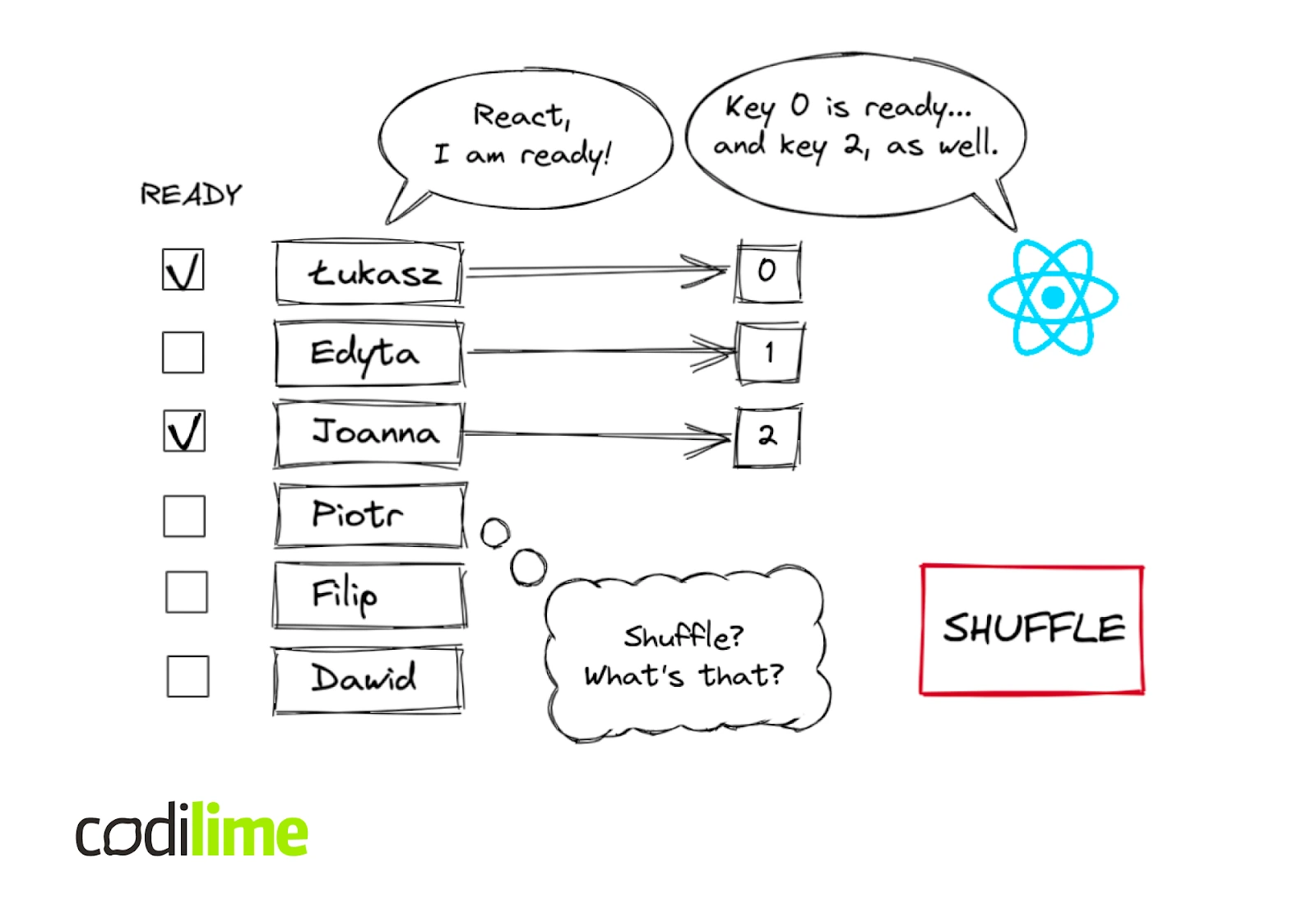
key={item.id}): When an array is re-sorted, React sees that the element withkey="abc"has just moved. It will move the existing DOM element to its new position, preserving its state (like a checked checkbox or text in an input field). - Without keys (or with unstable keys like array indices): If you add an item to the beginning of a list, the index of every subsequent item changes. React compares the old child at
index={0}with the new child atindex={0}. Since the data is different, it will update the DOM for that element. It will do this for every single item in the list, performing unnecessary work and potentially leading to bugs by mixing up component state.
This image perfectly illustrates the problem. React tracks items by their key. If you reorder the list, it knows that "Key 0" is still "Key 0", even if its position changes. Without a stable identity, confusion ensues.
To see a step-by-step explanation of how React's reconciliation uses keys, let's watch a short, focused video.
The Magic of React's Reconciliation: Behind the Scenes with a Microsoft Frontend Developer
This video from Code Sketched provides a clear, animated walkthrough of the list diffing problem and how keys solve it.
Watch the section on 'recursing over the children' from 03:53 to 04:54. Notice the inefficiency when an item is inserted at the start without keys, and how providing keys allows React to identify the new element and simply move the others.
Under the Hood: The List Diffing Algorithm
Given your interest in React's anatomy, let's take a look at how this is actually implemented. React's list reconciliation algorithm doesn't just do a simple one-to-one comparison. It's a multi-pass process designed to minimize DOM manipulations.
The article "How does 'key' work internally?" provides a commented walkthrough of the actual source code. We won't analyze every line, but understanding the high-level strategy is incredibly insightful.
Here's the general approach React takes inside its reconcileChildrenArray function:
- First Pass (Scan for matches): React iterates over both the old and new lists simultaneously. As long as the keys match at the same index, it knows it can update those elements in place. It stops at the first mismatch.
- Second Pass (Handle the rest): For the remaining items, React creates a
Mapof the old children, using their keys for lookup (key -> fiber). - It then continues iterating through the rest of the new children. For each new child, it checks if its key exists in the map.
- If yes, it means the element existed before but has moved. React reuses the old element and marks it for a move.
- If no, it means this is a new element that must be created and inserted.
- Final Pass (Clean up): Any elements left in the map after the second pass are ones that existed in the old list but not the new one. These are marked for deletion.
This approach cleverly handles insertions, deletions, and reordering. An important optimization here is the use of lastPlacedIndex, which helps React avoid moving elements that are already in their correct relative order.
How does 'key' work internally? List diffing in React
This article is a deep dive into the source code of React's list diffing algorithm. It's technical, but it directly answers the 'how does it work' question.
This is a more advanced read. Don't worry about understanding every single line of code. Instead, focus on: 'React’s approach' (Section 1): Read the high-level 2-step summary of the algorithm. Code Walkthrough (Section 2): Skim through the commented code blocks. The goal is to see the pattern: a for loop for the initial scan, followed by creating a map of remaining children, and then another loop to handle moves and insertions. placeChild() (Section 3): Read the explanation of this function. It's the core of the move optimization, using lastPlacedIndex to decide if a DOM node actually needs to be moved.
Conclusion
In this lesson, we contrasted the imperative "how-to" of Vanilla JS list rendering with the declarative "what-to-achieve" of React. While a direct, imperative DOM append can be faster in the simplest cases, React's approach provides immense benefits in terms of code readability, maintainability, and, when used correctly, excellent performance for complex dynamic UIs.
Key Takeaways:
- Imperative (Vanilla JS): You write step-by-step instructions to manipulate the DOM. This gives you fine-grained control but can become complex to manage for updates and reorders.
- Declarative (React): You describe the UI's final state using
.map(). React is responsible for figuring out the most efficient way to update the DOM to match that state. - Keys are the Bridge: Keys are the critical piece of information that makes React's declarative approach efficient. They provide a stable identity for each element, allowing React's reconciliation algorithm to intelligently reuse, reorder, and remove DOM nodes instead of wastefully re-creating them.
- The Reconciliation Strategy: React uses a multi-pass algorithm to diff lists, first scanning for simple updates and then using a map of keys to efficiently handle complex changes like reordering.
Preview of the Next Lesson:
We've established why keys are essential. In the next lesson, we will focus on the practical application and common pitfalls: "Explain the role of keys in list rendering and the consequences of using unstable keys." We'll explore in detail why using an array index as a key is an anti-pattern, what constitutes a good key, and look at more code examples where incorrect keying leads to subtle but significant bugs.