Hello! Welcome to the first lesson of Module 3: Concurrency Fundamentals with Locks.
In the previous module, we built a solid foundation in manual memory management. You learned how to allocate raw memory and meticulously control the lifecycle of objects, including entire arrays. This knowledge is crucial for building the high-performance data structures at the heart of our telemetry engine.
Now, we pivot from managing memory to managing execution. The core requirement of our profiler is to observe a running application without stopping it. This is impossible to do sequentially on a single thread. We need one part of our program (the application) to run unimpeded while another part (the profiler) collects and processes data in the background. This is the world of concurrent programming.
Our learning outcome for today is to create and manage threads using std::thread. This is your first step into writing multithreaded C++ applications and is fundamental to the architecture of our telemetry engine.
What is a Thread?
So far, all the programs you've written have been single-threaded. Execution starts at main() and proceeds sequentially, one instruction at a time. A thread is an independent sequence of execution within a program. Using multiple threads allows a program to perform several tasks concurrently.
Your computer's CPU has multiple cores, each capable of executing instructions simultaneously. True parallelism occurs when different threads run on different cores at the exact same time. Concurrency is a broader concept where multiple tasks make progress over the same period, even on a single core, by rapidly switching between them.
Let's watch a short video that clarifies this distinction with some helpful analogies.
Build your first multithreaded application - Introduction to multithreading in modern C++
The video 'Build your first multithreaded application' from the CodeBeauty channel provides an excellent conceptual introduction to multithreading.
Watch from 01:22 to 03:39. Pay attention to the difference between multitasking (concurrency on a single core) and true multithreading (parallelism on multiple cores).
For our telemetry project, the goal is to achieve true parallelism:
- Thread A (Main Application Thread): Runs the primary logic of the application being profiled.
- Thread B (Consumer Thread): Runs in parallel, reading data that Thread A produces and preparing it for visualization.
Creating Your First Thread with std::thread
C++ provides a standard, platform-independent way to work with threads through the <thread> header and the std::thread class.
Creating a thread is straightforward: you instantiate a std::thread object and pass it a callable entity—something that can be executed, like a function—along with any arguments it needs. The thread begins execution immediately upon creation.
Let's see this in action.
The Cherno's video, 'Threads in C++', gives a concise demonstration of creating and managing a basic thread.
Watch from 01:49 to 04:14. Observe how an std::thread object is created by passing a function pointer to its constructor. Crucially, notice the role of the join() method.
As the video demonstrates, there are two key steps:
- Creation:
std::thread my_thread(function_to_run); - Joining:
my_thread.join();
The join() call is essential. It instructs the calling thread (in this case, the main thread) to block and wait until my_thread has finished its execution. If you create a thread and don't join() it, the std::thread object's destructor will be called when it goes out of scope. An active, unjoined thread will cause your program to terminate abruptly.
Here is a simple, complete example:
#include <iostream>
#include <thread>

// This function will be executed by our new thread
void worker_function() {
    std::cout << "Worker thread is running." << std::endl;
}

int main() {
    std::cout << "Main thread: starting worker thread." << std::endl;

    // Create a new thread and pass it our worker function
    std::thread worker_thread(worker_function);

    std::cout << "Main thread: continuing execution." << std::endl;

    // Wait for the worker thread to finish before main() exits
    worker_thread.join();

    std::cout << "Main thread: worker thread has finished. Exiting." << std::endl;

    return 0;
}
When you run this, the output from the main and worker threads will be interleaved. The OS scheduler determines which thread runs when, so the exact order isn't guaranteed, but join() ensures the "worker thread has finished" message always comes before "Exiting."
The slide deck "Multi-Threading in C++" from the Technical University of Munich reinforces this critical rule. Slide 646 shows an example where a thread object's lifetime ends without join() being called, leading to program termination.
Multi-Threading in C++ (slides)
These slides offer a formal summary of the std::thread API. Pay special attention to the rules around the object's lifecycle.
Quickly review slides 643, 644, and 646. These slides cover the constructor syntax and explicitly state the consequence of not calling join() before the std::thread object is destroyed.
Managing Thread Lifecycle: join() vs. detach()
Every std::thread you create must be either joined or detached before its destructor is called.
-
join(): As we've seen, this creates a synchronization point. The parent thread waits for the child thread to complete. This is the most common and safest way to manage threads. -
detach(): This severs the connection between thestd::threadobject and the actual thread of execution. The thread becomes a "daemon" process that runs in the background. Thestd::threadobject is no longer associated with it and cannot be joined. This is useful for "fire-and-forget" tasks, but it's dangerous. You, the programmer, are now responsible for ensuring the detached thread doesn't access data that has gone out of scope. For our project, we will favor more explicit lifetime management overdetach().
This diagram provides a clear visual model of the two approaches.
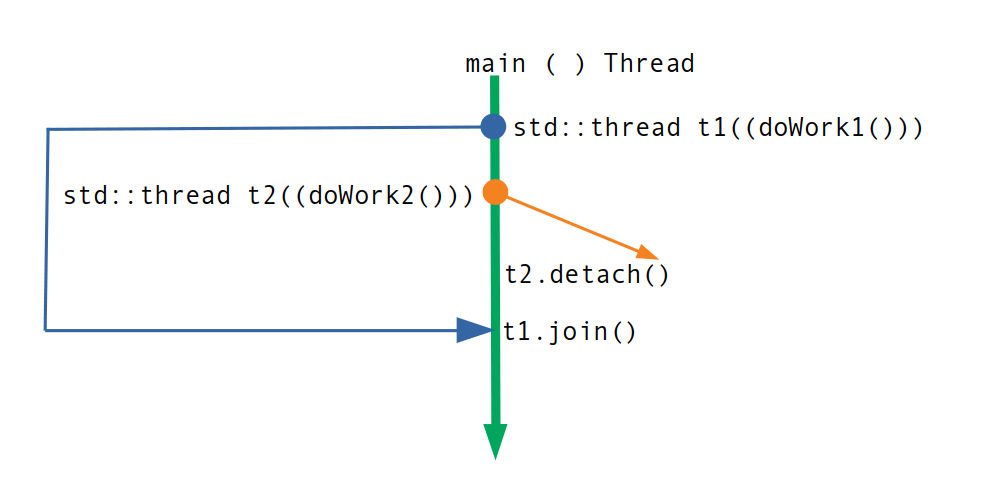
To prevent errors like joining a thread twice, you can check if a thread is joinable:
if (my_thread.joinable()) {
    my_thread.join();
}
Test your understanding!
Consider the following function:
void launch_worker() {
    std::thread t([](){ /* do some work for 5 seconds */ });
    // What happens here?
}

int main() {
    launch_worker();
    return 0;
}
What happens when the launch_worker function returns? Why?
Show answer
The program will terminate. When launch_worker returns, the std::thread object t goes out of scope. Since t is still associated with a running thread and join() (or detach()) was not called on it, its destructor calls std::terminate().
Threads in Action: Passing Data and Observing Behavior
Threads become much more useful when they can operate on data. You can pass arguments to your thread's function just by adding them to the std::thread constructor.
Let's watch another segment that demonstrates this and also highlights a common beginner mistake.
Build your first multithreaded application - Introduction to multithreading in modern C++
The CodeBeauty video also has a clear section on passing arguments to a thread's function.
Watch from 08:23 to 10:12. Note the simple syntax for passing arguments and the compiler error you get if you forget to provide them.
The <thread> header also provides the std::this_thread namespace, which contains utilities for interacting with the current thread.
std::this_thread::get_id(): Returns a unique ID for the current thread.std::this_thread::sleep_for(): Pauses the current thread for a specified duration.
Let's see how these are used to prove we are running on different threads and to control the pace of execution.
Let's return to The Cherno's video to see these utilities in use.
Watch from 07:02 to 10:05. See how sleep_for is used to prevent 100% CPU usage in a busy loop and how get_id confirms that the main and worker threads are distinct.
A Practical Example: The Background Worker
The concepts we've discussed—a background thread performing work without blocking the main thread—are perfectly illustrated in a final example. This next video segment builds a small weather application where a background worker thread periodically fetches new data, while the main thread (which would handle the UI) remains responsive.
This is an almost perfect analogy for our telemetry engine's consumer thread, which will periodically poll the ring buffers for new profiling data.
Build your first multithreaded application - Introduction to multithreading in modern C++
This extended segment from the CodeBeauty video puts all the concepts together into a practical example that directly mirrors the architecture we're aiming for.
Watch from 10:12 to 20:57. This is a longer segment, but it's worth it. Follow along as a background worker thread is created to periodically refresh data in a std::map. Pay attention to how sleep_for is used to create a periodic task and how the thread is passed the data it needs to modify. Note the bug fix at the end related to passing by value vs. by reference—this is a very common issue in multithreaded code!
Conclusion
Congratulations on completing your first step into concurrent programming! You now have the foundational knowledge to spawn and manage separate threads of execution, a skill that is absolutely essential for any systems programmer.
Key Takeaways:
- Multithreading allows a program to perform tasks concurrently, which is vital for performance and responsiveness.
- You can create a thread by including
<thread>and constructing astd::threadobject with a callable and its arguments. - A
std::threadobject must be either joined or detached before it goes out of scope to avoid program termination.join()is the safer, more common choice. - The
std::this_threadnamespace provides utilities likeget_id()andsleep_for()to manage the current thread of execution. - The background worker pattern, where one thread performs periodic work without blocking the main thread, is a core pattern we will use in our telemetry engine.
In our next lesson, we will confront the biggest challenge in concurrent programming: data races and race conditions. Now that we know how to get multiple threads running, we must learn how to make them safely share and modify data. This will lead us directly to the concept of the std::mutex.