Welcome to the first lesson of your course on building customized AI agents. Your goal is to move beyond using pre-configured agents in tools like Kilo Code and start creating your own specialized agents for algorithmic trading. As you requested, we'll begin by building a solid theoretical foundation before diving into more complex applications.
Today, we'll start with the two most fundamental concepts for controlling a Large Language Model (LLM):
- Crafting a System Prompt: This is how you define an agent's core identity—its persona, capabilities, and the rules it must follow.
- Executing a Basic API Call: This is the programmatic way to communicate your instructions to the model using Python.
Mastering these two skills is the first step toward building the specialized "Scientist," "Data Analyst," and "Backtesting Researcher" agents you envision for your trading infrastructure.
The Anatomy of a Prompt: System vs. User
When you interact with an LLM, you're providing it with a "prompt." However, not all parts of a prompt are treated equally. There's a distinct hierarchy.
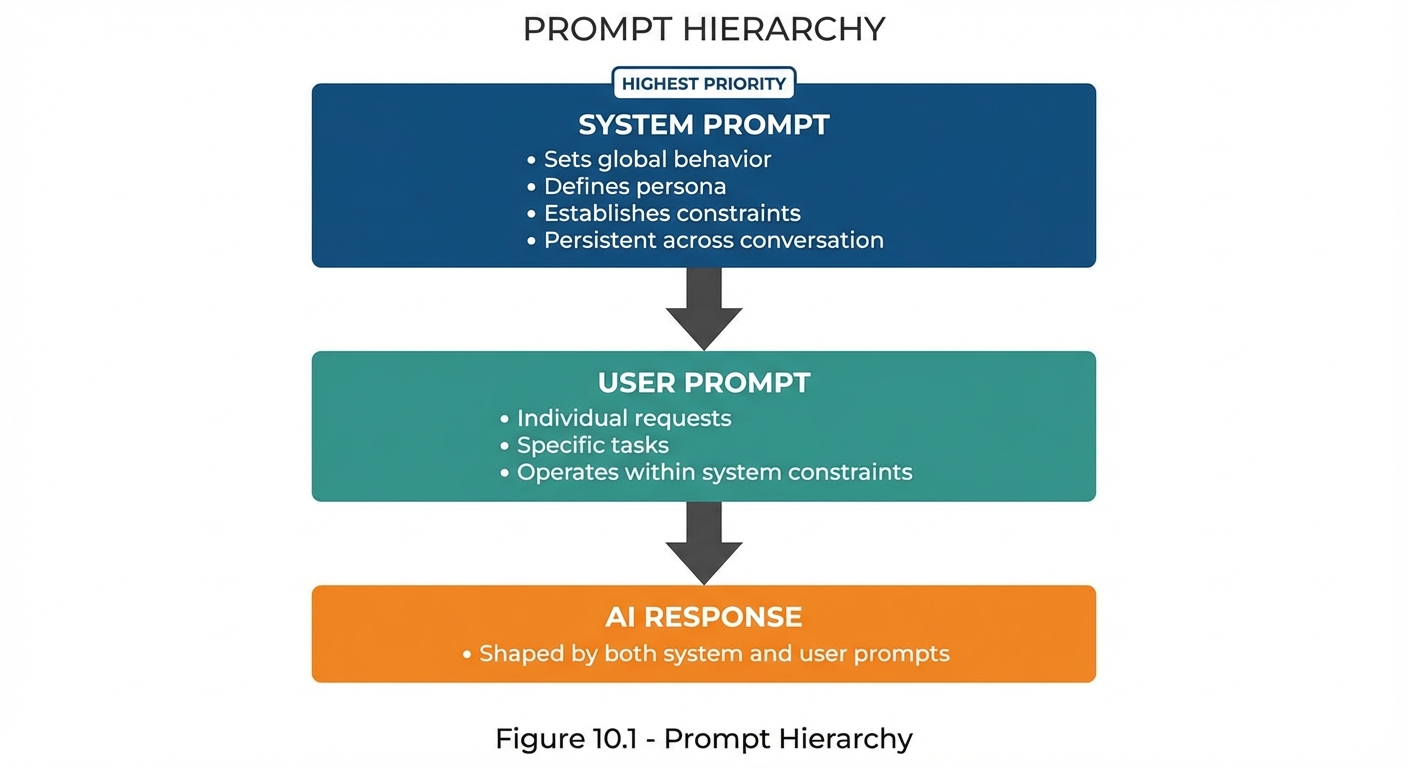
- System Prompt: This is the foundational, high-priority instruction. It sets the context for the entire interaction. Think of it as the agent's "DNA" or the constitution it must abide by. It defines the AI's persona, its permanent rules, and its core purpose.
- User Prompt: This is the specific, in-the-moment question or command from the user. It operates within the boundaries established by the system prompt.
Given your background in software development, you can think of the system prompt as being analogous to the __init__ method of a Python class. It initializes the agent, setting its core attributes, capabilities, and constraints. The user prompts are then like method calls on that instantiated object.
Crafting an Effective System Prompt
A well-designed system prompt is crucial for creating a reliable and effective agent. It moves the LLM from a general-purpose chatbot to a specialized assistant. Let's watch a video from Anthropic that breaks down the key components of a great prompt.
Prompting 101 | Code w/ Claude
This video, "Prompting 101," provides an excellent overview of best practices for structuring prompts for API-based tasks. It explains how to define the model's role, provide step-by-step instructions, and control its output format.
Please watch the following segments: First, watch the section on prompt structure to understand the recommended layout for an API prompt. Next, focus on task and tone, which directly relates to defining the agent's persona and constraints. Then, see how providing detailed tasks can guide the model's reasoning process in a structured way. Finally, observe how to control output formatting, which is essential for ensuring the agent's responses can be used programmatically by other parts of your system.
As the video highlights, a robust system prompt typically includes:
- Persona: Defines who the AI is (e.g., "You are a quantitative analyst...").
- Capabilities & Task: Specifies what the AI is supposed to do (e.g., "...specializing in analyzing time-series data for statistical anomalies.").
- Constraints: Sets hard rules on what the AI should not do (e.g., "Never provide financial advice or market predictions.").
- Output Format: Instructs the model to structure its response in a specific way, like JSON or XML, for easy parsing.
Now, let's see how these principles are applied directly in your domain of algorithmic trading.
Teaching an AI to Trade: System Prompt Engineering and ...
This article provides a superb, real-world example of building a system prompt for a trading bot. The author methodically breaks down how each instruction encodes a core trading principle into the AI's behavior.
Please read the article from the beginning, starting with the section "Building a Risk-First System Prompt" and continuing through to the end of "Why These Rules Matter for AI Trading". As you read, pay close attention to how the author translates established trading wisdom (e.g., capital preservation, risk management, trend-following) into explicit, actionable rules for the LLM.
The article demonstrates how a carefully constructed system prompt transforms an LLM into a disciplined trading agent by encoding rules that a human trader would learn through experience. Notice how specific constraints, like the "1-2% Rule" and "Mandatory Stop-Loss Orders," remove ambiguity and force the model to operate within a strict risk framework.
Making the First API Call in Python
Now that we understand what a system prompt is and how to craft one, let's execute it. We will use the official openai Python library to send our instructions to the model and receive a response.
Your experience with Python means you'll find the syntax straightforward. The key is to understand how the concepts of "system prompt" and "user prompt" map to the API call structure.
This first video will walk you through a basic API call. It assumes you have an OpenAI API key. If you don't, you can get one from the OpenAI API dashboard.
Building AI Agents in Pure Python - Beginner Course
The video "Building AI Agents in Pure Python" demonstrates how to interact with an LLM directly via its API. This first example is the "Hello, World!" of programmatic LLM interaction.
Watch the section from the first API call. The presenter shows how to set up the OpenAI client, structure the messages with a system prompt and a user query, and print the model's response.
As shown in the video, the core of the API call is the messages list. This is where you pass the sequence of prompts to the model. Each message in the list is a dictionary with two keys: role and content.
"role": "system": This is where you place your foundational system prompt."role": "user": This is for the specific, turn-by-turn queries."role": "assistant": This role is used for responses generated by the model, which becomes important for maintaining conversational history (a topic for a future lesson).
The OpenAI documentation provides further examples and clarifies the distinction between roles.
Prompt engineering | OpenAI API
This is the official documentation on prompt engineering. It reinforces the concepts of message roles and provides canonical code examples.
First, read the section titled "Message roles and instruction following." It explains how different roles (developer, user) are prioritized by the model. The developer role mentioned here is conceptually equivalent to the system role we are using with the Chat Completions API. Then, review the code in the section "Example prompt" and the corresponding "API request" below it. This shows a practical example of loading a detailed system prompt from a file and passing it to the API along with a user's question.
Your Turn: Create a Quantitative Analyst Agent
Let's combine everything we've learned. Your task is to write a Python script that defines and queries a simple "Quantitative Analyst" agent.
Instructions:
- Make sure you have the
openailibrary installed (pip install openai). - Set your OpenAI API key as an environment variable named
OPENAI_API_KEY. - Use the code below as a template.
- Craft a
system_promptbased on the persona described in the comments. - Run the script and observe the output.
Here is the Python code for you to complete and run:
import os
from openai import OpenAI


# It's best practice to use an environment variable for your API key
# The OpenAI library automatically looks for this environment variable.
# client = OpenAI(api_key="YOUR_API_KEY") is also an option.
client = OpenAI()


# --- TASK: Define the Agent's Persona ---
# Craft a system prompt for a Quantitative Analyst agent.
# Persona: A quantitative analyst specializing in time-series analysis for mid-frequency trading.
# Capabilities: Can identify statistical properties of a dataset (e.g., mean, std dev, stationarity).
# Constraints:
#   - Must NOT provide financial advice or make predictions.
#   - Must state its assumptions.
#   - Must respond in a formal, data-driven tone.
#   - Should request clarification if a user's query is ambiguous.
system_prompt = """
You are a quantitative analyst AI. Your specialty is the statistical analysis of financial time-series data for mid-frequency trading applications.

Your capabilities include:
- Calculating descriptive statistics (mean, median, standard deviation, variance).
- Assessing properties like stationarity.
- Identifying basic patterns or anomalies based purely on statistical evidence.

You must adhere to the following constraints:
1.  Your analysis must be strictly objective and data-driven.
2.  You must explicitly state any assumptions you make during your analysis.
3.  Under no circumstances will you provide financial advice, trading recommendations, or market predictions.
4.  Your communication style must be formal and precise.
5.  If a user query is vague or lacks sufficient data, you must ask for clarification before proceeding.
"""


# --- Define the User's Query ---
user_query = "Analyze this sample data: `[101.2, 101.5, 101.3, 102.0, 101.8, 102.5, 100.9, 103.1]`. Provide a brief statistical summary."


# --- Make the API Call ---
try:
    response = client.chat.completions.create(
        model="gpt-4-turbo",  # Or another model of your choice
        messages=[
            {"role": "system", "content": system_prompt},
            {"role": "user", "content": user_query}
        ]
    )


    # --- Print the Agent's Response ---
    agent_response = response.choices[0].message.content
    print("--- Agent Response ---")
    print(agent_response)

except Exception as e:
    print(f"An error occurred: {e}")
Experiment by changing the system_prompt. For example, remove the constraint about not giving financial advice and see if its behavior changes. This will give you a feel for how powerful these instructions are.
Key Takeaways and Next Steps
In this first lesson, we've laid the groundwork for building custom agents. You've learned that:
- The system prompt is the most critical instruction, defining an agent's persona, capabilities, and constraints.
- Crafting this prompt is an act of "encoding" expert knowledge and rules into the AI's behavior, which is especially vital in a domain like algorithmic trading.
- The
openaiPython library allows you to programmatically control the LLM by passing asystemprompt for foundational rules and auserprompt for specific queries.
You now have the basic tools to give an LLM a specific job and communicate with it through code.
In our next lesson, we will explore how to gain finer control over the quality of the AI's output. We will manipulate key generation parameters like temperature and top_p to make the agent's responses more deterministic and predictable or more creative and varied, depending on the task.