Welcome to the third lesson in our "Foundations of LLM Interaction" module. In our previous sessions, we established how to define an agent's persona with a system prompt and how to tune its response style using parameters like temperature and top_p. These are the building blocks for controlling a single interaction.
Today, we'll build upon that foundation to enable agents to perform sequential tasks. Your goal of creating specialized agents like a "Backtesting Researcher" or a "Data Analyst" requires them to handle multi-step workflows—for example, loading data, then cleaning it, then performing analysis, all while remembering the context from the previous steps. This lesson focuses on exactly that: implementing a multi-turn conversation by managing the message history and respecting the model's token limits. We will explore how to give your agent a memory.
The Stateless Nature of LLMs
A crucial concept to grasp is that LLM API calls are stateless. This means the model has no inherent memory of past interactions. Each time you send a request, it's treated as a brand-new conversation. If you ask a follow-up question without providing the previous context, the model won't know what you're referring to.
To create the illusion of a continuous conversation, we must explicitly send the entire chat history back to the model with every new request. This is managed through the messages array that you've already started using.
Managing Conversational History
As we've seen, the messages array is a list of dictionaries. To maintain a conversation, we simply append each new message—both the user's and the assistant's—to this list. The structure follows a logical turn-based pattern:
system: The initial instructions (persona, constraints). This is usually the first message and is kept throughout.user: Your first prompt.assistant: The model's response to your first prompt.user: Your second prompt (the follow-up question).assistant: The model's response to your second prompt.- ...and so on.
By re-sending this growing list, you provide the full context for the model to generate its next response coherently.
Exploring the ChatGPT API with Python: Multiple Completions, Max Tokens, Temperature, tiktoken
The video "Exploring the ChatGPT API with Python" by Venelin Valkov provides a clear, practical demonstration of this process.
Please watch the segment from how to create a conversation. Observe how the code first captures the assistant's response and then appends both that response (with the assistant role) and a new user prompt to the messages list before making the next API call.
The Challenge: Finite Context Windows
This method of appending messages works perfectly, but it runs into a fundamental constraint: every LLM has a finite context window, which is the maximum number of tokens it can process in a single request.

This diagram illustrates how a conversation unfolds. Each turn adds to the context. However, the context window has a fixed size (e.g., 128k tokens). Once the conversation history exceeds this limit, information must be discarded, leading to a truncated output or an error.
As the messages list grows, its token count increases. If it exceeds the model's limit (e.g., 4096 tokens for the standard gpt-3.5-turbo or 128,000 for gpt-4-turbo), the API will return an error. This poses two problems:
- Application Failure: Your agent will break during long conversations.
- Cost: Sending a long history in every call can become expensive, as you are billed for all input and output tokens.
Therefore, managing the size of the messages array is a critical engineering task.
Strategy 1: Token Counting and Simple Truncation
The most straightforward strategy for managing the context window is to count the tokens before each API call and remove the oldest messages if the total count approaches the limit.
Counting Tokens with tiktoken
OpenAI provides a library called tiktoken specifically for this purpose. It allows you to accurately replicate how a model tokenizes text and count the tokens in your messages array before you send it to the API.
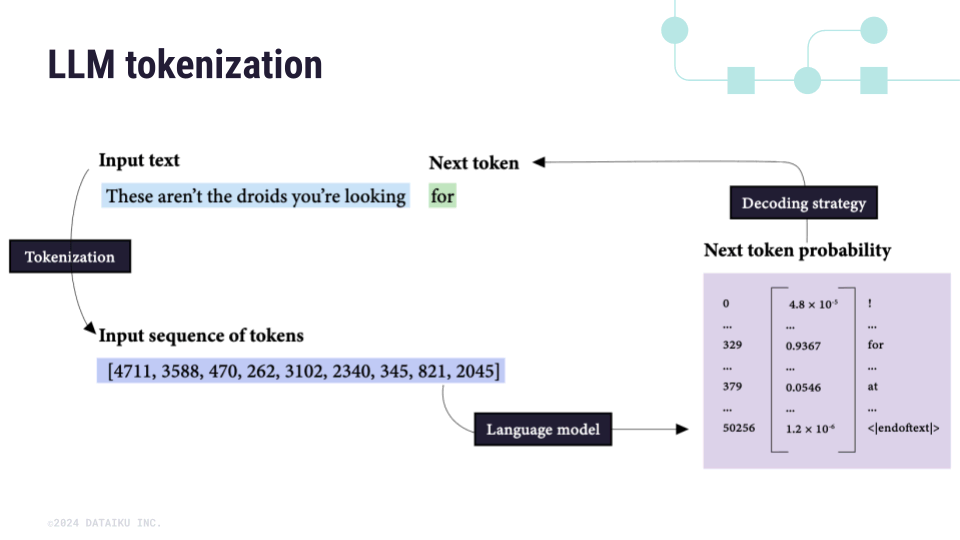
This image shows how input text is converted into a sequence of numerical tokens. The tiktoken library allows us to perform this tokenization step locally to count the tokens without an API call.
Implementing Truncation
Once you have the token count, you can implement a simple loop: while the current history is too long, remove the oldest message. A crucial best practice is to always preserve the system prompt, which is typically the first message in the list (messages[0]). Therefore, you should start removing messages from messages[1].
The following article provides a well-structured Python example of this entire process.
Mastering Token Management: Building Cost-Efficient Enterprise ...
This article, "Mastering Token Management," by FartsyRainbowOctopus on Medium, offers a clear explanation and a practical code implementation for managing conversation history.
Please read the sections "Efficient Conversation History Management," "Key Concepts for Token Management," and "Practical Code Example." Pay close attention to the run_chat_application function. Note how it: Counts tokens using num_tokens_from_messages. Uses a while loop to check if the context is too large (conv_history_tokens + MAX_RESPONSE_TOKENS >= TOKEN_LIMIT). Deletes the oldest non-system message (del conversation[1]) to make space. (Note: The article has a small typo conversation[18]; the correct index to remove the oldest user/assistant message is [1]). Preserves the system message at conversation[0].
Strategy 2: Advanced Context Management (The Theoretical View)
Simple truncation is effective, but it has a major drawback: it can discard potentially crucial information from the beginning of a conversation. For complex agents, more sophisticated techniques are required. As you're building agents for deep analysis, understanding these advanced methods is essential.
The Problem with Bloated Context
Simply having a large context window is not a silver bullet. Providing irrelevant or contradictory information can harm the model's performance.
The LLM context problem in 2026: strategies for memory, relevance ...
The article "The LLM context problem" from LogRocket provides an excellent overview of why context quality is more important than context length.
Read the introduction and the section "The four ways context fails." This will give you a solid theoretical understanding of potential issues like context poisoning (reinforcing wrong facts) and context clash (conflicting information in the history), which are highly relevant for multi-step analytical tasks.
Architecting for Memory
To overcome these challenges, we can design more complex memory systems. Instead of a simple chronological list, we can create structured summaries or databases of information.
The video below introduces an elegant architecture that separates the main conversational agent from a "memory agent" responsible for extracting and storing key information. This is a powerful pattern for building the kind of specialized agents you envision.
Build an Agent with Long-Term, Personalized Memory
This video by Deploying AI introduces a sophisticated approach to memory, inspired by the memgpt research paper.
Watch the sections explaining the theory and the agent architecture. Focus on: The idea of condensing a queue of messages into a "long-term memory." The architecture diagram showing a "meal planning agent" (your conversational agent) and a separate "memory agent" that listens and saves key facts to a "memory database." This previews concepts we'll explore further in later modules, such as multi-agent systems and tool use.
The key takeaway is that effective context management isn't just about avoiding errors; it's a core part of designing intelligent and reliable agents. The LogRocket article you just read also provides a great summary table of these advanced techniques, including RAG, summarization, and context pruning, which you can refer to in the future.
Your Turn: A Sequential Trading Analysis Agent
Now, let's put this into practice. The following Python script implements a multi-turn conversation with our "Quantitative Analyst" agent. It includes a simple token counting and truncation mechanism.
The goal is to guide the agent through a three-step analysis of a time series:
- Step 1: Ask for basic descriptive statistics.
- Step 2: Ask for the calculation of period-over-period returns, referencing the data from the first step.
- Step 3: Ask it to identify potential outliers in the returns calculated in the second step.
Instructions:
- Review the code, especially the
run_chat_sessionfunction. Notice how it appends messages and callstrim_conversation_history. - Run the script.
- Follow the prompts in your terminal to perform the three-step analysis. Observe how the agent successfully maintains context between your requests.
import os
from openai import OpenAI
import tiktoken

# --- Configuration ---
# Ensure your OPENAI_API_KEY is set as an environment variable
client = OpenAI()
GPT_MODEL = "gpt-4-turbo"
TOKEN_LIMIT = 8192  # gpt-4-turbo has a large context, but we'll use a smaller limit for demonstration
MAX_RESPONSE_TOKENS = 1000

# --- Token Counting Function ---
def num_tokens_from_messages(messages, model=GPT_MODEL):
    """Returns the number of tokens used by a list of messages."""
    try:
        encoding = tiktoken.encoding_for_model(model)
    except KeyError:
        print("Warning: model not found. Using cl100k_base encoding.")
        encoding = tiktoken.get_encoding("cl100k_base")

    num_tokens = 0
    for message in messages:
        # Every message follows <|start|>{role/name}\n{content}<|end|>\n
        num_tokens += 4
        for key, value in message.items():
            num_tokens += len(encoding.encode(value))
            if key == "name":
                # If there's a name, the role is omitted
                num_tokens -= 1
    num_tokens += 2  # Every reply is primed with <|start|>assistant
    return num_tokens

def trim_conversation_history(messages):
    """
    Checks token count and removes oldest messages (excluding system prompt) if limit is exceeded.
    """
    conv_history_tokens = num_tokens_from_messages(messages)

    while conv_history_tokens + MAX_RESPONSE_TOKENS >= TOKEN_LIMIT:
        # Ensure we don't remove the system prompt (at index 0)
        if len(messages) <= 1:
            print("Warning: Conversation history is too long even after trimming.")
            break

        # Remove the oldest user/assistant message pair (index 1 and 2)
        # This is a simple strategy; more complex ones could summarize or use vector stores.
        print(f"Trimming conversation... Current tokens: {conv_history_tokens}. Removing 2 oldest messages.")
        del messages[1:3] # Deletes the oldest user and assistant message
        conv_history_tokens = num_tokens_from_messages(messages)
        print(f"Tokens after trimming: {conv_history_tokens}")

    return messages

# --- Main Chat Logic ---
def run_chat_session():
    system_prompt = """
    You are a quantitative analyst AI. Your specialty is the statistical analysis of financial time-series data.
    You must adhere to the following constraints:
    1. Your analysis must be strictly objective and data-driven.
    2. You must explicitly state any assumptions you make.
    3. You must not provide financial advice or market predictions.
    4. Your responses must be clear, concise, and structured.
    """

    conversation = [{"role": "system", "content": system_prompt}]

    print("--- Quantitative Analyst Assistant ---")
    print("You can start a sequential analysis. Type 'quit' to exit.")
    print("Example Step 1: 'Analyze this price data: [110.5, 112.1, 111.8, 113.5, 115.2, 114.8, 116.0]'")

    while True:
        user_input = input("\nYou: ")
        if user_input.lower() == 'quit':
            break

        conversation.append({"role": "user", "content": user_input})

        # Trim history before making the call
        conversation = trim_conversation_history(conversation)

        try:
            response = client.chat.completions.create(
                model=GPT_MODEL,
                messages=conversation,
                temperature=0.2, # Low temperature for factual analysis
                max_tokens=MAX_RESPONSE_TOKENS,
            )

            assistant_response = response.choices[0].message.content
            print(f"\nAssistant: {assistant_response}")

            # Add assistant's response to the history for the next turn
            conversation.append({"role": "assistant", "content": assistant_response})

        except Exception as e:
            print(f"An error occurred: {e}")
            # Remove the last user message if the API call failed
            conversation.pop()

if __name__ == "__main__":
    run_chat_session()
Conclusion
In this lesson, you've learned the fundamental mechanism for creating stateful AI agents capable of handling multi-step tasks.
Key Takeaways:
- LLM APIs are stateless; you must manage conversational history by passing the
messagesarray in each request. - The conversation follows a
system->user->assistant->user... pattern. - Finite context windows require active token management to prevent errors and control costs.
- The
tiktokenlibrary is the standard for accurately counting tokens before an API call. - Simple truncation (removing old messages while preserving the system prompt) is a baseline strategy for managing context length.
- Advanced strategies like summarization and structured memory offer more robust solutions for complex, long-running agents.
You now have the skills to build an agent that can follow a sequence of instructions, a critical step towards creating the specialized assistants you need for your trading workflows.
In our next lesson, we will begin a new module, "Enabling Agents with Tools." We will shift from agents that can only talk to agents that can act. You will learn how to define custom Python functions that the LLM can invoke, allowing it to interact with your own data sources and backend systems—like a function to fetch live market data or run a backtest.