Hello! Welcome to the next lesson in our "Python Tools for AI and Data Manipulation" module.
In the previous lesson, we learned how to create, index, slice, and reshape NumPy arrays. These skills are about structuring and accessing data. Now, we'll focus on the reason NumPy is the cornerstone of scientific computing in Python: its ability to perform incredibly fast calculations.
This lesson addresses the learning outcome: Perform vectorized operations using NumPy for efficient computation. As a software engineer, you know that writing efficient code is crucial, especially when dealing with large amounts of data. In AI, we often work with millions or even billions of data points. Using standard Python for loops to iterate over them would be prohibitively slow. Vectorization is NumPy's solution to this problem, allowing you to write clean, readable code that executes at speeds comparable to low-level languages like C.
1. What is Vectorization and Why is it So Fast?
At its core, vectorization is the practice of applying an operation to an entire array at once, rather than element by element. Instead of you writing a for loop in Python, NumPy uses highly optimized, pre-compiled C code to loop over the elements.
To understand the concept and the performance benefits, the following reading provides an excellent definition and a clear demonstration.
“Vectorized” Operations: Optimized Computations on ...
This resource, '“Vectorized” Operations' from the guide Python Like You Mean It, clearly defines vectorization and explains why NumPy's approach is dramatically faster than native Python loops.
Find the section 'Vectorized Operations'. Read the concept overview. Focus on the definition of vectorization and the performance comparison between np.sum and a Python for-loop. The key takeaway is understanding why it's faster: NumPy leverages the fact that arrays are homogeneous (all one data type) to use optimized C code.
A Practical Performance Test
Let's see this in action. The difference isn't noticeable on small arrays, but it becomes dramatic as the data size grows. Consider the simple task of multiplying every element in a large array by 2.
Here's a script you can run. Let's create a file named vectorization_test.py:
import numpy as np
import time

# Create a large array with 10 million elements
large_array = np.arange(10_000_000)

# --- Method 1: Using a Python for-loop ---
print("Running Python for-loop...")
start_time_loop = time.time()
result_loop = []
for item in large_array:
    result_loop.append(item * 2)
end_time_loop = time.time()
loop_duration = end_time_loop - start_time_loop
print(f"For-loop took: {loop_duration:.4f} seconds\n")


# --- Method 2: Using a NumPy vectorized operation ---
print("Running NumPy vectorized operation...")
start_time_vec = time.time()
result_vec = large_array * 2 # This is the vectorized operation
end_time_vec = time.time()
vec_duration = end_time_vec - start_time_vec
print(f"Vectorized operation took: {vec_duration:.4f} seconds\n")

# --- Comparison ---
print(f"Vectorization was approximately {loop_duration / vec_duration:.0f}x faster!")
When you run this (poetry run python vectorization_test.py), you'll see that the vectorized approach is orders of magnitude faster. This is the single most important reason why NumPy is fundamental to AI and data science.
2. Types of Vectorized Operations
Vectorized operations in NumPy can be grouped into a few main categories. Let's explore them.
A. Binary and Unary Operations (Element-wise)
These are operations that apply to each element of an array.
- Binary operations involve two operands, such as adding two arrays or multiplying an array by a single number (a scalar).
- Unary operations involve a single operand, such as taking the square root or exponential of each element in an array.
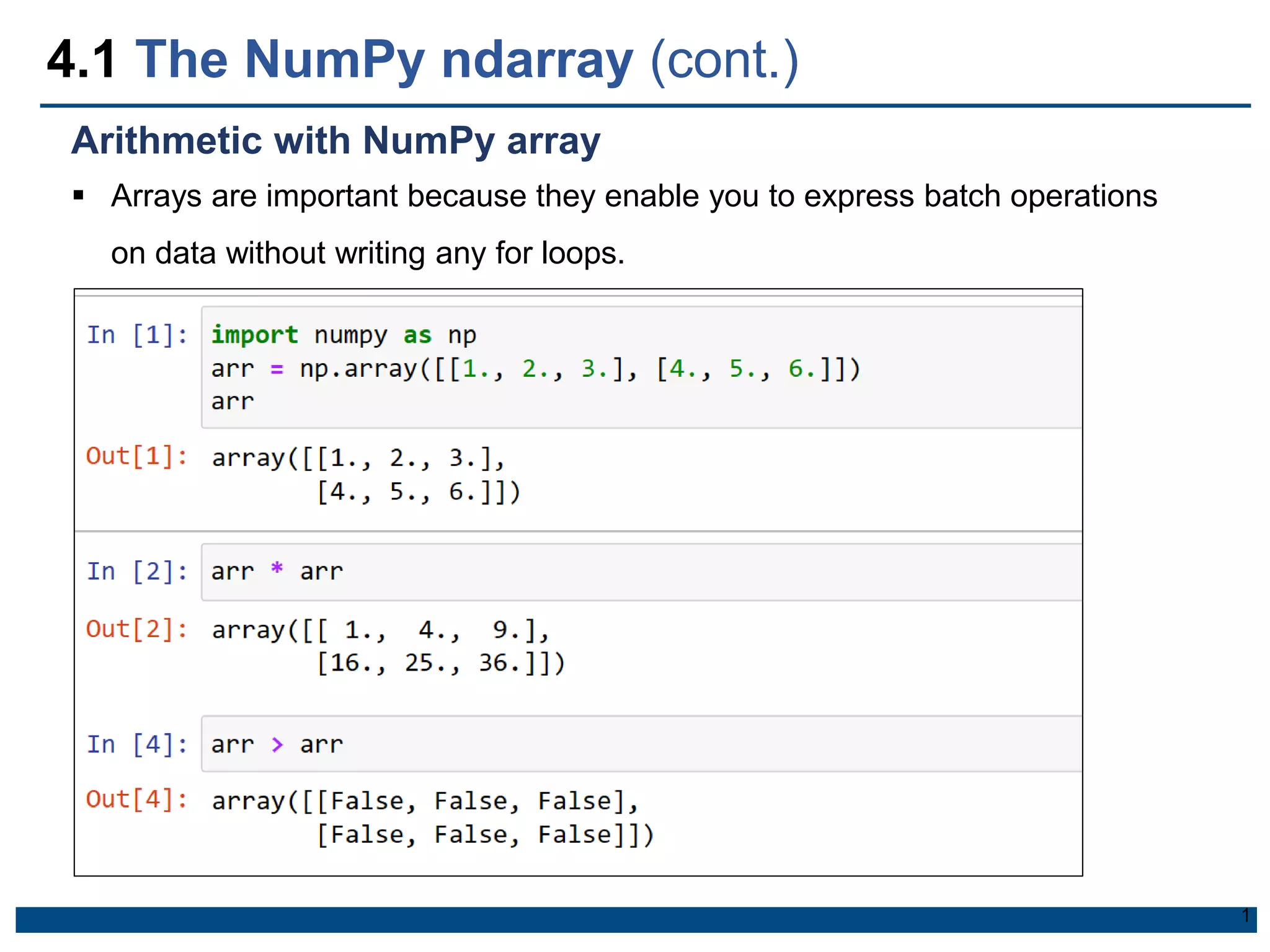
When you use standard Python arithmetic operators like +, *, or > with NumPy arrays, you are implicitly using NumPy's fast, vectorized functions. From a software engineering perspective, you can think of this as NumPy "overloading" these operators to work efficiently on its ndarray objects.
The image below gives a clear visual of how these element-wise operations work.
To get a more formal understanding of these function types, let's return to the Python Like You Mean It guide.
“Vectorized” Operations: Optimized Computations on ...
This resource provides a structured overview of unary and binary functions in NumPy.
Read the sections 'Unary Functions' and 'Binary Functions'. For each section, notice how the operation is applied element-wise, whether it's an array with a scalar (array * 2) or two arrays of the same shape (array1 + array2).
Here's a code summary:
import numpy as np

# Create two arrays for our examples
a = np.array([[1, 2], [3, 4]])
b = np.array([[10, 20], [30, 40]])

# --- Binary Operations ---
# 1. Array and Scalar
print("Array 'a' times 10:\n", a * 10)

# 2. Array and Array
print("\nArray 'a' plus array 'b':\n", a + b)

# 3. Logical/Comparison Operation (returns a boolean array)
print("\nElements in 'b' greater than 25?:\n", b > 25)

# --- Unary Operations ---
# 1. Square root of all elements in 'a'
print("\nSquare root of 'a':\n", np.sqrt(a))

# 2. Exponential of all elements in 'a'
print("\nExponential of 'a':\n", np.exp(a))
Boolean arrays from comparison operations are extremely useful for filtering, which we will see in a later lesson on Pandas.
B. Sequential (Aggregation) Operations and the axis Parameter
The next category of functions are aggregations, which compute a single value from a sequence of numbers, like sum(), mean(), or max().
When applied to a 1D array, their behavior is straightforward.
x = np.array([1, 2, 3, 4, 5])
print(x.sum()) # Output: 15
print(x.mean()) # Output: 3.0
However, for 2D or higher-dimensional arrays, you often want to control which dimension gets aggregated. Do you want to sum the columns, or the rows? This is where the axis parameter becomes essential.
axis=0: Performs the operation along the rows (collapsing them), resulting in a value for each column.axis=1: Performs the operation along the columns (collapsing them), resulting in a value for each row.
This concept can be tricky, so let's study a detailed explanation.
“Vectorized” Operations: Optimized Computations on ...
This is the most critical and often misunderstood part of NumPy aggregations. This resource provides a very clear, in-depth explanation of the axis parameter.
Read the sections 'Sequential Functions' and 'Specifying the axis Keyword Argument...' to learn about sequential functions. Pay close attention to the diagrams and examples showing how axis=0 and axis=1 work on a 2D array. Then, read 'Understanding the axis argument with a Multi-Dimensional Array' to see how the concept extends to 3D arrays, which is common in deep learning.
Let's solidify this with a 2D example. Imagine a matrix of sales data where rows are different products and columns are months (Jan, Feb, Mar).
import numpy as np

# Rows: Product A, Product B
# Columns: Jan, Feb, Mar
sales_data = np.array([
    [100, 150, 200], # Sales for Product A
    [120, 130, 220]  # Sales for Product B
])

# Total sales per month (sum down the rows -> collapse axis 0)
total_monthly_sales = sales_data.sum(axis=0)
print(f"Total sales per month (Jan, Feb, Mar): {total_monthly_sales}")
# Expected output: [100+120, 150+130, 200+220] -> [220, 280, 420]

# Total sales per product (sum across the columns -> collapse axis 1)
total_product_sales = sales_data.sum(axis=1)
print(f"Total sales per product (A, B): {total_product_sales}")
# Expected output: [100+150+200, 120+130+220] -> [450, 470]

# Total sales overall (default behavior, no axis specified)
total_sales = sales_data.sum()
print(f"Total overall sales: {total_sales}")
Test your understanding!
You have a 2D NumPy array student_scores of shape (20, 5). This represents the scores of 20 students on 5 different exams.
Write a single line of code to compute the average score for each exam. What will be the shape of the resulting array?
Show answer
average_exam_scores = student_scores.mean(axis=0)
- We use
axis=0because we want to compute the mean "down the rows" for each column. Each column represents an exam. - The resulting array will have a shape of
(5,), giving one average score for each of the 5 exams.
A Quick Note on np.vectorize
You might occasionally see np.vectorize() used. It allows you to apply a regular Python function that isn't already vectorized (e.g., one you wrote yourself) to an array in a vectorized-like syntax.
def my_complex_logic(x):
    if x > 10:
        return x * 2
    else:
        return x / 2

# This does NOT run in C. It's just a convenient wrapper for a for-loop.
vectorized_func = np.vectorize(my_complex_logic)

my_array = np.array([5, 10, 15, 20])
result = vectorized_func(my_array)
print(result) # Output: [ 2.5  5.  30.  40. ]
Important Caveat: np.vectorize is primarily for convenience. It does not offer the performance benefits of true NumPy vectorization, as it essentially runs a Python for loop under the hood. For genuine performance, you should always try to express your logic using NumPy's built-in C-optimized functions.
Conclusion
In this lesson, you've grasped the concept that is central to high-performance computing in Python. By leveraging vectorization, you can process massive datasets efficiently, which is a non-negotiable requirement for building modern AI systems.
Here are your key takeaways:
- Vectorization is the process of applying operations to entire arrays at once, which is significantly faster than using Python
forloops. - The speed comes from NumPy executing these operations in optimized, pre-compiled C code.
- Vectorized operations include element-wise binary (e.g.,
array1 + array2), unary (e.g.,np.sqrt(array)), and logical (e.g.,array > 5) functions. - Aggregation functions like
.sum()and.mean()can be controlled with theaxisparameter to perform calculations along specific dimensions (e.g., row-wise or column-wise).
Next up:
You've now covered the essentials of creating, manipulating, and performing computations on NumPy arrays. This provides you with the foundational skills needed to work with numerical data. In the next lesson, we will build on this foundation by introducing Pandas, a library that provides a more powerful and flexible data structure called the DataFrame. You'll learn how to load data from files (like CSVs) and perform initial inspections—the first steps in any real-world data science or AI project.