Hello! Welcome to the first lesson of our second module, "Python Tools for AI and Data Manipulation."
In the previous module, we built a solid mathematical foundation, covering the essentials of linear algebra, calculus, and probability. We wrapped up with Bayes' theorem, a powerful tool for updating our beliefs with evidence. Now, we shift from theory to practice. To build, train, and deploy AI models, we need a robust and professional development setup. This starts with managing our project's environment and dependencies.
The learning outcome for this lesson is to set up and manage Python environments for machine learning projects. As a software engineer, you're likely familiar with the headaches that can arise from conflicting library versions. In machine learning, this problem is magnified. Reproducibility is not just a nice-to-have; it's a scientific and engineering necessity. An experiment that can't be reproduced is of little value.
We'll explore why isolated environments are critical, look at Python's built-in tools, and then dive deep into a modern, powerful tool called Poetry, which aligns perfectly with professional software engineering best practices.
1. Why Do We Need Isolated Environments?
Imagine you're working on two different AI projects:
- Project A is an older project that uses
tensorflow==2.8. - Project B is a new one that requires a feature only available in
tensorflow==2.11.
If you install these libraries globally on your system, you can't satisfy both requirements simultaneously. Installing tensorflow==2.11 for Project B would break Project A. This classic problem is often called "dependency hell."
Virtual environments solve this by creating isolated spaces for each project. Each space has its own Python interpreter and its own set of installed packages, which don't interfere with other projects or your system's global packages.
To get a deeper understanding of the importance of this concept, especially in the context of machine learning, please read the introductory sections of the following article.
Python Virtual Environments for Machine Learning
The article 'Python Virtual Environments for Machine Learning' by Senthil E provides a great overview of why virtual environments are essential for ML development.
In the article's opening sections, read the introduction to virtual environments and common challenges in ML project dependencies. Focus on the key benefits (Isolation, Reproducibility) and the specific challenges ML projects present.
As the article highlights, reproducibility is paramount. You need to ensure that a model you trained on your machine behaves identically when a colleague runs it, or when you deploy it to a server. This is only possible if the environment—including the exact versions of all dependencies—is identical.
2. The Standard Tool: venv and pip
Python comes with a built-in module for creating virtual environments called venv. It's lightweight and straightforward to use. When paired with pip, Python's package installer, it forms the most basic and common workflow for managing dependencies.
Let's see how it works.
Python Virtual Environments for Machine Learning
The same article provides a clear, step-by-step guide on using venv.
Read through the section on setting up with Python venv. You don't need to run the code, but pay attention to the core commands: creating the environment (python -m venv .venv), activating it (source .venv/bin/activate), installing packages (pip install -r requirements.txt), and saving the dependencies (pip freeze > requirements.txt).
The typical venv and pip workflow is as follows:
- Create an environment:
python3 -m venv .venv(This creates a.venvdirectory in your project.) - Activate it:
source .venv/bin/activate(On Windows:.venv\Scripts\activate) - Install packages:
pip install numpy pandas - Save dependencies:
pip freeze > requirements.txt(This command lists all installed packages and their exact versions, saving them to a file.) - Recreate the environment elsewhere: A collaborator can create a new virtual environment, activate it, and run
pip install -r requirements.txtto install the same packages.
Limitations of this approach:
- No clear separation of dependencies: The
requirements.txtfile mixes your project's direct dependencies (e.g.,pandas) with development-only tools (e.g.,pytest). - Poor dependency resolution:
pipinstalls dependencies one by one. If two of your packages require conflicting versions of a third package, the installation might fail or result in a broken environment. - Not fully deterministic:
pip freezeincludes all sub-dependencies, which is good. However, if you only list your top-level dependencies inrequirements.txt(e.g., justpandas),pip installwill grab the latest versions of sub-dependencies, which might differ from the ones you tested with.
While venv is a solid foundation, modern software engineering demands more robust tooling.
3. A Modern and Robust Solution: Poetry
Poetry is a tool that handles project setup, environment management, dependency management, and even packaging and publishing. It brings a level of rigor and predictability that is highly valued in professional software development and is increasingly adopted in AI engineering.
Poetry's philosophy is centered around two key files:
pyproject.toml: A standardized configuration file where you declare your project's metadata and its direct dependencies (e.g., "my project needs pandas, version 1.5 or higher").poetry.lock: A file that Poetry generates automatically. It contains the exact versions of all your direct and indirect (transitive) dependencies. This file guarantees deterministic builds, meaning anyone who uses it to install dependencies will get the exact same environment.
This is analogous to package-lock.json in the Node.js ecosystem or your experience with Docker, where a Dockerfile specifies a precise, reproducible environment.
The following guide from Real Python is an excellent, comprehensive resource on Poetry. We'll walk through the most important parts.
Dependency Management With Python Poetry
The tutorial 'Dependency Management With Python Poetry' is a fantastic deep dive into using Poetry. We will use it to guide our hands-on exploration.
This is a long resource, so we will break it down. For now, focus on the sections covering installation and project creation. Read 'Take Care of Prerequisites' and 'Get Started With Python Poetry'.
Step-by-Step Guide to Using Poetry
Let's synthesize the key steps from the guide.
1. Installation
The recommended way to install Poetry is using pipx, which installs Python command-line applications in isolated environments. This prevents Poetry's own dependencies from conflicting with your projects.
# If you don't have pipx, install it first (e.g., on macOS)
# python3 -m pip install --user pipx
# python3 -m pipx ensurepath

# Install poetry
pipx install poetry

# Verify installation
poetry --version
2. Creating a New Project
With Poetry, you can scaffold a new project with a standard structure.
poetry new my-ai-project
cd my-ai-project
This creates a directory my-ai-project containing:
my_ai_project/: The main package folder.tests/: A folder for your tests.pyproject.toml: The all-important configuration file.README.md
3. Adding Dependencies
This is where Poetry shines. You declare what you need, and Poetry figures out the rest.
# Add main dependencies for an AI project
poetry add numpy pandas torch scikit-learn

# Add a development-only dependency
poetry add pytest --group dev
After running these commands, inspect your pyproject.toml file. You'll see these packages listed under [tool.poetry.dependencies] and [tool.poetry.group.dev.dependencies]. This provides a clean separation.
4. The poetry.lock File
You will also see a poetry.lock file has been created. You should commit this file to version control (e.g., Git). This file is the key to reproducibility. It locks down the specific versions of every package in the dependency tree.
5. Installing Dependencies for Collaboration
When a teammate (or a CI/CD pipeline) clones your repository, they won't run poetry add. Instead, they'll run:
poetry install
This command reads the poetry.lock file and installs the exact versions specified within, creating a perfectly replicated environment. By default, it also installs the development dependencies. To install only the production dependencies, you would run poetry install --without dev.
6. Working within the Environment
Poetry automatically creates and manages a virtual environment for your project. To run a script within this environment, you have two options:
poetry run: Executes a single command inside the virtual environment.poetry run python my_script.py poetry run pytestpoetry shell: Activates the virtual environment in your current shell, just likesource .venv/bin/activate.poetry shell # Now you are inside the virtual environment (my-ai-project-py3.11) $ python my_script.py (my-ai-project-py3.11) $ exit
Test your understanding!
You've just cloned a new AI project from your company's repository. The project uses Poetry. You see a pyproject.toml and a poetry.lock file in the root directory. What is the first command you should run to set up your local environment to start working on the project?
Show answer
You should run poetry install. This will read the poetry.lock file and install all the necessary dependencies at their exact, specified versions, ensuring your environment is identical to the one used by your teammates and in deployment. You should not run poetry add ... because that is for adding new dependencies, not for setting up an existing project.
4. How Does Poetry Compare to Other Tools?
While we're focusing on Poetry because of its strong alignment with software engineering principles, it's crucial to be aware of other tools, especially Conda, which is extremely popular in the data science and ML communities.
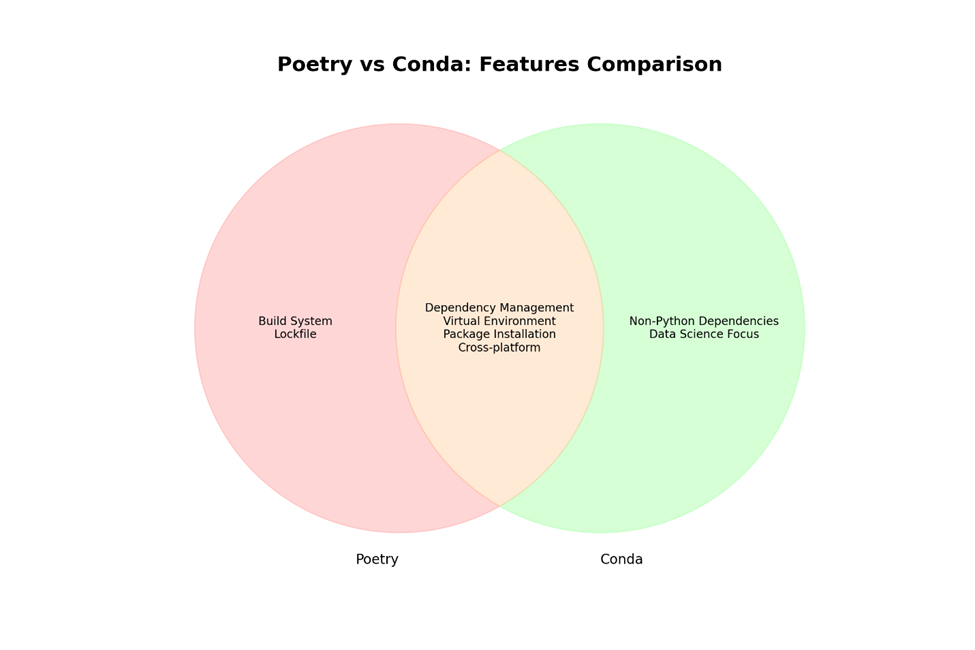
The most significant advantage of Conda is its ability to manage non-Python dependencies. Many ML libraries, especially those requiring GPU acceleration, depend on system-level libraries like the NVIDIA CUDA Toolkit. Conda can install these for you within its environment, which can simplify setup enormously.
In short:
- Choose Poetry for projects that are primarily Python-based. Its dependency resolution and packaging tools are top-notch and follow modern Python standards (
pyproject.toml). This is an excellent default for most AI application development. - Consider Conda when your project has complex non-Python dependencies (like CUDA, MKL, or specific C++ libraries) or if you're in a more research-focused environment where the data science ecosystem around Conda is dominant.
For your goal of becoming an AI Engineer, proficiency with Poetry is a highly valuable skill that translates well from your software engineering background. Knowing when and why you might need Conda is also important context.
Conclusion
In this lesson, you've learned the critical importance of creating isolated and reproducible Python environments for AI projects.
Here are the key takeaways:
- Virtual Environments prevent "dependency hell" and are essential for creating reproducible ML experiments.
- The built-in
venvandpipprovide a basic workflow but have limitations in dependency resolution and separation. - Poetry offers a modern, robust solution using
pyproject.tomlfor declaring dependencies andpoetry.lockfor ensuring deterministic, reproducible builds. - The standard Poetry workflow includes
poetry new,poetry add,poetry install, andpoetry run. - You should always commit your
poetry.lockfile to version control for application projects.
You are now equipped to set up any AI project with a professional and reliable structure. This is the foundation upon which we'll build in the upcoming lessons.
Next up: Now that our environment is ready, we'll start learning the first major tool in our AI toolkit: NumPy. In the next lesson, you will learn how to "Create and manipulate NumPy arrays including indexing, slicing, and reshaping," which are the fundamental data structures for numerical computation in Python.