Hello! Welcome to the practical culmination of our recent lessons. Let's get our hands dirty and fine-tune a model.
Introduction
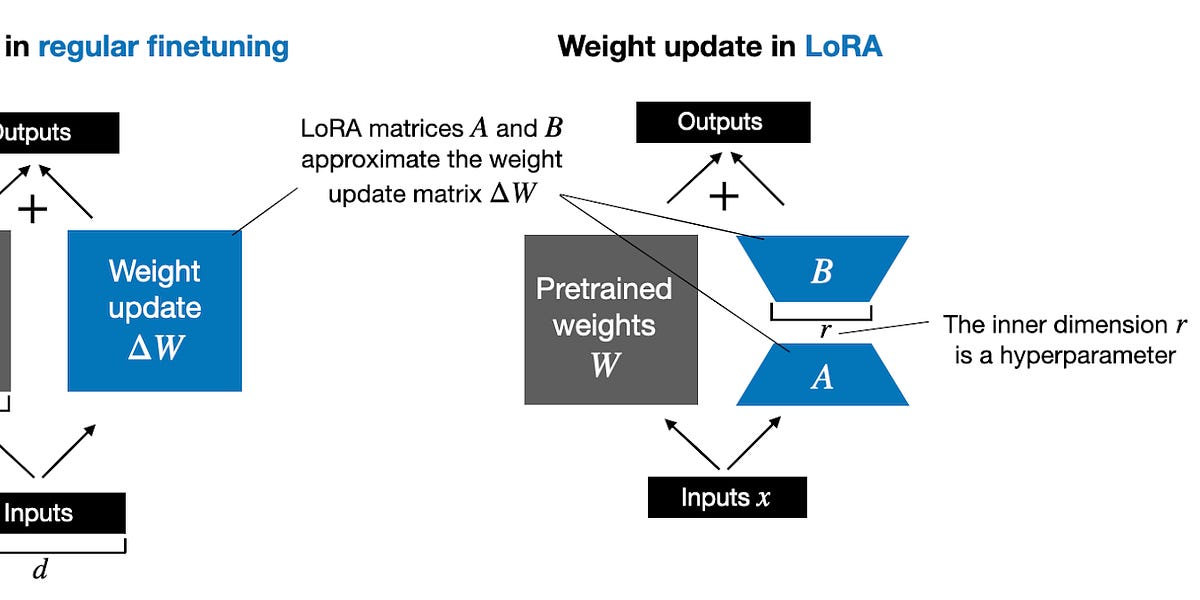
In our last two lessons, we established the core concepts needed for efficient fine-tuning. First, we explored the "how" with LoRA, understanding its mechanism for updating models with minimal trainable parameters. Then, we covered the "what" by learning how to prepare and format instruction-following datasets, paying close attention to structure and the critical process of masking.
Today, we merge theory with practice. This lesson is all about executing the fine-tuning process from start to finish. Our learning outcome is to fine-tune an open-source LLM on a custom dataset using a PEFT method like LoRA. We will write the code that brings all these pieces together, using powerful libraries from the Hugging Face ecosystem like transformers, peft, and trl.
This is the quintessential task of an AI engineer specializing in LLMs: taking a general-purpose model and adapting it to excel at a specific task. Let's begin.
Part 1: The Anatomy of a Fine-Tuning Script
A typical LoRA fine-tuning script involves a sequence of well-defined steps. We will rely on several key libraries:
transformers: For loading the base model and tokenizer.datasets: For loading and processing our custom data.peft: (Parameter-Efficient Fine-Tuning) For creating our LoRA configuration.trl: (Transformer Reinforcement Learning Library) For itsSFTTrainer, a high-level trainer class that simplifies supervised fine-tuning.bitsandbytes: For applying quantization to the model to reduce its memory footprint.
Here is the logical flow of the code you will build:
- Environment Setup: Install the required libraries and set up access to a GPU.
- Load Dataset: Load your custom instruction-following dataset (e.g., the JSON file we discussed in the previous lesson).
- Format and Tokenize: Apply a model-specific chat template to each example and tokenize the resulting text.
- Load Base Model (with Quantization): Load the pre-trained LLM. To fit a large model into memory, we'll load it in 4-bit precision using a technique called QLoRA.
- Configure LoRA: Define the parameters for the LoRA adapter using
LoraConfigfrom thepeftlibrary. This is where you specify the rank (r) and which layers to adapt. - Configure Trainer: Set up the
SFTTrainerfromtrl, passing it the model, tokenizer, dataset, LoRA config, and training arguments (like learning rate, number of epochs, etc.). - Train: Kick off the training process with a single command:
trainer.train(). - Save the Adapter: After training, save the small, newly trained adapter weights. These are the only files you need to share or deploy.
This process might seem complex, but the Hugging Face ecosystem provides powerful abstractions that make the implementation remarkably straightforward.
Part 2: An End-to-End Walkthrough
To see how these steps come together in a real project, we'll follow a comprehensive video tutorial by Nicholas Renotte. This video is an excellent, fast-paced walkthrough of a full fine-tuning project, from identifying a model's weakness to improving its performance through iteration.
Your goal isn't to code along in real-time but to watch and understand how each part of the script we outlined above is implemented. The video uses a custom dataset about a niche software (TM1) to demonstrate how fine-tuning can teach a model specialized knowledge.
How to Fine Tune your own LLM using LoRA (on a CUSTOM dataset!)
The following video by Nicholas Renotte is a complete end-to-end guide. We will watch it in segments, focusing on the core training pipeline. The first few minutes of the video cover data generation, which was the topic of our previous lesson. We'll start where the environment setup for training begins.
Please watch the following segments carefully. I've broken them down to align with the steps in our script. Environment Setup (19:13 - 21:12): Watch how a remote GPU instance (on RunPod) is set up. As a software engineer, this practice of using cloud resources for heavy computation should be familiar. He also installs the necessary dependencies. Data Loading & Formatting (21:12 - 26:57): This is a key section. Observe how the datasets library is used to load the instruction JSON file. Pay close attention to the format_chat_template function, which programmatically applies the Llama 3 chat template to each data sample. This is the practical implementation of the 'prompt templating' we discussed. Model Loading & QLoRA Config (26:57 - 30:17): Here, he loads the base model (Llama-3.2-8B). Critically, notice the use of BitsAndBytesConfig to load the model in 4-bit precision. This is QLoRA in action. He shows the model architecture before and after quantization, highlighting the change to Linear4bit layers. LoRA Config & SFT Trainer (30:17 - 33:07): This is the heart of the process. Watch how LoraConfig is defined, specifying the rank (r=32), alpha, and target modules. Then, see how all the pieces (model, dataset, tokenizer, LoRA config) are passed to the SFTTrainer. Finally, training is kicked off with trainer.train().
Test your understanding!
In the video, the SFTTrainer is initialized. What are the five most essential components passed to it to set up the fine-tuning job?
Show answer
model: The quantized base model that will be trained.train_dataset: The pre-processed and tokenized training data.peft_config: TheLoraConfigobject that defines the LoRA adapter's architecture.tokenizer: The tokenizer corresponding to the base model.args: TheTrainingArgumentsthat define hyperparameters like learning rate, batch size, and number of epochs.
For a clear, written version of the code snippets involved in this process, you can refer to the following DataCamp article. It uses a similar Llama 3 model and dataset, providing a great textual reference.
Fine-Tuning Llama 3 and Using It Locally
This DataCamp tutorial provides a structured, code-first walkthrough of the same process shown in the video. It's a great resource to review the specific code for each step.
Skim through these sections to see the code for: Setting up: Installing libraries and configuring the model with BitsAndBytesConfig (QLoRA). Adding the adapter: Defining the LoraConfig. Loading the dataset: Loading and formatting the data with apply_chat_template. Compiling and training: Configuring TrainingArguments and SFTTrainer, then calling trainer.train().
Part 3: The Reality of Fine-Tuning: Iteration and Improvement
Running a training script is just the first step. As the video demonstrates, the initial results are often imperfect. The real work of an AI engineer involves iterating to improve model performance. The second half of the video is a masterclass in this iterative loop.
The initial fine-tuned model still hallucinates and gives incorrect answers. The video then explores two powerful techniques to improve it:
- Data Quality Filtering: The most impactful change. A more powerful "judge" LLM is used to score each synthetic instruction-response pair for accuracy and style. Only pairs that meet a quality threshold (e.g., score >= 6/10) are kept. This drastically improves the signal-to-noise ratio of the training data.
- Hyperparameter Tuning: The LoRA rank (
r) and alpha (lora_alpha) are significantly increased. A higher rank gives the adapter more capacity to learn, at the cost of more trainable parameters. The number of training epochs is also increased to allow the model more time to learn from the higher-quality data.
Let's watch how this is done and the remarkable effect it has on the final model.
How to Fine Tune your own LLM using LoRA (on a CUSTOM dataset!)
Now, let's watch the iterative improvement process. This demonstrates the real-world workflow of refining a fine-tuned model.
Please watch these final segments: Improving Performance (40:08 - 56:09): This is a long but incredibly valuable section. Watch how he implements a data_quality.py script to filter the dataset. Then, see how he adjusts the LoraConfig (increasing rank and alpha) and TrainingArguments (increasing epochs) before re-training the model on the new, higher-quality dataset. Final Evaluation (56:09 - 01:01:06): Witness the final test of the improved model. Compare its answers on the baseline questions to the poor results from the first run. The difference is night and day, demonstrating the power of high-quality data and proper tuning.
This iterative loop—train, evaluate, refine data, adjust parameters, repeat—is fundamental to applied machine learning and is a skill that directly translates from your experience in agile software development.
Conclusion
Congratulations! You have now walked through the entire lifecycle of a practical fine-tuning project. You've seen how the theoretical concepts of LoRA and instruction data preparation are translated into a working Python script and, more importantly, how to iterate on that initial result to produce a high-performing, specialized model.
Key Takeaways:
- The Fine-Tuning Workflow is Scriptable: The process of loading a model, preparing data, and training can be systematically scripted using libraries like
transformers,peft, andtrl. - QLoRA is the Practical Standard: Combining 4-bit quantization (
bitsandbytes) with LoRA (peft) is the standard, memory-efficient way to fine-tune large models on consumer or single-node enterprise GPUs. SFTTraineris Your Best Friend: TheSFTTrainerfrom thetrllibrary is a powerful abstraction that handles the complexity of the training loop for you.- Fine-Tuning is an Iterative Process: Your first attempt is a baseline. True performance gains come from iterating on data quality and tuning hyperparameters like LoRA rank, alpha, and learning rate.
- Data Quality is King: As demonstrated, filtering your dataset to include only high-quality, relevant examples can yield more significant performance improvements than any other single change.
Next Up:
In this lesson, we used quantization as a practical tool to make our fine-tuning feasible. In the next lesson, we will formally explore the concepts behind it. You will learn about the benefits of quantization for reducing model size and memory usage, diving into the theory that makes techniques like QLoRA possible.