Hello! Welcome to the final lesson in our "Fine-Tuning Language Models" module.
In our last session, we delved into QLoRA, a powerful technique for fine-tuning large models efficiently on a single GPU. We saw how to combine quantization and LoRA to make the training process feasible. But once the training is complete, we're left with a crucial question: "Was it worth it?"
This lesson is all about answering that question. Our learning outcome is to evaluate the performance of a fine-tuned model on a specific task and compare it to the base model. We will explore both the concepts and the practical tools you need to measure the impact of your fine-tuning efforts, moving from a vague sense of improvement to concrete, quantifiable results.
Let's begin by looking at a simple, visual example of what "improvement" after fine-tuning can look like.

This image shows a qualitative comparison. The base model gives a correct but brief answer, while the fine-tuned model provides a much more detailed and explanatory response, demonstrating a deeper understanding. Our goal in this lesson is to learn how to measure this kind of improvement objectively.
1. The Core Strategy: Baseline vs. Fine-Tuned
The fundamental principle of evaluation is comparison. To know if you've made progress, you need to know where you started. In the context of fine-tuning, this means establishing a baseline.
- Establish a Baseline: Before you even begin fine-tuning, you must measure the performance of the original, pre-trained base model on your specific task. This gives you the "before" picture.
- Evaluate on a Held-Out Test Set: As you'll remember from our "Fundamentals of Model Training" module, it is critical to evaluate models on data they have never seen. You'll use the same test set to evaluate both the base model and your new fine-tuned model. This ensures a fair, apples-to-apples comparison.
- Measure the Delta: The difference in performance between the fine-tuned model and the base model is the "delta" or improvement you've achieved.
A great practical demonstration of this process is shown in the video below. It walks through a task of classifying arXiv papers into categories.
Finetune LLMs to teach them ANYTHING with Huggingface and Pytorch | Step-by-step tutorial
First, let's watch how a baseline is established by testing the original, untrained model on the classification task.
Watch the segment from 14:20 to 15:18. The author runs the base model on a test set and finds its accuracy is quite low, around 40%. This result serves as the benchmark to beat.
After fine-tuning the model on a training set of paper abstracts and their correct categories, the model is re-evaluated on the same test set.
Finetune LLMs to teach them ANYTHING with Huggingface and Pytorch | Step-by-step tutorial
Now, let's see the 'after' picture. This part of the video evaluates the fine-tuned model and compares its predictions directly against the base model on new, unseen papers.
Watch from 35:30 to 38:36. Notice how the accuracy on a small sample jumps from the 30s to over 60%. More importantly, when testing on new papers from arXiv, the fine-tuned model correctly classifies them while the base model makes mistakes. This demonstrates a clear, practical improvement.
This before-and-after comparison is the heart of model evaluation. Now, let's formalize this by looking at the specific metrics we can use.
2. A Toolkit of Evaluation Metrics
The metric you choose depends heavily on your task. Is there a single correct answer, or is the output more open-ended and subjective? The following video provides an excellent overview of different evaluation methods.
LLM evaluation methods and metrics
This video from Evidently AI categorizes LLM evaluation methods into two broad groups: those that require a 'ground truth' reference answer and those that work in more open-ended scenarios.
Please watch from the beginning to 03:21. This will introduce you to several key evaluation concepts: Traditional ML Metrics (like accuracy, precision, recall) for tasks with clear right/wrong answers. Generative Metrics (like ROUGE/BLEU) that measure word overlap. Semantic Similarity for comparing meaning rather than exact words. LLM-as-a-Judge for evaluating subjective qualities.
Let's organize these methods into a practical toolkit.
For Tasks with Ground Truth
When your task has a clear, correct answer (e.g., classification, data extraction, question answering on a document), you can use metrics that directly compare the model's prediction to the reference answer.
-
Classification Metrics (Accuracy, Precision, Recall, F1-Score):
- Accuracy: What percentage of predictions were correct? (Useful for balanced datasets).
- Precision: Of the items the model predicted as positive, how many were actually positive? (Measures exactness).
- Recall: Of all the actual positive items, how many did the model correctly identify? (Measures completeness).
- F1-Score: The harmonic mean of precision and recall, providing a single score that balances both. This is often the go-to metric for classification tasks.
-
Exact Match (EM) and F1 for Question Answering:
- Exact Match: The model's output must be character-for-character identical to the ground truth answer. This is a very strict metric.
- F1-Score (for QA): A more flexible metric that treats the prediction and ground truth as bags of words and measures the overlap. It rewards answers that share the same words, even if the phrasing is slightly different.
For Open-Ended Generative Tasks
When evaluating tasks like summarization, creative writing, or chatbot conversations, there is no single "correct" answer. Here, we need more sophisticated methods.
-
Semantic Similarity: This is a powerful technique that moves beyond simple word matching.
- You take the model's generated response and the ground truth (or reference) answer.
- You use another model (typically a sentence-transformer) to convert each text into a numerical vector (an embedding).
- You calculate the cosine similarity between the two vectors. A score close to 1.0 means the meanings are very similar, even if the wording is different. A score near 0.0 means they are unrelated.
Fine-tuning often improves a model's ability to create high-quality semantic representations, as shown in the image below.
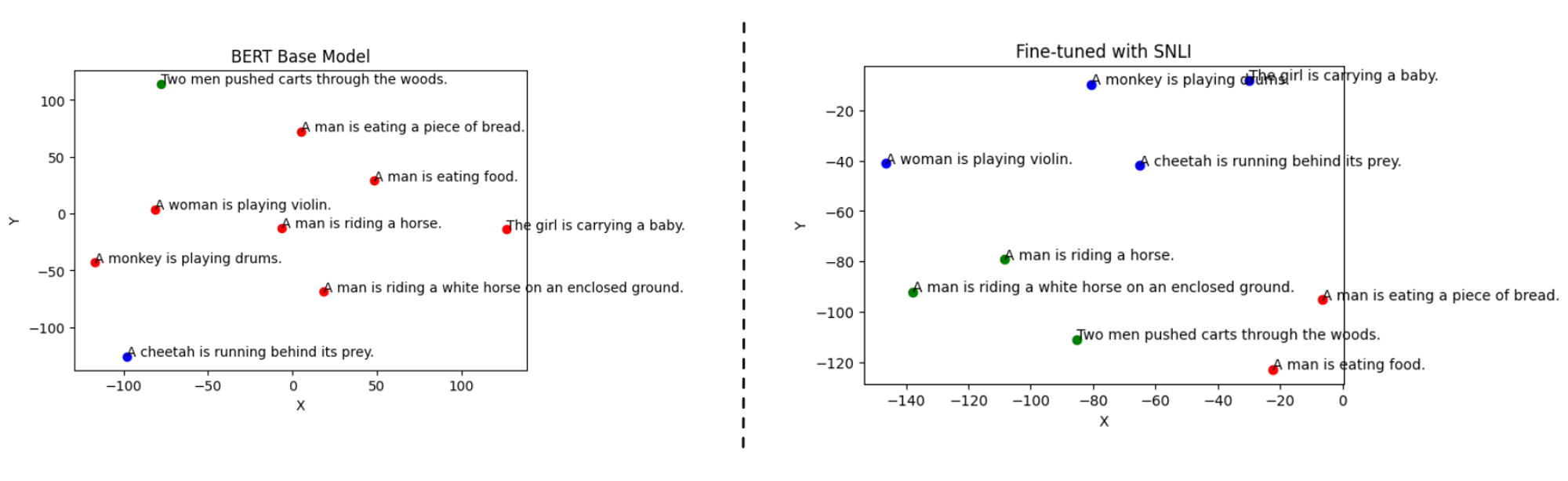
*This image shows how sentence embeddings become more meaningfully clustered after fine-tuning. Sentences with similar meanings (e.g., 'a man is eating') move closer together in the vector space, which is why semantic similarity becomes a more effective evaluation metric.*
- LLM-as-a-Judge: This is an increasingly popular and practical technique. You use a powerful, state-of-the-art "judge" LLM (like GPT-4 or Claude 3 Opus) to evaluate the output of your fine-tuned model.
- How it works: You create a prompt that includes the original input, the model's output, a reference answer (if available), and a detailed rubric. You then ask the judge LLM to score the output based on criteria like helpfulness, accuracy, tone, or adherence to instructions.
- Why it's useful: It allows you to automate the evaluation of subjective qualities that are difficult to capture with numerical metrics, providing a scalable alternative to expensive manual human review.
Test your understanding!
You have fine-tuned a model for two different tasks:
- Task A: Extract a date from a block of text in
YYYY-MM-DDformat. - Task B: Summarize a customer service chat log into a short paragraph.
Which primary evaluation metric would you choose for each task, and why?
Show answer
-
Task A (Date Extraction): The best metric would be Exact Match (EM). Since the format is strict and there is only one correct answer, you want to measure if the model produced the exact string required.
-
Task B (Summarization): The best metric would be either Semantic Similarity or LLM-as-a-Judge. There are many ways to write a good summary, so word-overlap metrics like ROUGE might be misleading. Semantic similarity would compare the meaning of the generated summary to a reference summary, while LLM-as-a-Judge could evaluate the summary's quality based on a rubric (e.g., "Does it capture the main problem? Is it concise?").
3. Running Evaluations in Practice
Now let's translate these concepts into code. As a software engineer, you have two main routes for evaluating your models: writing a custom evaluation script or using a standardized benchmarking framework.
Method 1: Custom Evaluation Script
This approach gives you maximum flexibility and is ideal for evaluating performance on your specific, proprietary dataset. The following guide from Together.ai provides an excellent code example for this.
This guide demonstrates how to build a Python script to evaluate a fine-tuned model against its base model for a question-answering task. It's a perfect example of a custom evaluation pipeline.
Please read the section titled Evaluating a Fine-tuned Model. Focus on the five steps in the Post-Training Evaluation Example: Loading the dataset: Note how it loads a validation split. Generating answers: Pay attention to the get_model_answers function, which queries both the base and fine-tuned models. Generating answers from both models: The actual execution of the function. Calculating metrics: See how the get_metrics function computes EM and F1 scores by comparing predictions to true answers. Comparing metrics: The final step where the results are printed in a clear table. This is the final output of your evaluation.
This approach is powerful because it's tailored to your exact use case. You control the dataset, the prompts, and the metrics, giving you a highly relevant assessment of performance.
Method 2: Standardized Benchmarking Frameworks
Sometimes, you want to see how your model stacks up against well-known public benchmarks (like MMLU for general knowledge or HellaSwag for commonsense reasoning). For this, you can use standardized tools. The industry standard is EleutherAI's LM Evaluation Harness.
This tool automates the process of running models against dozens of popular benchmarks, ensuring that the prompts and evaluation methods are consistent.
LLM Benchmarks Explained: A Guide to Comparing ...
This DataCamp article provides a great tutorial on how to use the LM Evaluation Harness to benchmark models locally. It's the same tool that powers the Hugging Face Open LLM Leaderboard.
Please read the sections How to Benchmark LLMs and Benchmarking best practices. Focus on: Installation: The simple pip install lm-eval command. Running an evaluation: Understand the structure of the lm_eval command, including how to specify the model, task, and device. Best Practices: These are crucial. Pay close attention to the advice on data contamination (ensuring the model wasn't trained on test questions) and setting temperature=0 for reproducible, deterministic outputs.
Using a tool like the LM Evaluation Harness is like running a standardized unit test suite for your model, giving you comparable results that you can use to judge your model against others in the field.
Conclusion
Congratulations on completing the "Fine-Tuning Language Models" module! You've gone from understanding the theory of fine-tuning to applying cutting-edge techniques like QLoRA and, finally, to rigorously measuring the outcome of your work.
Key Takeaways:
- Evaluation is a comparative process: You must always measure your fine-tuned model's performance against its original base model on a held-out test set.
- Metrics depend on the task: For tasks with a single correct answer, use metrics like Accuracy, F1-score, or Exact Match. For open-ended generative tasks, use Semantic Similarity or LLM-as-a-Judge.
- Evaluation can be implemented in two ways: Through custom scripts for specific, domain-relevant tasks, or with standardized frameworks like the LM Evaluation Harness for public benchmarks.
- Reproducibility is key: Always use a
temperatureof 0 during evaluation to get deterministic results and ensure you are not testing on data the model has already seen.
What's Next?
You now have the skills to take a general-purpose LLM and specialize it for a particular task, making it more accurate and efficient. You can build, train, and evaluate your own custom models.
In our next module, Foundations of AI Agents, we will take this a step further. We'll learn how to give these powerful models the ability to interact with the outside world. Instead of just generating text, your models will be able to use tools, call functions, and take actions to accomplish complex, multi-step goals. We're moving from model-as-wordsmith to model-as-worker.