Hello! Welcome back to our module on Deploying AI Models as Services.
In our previous lesson, you successfully built a REST API for an AI model using FastAPI. You learned how to create a standard request-response endpoint, handle data with Pydantic, and serve a model both by proxying to an external service and by loading it locally. This is the foundation for almost any AI service.
However, when working with generative models like LLMs, the standard request-response pattern has a significant drawback. These models generate text token by token, and a full response can take several seconds. Waiting for the entire response to be generated before sending it back to the user leads to high perceived latency, making the application feel slow and unresponsive.
Today, we will solve this exact problem. Your goal is to implement streaming responses over an API for generative models. You'll learn how to send back data in chunks as the model produces it, dramatically improving the user experience, much like you see in applications like ChatGPT.
1. Why Stream? The Problem with "Wait-and-See"
LLMs work through an autoregressive process: they generate one token (or a small group of tokens), add it to the input, and then predict the next one. This happens sequentially until a complete response is formed.
In a standard HTTP request-response cycle, the client sends a request and then waits. The server computes the entire response and then sends it back in one go. The connection is then closed.

This model is inefficient for generative tasks. If a response takes 5 seconds to generate, the user stares at a loading spinner for 5 seconds.
The solution is streaming. Instead of waiting, we can send each part of the response as soon as it's ready. This is achieved using a technology called Server-Sent Events (SSE). With SSE, the client establishes a persistent connection to the server, and the server can push multiple "events" or messages over that single connection.
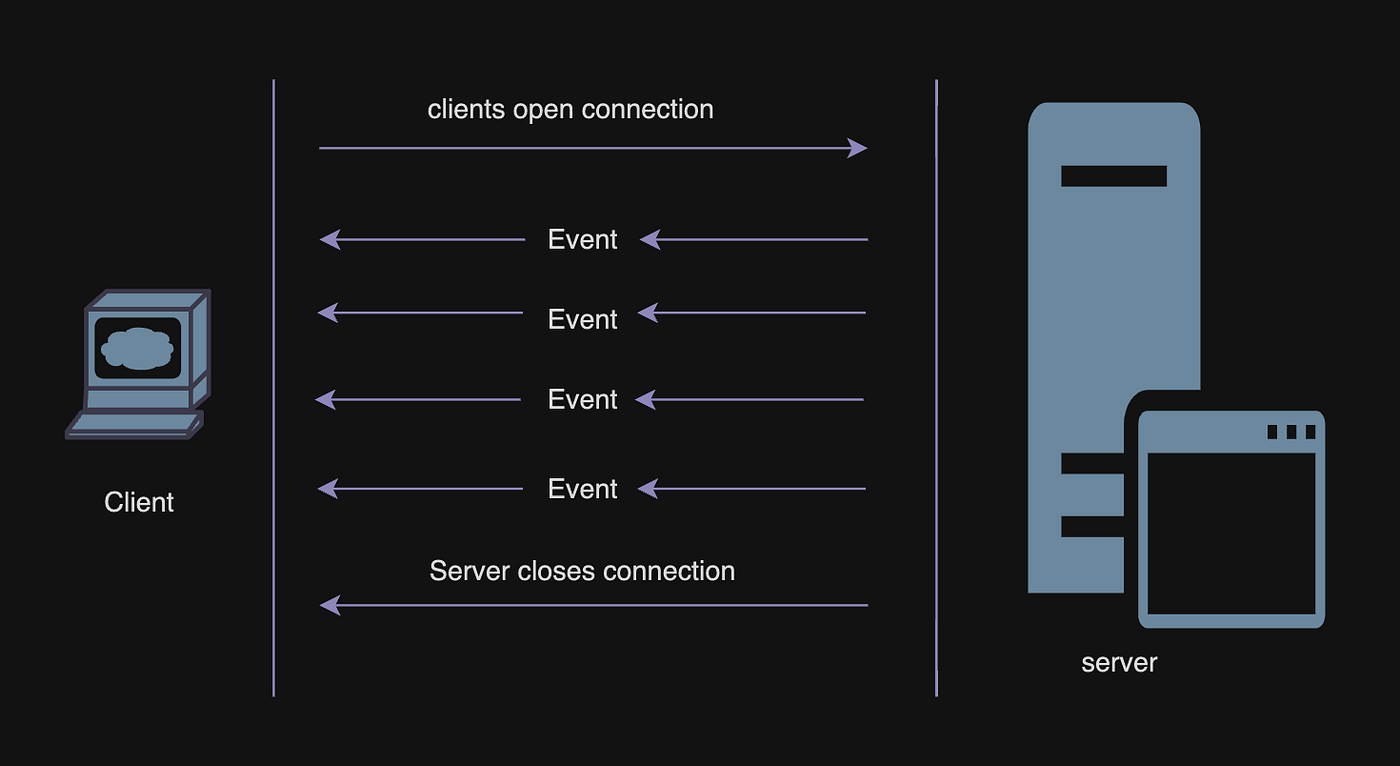
2. Streaming Basics in FastAPI
Before we involve an LLM, let's understand the core streaming mechanism in FastAPI. It relies on two key Python features: generator functions (using yield) and FastAPI's StreamingResponse class.
A generator function is a function that can pause its execution and "yield" a value, then resume later to yield another one. FastAPI can take a generator and stream its yielded values to the client.
Mastering Real-Time AI: A Developer's Guide to Building ...
The article 'Mastering Real-Time AI' provides an excellent, simple example of a streaming endpoint. We'll use this to understand the basic mechanics before adding the complexity of a language model.
Please read the code snippet under the section 'Step 3: Build the Streaming Endpoint'. Focus on the event_stream async generator function and how it's used within StreamingResponse. Notice the yield keyword and the media_type.
Let's look at the key pieces of code from that example:
import asyncio
from fastapi.responses import StreamingResponse

# This is an async generator function
async def event_stream():
    for i in range(10):
        yield f"data: Message {i}\n\n"  # Yield a formatted string
        await asyncio.sleep(1)         # Simulate a delay

@app.get("/stream")
async def stream_response():
    return StreamingResponse(event_stream(), media_type="text/event-stream")
Here's the breakdown:
async def event_stream(): This function is a coroutine that is also a generator.yield f"data: Message {i}\n\n": This is the core of the streaming logic. Instead ofreturn, weyielda value. Thedata: ...\n\nformat is part of the SSE specification.StreamingResponse(event_stream(), ...): We pass an instance of our generator toStreamingResponse. FastAPI then iterates over it, sending each yielded item to the client.media_type="text/event-stream": This HTTP header tells the browser to keep the connection open and handle the incoming data as a stream of events.
Now that you understand the basic mechanism in FastAPI, let's apply it to a real LLM.
3. Streaming LLM Responses with Hugging Face Transformers
The main challenge is bridging the gap between the model.generate() method from the transformers library and our FastAPI async generator. model.generate() is a synchronous, blocking call. If we run it directly in our async endpoint, it will freeze the entire server until the generation is complete, defeating the purpose of streaming.
The solution involves a classic backend architecture pattern:
- Run the blocking
model.generate()call in a separate thread. - Use a thread-safe queue to pass data from the model's thread to our main
asyncthread. - Use a custom Hugging Face
Streamerto intercept the generated tokens and put them onto the queue.
This might sound complex, but it's a powerful and common pattern for integrating synchronous libraries into an asynchronous framework.
Streaming Locally Deployed LLM Responses Using FastAPI
The article 'Streaming Locally Deployed LLM Responses Using FastAPI' provides a complete, practical implementation of this architecture. It's an excellent resource that walks through every component you need.
Please read the following sections to understand the complete implementation: 'How do we extend the same concept for LLM?': This introduces the BaseStreamer and TextStreamer from Hugging Face. The code for the CustomStreamer class: This is the key piece that connects the model's output to a queue. The sections on 'Develop a generation method', 'Develop a Response Generator', and 'Modify the end point': These show how to use threading and the custom streamer within a FastAPI application.
Let's walk through the architecture described in the article.
Step 1: The CustomStreamer
The transformers library provides a TextStreamer class that prints generated text to the console. We can inherit from it and override its on_finalized_text method to put the text into a queue instead of printing it.
# streamer.py
from transformers import TextStreamer
from queue import Queue

class CustomStreamer(TextStreamer):
    def __init__(self, queue: Queue, tokenizer, skip_prompt, **decode_kwargs):
        super().__init__(tokenizer, skip_prompt, **decode_kwargs)
        self._queue = queue
        self.stop_signal = None  # A signal to end the stream

    def on_finalized_text(self, text: str, stream_end: bool = False):
        # Put the generated text into the queue
        self._queue.put(text)
        if stream_end:
            # At the end, put the stop signal
            self._queue.put(self.stop_signal)
Step 2: The Threaded Generation Function
This function sets up the model generation and runs it in a background thread to avoid blocking our main application.
# main.py
from threading import Thread

# ... (model, tokenizer, and streamer setup) ...

def start_generation(query: str):
    # Prepare inputs and generation arguments
    inputs = tokenizer([query], return_tensors="pt").to("cuda:0") # Assuming CUDA
    generation_kwargs = dict(inputs, streamer=streamer, max_new_tokens=128)

    # Run model.generate in a separate thread
    thread = Thread(target=model.generate, kwargs=generation_kwargs)
    thread.start()
Step 3: The Async Response Generator
This is the async generator function that our FastAPI endpoint will use. It pulls items from the queue and yields them.
# main.py
import asyncio

async def response_generator(query: str):
    start_generation(query) # Start the background generation

    while True:
        # Get a value from the queue
        value = streamer_queue.get()

        if value == streamer.stop_signal:
            # If it's the stop signal, we're done
            break

        yield value # Yield the text chunk
        streamer_queue.task_done()

        # Briefly sleep to allow other tasks to run
        await asyncio.sleep(0.1)
Step 4: The FastAPI Endpoint
Finally, the endpoint ties everything together using StreamingResponse.
# main.py
@app.get('/query-stream/')
async def stream(query: str):
    return StreamingResponse(response_generator(query), media_type='text/event-stream')
This architecture elegantly separates the synchronous, CPU-intensive model inference from the asynchronous, I/O-bound web serving, which is a hallmark of a well-designed AI service.
Test your understanding!
In the architecture we just reviewed, why is it necessary to use both a threading.Thread and a queue.Queue? What specific problem does each component solve in the context of an asyncio-based application like FastAPI?
Show answer
-
threading.Thread: Themodel.generate()method is a synchronous and blocking operation. If you call it directly within anasyncfunction, it will block the entireasyncioevent loop. This means your FastAPI server would become unresponsive and couldn't handle any other requests until the generation is complete. Runningmodel.generate()in a separate thread moves the blocking work off the main event loop, allowing the server to remain responsive. -
queue.Queue: This acts as a thread-safe communication channel. The worker thread (runningmodel.generate) is the "producer" that adds generated text chunks to the queue. The mainasynciothread (running theresponse_generator) is the "consumer" that pulls text from the queue. TheQueuehandles the necessary locking to ensure that data is passed safely between these two different threads without race conditions or corruption.
In short, the thread isolates the blocking work, and the queue provides a safe bridge back to the asynchronous world.
4. Consuming the Stream
To complete the picture, let's see how a client would consume this stream. For testing from a Python script, you can use the requests library.
import requests

query = "Explain the benefits of streaming LLM responses."
url = f"http://127.0.0.1:8000/query-stream/?query={query}"

with requests.get(url, stream=True) as r:
    for chunk in r.iter_content(chunk_size=None, decode_unicode=True):
        if chunk:
            print(chunk, end="", flush=True)

print()
The key here is stream=True, which tells requests not to download the whole response at once. In a web frontend, you would use the native EventSource API in JavaScript to listen for messages from the server.
Conclusion
Congratulations! You've just learned one of the most important techniques for building modern, user-friendly LLM applications. By moving beyond the simple request-response model, you can create services that feel fast and interactive.
Key Takeaways:
- Streaming reduces perceived latency for generative models by sending data in chunks as it's created.
- FastAPI uses
StreamingResponseand async generator functions (yield) to implement streaming. - Server-Sent Events (SSE), using the
text/event-streammedia type, is the underlying technology. - To integrate blocking, synchronous code (like
model.generate()) into anasyncframework, you must run it in a separate thread. - A thread-safe queue is the standard pattern for communicating between the synchronous worker thread and the main
asyncapplication thread. - The Hugging Face
Streamerclasses provide the necessary hooks to intercept tokens during generation.
What's Next?
Our API is now functional and performs well, but it's completely open to the public. In a real-world scenario, you'd need to control who can access it. In the next lesson, we will address this by learning how to secure an AI API endpoint using API key authentication. This is a fundamental step in preparing your service for production.