Hello! Welcome back to our module on Retrieval-Augmented Generation (RAG).
In our last lesson, we established the "why" and "what" of RAG. You learned that it's a powerful "open-book" approach that grounds LLMs in external knowledge, reducing hallucinations and allowing them to work with private, up-to-date information. We saw that the core process is to retrieve relevant documents, augment the user's prompt with them, and then have the LLM generate a response.
Today, we dive into the first practical step of building a RAG pipeline: the embedding process. The central goal of this lesson is to learn how to create vector embeddings for text documents using sentence-transformer models. This is the foundational technique that enables a computer to understand and compare text based on its semantic meaning, which is the magic behind the "retrieval" step.
What are Sentence Embeddings?
At their core, LLMs and other neural networks don't understand words or sentences; they understand numbers. To perform any meaningful operation like searching for similar documents, we first need to convert our text into a numerical format. This is where embeddings come in.
A sentence embedding is a fixed-size vector (an array of numbers) that represents the semantic meaning of a sentence or a piece of text. You can think of this vector as a coordinate in a high-dimensional "meaning space".
- Texts with similar meanings, like "The weather is great today" and "It's a beautiful, sunny day," will be mapped to points that are close to each other in this space.
- Texts with different meanings, like "How to cook pasta" and "Tesla stock prices," will be mapped to points that are far apart.
This conversion from text to a vector is done by a specialized type of transformer model called a sentence transformer.
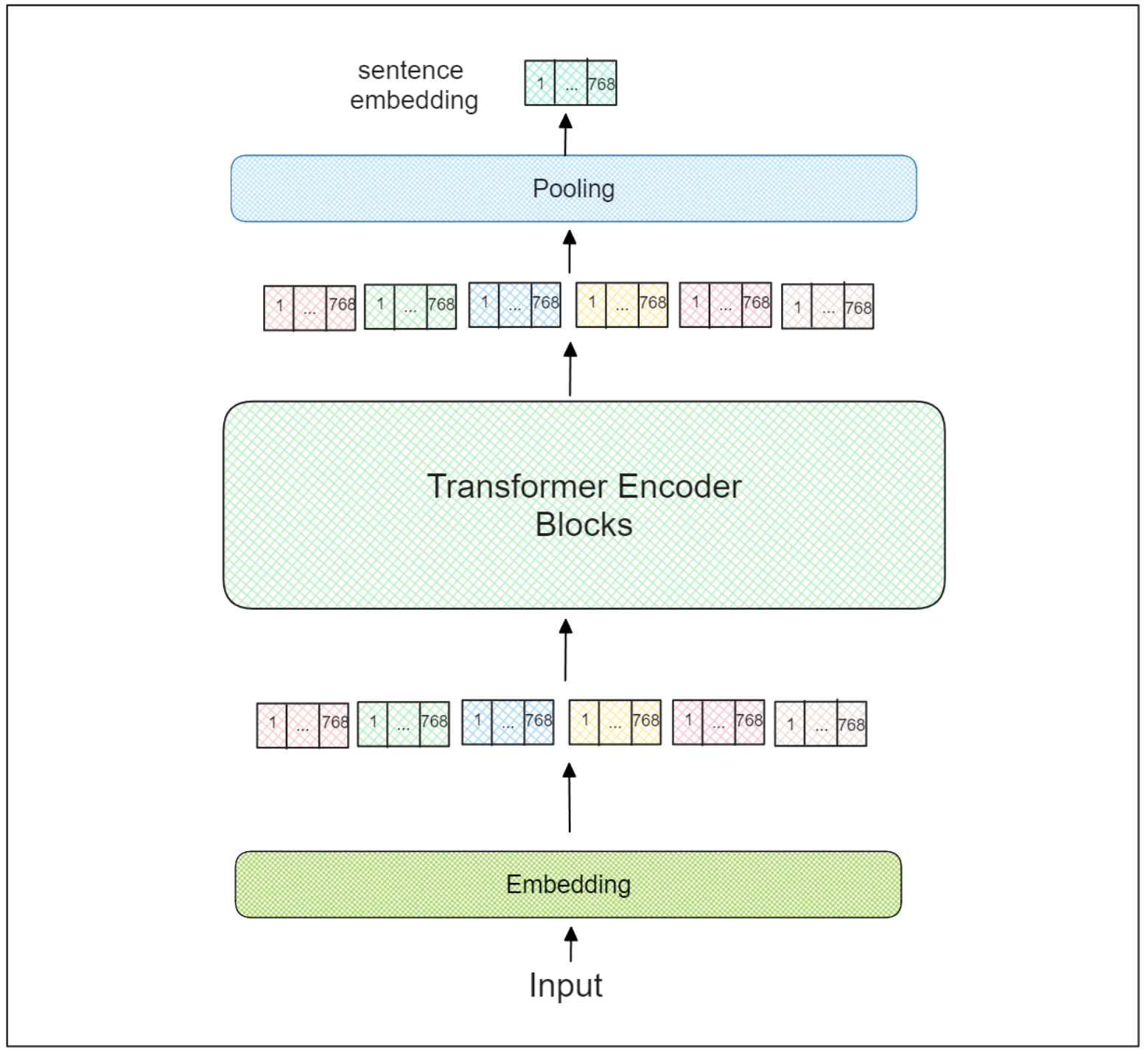
You might recall from our module on Transformer Architectures that models like BERT output a vector for every single token in the input. A sentence transformer builds on this by adding a pooling layer to aggregate these individual token vectors into a single, meaningful vector for the entire sentence. A common method is to average all the token embeddings.

To see a quick recap of what sentence embeddings are and what they're used for, the beginning of the following video is an excellent primer.
Sentence Transformers: Sentence Embedding, Sentence Similarity, Semantic Search and Clustering |Code
This video by Pradip Nichite starts with a great, concise explanation of what sentence embeddings are and why they are useful for tasks like finding similarity between sentences.
Watch the first 1 minute and 40 seconds of the video to get a solid conceptual foundation for sentence embeddings.
Generating Your First Embeddings
Now for the practical part. We'll use the sentence-transformers library, a popular and powerful Python framework that makes creating high-quality embeddings incredibly straightforward. Since you're already comfortable with Python, you'll find this process very intuitive.
The process involves three simple steps:
- Install the library.
- Load a pre-trained model.
- Use the model to encode your text.
For a comprehensive guide, the following reading from Elastic provides a clear and concise walkthrough.
Generate Embeddings - Elasticsearch Labs
This tutorial from Elastic Labs covers the essential steps to get started with the sentence-transformers library. It's a great text-based reference for the code we'll be discussing.
Please read through the sections 'Install SentenceTransformers', 'Selecting a Model', 'Loading the Model', and 'Generating Embeddings'. This will give you the complete code and context.
Let's walk through the code together.
Step 1: Installation
First, you'll need to install the library in your Python environment.
pip install sentence-transformers
Step 2: Choosing and Loading a Model
The sentence-transformers library integrates with the Hugging Face Hub, giving you access to thousands of pre-trained models. The model you choose is a trade-off between performance (embedding quality) and efficiency (speed, size).
For this example, we'll use all-MiniLM-L6-v2. It's a fantastic general-purpose model that is very fast and lightweight while providing good quality.
from sentence_transformers import SentenceTransformer

# Load a pre-trained model from Hugging Face
model = SentenceTransformer('all-MiniLM-L6-v2')
The first time you run this, the library will download and cache the model, which might take a minute. Subsequent runs will be instantaneous.
Step 3: Encoding Text
With the model loaded, you can now generate embeddings using the .encode() method. It can take a single string or, more commonly, a list of strings.
# A list of documents for our knowledge base
documents = [
    "A RAG system retrieves relevant documents to augment a prompt.",
    "Vector embeddings are numerical representations of text meaning.",
    "The weather in London is usually cloudy.",
    "To cook pasta, bring a large pot of salted water to a boil."
]

# Generate embeddings for the documents
embeddings = model.encode(documents)

# Let's inspect the output
print(f"Shape of the embeddings numpy array: {embeddings.shape}")

# The model 'all-MiniLM-L6-v2' creates 384-dimensional vectors
# So the shape should be (number of documents, 384)
# In our case: (4, 384)

# You can also look at a single embedding
first_embedding = embeddings[0]
print(f"\nEmbedding for the first document (first 5 dimensions):")
print(first_embedding[:5])
The output of model.encode() is a NumPy array. Given your background, you'll recognize that an (N, D) shaped array, where N is the number of documents and D is the embedding dimension of the model, is a very efficient structure for vectorized computations.
For a video walkthrough of this exact process, please watch the following clip.
Sentence Transformers: Sentence Embedding, Sentence Similarity, Semantic Search and Clustering |Code
Let's return to the video from Pradip Nichite. It provides a great live-coding demonstration of installing the library, loading a model, and using the .encode() method.
Watch from 01:40 to 05:19. This will show you the code in action and reinforce what we've just covered.
Test your understanding!
You are using the all-mpnet-base-v2 model, which is known to produce embeddings with 768 dimensions. If you pass a list containing 50 text documents to the model.encode() method, what will be the shape of the resulting NumPy array?
Show answer
The resulting NumPy array will have a shape of (50, 768). The first dimension corresponds to the number of documents (50), and the second dimension corresponds to the size of the embedding vector for that model (768).
Advanced Topic: Task-Specific Prompts for Better Embeddings
While generating a standard embedding is great, for a high-performance RAG system, we can do better. Some of the latest embedding models are trained to produce different embeddings for the same text depending on its intended task.
Think about it: the vector for "How to use FastAPI?" when it's a user query should be optimized to find relevant documentation. The vector for a paragraph in the FastAPI documentation should be optimized to be found.
Some models, like Google's EmbeddingGemma, allow you to specify this task by adding a small instruction prompt to your text before encoding it. This is a cutting-edge technique that can significantly improve retrieval quality.
Generate Embeddings with Sentence Transformers | Gemma
This guide from Google AI explains how to use their EmbeddingGemma model. It has an excellent section on 'Using Prompts' that details how to optimize embeddings for specific tasks, which is highly relevant for RAG.
Please read the sections titled 'Using Prompts with EmbeddingGemma' and its subsection 'Use Case: Retrieval-Augmented Generation (RAG)'. Focus on how and why you would use different prompts for queries versus documents.
In a RAG system, you'll have two main types of text to embed:
- The user's query (what they are asking).
- The documents in your knowledge base (the potential answers).
Using a model that supports task prefixes, you can generate specialized embeddings for each. The sentence-transformers library makes this easy with the prompt_name argument.
Here's a conceptual example. Note that you would need to use a model trained for this, like google/embeddinggemma-300M.
# Note: You would need to load a model that supports task prompts, e.g.,
# model = SentenceTransformer('google/embeddinggemma-300M')

# The user's question
query = "How do I create an API with streaming?"

# A document from our knowledge base
document_text = "FastAPI supports streaming responses using a Generator. You can yield data chunks, which is efficient for large files or real-time data feeds."

# Generate embeddings optimized for their role in a RAG system
query_embedding = model.encode(
    query,
    prompt_name="Retrieval-query"
)

document_embedding = model.encode(
    document_text,
    prompt_name="Retrieval-document"
)
By generating these distinct embeddings, you're helping the model better differentiate between a question and a potential answer, which will lead to more accurate retrieval in the next step of our RAG pipeline.
Conclusion
In this lesson, you've moved from the theory of RAG to the first critical, practical step. You now have the skill to convert any text document into a rich, numerical representation that captures its meaning.
Key Takeaways:
- Sentence embeddings are fixed-size vectors that represent the semantic meaning of text, enabling computers to perform search and comparison.
- The
sentence-transformerslibrary is the standard tool for this, allowing you to load a pre-trained model and generate embeddings with the.encode()method. - The choice of model involves a trade-off between quality and computational cost. Models like
all-MiniLM-L6-v2offer a great balance. - For advanced RAG systems, using task-specific prompts (e.g., for
Retrieval-queryvs.Retrieval-document) can significantly improve the quality of your embeddings and, consequently, your retrieval results.
Next Up:
We can now turn our entire knowledge base into a collection of vectors. But where do we store them? And how do we efficiently search through millions of these vectors to find the most relevant ones for a user's query in milliseconds? The answer is a vector database. In the next lesson, we will learn how to set up and query a vector database, which is the core component of the "retrieval" in RAG.