Hello! Welcome to your next lesson on Retrieval-Augmented Generation (RAG).
Introduction
In our previous lessons, we built the fundamental components of a RAG system. You learned how to implement the retrieval component to fetch relevant documents and the generation component to produce an answer based on that context.
Today, we will integrate these pieces to fulfill this lesson's learning outcome: to build an end-to-end RAG pipeline to answer questions from a custom knowledge base.
We'll move beyond isolated scripts and construct a complete, functioning application. This system will have two main pathways:
- An Ingestion Pipeline: To process custom documents (like PDFs), create embeddings, and store them in a vector database.
- A Query Pipeline: To take a user's question, retrieve relevant context from the database, and generate a final, fact-grounded answer.
As a backend engineer, you can think of this as building a service with distinct "write" (ingest) and "read" (query) APIs for a specialized knowledge system. To make this practical, we'll use tools common in production environments, including a web API, a containerized database, and an orchestration layer.
Let's look at a map of a sophisticated RAG pipeline to see where our components fit.
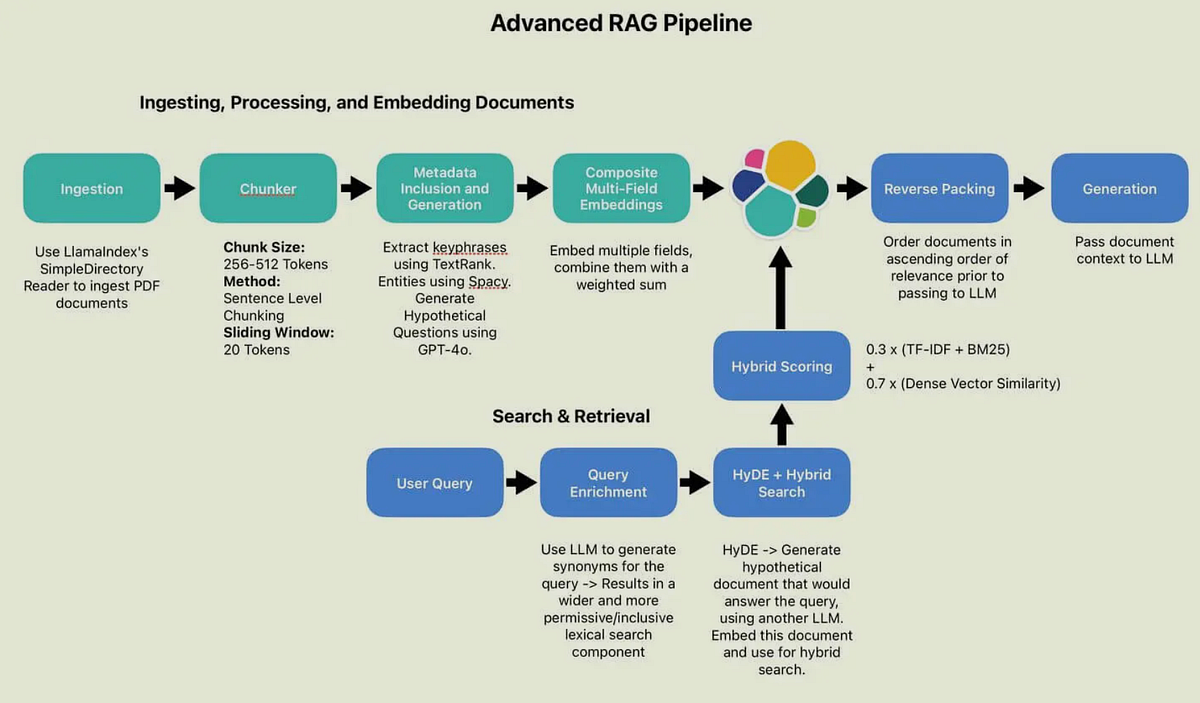
The "Production-Ready" RAG Architecture
We will build our system using a robust and modern stack that aligns well with a software engineering background:
- Backend API: FastAPI to create our API endpoints for ingesting and querying.
- Vector Database: Qdrant, a high-performance vector database, which we will run locally using Docker. Your experience with Docker will be helpful here.
- Ingestion: LlamaIndex to efficiently load and chunk PDF documents.
- LLM & Embeddings: OpenAI for both generating text and creating embeddings.
- Orchestration: Ingest, an open-source tool to manage, observe, and debug the multi-step workflows typical in AI applications. This introduces a layer of production-readiness by providing features like automatic retries, logging, and tracing.
- Frontend: Streamlit to build a simple user interface for interacting with our pipeline.
The following video by Tech With Tim provides an excellent, comprehensive walkthrough of building this exact system. We will use it as our primary guide.
Part 1: Setting Up the Project and Services
First, let's get our environment and services up and running. This involves setting up the Python project, running the Qdrant vector database in Docker, and starting the Ingest development server.
How to Build a Production-Ready RAG AI Agent in Python (Step-by-Step)
This first video segment covers the architecture of our RAG application and the complete setup process. You'll install the necessary Python libraries, configure your OpenAI API key, and launch the Qdrant vector database using a Docker command.
Please watch the following three clips from the video: Architecture Overview (4:04 - 8:16): Get a high-level understanding of RAG and the roles of Qdrant, LlamaIndex, and Ingest. Project Dependencies (8:16 - 11:16): Follow along to set up your project and install all required packages. You will also create your .env file for the OpenAI API key. Run Qdrant with Docker (25:01 - 28:08): Use the provided Docker command to start your local Qdrant instance. This is the database where our document vectors will be stored.
After completing these steps, you should have a running Qdrant container and a Python environment ready for development.
Part 2: The Ingestion Pipeline
Now, let's build the "write" path of our system. The goal is to create a process that takes a PDF file, breaks it down, converts it to vectors, and stores it in Qdrant. We'll use the Ingest orchestration tool to define this as a series of observable, retryable steps. This is a common pattern in production systems to make complex workflows more reliable and debuggable.
First, you'll see how to set up a FastAPI application and integrate Ingest to define and serve our AI workflows. Then, we will implement the logic for each step of the ingestion process.
How to Build a Production-Ready RAG AI Agent in Python (Step-by-Step)
This next series of clips dives into the code. You will build the core components for the ingestion pipeline and tie them together within an Ingest function.
Watch the following segments to build and test the ingestion pipeline: FastAPI & Ingest Setup (11:16 - 19:30): Learn how to initialize a FastAPI app and define your first Ingest function. This is key to understanding the orchestration pattern. Running the Ingest Dev Server (19:30 - 25:01): Follow the steps to run the local Ingest UI, which will allow you to monitor and trigger your functions. Vector DB Code (28:08 - 36:28): Implement the vector_db.py file. This class will act as our client for interacting with the Qdrant database. Data Loader Code (36:28 - 43:17): Implement the data_loader.py file. This contains the logic for loading a PDF with LlamaIndex, chunking the text, and embedding it with OpenAI. Build the Ingestion Workflow (45:57 - 56:06): Integrate the data loader and vector DB client into the rag_ingest_pdf function in main.py. Pay close attention to how ctx.step.run is used to define distinct, observable steps for 'load and chunk' and 'embed and upsert'. Test the Ingestion (56:06 - 58:09): Use the Ingest UI to trigger your ingestion function with a sample PDF and watch it execute step-by-step.
At this point, you have successfully built and tested a complete data ingestion pipeline. You can now programmatically add knowledge from PDF documents into your vector database.
Test your understanding!
In the rag_ingest_pdf function, the workflow is broken into two steps: load and chunk and embed and upsert using ctx.step.run. From a backend engineering perspective, what is the advantage of defining these as separate, orchestrated steps instead of just calling them as regular Python functions one after another?
Show answer
The primary advantage is observability and fault tolerance. By defining them as separate steps within an orchestration tool like Ingest, you gain:
- Observability: Each step is logged and timed independently in the Ingest UI. You can see the inputs, outputs, and duration of
load and chunkseparately fromembed and upsert. This is invaluable for debugging and performance tuning. If a step is slow, you know exactly which one it is. - Fault Tolerance: Ingest functions have built-in retry logic. If the
embed and upsertstep fails (e.g., due to a temporary network issue with the OpenAI API or a problem with the Qdrant DB), the orchestrator can automatically retry just that step. In a simple sequential script, the entire process would fail, and you'd have to restart from the beginning. - Modularity: It makes the workflow easier to understand and manage. Each step is a self-contained unit of work, which is a core principle of good software design.
Part 3: The Query Pipeline
With our knowledge base populated, let's build the "read" path. This pipeline will:
- Receive a user's question.
- Embed the question into a vector.
- Search Qdrant for the most relevant document chunks (retrieval).
- Combine the question and the retrieved chunks into a prompt (augmentation).
- Send the prompt to an LLM to generate a final answer (generation).
We will again wrap this entire process in an Ingest function.
How to Build a Production-Ready RAG AI Agent in Python (Step-by-Step)
Now, let's build the second half of our RAG system: the query pipeline. This function will use the data we ingested to answer questions.
Watch these two clips to implement and test the query function: Build the Query Workflow (58:09 - 1:06:27): Implement the rag_query_pdf_ai function in main.py. Notice the similar step-based pattern: one step for embedding and searching, and another for inferring the answer with the LLM using ctx.step.ai.infer. Test the Query (1:06:27 - 1:08:56): Add the new function to the list served by Ingest, restart your server, and use the Ingest UI to ask a question related to the PDF you ingested earlier. Observe the full RAG process in the run logs.
You now have two fully functional, independent API workflows: one for ingesting data and one for querying it.
Part 4: The Streamlit Frontend
To make our RAG pipeline a truly end-to-end application, we'll add a simple user interface using Streamlit. The video's author provides the code for this, and we will do the same. Your focus should be on understanding how this frontend interacts with the backend you just built.
The Streamlit app doesn't call your FastAPI endpoints directly. Instead, it uses the Ingest client to send events (rag/ingest.pdf and rag/query.pdf.ai). The Ingest server receives these events and triggers the corresponding functions you wrote in main.py. This decouples the frontend from the backend, another common pattern in distributed systems.
How to Build a Production-Ready RAG AI Agent in Python (Step-by-Step)
In this final segment, you'll see how to connect a Streamlit frontend to your backend. You don't need to code this from scratch, but pay attention to how the UI triggers the Ingest events.
Watch the clip from 1:08:56 to 1:13:53. The presenter will walk through a pre-written streamlit_app.py. Focus on the send_rag_ingest_event and run_query_event functions to see how the frontend sends events to the Ingest server to trigger your backend logic. You can copy the code from the video's repository (linked in its description) or simply understand the concept, as our primary goal was building the backend pipeline.
Conclusion
Congratulations! You have successfully built a complete, end-to-end RAG pipeline. You now have a working application that can ingest knowledge from custom PDF documents and answer questions based on that knowledge, all orchestrated through a professional-grade workflow.
Key Takeaways:
- An end-to-end RAG system consists of two primary pipelines: Ingestion (load, chunk, embed, store) and Querying (embed, retrieve, augment, generate).
- Using a backend framework like FastAPI allows you to expose your AI logic as a scalable service.
- Running components like a vector database in Docker provides a consistent and isolated environment.
- Orchestration tools like Ingest are crucial for managing, debugging, and adding resilience (e.g., retries) to complex, multi-step AI workflows.
- The entire system can be decoupled, with a frontend triggering backend workflows via events rather than direct API calls.
Next Up:
We have a working system, but how do we know if it's any good? Is it retrieving the right information? Are the answers accurate and helpful? In our next and final lesson of this module, we will explore how to evaluate the performance of a RAG system, looking at key metrics for both retrieval and generation quality.