Hello! Let's dive back into our module on Retrieval-Augmented Generation (RAG).
In the previous lesson, we established the foundation for the "retrieval" part of RAG. You learned how to set up a vector database, specifically ChromaDB, to store document embeddings and perform similarity searches. We now have a searchable knowledge base.
Today, we will build on that foundation to achieve this lesson's learning outcome: to implement the retrieval component of a RAG system to find relevant documents for a given query. We'll move from manually querying a database to building a formalized, reusable "retriever" component using the LangChain framework. As a software engineer, you'll find LangChain's modular approach intuitive, as it allows us to build complex AI pipelines from well-defined building blocks.
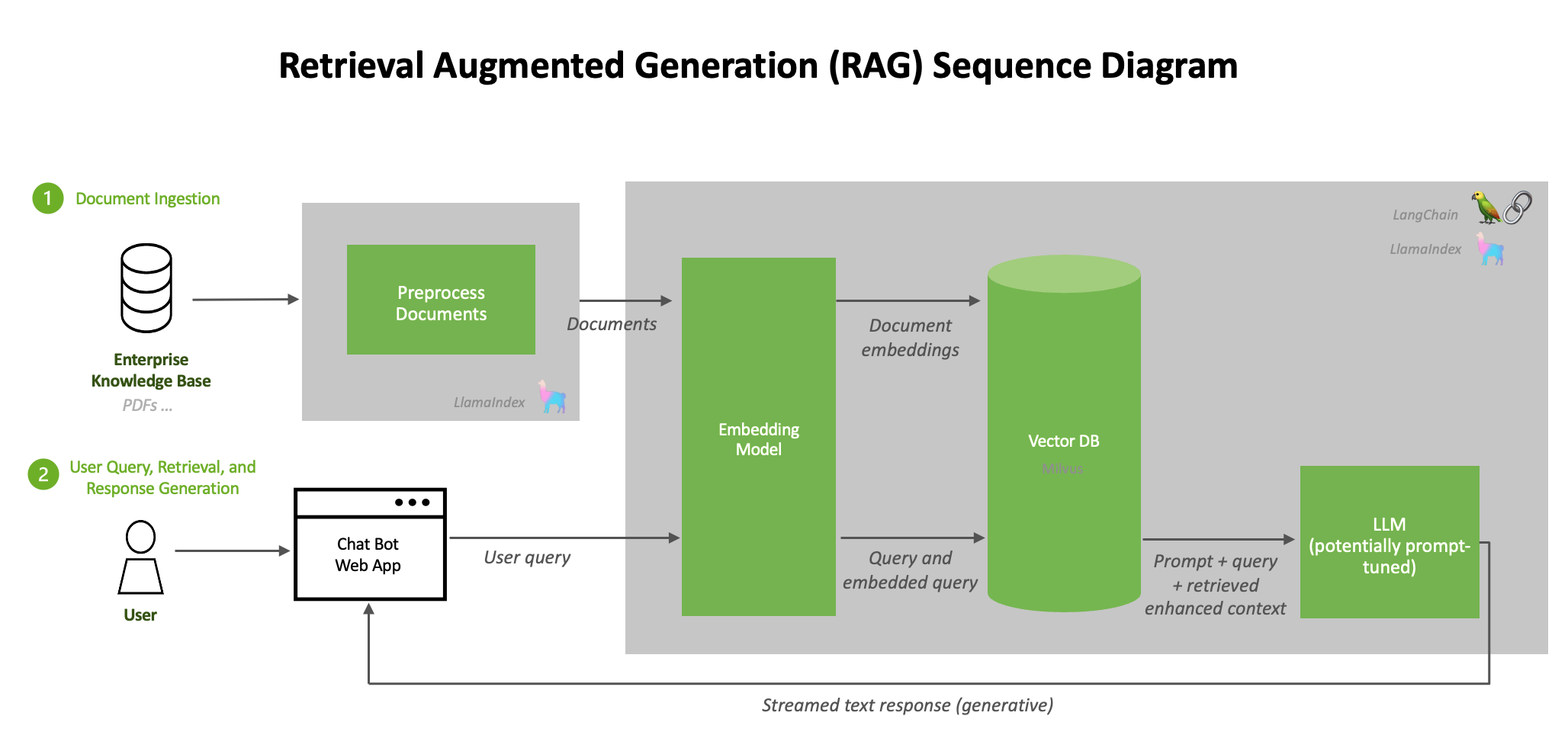
The diagram below shows the full RAG pipeline. Our focus today is squarely on the "Retrieval" step: taking a user's query and finding the most relevant information in our vector database.
The Retriever: An Abstraction for Searching
In software engineering, we value abstractions that hide implementation details. LangChain provides a perfect example of this with its Retriever interface.
In our last lesson, we interacted directly with the VectorStore (ChromaDB) using its query method. While this works, a more robust approach is to use a Retriever.
VectorStore: This is the database itself (e.g., Chroma, FAISS). It is responsible for storing the data and embeddings.Retriever: This is an interface built on top of aVectorStore. Its sole job is to accept a query string and return a list of relevant documents.
Using a Retriever decouples the rest of our application from the specific vector database we're using. We could swap ChromaDB for FAISS or a cloud-based solution, and the rest of our RAG chain wouldn't need to change, as long as the new VectorStore can expose a Retriever interface.
Implementing the Retrieval Component
Let's build a complete retrieval component in Python using LangChain. The process involves four main steps:
- Loading the source documents.
- Splitting the documents into smaller, manageable chunks.
- Storing the chunks in a
VectorStore, which handles embedding them. - Retrieving relevant chunks using a retriever created from the
VectorStore.
The following video from pixegami provides a great, concise overview of this entire process. We will follow a similar structure in our code.
RAG + Langchain Python Project: Easy AI/Chat For Your Docs
This video project demonstrates the end-to-end process of building a simple RAG application. We will focus on the sections covering data loading, chunking, database creation, and querying, which together form our retrieval component.
Watch the following segments: 01:26 - 05:01: This covers loading data from files and splitting it into chunks using a text splitter. Pay attention to the concepts of chunk_size and chunk_overlap. 05:01 - 06:21: This shows how to create a ChromaDB vector store from the document chunks and an embedding function. 09:31 - 12:38: This is the most crucial part. It demonstrates how to load the database and use it to search for relevant chunks based on a query.
Now, let's translate those concepts into a working Python script. We'll use the langchain-community and langchain-openai packages, along with chromadb for our vector store.
Step 1: Project Setup
First, make sure you have the necessary libraries installed and your environment configured. As a backend developer, you're familiar with managing dependencies and environment variables.
Introduction to RAG with Python & LangChain
This article, 'Introduction to RAG with Python & LangChain', provides a clear, code-first guide. We'll follow its structure for our implementation. First, let's review the setup steps.
Read the section 'A Naive RAG Flow in Python — Environment Set Up'. This covers creating a virtual environment, installing packages, and setting up your .env file for the OpenAI API key. Ensure your environment is set up this way before proceeding.
Step 2: Building the Retrieval Script
Below is a Python script that encapsulates the entire retrieval process. It loads a text file, chunks it, creates a vector store, and then uses a retriever to find relevant information.
You can create a file named state_of_the_union.txt and populate it with some text for this example. The text from the LangChain article or any other source will work.
import os
from dotenv import load_dotenv
from langchain_community.document_loaders import TextLoader
from langchain_text_splitters import CharacterTextSplitter
from langchain_openai import OpenAIEmbeddings
from langchain_community.vectorstores import Chroma

# 1. Load Environment Variables (for OpenAI API key)
load_dotenv()

# --- INGESTION & STORAGE ---
# This part would typically be run once to populate the database.
print("--- Starting Ingestion Process ---")

# 2. Load the source document
loader = TextLoader("./state_of_the_union.txt")
documents = loader.load()
print(f"Loaded {len(documents)} document(s).")

# 3. Split the document into chunks
text_splitter = CharacterTextSplitter(chunk_size=1000, chunk_overlap=200)
chunked_documents = text_splitter.split_documents(documents)
print(f"Split document into {len(chunked_documents)} chunks.")

# 4. Create embeddings and store in ChromaDB
# This will create a directory 'chroma_db' and persist the data.
# If the directory already exists, it will load the existing data.
vector_store = Chroma.from_documents(
    documents=chunked_documents,
    embedding=OpenAIEmbeddings(),
    persist_directory="./chroma_db"
)
print("--- Ingestion Complete ---")


# --- RETRIEVAL ---
# This is the part your application would run for each user query.
print("\n--- Starting Retrieval Process ---")

# 5. Define the user query
query = "What did the president say about Putin?"

# 6. Create the retriever from the vector store
retriever = vector_store.as_retriever(
    search_type="similarity",
    search_kwargs={'k': 3} # Retrieve the top 3 most relevant chunks
)

# 7. Invoke the retriever to get relevant documents
retrieved_docs = retriever.invoke(query)

# 8. Display the results
print(f"Query: {query}\n")
print("Retrieved Documents:")
for i, doc in enumerate(retrieved_docs):
    print(f"--- Document {i+1} ---\n")
    print(doc.page_content)
    print("\n--------------------")
Code Breakdown
- Steps 1-4 (Ingestion): This section prepares your knowledge base. You load a file, split it into chunks, and then use
Chroma.from_documents()to both generate embeddings (viaOpenAIEmbeddings) and store everything in a persistent local directory (./chroma_db). In a real application, you'd run this ingestion pipeline whenever your source data changes. - Step 6 (Create Retriever): This is the key step for our lesson. The
vector_store.as_retriever()method creates our retrieval component. We configure it to retrieve thek=3most similar documents. - Step 7 (Invoke Retriever): The
retriever.invoke(query)call executes the search. It takes the query string, automatically embeds it using the same embedding model used for storage, and performs a similarity search in the vector store to find the most relevant document chunks. - Step 8 (Display Results): The output,
retrieved_docs, is a list ofDocumentobjects, each containing thepage_contentand associated metadata. This is the context that will be passed to the LLM in the next stage of the RAG pipeline.
Test your understanding!
In the code example above, how would you modify the retriever to return the top 5 most relevant documents instead of 3?
Show answer
You would change the search_kwargs dictionary when creating the retriever:
retriever = vector_store.as_retriever(
    search_type="similarity",
    search_kwargs={'k': 5} # Changed k from 3 to 5
)
The k parameter controls the number of results to retrieve.
Alternative Vector Stores: FAISS
While ChromaDB is excellent for getting started, LangChain supports many other vector stores. Another popular choice is FAISS (Facebook AI Similarity Search), which we briefly discussed in the last lesson. It's a highly efficient library for similarity search.
The process is very similar. You'd use FAISS.from_documents() instead of Chroma.from_documents(). The following video from Krish Naik demonstrates using both ChromaDB and FAISS within LangChain, highlighting the flexibility of the framework.
4-Langchain Series-Getting Started With RAG Pipeline Using Langchain Chromadb And FAISS
Krish Naik's tutorial provides another practical look at the RAG pipeline. This specific section demonstrates querying with both ChromaDB and FAISS, reinforcing the idea that the retriever abstraction makes it easy to switch between vector stores.
Watch the segment from 25:01 to 29:50. Notice how the query logic (db.similarity_search(query)) is conceptually identical for both ChromaDB and FAISS, even though the setup is slightly different. This illustrates the power of LangChain's abstractions.
Conclusion
You have successfully implemented the "R" in RAG! You've built a component that can take any user query and intelligently retrieve relevant context from a knowledge base. This is a massive step up from simple keyword search and forms the backbone of any powerful question-answering system.
Key Takeaways:
- The retrieval component is a formal piece of a RAG system that takes a query and returns relevant documents.
- LangChain's
Retrieveris a powerful abstraction built on top of aVectorStore, separating the act of retrieving from the underlying database implementation. - The end-to-end retrieval workflow is: Load -> Split -> Store -> Retrieve.
- The
vector_store.as_retriever()method is the standard way to create a retrieval component from a configured vector store. The retriever'sinvoke()method then executes the search.
Next Up:
We now have the context. The next logical question is: what do we do with it? In the next lesson, we will implement the generation component of a RAG system by combining this retrieved context with the user's query in a prompt and feeding it to an LLM to generate a final, context-aware answer.