Hello! Welcome back to the final lesson in our module on the fundamentals of model training.
In the last lesson, we focused on how to evaluate a model's performance using metrics like precision, recall, and the F1-score. You learned that these metrics give us a much richer understanding of a model's behavior than accuracy alone. This is a crucial skill, because as the saying goes, "you can't improve what you don't measure."
Now, it's time to use those measurements to actually improve our models. This lesson will tackle the learning outcome: Perform hyperparameter tuning by adjusting learning rate, batch size, and network architecture. We'll explore how these "settings" of the training process can dramatically impact a model's final performance and how to find the optimal combination for your task.
1. What are Hyperparameters?
First, let's distinguish between two types of parameters in machine learning:
- Model Parameters: These are the values the model learns on its own during training. The most common examples are the weights and biases in the neural network's layers. You don't set these manually; they are updated by the optimizer based on the training data.
- Hyperparameters: These are the configuration settings for the training process that you, the engineer, must set before training begins. They control the behavior of the learning algorithm itself.
For this lesson, we'll focus on three of the most important hyperparameters:
- Learning Rate: Controls how much the optimizer adjusts the model's weights in response to the estimated error each time they are updated.
- Batch Size: The number of training samples used in one forward/backward pass. The model's weights are updated once per batch.
- Network Architecture: The structure of the model itself, such as the number of hidden layers or the number of neurons in each layer.
The following reading from the PyTorch documentation formally introduces these concepts.
Let's start with a clear definition of the core hyperparameters we'll be tuning. This article from PyTorch provides a concise overview.
Please read the short section titled 'Hyperparameters'. It defines the number of epochs, batch size, and learning rate and explains their roles in the optimization process.
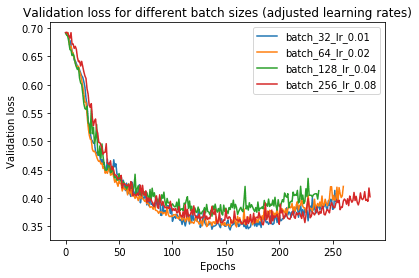
As the reading mentions, a small learning rate can lead to painfully slow convergence, while a large learning rate can cause the training to become unstable and the loss to jump around unpredictably. Similarly, the batch size affects both the speed of training and the stability of the gradient updates. Finding the right balance is key.
2. The Goal and Strategies for Tuning
The goal of hyperparameter tuning is to find the combination of values that results in the best performance on your validation set. The metrics you learned in the previous lesson (F1-score, precision, recall, or even just validation loss) are the compass you use to navigate this search.
So, how do you search for the best combination?
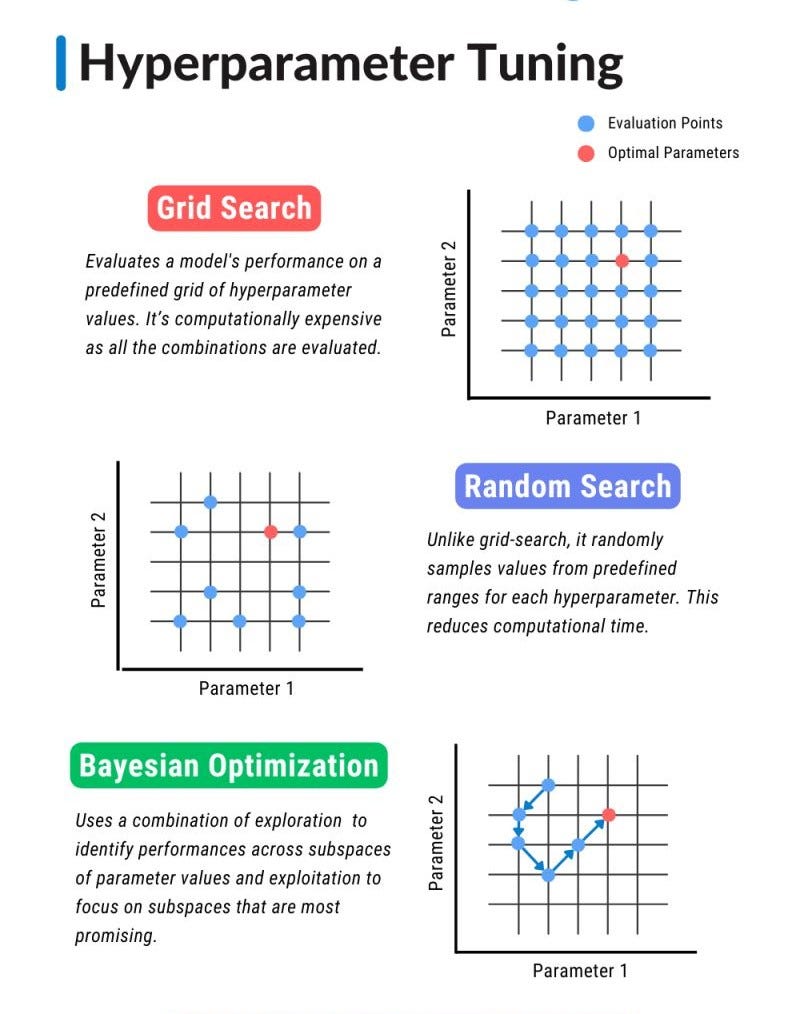
- Grid Search: You define a specific list of values for each hyperparameter and the algorithm exhaustively trains and evaluates a model for every possible combination. It's thorough but can be incredibly slow and computationally expensive.
- Random Search: Instead of a fixed grid, you define a statistical distribution or range for each hyperparameter and sample random combinations. It turns out that random search is often more effective than grid search for the same computational budget, because not all hyperparameters are equally important.
- Automated Methods (e.g., Bayesian Optimization): These are more advanced techniques where the results from previous trials are used to make more intelligent guesses about which combination to try next. They try to balance exploring new, unknown parts of the search space with exploiting areas that have already shown good results.
3. Practical Hyperparameter Tuning with Ray Tune
Manually running dozens of training jobs with different hyperparameters is tedious and error-prone. In practice, you'll use a specialized library to automate this process. We will explore Ray Tune, a popular and powerful library that integrates seamlessly with PyTorch.
Ray Tune allows you to define a search space for your hyperparameters, and it handles the process of running multiple training "trials" in parallel, tracking the results, and even stopping unpromising trials early to save time and resources.
The official PyTorch tutorial on using Ray Tune is an excellent guide. We will walk through its key parts to understand how to adapt your existing training code for automated hyperparameter tuning.
Hyperparameter tuning using Ray Tune
This is the core resource for our lesson. It's a complete tutorial from PyTorch that shows how to integrate Ray Tune. We'll break it down piece by piece.
For now, just skim the entire tutorial to get a high-level sense of the workflow. Don't worry about understanding every line of code yet. We'll focus on specific sections next. Notice the key steps: modifying the model, defining a search space, wrapping the training loop, and launching the tuner.
Let's break that down into concrete steps.
Step 1: Make Your Code Configurable
First, you need to modify your model and training loop to accept hyperparameters from a configuration dictionary. For example, instead of hardcoding the number of neurons, you pass them as arguments to your model's __init__ method.
In the Ray Tune tutorial, notice how the Net class is defined to accept l1 and l2 as arguments. This allows Ray Tune to create models with different architectures.
# From the tutorial (resource [LINK](https://docs.pytorch.org/tutorials/beginner/hyperparameter_tuning_tutorial.html))
class Net(nn.Module):
    def __init__(self, l1=120, l2=84): # <-- Configurable architecture
        super().__init__()
        self.conv1 = nn.Conv2d(3, 6, 5)
        # ... rest of the layers
        self.fc1 = nn.Linear(16 * 5 * 5, l1) # <-- Use the parameters
        self.fc2 = nn.Linear(l1, l2)
        self.fc3 = nn.Linear(l2, 10)
    # ... forward pass
Similarly, the training function train_cifar takes a config dictionary. Inside this function, the learning rate and batch size are pulled from this dictionary to set up the optimizer and DataLoader.
# From the tutorial (resource [LINK](https://docs.pytorch.org/tutorials/beginner/hyperparameter_tuning_tutorial.html))
def train_cifar(config, data_dir=None):
    # ...
    # Use architecture hyperparameters
    net = Net(config["l1"], config["l2"])
    # ...
    # Use optimizer hyperparameter
    optimizer = optim.SGD(net.parameters(), lr=config["lr"], momentum=0.9)
    # ...
    # Use data loader hyperparameter
    trainloader = torch.utils.data.DataLoader(
        train_subset,
        batch_size=int(config["batch_size"]),
        #...
    )
    # ... rest of the training loop
Step 2: Define the Search Space
Next, you tell Ray Tune which hyperparameters to tune and what values to try. You create a dictionary where keys are the hyperparameter names and values are "search space distributions" from ray.tune.
tune.choice([...]): Samples randomly from a list of values.tune.loguniform(min, max): Samples values from a logarithmic scale, which is great for learning rates that can span several orders of magnitude (e.g., from1e-4to1e-1).
# From the tutorial (resource [LINK](https://docs.pytorch.org/tutorials/beginner/hyperparameter_tuning_tutorial.html))
config = {
    "l1": tune.choice([2**i for i in range(9)]), #
    "l2": tune.choice([2**i for i in range(9)]), # Sizes for fully-connected layers
    "lr": tune.loguniform(1e-4, 1e-1),          # Learning rate
    "batch_size": tune.choice([2, 4, 8, 16]),   # Batch size
}
This configuration defines a search for the best network architecture (sizes l1, l2), learning rate, and batch size, directly addressing our learning outcome.
Step 3: Report Metrics from Your Training Loop
This is the most critical integration point. Inside your training loop (usually at the end of each epoch), you must report the performance metrics back to Ray Tune using tune.report(). Ray Tune uses these metrics to compare trials and decide which ones to stop early.
# From the tutorial (resource [LINK](https://docs.pytorch.org/tutorials/beginner/hyperparameter_tuning_tutorial.html))
# Inside the training loop, after the validation step...
tune.report({"loss": val_loss / val_steps, "accuracy": correct / total})
Here, we are reporting the validation loss and validation accuracy. We would use one of these (e.g., "loss") as the main metric to optimize.
Step 4: Configure and Run the Tuner
Finally, you configure and launch the Tuner. You provide:
- The trainable function (your
train_cifarfunction). - The hyperparameter search space (
param_space). - The
TuneConfig, which specifies how to run the search. This includes:metric: Which reported value to optimize (e.g.,"loss").mode: Whether to"min"or"max"the metric.num_samples: How many different hyperparameter combinations to try.scheduler: An optional algorithm for early stopping.ASHAScheduleris a great choice that aggressively stops underperforming trials.
# From the tutorial (resource [LINK](https://docs.pytorch.org/tutorials/beginner/hyperparameter_tuning_tutorial.html))
scheduler = ASHAScheduler(
    max_t=max_num_epochs,
    grace_period=1,
    reduction_factor=2)

tuner = tune.Tuner(
    train_cifar, # Your trainable function
    tune_config=tune.TuneConfig(
        metric="loss",
        mode="min",
        scheduler=scheduler,
        num_samples=num_trials,
    ),
    param_space=config, # Your search space
)
results = tuner.fit() # Start the tuning
After tuner.fit() completes, you can easily retrieve the best performing trial and its hyperparameter configuration.
Test your understanding!
Suppose you want to add dropout to your network and also want to tune the dropout rate. You modify your Net to accept a dropout_rate and add a nn.Dropout(p=dropout_rate) layer.
How would you modify the config dictionary to also search for a dropout rate between 0.1 and 0.5, trying values 0.1, 0.2, 0.3, 0.4, and 0.5?
Show answer
You would add a new key "dropout_rate" to the config dictionary and use tune.choice to specify the values you want to test.
config = {
    "l1": tune.choice([2**i for i in range(9)]),
    "l2": tune.choice([2**i for i in range(9)]),
    "lr": tune.loguniform(1e-4, 1e-1),
    "batch_size": tune.choice([2, 4, 8, 16]),
    "dropout_rate": tune.choice([0.1, 0.2, 0.3, 0.4, 0.5]) # <-- Add this line
}
Conclusion
You've now completed the journey from building a model and training loop to properly evaluating it and, finally, systematically improving it. Hyperparameter tuning is a fundamental part of the iterative process of building effective AI models.
Key Takeaways:
- Hyperparameters are external settings (like learning rate, batch size, and network architecture) that you must configure before training.
- The goal of tuning is to find the hyperparameter combination that yields the best performance on a validation set.
- Systematic search strategies like Grid Search and Random Search automate this process.
- Modern libraries like Ray Tune make it easy to integrate hyperparameter tuning into your PyTorch code, manage parallel trials, and use advanced scheduling algorithms for efficiency.
Next up:
This lesson concludes our module on the fundamentals of model training. You now have a complete, end-to-end understanding of how to train and improve a basic neural network. In the next module, we'll pivot to the exciting world of Transformer Architectures, the foundation of modern Large Language Models. We will start by exploring word embeddings, the technique used to represent text as numerical vectors that a neural network can understand.