Hello! In our last lesson, we focused on how JavaScript interacts with the browser's Document Object Model (DOM) and handles user events. With that foundation in place, we're now ready to dive into the JavaScript engine itself.
This lesson is laser-focused on a skill crucial for your QCM exam: tracing the output of JavaScript code snippets. You'll encounter questions that present a piece of code and ask you to predict its output. Mastering this requires a sharp eye for the language's nuances. We'll dissect how JavaScript handles synchronous code, explore the often-misunderstood world of asynchronous execution via the event loop, and clarify core concepts like hoisting and closures. Your experience as a developer means you've written plenty of loops and functions; today, we'll refine that experience to anticipate the exact behavior the exam will test.
Tracing Synchronous Code: The Devil in the Details
Even straightforward code can hide traps related to JavaScript's internal rules. Two areas that are frequent sources of exam questions are type coercion and array method behavior.
Type Coercion and Equality
JavaScript often tries to be helpful by automatically converting data types (coercion) when you use operators like +, -, or ==. While convenient, this can lead to unexpected results. The strict equality operator (===) is your friend because it checks for both value and type without performing coercion.
Mutating vs. Non-Mutating Array Methods
Another critical area is understanding which array methods modify the original array (mutating) and which return a new, modified array (non-mutating). A common QCM question might show a block of code and ask for the final state of an array after several operations.
- Mutating:
push(),pop(),splice(),sort() - Non-mutating:
map(),filter(),slice(),concat(), and the spread syntax (...)
The following video provides an excellent, fast-paced review of how to correctly transform arrays using modern, non-mutating approaches, which lead to more predictable code.
Javascript Interview Questions and Answers - Dominate Your Next Interview
This video from Monsterlessons Academy compares different ways to achieve common array tasks. It highlights the difference between older, mutating patterns and modern, safer alternatives.
Please watch these specific segments to sharpen your understanding of array transformations: Transforming Arrays: Watch the segment from this timestamp. It compares using a for loop, forEach, and map/filter to transform an array of objects. Notice how map and filter produce a new array, making the outcome clear. Adding Elements Safely: Pay close attention to the section from this part. It vividly demonstrates the problem with array.push() (it mutates the original array) and shows how the spread operator (...) creates a new, independent array. Merging Arrays Safely: Similarly, watch this segment, which contrasts a mutating approach with array.concat() and the spread operator for merging arrays. The sort() Mutation: Finally, review the section on sorting from this timestamp. It's crucial to remember that sort() mutates the original array in place.
Understanding Scope: Hoisting and Closures
To accurately trace code, you must know how JavaScript handles variables and function scopes.
Hoisting: var vs. let/const
Hoisting is JavaScript's behavior of moving declarations to the top of their scope before code execution. However, how it does this differs significantly between var, let, and const.
var: Declarations are hoisted and initialized withundefined. This means you can access avarvariable before its line of code without an error, but its value will beundefined.letandconst: Declarations are hoisted but not initialized. Accessing them before the declaration results in aReferenceError. The time between the start of the block and the declaration is called the "Temporal Dead Zone."
For your exam, if you see a variable being used before its declaration, the keyword used (var, let, or const) is the key to predicting the output.
Closures
A closure is a fundamental concept where a function "remembers" the environment in which it was created. This means an inner function has access to the variables of its outer function, even after the outer function has finished executing. This is how functions can maintain state.
The video below offers clear, practical examples of both hoisting and closures.
Javascript Interview Questions and Answers - Dominate Your Next Interview
The same video from Monsterlessons Academy has excellent explanations for these two core concepts.
Watch the following parts: Hoisting Explained: The segment from this timestamp walks through several classic hoisting interview questions. It clearly contrasts the behavior of var with let and const. Closures in Practice: From this point, the video explains closures by building a practical counter function. This example makes the abstract concept of "remembering its environment" tangible.
Decoding Asynchronous JavaScript: The Event Loop
Asynchronous code is one of the trickiest parts of JavaScript to trace because it doesn't execute top-to-bottom. To understand it, you need to understand the Event Loop.
Here is a simplified model:
- Call Stack: This is where JavaScript keeps track of what function is currently running. When a function is called, it's pushed onto the stack. When it returns, it's popped off.
- Web APIs: When you call an asynchronous function like
setTimeout, the browser takes it out of the JavaScript Call Stack and handles it. The timer forsetTimeout, for example, runs here. - Callback Queue (or Task Queue): Once the Web API finishes its task (e.g., the
setTimeouttimer expires), it places the provided callback function into the Callback Queue. - Event Loop: The Event Loop has one simple job: it constantly checks if the Call Stack is empty. If it is, it takes the first item from the Callback Queue and pushes it onto the Call Stack to be executed.
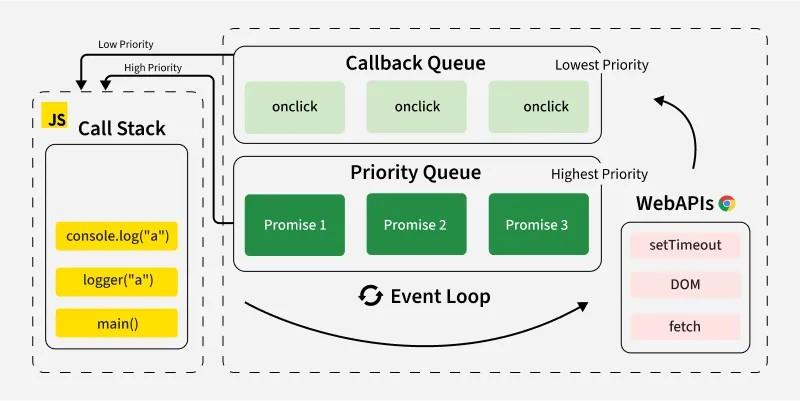
This model explains why console.log statements after a setTimeout(..., 0) run before the timeout's callback. The main script must finish (emptying the Call Stack) before the Event Loop can move the callback from the queue to the stack.
The Classic setTimeout in a for Loop Problem
This is a quintessential interview and exam question that combines loops, asynchronicity, and closures. The goal is to print numbers 1 through 5, each after a one-second delay.
The following video is one of the best explanations available for this exact problem. It will show you why a naive approach with var fails and why using let or a closure fixes it.
setTimeout + Closures Interview Question 🔥 | Namaste 🙏 JavaScript Ep. 11
Akshay Saini's "Namaste JavaScript" series is renowned for its clear explanations of deep JavaScript concepts. This episode is a must-watch.
Please watch the video in its entirety, or focus on these parts: How setTimeout Works: This introduction explains that setTimeout is non-blocking and its callback is handled asynchronously. The Problem with var: Here, he presents the problem and explains precisely why using var in the loop causes every callback to print the final value of i (which is 6). It's because all callbacks close over the same variable reference. The let Solution: The section from this timestamp shows how simply changing var to let solves the problem. This is because let is block-scoped, creating a new binding for i in each loop iteration. Each callback closes over its own unique copy. The Closure Fix (Advanced): From this point, he shows how to solve the problem using var by wrapping the setTimeout in an Immediately Invoked Function Expression (IIFE) to create a new scope for each iteration. Knowing this demonstrates a deep understanding of closures.
Time to Practice
Now it's your turn to apply these concepts. The best way to prepare for the QCM is to practice on similar questions. The resources below contain dozens of output-based questions. For each one, try to predict the answer before revealing the explanation. This active recall will solidify your understanding.
JavaScript Output Based Interview Questions - GeeksforGeeks
This GeeksforGeeks article is a collection of over 60 output-based questions, perfect for exam practice.
Go through the list of questions. For each one, cover the explanation, read the code snippet, and write down what you think the output will be. Then, compare your answer with the explanation provided. Pay special attention to questions involving type coercion (Q5, Q8, Q10, Q55), hoisting (Q19), and array methods (Q12, Q26, Q32, Q54).
Conclusion
In this lesson, we've moved from interacting with the web page to understanding the internal mechanics of the JavaScript engine. You now have a framework for analyzing and predicting the output of complex code snippets, a vital skill for your upcoming exam.
Key Takeaways:
- Synchronous Traps: Always be mindful of type coercion with
==and the mutating nature of methods likesort()andpush(). Prefer===and non-mutating alternatives likemap,filter, and the spread (...) operator for predictable code. - Scope is King:
letandconstprovide block scope and are generally safer than function-scopedvardue to the "Temporal Dead Zone" and lack of re-declaration. - The Event Loop Rules Async: Asynchronous operations like
setTimeoutdon't block code execution. Their callbacks are queued and only run after the main call stack is empty. - Closures and Loops: When an async function is inside a loop,
letgives each callback its own variable. Withvar, all callbacks share the same variable, which will have its final value by the time they execute.
In our next lesson, we will shift our focus from the client-side to the server-side, starting with the fundamentals of how a client communicates with a server. Our first topic will be differentiating between GET and POST methods in HTML form submissions, a cornerstone of server-side scripting with PHP.