Welcome to our third lesson. We've laid a solid foundation in the "visual" layer of the front end by reviewing HTML structure and the CSS rules for specificity and the box model. Now, we shift our focus from structure and styling to behavior, by diving into the heart of client-side interactivity: JavaScript.
This lesson addresses a topic that is a frequent source of tricky multiple-choice questions: JavaScript's data types and its rules for automatic type conversion, also known as type coercion. We will distinguish between primitive and object types, understand how they are stored and compared differently, and then unravel the logic behind JavaScript's often surprising implicit coercion rules. Mastering this is essential not just for the exam, but for writing predictable and bug-free code.
Primitives vs. Objects: Value vs. Reference
In JavaScript, all data is categorized into two main types: primitive values and objects. This distinction is fundamental because it dictates how data is stored, copied, and compared.
The primitive types are:
StringNumberBooleannullundefinedSymbolBigInt
Anything that is not a primitive is an object. This includes arrays, functions, and of course, plain objects ({}).
The most critical difference is this:
- Primitives are assigned and passed by value. When you assign a primitive variable to another, you are copying the actual value.
- Objects are assigned and passed by reference. When you assign an object variable to another, you are copying a reference—a pointer to the same location in memory where the object is stored.
The following video provides an excellent visual explanation of this concept. Understanding it is key to solving a whole class of QCM questions.
JavaScript Value vs. Reference (Primitives vs. Objects) -- Tutorial for Beginners
This tutorial from the ColorCode channel clearly demonstrates the difference between primitive and object types in JavaScript, focusing on how they are stored and compared.
Please watch these segments carefully: Two Kinds of Types: A quick introduction to primitives and objects. Comparison Example: Pay close attention to why 1 === 1 is true, but [] === [] is false. This is a classic interview and exam question. How Assignment Works: This visual breakdown shows how variables point to values (for primitives) versus memory locations (for objects). Passing to Functions: See how passing a primitive to a function creates a copy, while passing an object passes a reference, allowing the function to modify the original object.
The key consequence you saw in the video is how comparison works. Because primitives are compared by their value, 10 is strictly equal (===) to 10. However, because objects are compared by their reference, two separate arrays or objects are never equal to each other, even if they contain the exact same values. Each one is a different object in a different memory location.
const num1 = 100;
const num2 = 100;
console.log(num1 === num2); // true (compared by value)

const arr1 = [1, 2, 3];
const arr2 = [1, 2, 3];
console.log(arr1 === arr2); // false (compared by reference)

const arr3 = arr1;
console.log(arr1 === arr3); // true (both variables point to the same reference)
For a definitive list and description of JavaScript's data structures, the Mozilla Developer Network (MDN) is the best reference.
JavaScript data types and data structures - MDN Web Docs
This MDN article is the canonical guide to data types in JavaScript. We'll use it to formalize our understanding.
Please read the following two sections: Primitive values: This defines what a primitive is and provides the complete list. Pay attention to the definition of primitives as "immutable". Objects: This section defines objects as the only mutable type in JavaScript.
The Rules of Type Coercion
JavaScript is known as a "weakly typed" language. This means if you perform an operation with mismatched types, it won't throw an error; instead, it will try to "coerce" or convert one of the values to an appropriate type. This implicit coercion is powerful but can lead to unexpected results if you don't know the rules. This is precisely what exam questions love to test.
There are three main types of coercion: to a string, to a number, and to a boolean.
Truthy and Falsy Values (Boolean Coercion)
In a context that expects a boolean, like an if statement, JavaScript coerces any value to true or false. This is not the same as the == comparison. The rule is simple: almost every value is "truthy" (coerces to true). There is only a small, specific list of "falsy" values that coerce to false.
The complete list of falsy values is:
false0(and-0)""(empty string)nullundefinedNaN(Not a Number)
Everything else is truthy. This includes empty objects ({}), empty arrays ([]), and non-empty strings (like "false" or "0").
if ([]) {
  console.log("Empty array is truthy"); // This will run
}

if (0) {
  console.log("0 is truthy"); // This will NOT run
}
The following video clearly distinguishes between type coercion for comparisons and the concept of truthy/falsy for conditional logic.
Avoiding JavaScript Type Conversion Issues - How Type Coercion Works
This Academind video provides an excellent clarification on truthy and falsy values, which is a different concept from the type conversion used in comparisons.
Watch the segment from Truthy and Falsy. It explains which values are considered "falsy" in a conditional context like an if statement and correctly points out that this is not the same as the type coercion that happens with operators like ==.
String and Number Coercion
This is where things get more complex. Whether a value is coerced to a string or a number depends on the operator being used.
- The
+Operator: This operator is unique. If either operand is a string, it will convert the other operand to a string and perform concatenation. - Other Arithmetic Operators (
-,*,/,%): These operators always try to convert non-numeric operands to numbers. - Comparison Operators (
==,!=,>,<): These operators will generally try to convert operands to numbers for comparison.
The Academind video you just watched also has great segments explaining this.
Avoiding JavaScript Type Conversion Issues - How Type Coercion Works
Let's revisit the same video to see how different operators trigger different coercion rules, and how the loose equality operator == works.
Please watch these parts: Primitives vs. Reference & Coercion Intro: A quick introduction to how the + operator behaves with a string. Operator-Specific Coercion: This is a critical section. It explains why the + operator has a special rule (favoring string concatenation) while other math operators (-, *, /) force conversion to a number. Comparison with Coercion: Explains how == allows type coercion, contrasting it with ===. The explanation of why [] == 0 is true but {} == 0 is false is excellent preparation for exam questions.
To bring all these rules together, this table is a helpful visual summary of how different JavaScript values are converted.
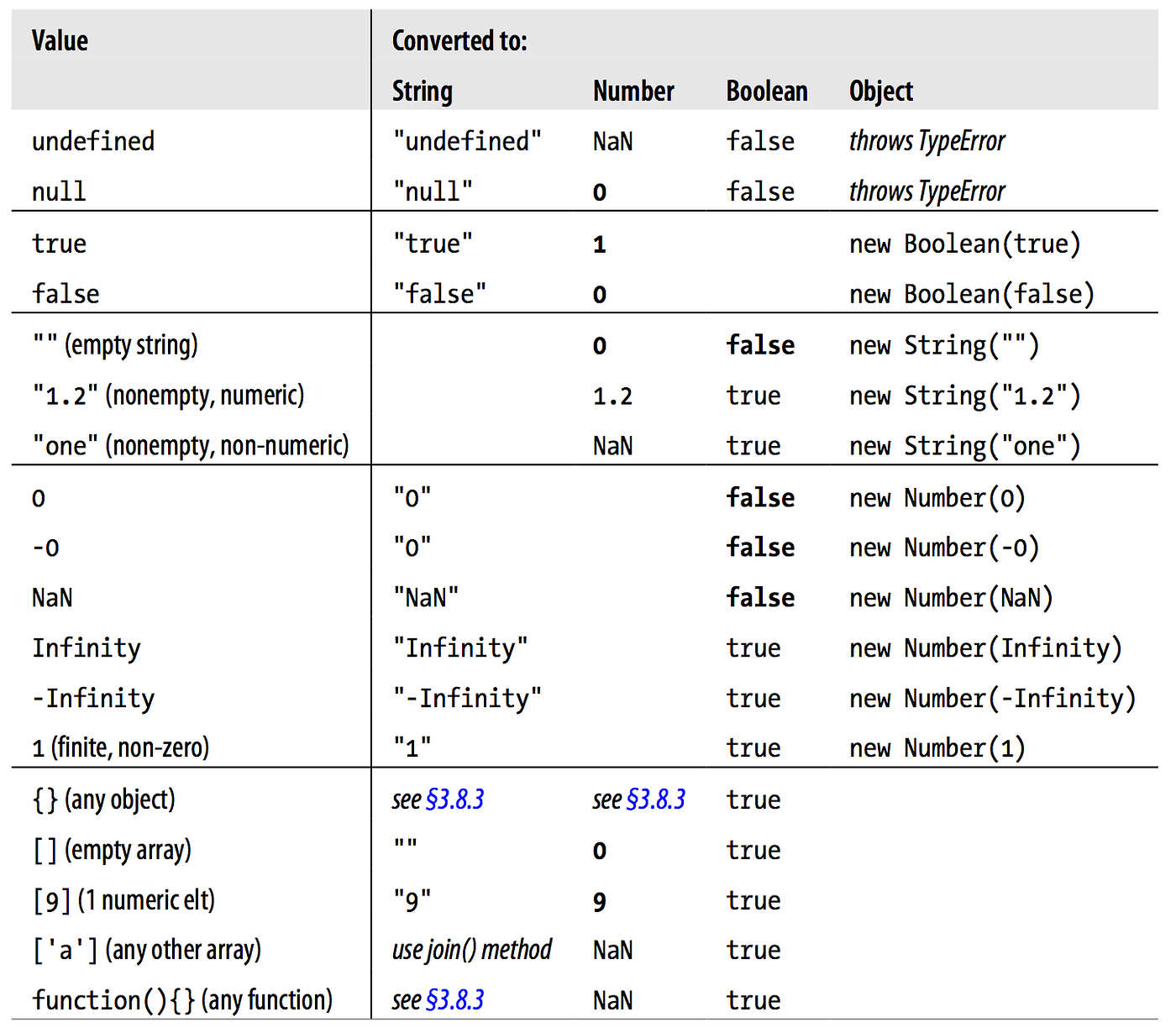
Object-to-Primitive Coercion
As you saw in the video, to understand why [] == 0 is true, you need to know how JavaScript converts an object to a primitive. When an object needs to be coerced, JavaScript follows a specific algorithm:
- It first calls the object's
valueOf()method. If this returns a primitive value, that value is used. For arrays and plain objects,valueOf()returns the object itself, so this step is usually ignored. - If
valueOf()did not return a primitive, it then calls thetoString()method. If this returns a primitive, that value is used.- For an empty array
[],toString()returns""(an empty string). - For an object
{},toString()returns"[object Object]".
- For an empty array
So, in the comparison [] == 0:
[]is an object, so it's converted to a primitive.[].toString()is called, resulting in"".- The comparison becomes
"" == 0. - Now comparing a string and a number, the string
""is coerced to a number, which is0. - The final comparison is
0 == 0, which istrue.
The freeCodeCamp article and MDN guide provide detailed written explanations of this process, which are perfect for solidifying your understanding.
JavaScript type coercion explained
This article from freeCodeCamp is one of the best practical guides on this topic. It clearly defines the types of conversion and the internal mechanisms.
Focus on these sections: Implicit vs. explicit coercion: Understand the difference and the role of the === operator. Three types of conversion: Introduces the main conversion paths (string, boolean, numeric). Boolean conversion: Reinforces the concept of falsy values. Numeric conversion: A great table showing how primitives convert to numbers. Note the special handling of null and undefined. Object coercion: This explains the valueOf() and toString() algorithm.
Synthesis: The Equality Table
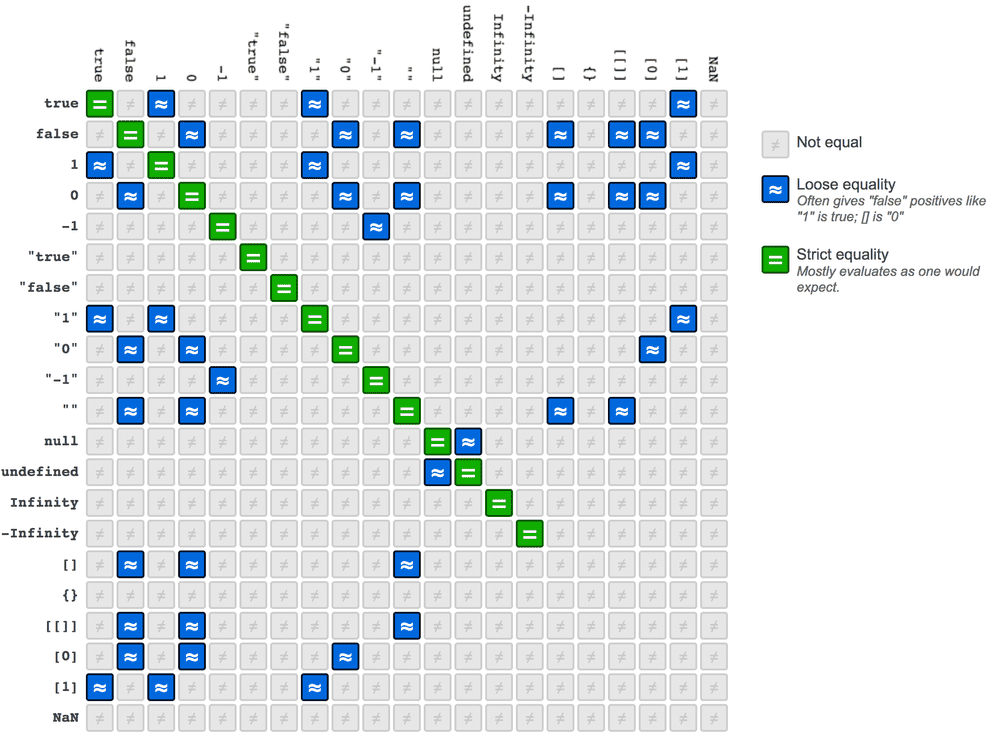
Now that you understand the rules of coercion, you can see how they play out in practice with the loose equality (==) operator. Trying to memorize all the combinations is a losing battle. The goal is to be able to derive the result by applying the coercion rules.
This table provides a comprehensive overview of loose (==) versus strict (===) equality. Use it to test your understanding. Pick a cell (e.g., [] == 0) and try to reason through the coercion steps that lead to the result.
Conclusion
In this lesson, we dissected the core mechanics of JavaScript's type system, a fundamental topic for any developer and a prime target for exam questions.
Key Takeaways:
- Value vs. Reference: Primitives (
string,number, etc.) are immutable and compared by value. Objects (array,function, etc.) are mutable and compared by reference.[] === []isfalse. - Strict vs. Loose Equality: Use strict equality (
===) to avoid implicit type coercion. Loose equality (==) will attempt to convert types before comparing, following specific rules. - Truthy vs. Falsy: For conditional checks (
if,while), JavaScript uses a short list of falsy values (false,0,"",null,undefined,NaN). Everything else is truthy, including{}and[]. - Operator-Driven Coercion: The
+operator prioritizes string concatenation. Other math operators (-,*,/) prioritize numeric conversion.
With this foundation in place, we are ready to move on to the next lesson, where we will examine how variables are declared, scoped, and hoisted in JavaScript, building directly on our understanding of the data types they hold. We will explore the differences between var, let, and const.