Hello! Welcome to the final lesson in our "Audio World-Building" module.
In our last lesson, you learned how to be a "casting director" for your AI characters, selecting and designing voices that give them unique personalities. You now know how to make your characters sound distinct and believable. Today, we're zooming out from the character to the world they inhabit. We will focus on how to score that world with music.
The learning outcome for this lesson is to choose and incorporate background music to enhance the emotional tone and atmosphere of a scene. Music isn't just filler; it's one of the most powerful tools in your storytelling toolkit. It tells the audience how to feel, builds tension, creates excitement, and can make a simple scene unforgettable. By the end of this lesson, you'll have a clear framework for selecting the perfect soundtrack for your AI-generated narratives.
1. Music as the Story's Emotional Compass
Before we get into the "how," let's establish the "why." Music has a direct line to our emotions, often bypassing our conscious thought. The right score can completely transform how an audience perceives a scene.

To understand this powerful connection, let's look at the psychological role of audio in storytelling.
Amplifying Stories: The Vital Role of Audio in Video ...
The article 'Amplifying Stories' from LWKS.com provides a great explanation of how sound shapes our perception. We'll focus on a key section that illustrates this concept perfectly.
Please read the subsections 'Emotional Resonance' and 'Setting the Tone'. Pay close attention to the example of a person walking down a street at night and how different music choices completely change the scene's meaning.
As the article highlights, your choice of music acts as an instruction to the audience. Are they supposed to feel romance, dread, excitement, or nostalgia? The score is your most direct way to guide their emotional journey.
A great way to think about this is to treat music as its own language.
How to Use Music for 10X Storytelling (4 Steps for Video Editors)
The video 'How to Use Music for 10X Storytelling' by The Bhavya Shah introduces a helpful analogy: learning music for film is like learning a language.
Watch from the beginning of the second chapter at 02:13 to 07:03. Focus on how the video breaks down music from 'letters' (instruments) to 'sentences' (emotional impact). Notice the examples of how different instrument families (percussion, strings, brass) are typically used to evoke specific feelings like intensity, horror, or heroism.
By starting to recognize the emotional character of different instruments and sounds, you're building your "mental dictionary" for musical storytelling. You don't need to be a musician; you just need to be an observant listener.
2. A Practical Guide to Choosing Your Soundtrack
Understanding the theory is one thing, but how do you find the right track for your scene? Let's move on to a practical framework and a valuable resource you can use as a "cheat sheet."
The best background music for videos — tips and examples
This article from Clipchamp, 'The best background music for videos', offers a simple but effective framework for making your selection. It also provides an excellent genre guide.
First, read the section 'How to choose the right background music for videos'. This will give you three key questions to ask yourself. Then, quickly scroll through the main section, 'Discover royalty-free background music...'. You don't need to read it all in detail, but notice how it categorizes music by genre and mood (e.g., Pop, EDM, Lo-fi, Sad, Upbeat, etc.) and suggests what types of videos they fit. This is a fantastic reference for later.
Let's summarize that framework. When choosing music, ask yourself:
- What is the goal of the scene? Are you trying to build suspense, show a character's sadness, or create a feeling of epic adventure?
- What is the desired mood and tone? Should the music be in the foreground, driving the action? Or should it be a subtle, atmospheric layer in the background?
- What genre fits the story? As the article shows, genres are shortcuts to emotion.
- Lo-fi: Often used for calm, reflective, or tutorial-style content.
- Orchestral/Cinematic: Great for epic, inspiring, or dramatic moments.
- Electronic/Synth: Can create a sense of futuristic technology, tension, or 80s nostalgia (as mentioned in the Stranger Things example from the "10X Storytelling" video).
- Rock: Conveys energy, rebellion, and power (like the Peaky Blinders example).
Test your understanding!
Imagine you're creating a 30-second scene for your video project. The visuals show a lonely robot sitting on a rooftop at night, looking at the stars.
Based on the frameworks we've discussed, what music genre would you choose and why? What is the mood you are trying to create?
Show answer
There are a few great options here, and the justification is what matters most.
-
Choice: A slow, minimalist Piano track or a soft Instrumental piece.
-
Justification: The goal is to evoke a sense of loneliness, contemplation, and perhaps a touch of melancholy or wonder. A simple piano melody is emotionally direct and won't overpower the visuals. It creates a mood that is sad but beautiful, matching the image of a lonely robot looking at the vastness of space.
-
Alternative Choice: A gentle Lo-fi or Chill track.
-
Justification: This could give the scene a more modern, introspective, and slightly less melancholic feel. It would suggest a mood of quiet reflection rather than deep sadness.
Both are valid choices that serve the emotional core of the scene.
3. Case Study: One Scene, Two Emotions
To see this principle in action, there's no better way than to watch it demonstrated. The following video shows how the exact same sequence of shots can tell two completely different stories, with music being one of the most critical variables.
BEST Video EDITING Exercise For EMOTION (CHALLENGE)
In this brilliant exercise from Austen Menges, you'll see the same six shots edited to create two different emotional responses: 'inspiration' and 'playfulness'. This is a masterclass in the power of editing and music.
Please watch from 01:34 to 05:03. The creator will first show you the 'inspired' version and explain his choices, then the 'playful' version. As you watch, pay close attention to how the choice of music and sound effects fundamentally changes your interpretation of the architect's actions.
This case study is the perfect illustration of today's lesson. The visuals are identical, but the feeling is completely different.
- The "Inspired" version uses a more serious, atmospheric track that adds gravity and importance to the architect's work.
- The "Playful" version uses upbeat, whimsical music that reframes the scene as a fantasy, as if the model is coming to life on its own.
This demonstrates that music isn't just a layer you add on top; it's a core component of the narrative itself.
4. Music and Your AI Workflow
So, how does this apply to your AI video creation process?
You're already familiar with prompting for visuals and voices. You can apply the same mindset to music. Many stock music sites and AI music generators allow you to search or generate music using the very keywords we've been discussing: mood, genre, and instrumentation.
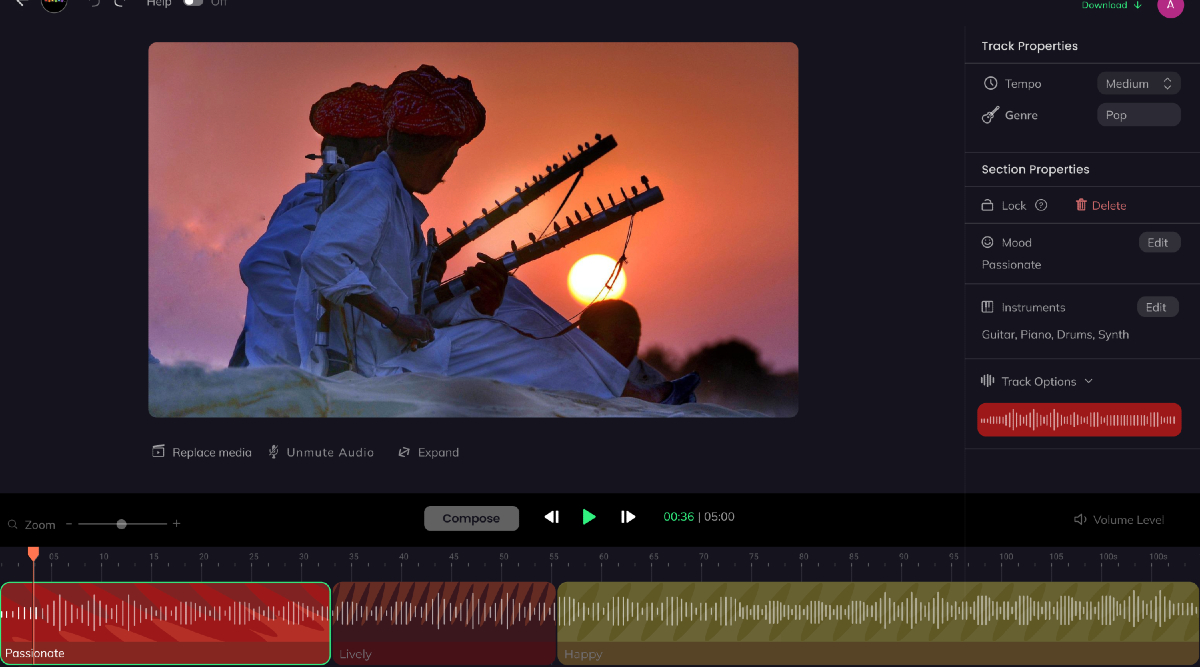
When you're ready to add music to your project, you can:
- Search Stock Libraries: Use services like Artlist, Epidemic Sound, or even the built-in library in your editing software. Search for terms like "sad piano," "uplifting cinematic," or "tense electronic."
- Use AI Music Generators: Explore tools like Beatoven.ai, Soundraw, or AIVA. Here, you can prompt the AI with the genre, mood, and even the pace you want for your scene, generating a unique track tailored to your needs.
Conclusion
Today, we've completed your audio toolkit. You've learned that music is a narrative force, capable of shaping an audience's emotions and interpreting the action on screen.
Key Takeaways:
- Music is Emotion: Music is your most direct tool for setting the emotional tone and atmosphere of a scene.
- Think Like a Director: Choose music based on the scene's goal and desired mood, not just what "sounds cool."
- Use Genres as a Guide: Music genres (cinematic, lo-fi, rock, etc.) are effective shortcuts for finding a specific emotional quality.
- Music Transforms Narrative: As the case study showed, changing the score can completely change the story your visuals are telling.
You now have the skills to manage both dialogue and music, the two pillars of audio storytelling. In our next module, "The Art of the Edit," we'll start bringing everything together. The first lesson will focus on pacing and assembly. You'll see how the rhythm and emotional arc of your chosen music track can provide the perfect blueprint for timing your cuts and structuring your scene.