Welcome to the final lesson in our module on Parquet. So far, you've learned about the significant advantages of Parquet's columnar format, how to write data into Parquet files, and how to query them efficiently using DuckDB. You now have all the individual pieces of the puzzle.
In this lesson, we will put everything together to achieve today's goal: refactoring a simple data pipeline that ingests CSVs to store its processed data as Parquet. We'll start by examining a common but inefficient pipeline built with pandas and then transform it into a high-performance, memory-efficient workflow using DuckDB. This process is central to your goal of building robust automation for your finance work and moving beyond the limitations of traditional, script-based data handling.
The "Before" Picture: The Pandas-First Trap
In many corporate environments, especially in finance, a common task is to consolidate data from multiple CSV files—perhaps monthly budget reports, daily transaction logs, or regional sales data. A typical approach for someone comfortable with pandas is to write a script that does the following:
- Find all the relevant CSV files.
- Loop through the files.
- Read each CSV into a separate DataFrame.
- Append each DataFrame to a list.
- Concatenate the list of DataFrames into one large DataFrame.
- Perform transformations on the consolidated DataFrame.
While this works for small datasets, it quickly becomes a major bottleneck as data volumes grow. The primary issue is memory: loading all the data into a pandas DataFrame consumes a large amount of RAM, often more than is available, leading to crashes or extremely slow performance.
The following short video demonstrates this exact problem. It shows a simple attempt to convert a 270 MB CSV file to Parquet using pandas. Watch what happens when the script is run with a limited amount of memory, a scenario you'll often encounter in production environments.
Exporting CSV files to Parquet with Pandas, Polars, and DuckDB
This video from the Learn Data with Mark channel shows the memory limitations of a pandas-based file conversion.
Watch the section that demonstrates using pandas. Note how the process succeeds with 1GB of RAM but fails with an "out of memory" error when limited to just 100MB. This is the exact problem we aim to solve.
This "out of memory" issue is the classic "Pandas-first trap." We're forcing an interpreter-based tool (pandas) to do the heavy lifting of data ingestion, which is better handled by a dedicated query engine.
The "After" Picture: A Modern Data Pipeline
The solution is to change our mental model. Instead of loading raw data into Python first, we should let a specialized engine do the hard work. The winning pattern is: do the heavy lifting (extract, filter, aggregate) in DuckDB, and only bring the final, smaller results into Python for presentation or further analysis.
Our refactored pipeline will produce a clean, compressed, and fast Parquet file as its primary output. This Parquet file acts as a "data modeling layer" that is optimized for the analytical queries you'll run later. The overall architecture looks like this:
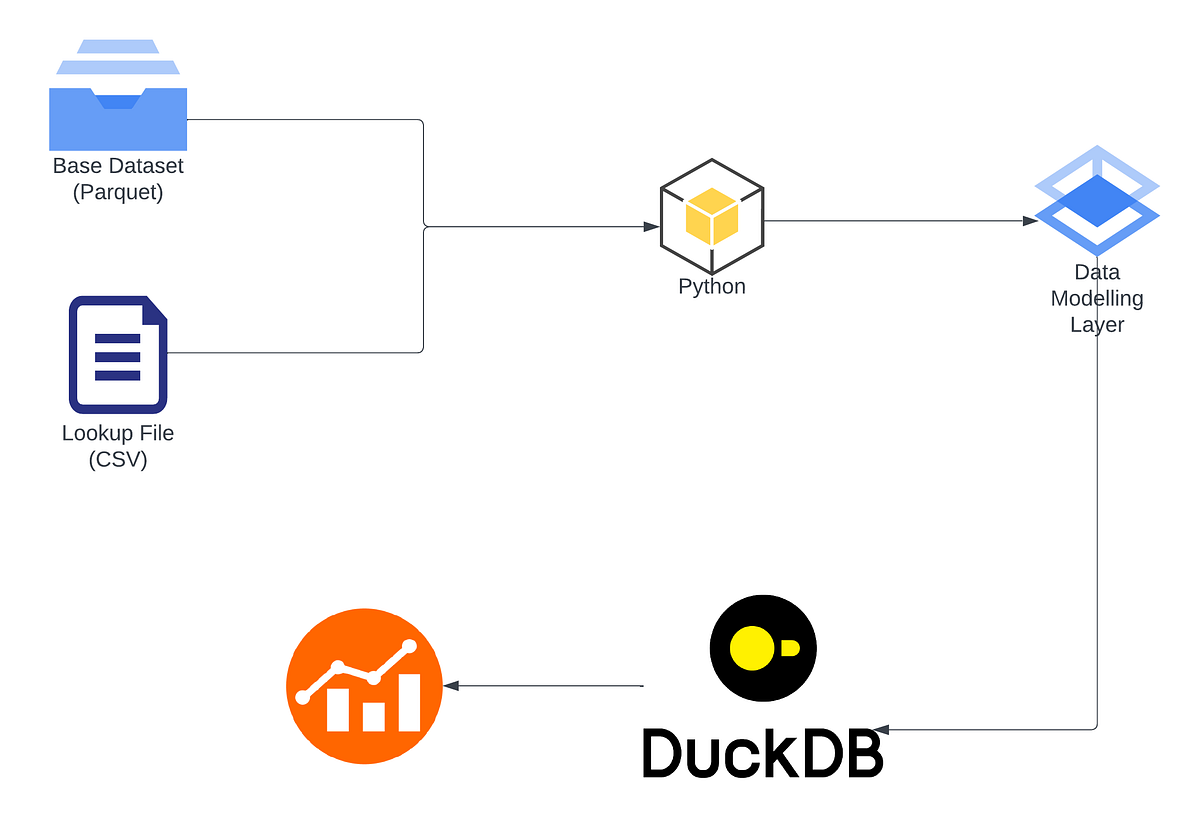
Simple Conversion: CSV to Parquet
The most basic form of this refactoring is a direct conversion from one or more CSVs into a single Parquet file. DuckDB makes this incredibly straightforward with its COPY command.
import duckdb


# Connect to a database (in-memory or on-disk)
con = duckdb.connect()


# Use a single SQL command to read all CSVs in a directory and write to a Parquet file
con.execute("""
    COPY (SELECT * FROM read_csv_auto('raw_data/*.csv'))
    TO 'processed_data/consolidated_actuals.parquet' (FORMAT PARQUET);
""")

con.close()
This single command is a complete, memory-efficient pipeline. DuckDB streams the data from the CSV files directly to the output Parquet file without ever needing to load the entire dataset into your computer's main memory. This approach can handle files far larger than your available RAM.
The article "10 DuckDB Tricks to Supercharge Python Analytics" provides an excellent overview of this mindset.
10 DuckDB Tricks to Supercharge Python Analytics
This article from ThinkingLoop explains the mental model for using DuckDB effectively within a Python environment.
First, read the introductory sections on the mental model to solidify the core architectural concept. Then, read Tip 2, which shows the exact COPY command for a CSV-to-Parquet conversion and explains its benefits.
Refactoring a Complete ETL Pipeline
Let's now consider a more realistic scenario from your FP&A work. You don't just want to convert files; you want to transform them in the process—filter out irrelevant rows, calculate new financial metrics, and clean up data types.
The beauty of DuckDB is that you can embed all this transformation logic directly into the SQL query within the COPY statement.
Let's walk through a complete refactoring example using a detailed case study. The following article compares a pandas-based pipeline with a DuckDB equivalent for a large dataset. While the example in the article reads from Parquet and writes to CSV, the principles are identical for our goal of reading from CSV and writing to Parquet. The key takeaway is the stark contrast in code complexity and performance.
DuckDB: How to Speed Up Your Data Pipelines 10x and ...
This DataCamp tutorial provides a side-by-side comparison of a data aggregation pipeline implemented in pandas versus DuckDB.
First, read the section Data pipeline objectives to understand the goal. Next, examine the pandas implementation under the pandas code. Notice the need to process files sequentially in a loop due to memory errors—this is the exact pattern we want to replace. Then, review the DuckDB code. See how the entire multi-file reading, filtering, and aggregation logic is expressed in a single, clean SQL query. Finally, look at the performance comparison. The massive speedup is the direct result of the refactoring we are learning.
To adapt the DuckDB code from the article for our CSV-to-Parquet use case, you would simply modify the query like this:
import duckdb
con = duckdb.connect()


# The data_dir contains your raw CSV files
data_dir = "raw_financial_data"


# The complex transformation logic is all inside the SELECT statement.
# The result is directly copied to a Parquet file.
query = f"""
    COPY (
        -- This is the same transformation logic from the article's query
        SELECT
            ride_period,
            num_rides,
            ROUND(total_ride_cost - total_rider_pay, 2) AS company_revenue,
            -- ... other calculations ...
        FROM (
            SELECT
                strftime(pickup_datetime, '%Y-%m') AS ride_period,
                -- ... other aggregations ...
            FROM read_csv_auto('{data_dir}/*.csv', header=True) -- Reading CSVs here!
            GROUP BY ride_period
        )
    )
    TO 'processed_data/monthly_summary.parquet' (FORMAT PARQUET);
"""

con.execute(query)
con.close()
This pattern is incredibly powerful. You've now built a robust, scalable ETL process that extracts from multiple CSVs, transforms the data using the full power of SQL, and loads it into an optimized Parquet file, all in one memory-safe operation.
Why Parquet is the Right Target Format
As a final reinforcement of why this refactoring is so valuable, let's quickly revisit the core benefits of Parquet. The goal isn't just to make the ingestion faster, but to set up all downstream analysis for success.
The following video gives a great high-level overview of why Parquet is superior to CSV for analytical work.
5 Reasons Parquet Files Are Better Than CSV for Data Analyses | PyData Global 2021
This video from PyData Global 2021 summarizes the key advantages of the Parquet file format.
Watch the high-level overview for a quick summary of the five main benefits. Next, review the sections on better compression and how Parquet files contain schema metadata. These features save disk space and eliminate common errors related to data types. Finally, watch the short segment on how to convert CSVs to Parquet, which confirms the pattern we've just learned.
By making Parquet the output of your initial processing pipeline, you create a stable, reliable, and high-performance "source of truth" for all your subsequent financial modeling and analysis scripts.
Conclusion
In this lesson, you've learned one of the most important patterns in modern data work: refactoring inefficient, memory-bound pipelines into declarative, engine-driven workflows. This is a significant step towards your goal of building professional-grade automation.
Key Takeaways:
- Loading large or multiple CSVs directly into pandas is inefficient and often fails due to memory limitations.
- A better approach is to use DuckDB to perform the extraction and transformation steps directly on the source files.
- The
COPY (SELECT ... FROM read_csv_auto(...)) TO 'output.parquet'pattern is a powerful and memory-safe way to build a CSV-to-Parquet pipeline. - Storing your processed data as Parquet creates a clean, fast, and reliable starting point for all future analysis, leveraging benefits like compression, columnar storage, and embedded schemas.
You have now completed the module on high-performance data storage with Parquet. In the next module, we'll shift our focus from scripting to interactive analysis. You will learn how to connect DBeaver, a graphical SQL client, to your DuckDB database. This will enable you to visually explore the Parquet files you've just created, test complex SQL queries interactively, and perfect your analytical logic before embedding it into your Python scripts.