Hello! Welcome back to our module on Core Data.
In our previous lesson, we laid the groundwork by setting up the Core Data stack. We demystified its components and established a clean PersistenceController to manage the NSPersistentContainer. The key takeaway was that the NSManagedObjectContext acts as our in-memory "workspace" for all data interactions.
Today, we'll put that workspace into action. This lesson is all about performing the four fundamental database operations, commonly known as CRUD: Create, Read, Update, and Delete. By the end of our session, you'll be able to confidently manage the lifecycle of your data objects, from their creation to their removal.
The Core Data CRUD Workflow
Before diving into code, let's establish the mental model for working with NSManagedObject instances. Every change you make happens in two stages:
- In-Memory Change: You first perform an operation (create, update, or delete an object) within the
NSManagedObjectContext. At this point, the change only exists in memory. The context acts like a change tracker. - Persistence: To make your changes permanent, you must explicitly save the context. This action commits the in-memory changes to the persistent store (the underlying SQLite database).
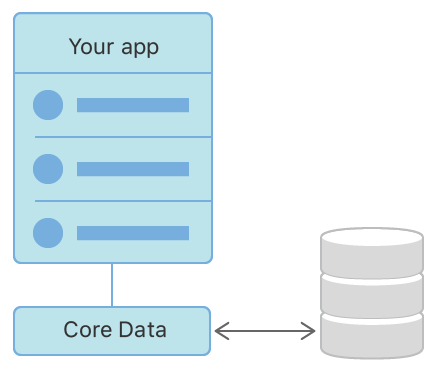
The 'Read' operation is slightly different, as it involves fetching data from the store into the context so your application can access it.
Let's see this entire workflow in a practical example.
A Practical Walkthrough: Building a To-Do List
We're going to use a video that builds a simple to-do list app. This is an excellent way to see each CRUD operation implemented in a real-world context. While the video places the Core Data logic directly in the ViewController for simplicity, the core methods for each operation are exactly what you'd use within a more structured pattern, like the TaskService we'll discuss later.
Core Data To Do List App for Beginners (Xcode 12, Swift 5, iOS Basics) - Development
This video from iOS Academy demonstrates each CRUD operation by building a complete feature. It will give you a strong, practical understanding of how the pieces fit together.
Watch the specified segments below. Pay close attention to how each function interacts with the NSManagedObjectContext (which the author calls context). Getting the Context (08:15 - 09:08): Notice how the presenter gets a reference to the viewContext. In our last lesson, we put this inside a PersistenceController, which is a cleaner approach, but the goal is the same: get access to the main context. Read (getAllItems) (09:08 - 10:43): Focus on how NSFetchRequest is used to define a query and context.fetch() is called to execute it. This is the standard pattern for retrieving objects. Create (createItem) (10:43 - 11:39): Observe the two-step process: first, a new ToDoListItem is instantiated with the context, and second, context.save() is called to persist it. Delete (deleteItem) (11:39 - 11:59): See how context.delete(object) marks an object for deletion, which is then finalized by a context.save() call. Update (updateItem) (11:59 - 12:33): Note that updating is the simplest operation. You just change the property of a managed object that's already in the context, and then call context.save() to persist the change.
After watching these segments, you can optionally skim through the rest of the video (from 12:40 onwards) to see how these functions are integrated with a UITableView to build the final UI. This provides a complete picture of how data persistence drives an application's user interface.
Structuring CRUD with a Service Layer
Placing data access logic directly in a ViewController is fine for simple demos, but in a professional application, this violates the principle of separation of concerns. A better approach is to encapsulate all your Core Data interactions within a dedicated service layer.
This aligns with your goal of learning advanced architecture. The following article provides an excellent example of this pattern.
How to Use Core Data for Persistence in iOS
The article "How to Use Core Data for Persistence in iOS" demonstrates how to organize CRUD logic into a TaskService class. This is a robust and testable way to manage your data layer.
Read the four sections under the main heading "CRUD Operations": Creating Objects: See how the createTask function hides the details of NSManagedObject instantiation and saving. Reading (Fetching) Objects: Notice how different fetching methods are provided for various use cases (e.g., fetchAllTasks, fetchIncompleteTasks). We will explore predicates and sort descriptors in the next lesson. Updating Objects: Observe the updateTask function, which takes a Task object and the new values, then handles the save. Deleting Objects: See how the deleteTask function abstracts the context.delete() and save() calls. \nFocus on how this TaskService provides a clean public API to the rest of the application, while keeping the Core Data implementation details private.
This service layer approach makes your code more modular, easier to maintain, and significantly easier to test, as you can mock the service during unit tests.
A Deeper Look: Managed Object Lifecycle Hooks
For a developer with your background, it's valuable to know that you can intervene directly in the lifecycle of a managed object. NSManagedObject provides several overridable methods that are automatically called by the framework at key moments during CRUD operations.
This allows you to add custom validation, set default values, or perform cleanup tasks.
Mastering Data Tracking and Notifications in Core Data and SwiftData
The article "Mastering Data Tracking and Notifications..." by Fatbobman provides an excellent overview of these lifecycle methods.
Read the section titled "Extending Managed Object Subclasses." You don't need to memorize every method, but pay attention to these key hooks related to CRUD: awakeFromInsert(): Called when an object is created. Perfect for setting default properties like a createdAt timestamp. willSave(): Called just before an object is saved (for both creates and updates). Useful for last-minute data validation or normalization. validateForInsert(), validateForUpdate(), validateForDelete(): Called before saving to validate the object's state. You can throw an error here to prevent an invalid save. prepareForDeletion(): Called when an object is marked for deletion, before it's saved. Ideal for cleaning up related external resources (e.g., deleting a corresponding file from disk).
Understanding these hooks gives you fine-grained control over your data entities, enabling you to enforce complex business logic right at the model level.
Conclusion
You've done an excellent job today. We've moved from the theoretical setup of Core Data to the practical, day-to-day work of managing data.
Key Takeaways:
- CRUD Operations: Each operation follows a distinct pattern involving the
NSManagedObjectContext.- Create: Instantiate a new
NSManagedObjectwith a context, set its properties, and then callcontext.save(). - Read: Create an
NSFetchRequestand execute it usingcontext.fetch(request). - Update: Fetch an existing object, modify its properties, and call
context.save(). The context automatically tracks the changes. - Delete: Fetch an existing object, pass it to
context.delete(), and callcontext.save().
- Create: Instantiate a new
- The Golden Rule: Changes made in the context (Create, Update, Delete) are temporary until you persist them with
context.save(). - Architectural Pattern: Encapsulating CRUD logic in a dedicated service class is a professional practice that improves modularity and testability.
- Lifecycle Hooks:
NSManagedObjectprovides methods likeawakeFromInsertandprepareForDeletionthat allow you to inject custom logic directly into the CRUD process.
Preview of the Next Lesson:
We've now seen the "Read" operation in its simplest form: fetching all objects of a certain type. In a real application, you'll need more power and precision. Our next lesson will dive deeper into fetching, where we'll learn how to design and execute efficient fetch requests using predicates and sort descriptors to filter and order your results.