Hello! Welcome back to our module on Network Performance Optimization.
In our last lesson, we focused on making your app more efficient by caching network responses. This prevents the app from re-downloading data that hasn't changed. Today, we'll address another common source of network inefficiency: user input.
This lesson is all about implementing debouncing on a search field. This technique is essential for creating responsive and efficient apps, as it prevents you from firing off a flood of network requests while a user is still typing. You'll learn the concept behind debouncing and explore how to implement it using both the established Combine framework and modern Swift Concurrency.
The "Why": What is Debouncing?
Imagine a user searching for "SwiftUI". As they type, they generate a sequence of search queries: "S", "Sw", "Swi", "Swif", "Swift", "SwiftU", "SwiftUI". Without any optimization, your app might fire a network request for each of these fragments. This is highly inefficient. It wastes bandwidth, burdens your server, and can even lead to a confusing UI as search results flicker and update rapidly.
Debouncing solves this by waiting for a "quiet period." Instead of acting on every single input event, it waits until the user has paused typing for a specified duration (e.g., 500 milliseconds) and then sends a single request with their complete query.
These diagrams perfectly illustrate the concept:

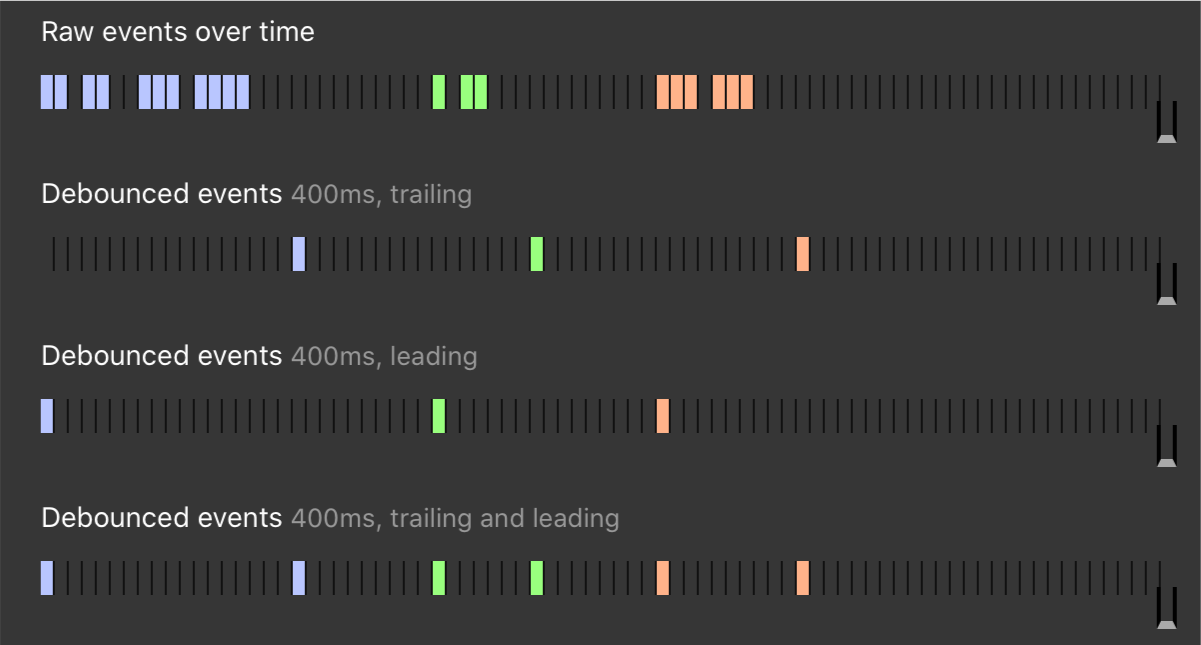
To see the problem in action and hear a great explanation of debouncing, let's watch a short segment from a CodeSlicing tutorial.
SwiftUI Tutorial: Using Combine to Debounce User Input
This video clearly demonstrates the problem of excessive updates from user input and introduces debouncing as the solution.
Watch from 00:44 to 02:46. Pay attention to the counter that shows how many updates are triggered by simply typing a word, which illustrates why we need to debounce this input.
Debouncing vs. Throttling
You might also hear about a related technique called throttling. It's important to know the difference.
- Debouncing: Fires an event only after a period of inactivity. If the user keeps typing, the timer continuously resets. Ideal for search fields.
- Throttling: Fires events at a regular, controlled interval. No matter how many events occur, it will only allow one to pass through every X seconds. This is useful for things like tracking scroll position, where you want updates but not an overwhelming number of them.
The video you just saw also has a great segment explaining this difference.
SwiftUI Tutorial: Using Combine to Debounce User Input
To solidify your understanding, this part of the 'SwiftUI Tutorial: Using Combine to Debounce User Input' video compares the behavior of debounce and throttle.
Watch from 10:06 to 11:10. Notice how throttle sends updates periodically while you're typing, whereas debounce waits until you've stopped.
For our search field use case, debouncing is the correct choice.
The "How": Two Approaches to Implementation
As an experienced developer, it's crucial to be familiar with both the established and the modern ways of implementing this pattern. We'll look at the Combine framework, which is common in codebases from the last few years, and then the newer, cleaner approach using Swift's native concurrency features.
1. The Combine Approach
The Combine framework allows you to process values over time using a declarative Swift API. It's built around three core concepts:
Publisher: An object that emits a sequence of values over time. For our search bar, the text being typed is the stream of values.Operator: A method that transforms, filters, or combines values from a publisher.debounceis the key operator for us.Subscriber: An object that receives values from a publisher. In our case, the subscriber will take the final, debounced search query and trigger the network request.
Let's see how to put this together. The following video demonstrates adding the .debounce operator to a Combine pipeline that filters a list of cryptocurrencies.
Filtering data based on search bar text using Combine | SwiftUI Crypto App #11
This video from Swiftful Thinking, 'Filtering data based on search bar text using Combine', shows a practical application of debouncing in a view model.
Watch from 13:55 to 16:22. The key line of code is when .debounce(for: .seconds(0.5), scheduler: DispatchQueue.main) is added to the publisher chain. This is the core of the implementation.
Now, let's look at a complete, focused example for a UIKit UIViewController. This pattern uses a PassthroughSubject as the publisher, which you can think of as a programmatic way to send values into a Combine pipeline.
import Combine
import UIKit

class SearchViewController: UIViewController, UISearchBarDelegate {

    private let searchBar = UISearchBar()

    // 1. A subject to publish search text changes. It never fails and sends Strings.
    private let searchSubject = PassthroughSubject<String, Never>()

    // 2. A place to store the subscription to cancel it later.
    private var cancellables = Set<AnyCancellable>()

    override func viewDidLoad() {
        super.viewDidLoad()
        setupSearchBar()
        setupSearchSubscription()
    }

    // The UISearchBarDelegate method that feeds the publisher.
    func searchBar(_ searchBar: UISearchBar, textDidChange searchText: String) {
        searchSubject.send(searchText)
    }

    private func setupSearchSubscription() {
        searchSubject
            // 3. Wait for 500ms of inactivity before publishing the latest value.
            .debounce(for: .milliseconds(500), scheduler: DispatchQueue.main)

            // 4. Avoid sending a new request if the text is the same as the last one.
            .removeDuplicates()

            // 5. The subscriber (sink) receives the final value.
            .sink { [weak self] query in
                print("Debounced query: \(query). Triggering network request...")
                // In a real app, you would call your network layer here.
                // self?.performSearch(query: query)
            }
            .store(in: &cancellables) // 6. Store the subscription.
    }

    private func setupSearchBar() {
        // Standard search bar setup...
        searchBar.delegate = self
        navigationItem.titleView = searchBar
    }
}
This is a robust and very common pattern you'll find in many existing iOS projects.
2. The Modern Swift Concurrency Approach
While Combine is powerful, the Swift ecosystem is rapidly moving towards the native async/await syntax for asynchronous operations. Apple has released the Swift Async Algorithms package, which provides operators like debounce that work directly with AsyncSequence.
The result is code that is often more linear and easier to read. The following article provides a fantastic side-by-side comparison.
Debounce in Swift: Ditch Combine for This One Simple Loop
Read 'Debounce in Swift: Ditch Combine for This One Simple Loop' to see a direct comparison between the Combine and Async Algorithms implementations.
First, add the package to a sample project in Xcode via File > Add Package Dependencies... using the URL https://github.com/apple/swift-async-algorithms. \nThen, read the article sections 'The Combine Way', 'The Async Algorithms Way', 'Breaking Down the Async Algorithms Approach', and 'Installation'. \nPay close attention to the AsyncSearchViewController implementation. Notice how the complex chain of Combine operators is replaced by a simple for await loop. This is the key benefit.
As the article shows, the core logic becomes beautifully simple:
import AsyncAlgorithms
import UIKit

// (Inside a class, like the article's AsyncSearchViewController)

private let searchStream = AsyncChannel<String>()

// This function runs in a Task from viewDidLoad()
private func observeSearches() async {
    // This loop reads like plain English!
    for await query in searchStream.debounce(for: .milliseconds(500)).removeDuplicates() {
        await performSearch(query: query)
    }
}

// Delegate method to feed the async channel
func searchBar(_ searchBar: UISearchBar, textDidChange searchText: String) {
    Task {
        await searchStream.send(searchText)
    }
}
This for await loop elegantly suspends until the debounced stream produces a value, then runs the search, and waits again. There are no .sink closures or cancellables to manage, which greatly simplifies the code.
For a deeper dive into modern debouncing without external packages, the article "How to use Debounce in SwiftUI or in Observable classes" (resource LINK) presents a clever, actor-based debouncer using Task.sleep. This demonstrates how the core debouncing logic can be built from scratch using modern concurrency primitives, which is an excellent advanced topic to be aware of.
Conclusion
You've now learned a critical technique for optimizing network performance in response to user input. Understanding and being able to implement debouncing is a hallmark of a professional iOS developer who builds polished, efficient applications.
Key Takeaways:
- Debouncing is a performance optimization that groups a burst of events into a single one by waiting for a period of inactivity.
- It's the ideal solution for handling input from a search field to prevent excessive network requests.
- The Combine framework offers the
.debounceoperator, a powerful and common way to implement this in many existing projects. - The new Swift Async Algorithms package provides a more modern and often more readable solution using an async sequence and a
for awaitloop.
Preview of the Next Lesson:
We've optimized when and how often we make network calls. But what happens once the data arrives? In our next lesson, we'll shift our focus from the network to the CPU. You will learn how to profile and optimize JSON parsing performance using Codable and Instruments, ensuring your app can process server responses quickly and efficiently.