Hello! This lesson marks the final step in our Python foundations module. In our last session, we learned how to build resilient code by handling runtime errors with try/except blocks. This skill is vital for creating applications that don't crash when faced with unexpected input or network issues.
Today, we'll address another cornerstone of professional software development. Our learning outcome is to access sensitive data like API keys securely from environment variables. As you build applications that connect to services like OpenAI, you'll be working with secret keys that grant access to your account. How you manage these keys is the difference between a secure application and a potential security breach. This lesson is fundamental to your goal of mastering API engineering, as it establishes a secure foundation for all the API calls we will make in the future.
The Problem: The Danger of Hardcoded Secrets
When you first get an API key, the most straightforward way to use it is to paste it directly into your code as a string variable. This is known as "hardcoding."

While this works, it poses a significant security risk. If you use a version control system like Git and push your code to a public repository like GitHub, your API key becomes visible to the entire world. Malicious bots constantly scan public repositories for exactly this kind of leaked credential. Within seconds, they can find your key and use it to make API calls on your behalf, potentially costing you a lot of money.
Even in private projects, hardcoding is poor practice. It makes it difficult to manage different keys for different environments (e.g., a test key for development and a live key for production) and requires a code change every time a key needs to be updated.
The Solution: Environment Variables and .env Files
The professional solution is to store secrets in environment variables. These are variables that live outside your application's source code, making your code independent of its configuration.
A common and convenient way to manage these variables on a per-project basis in Python is by using a .env file. This is a simple text file where you store your secrets as key-value pairs.
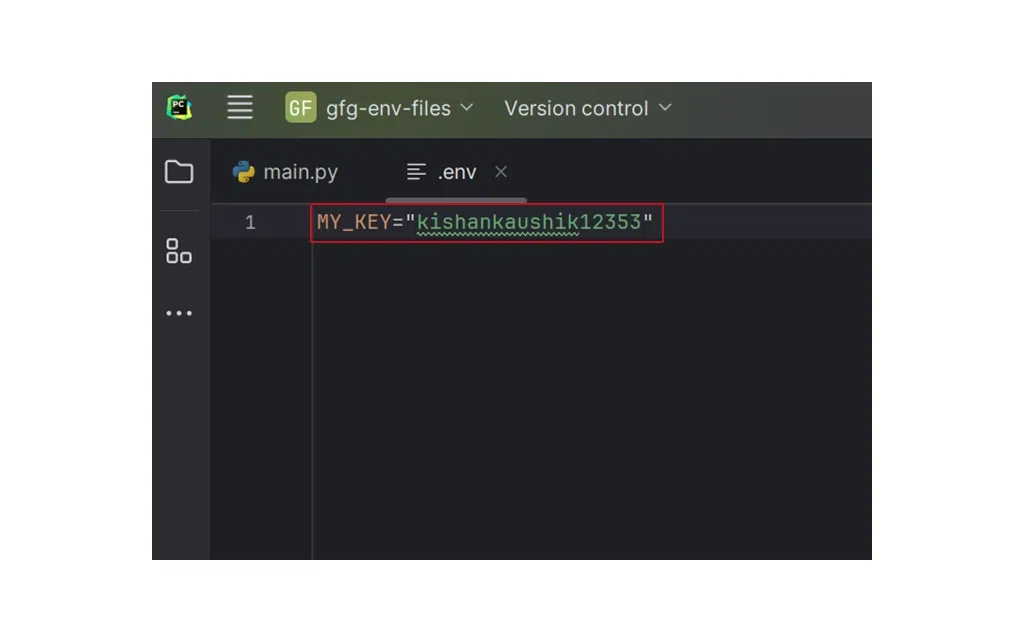
To load these values from the .env file into your Python script's environment, we use a small, popular library called python-dotenv.
Corey Schafer has an excellent tutorial that walks through this entire process. We'll watch it in a few parts to build up our understanding step-by-step.
Python Tutorial: Securely Manage Passwords and API Keys with DotEnv
This video from Corey Schafer's channel provides a clear, practical guide to using python-dotenv.
First, watch the introduction to understand the benefits of this approach over managing system-wide environment variables. Next, see how to install the library and set up the project by watching from installation. Finally, watch the core implementation from loading variables. Pay close attention to how load_dotenv() is called and how os.getenv() is used to retrieve the value in the Python script.
To summarize the process shown in the video:
- Install the library: In your terminal, with your virtual environment activated, run
pip install python-dotenv. - Create a
.envfile: In the root directory of your project, create a new file named.env. - Add your key: Inside
.env, add your secret. The format isKEY_NAME=value. For example:OPENAI_API_KEY="sk-...". There are no spaces around the equals sign. - Load in Python: At the beginning of your Python script, add the following:
import os
from dotenv import load_dotenv

load_dotenv() # This line reads the .env file and loads the variables

api_key = os.getenv("OPENAI_API_KEY")
Your api_key variable now securely holds the value from your .env file without it ever appearing in your source code.
The Most Important Step: .gitignore
You've successfully separated your secret from your code. Now, you must ensure you never commit the secret file to your version control history. This is done using a file called .gitignore. This file tells Git which files or folders it should intentionally ignore.
Your .env file must always be listed in your .gitignore file.
Python Tutorial: Securely Manage Passwords and API Keys with DotEnv
Let's return to Corey Schafer's video for the most critical part of this process.
Watch the segment from on .gitignore. He explains why this is essential and how to create the .gitignore file to exclude your .env file from version control.
This step is non-negotiable for any project that uses a .env file for secrets. To reinforce this concept, here is a concise text-based guide that walks through the same security-first process.
Keeping your API keys secret with dotenv - Jonathan Soma
This article by Jonathan Soma provides a clear, step-by-step guide to the entire workflow.
Please read the article from the beginning. It breaks the process down into four clear steps, with a strong emphasis on the role of the .gitignore file. This reinforces the secure workflow we've just learned.
A Production-Ready Pattern
Now, let's combine what we learned today with our previous lesson on error handling. What happens if someone runs your code without creating a .env file or if the key is named incorrectly? In that case, os.getenv("YOUR_KEY") will return None. A robust application should anticipate and handle this.
Here is a code pattern that represents a professional standard for loading an API key:
import os
from dotenv import load_dotenv


# Load variables from the .env file into the environment
load_dotenv()


# Retrieve the API key
api_key = os.getenv("OPENAI_API_KEY")


# Check if the API key was found
if not api_key:


    # This combines our previous lesson on error handling
    # with today's lesson on secure key management.
    raise ValueError("API key not found. Please set the OPENAI_API_KEY environment variable in your .env file.")

print("API key loaded successfully.")


# Now you can safely use the 'api_key' variable in your API calls
# For example:
# headers = {"Authorization": f"Bearer {api_key}"}
# ...
This script attempts to load the key and then immediately checks if it was successful. If not, it stops execution and raises a ValueError with a helpful message telling the user exactly how to fix the problem. This is a much better experience than the program failing cryptically later on.
This practice of separating configuration from code is a core principle of a well-known software development methodology called the Twelve-Factor App. Storing config in the environment is considered a best practice for building scalable and maintainable applications.
Load Environment Variables From .env Files in Python
This video from NeuralNine briefly touches on the conceptual background for this practice.
For context on why this is a recognized best practice, watch the short segment on the 12-Factor App. This connects our practical work to a broader industry standard.
Conclusion
This lesson concludes our Python foundations module. You've equipped yourself with the essential skills for writing clean, robust, and secure code, setting a strong base for your journey into API engineering.
Here are the key takeaways from today's lesson:
- Never hardcode secrets like API keys directly in your source code.
- Use a
.envfile to store sensitive key-value pairs in your project directory. - Use the
python-dotenvlibrary to load these variables into your script's environment. - Access the variables in your code using
os.getenv("VARIABLE_NAME"). - Crucially, always add your
.envfile to.gitignoreto prevent it from ever being committed to version control. - Combine
os.getenvwith checks and error handling to create robust, user-friendly applications.
With these foundational Python skills in place, you are now fully prepared for our next module, Fundamentals of Web APIs. In the upcoming lesson, we will explore the client-server model and the role of a REST API, which will demystify how our applications will communicate with services like OpenAI.