Welcome back! In our last session, we established the fundamental difference between value types (struct) and reference types (class) in C#, focusing on how they are managed in memory. We now have our containers; this lesson is about controlling what goes in and out of them.
Today, we'll dive into access modifiers, a core principle of object-oriented programming that is almost guaranteed to come up in your interview. You'll learn how to apply keywords like public, private, protected, and internal to control the visibility of your class members. This concept is central to encapsulation—the practice of bundling data with the methods that operate on that data while hiding implementation details from the outside world. For someone with your experience in designing APIs and microservices, you can think of this as defining the public contract of your classes, just as you would for a web service.
1. The "Why": Encapsulation and Robust Design
Before we memorize the keywords, it's crucial to understand why access modifiers exist. Why not just make everything public for convenience? The goal is to build robust, secure, and maintainable software. By carefully controlling access, you create a clear distinction between a class's public interface and its private implementation details.
To build intuition, let's start with a short conceptual video from Programming with Mosh. He uses a great analogy to explain the principle of encapsulation.
C# Access Modifiers: What They Are and Why We Need Them
This video introduces the concept of access modifiers as a tool for encapsulation, or "information hiding."
Watch the first two segments, covering what an access modifier is and the restaurant analogy for encapsulation. This will set the stage for why we deliberately hide parts of our code.
As Mosh explains, a class should hide its internal workings. Exposing everything can lead to three major problems, which are excellent points to bring up in an interview:
- Security Risks: Publicly exposing a field that stores sensitive data (like a password hash or credit card number) allows any part of the application to access or modify it, bypassing any security logic.
- Bugs and Invalid State: If a field is public, other classes can set it to any value, potentially bypassing validation logic. For example, an
Ageproperty could be set to -100, putting your object into an invalid state. - Complexity and Maintenance: Exposing every helper method and internal field creates a cluttered and confusing API for other developers. It makes it difficult to know which members are safe to use and makes refactoring a nightmare, as changing any "public" detail could break dependent code.
2. The Spectrum of Visibility in C#
C# provides a range of access modifiers to define different levels of visibility. Think of them on a spectrum from most restrictive (private) to least restrictive (public). A key concept here is the assembly, which is the compiled output of your project (a .dll or .exe file). In your experience, you can think of an assembly as a single microservice or a shared library project.
Let's explore the modifiers, from most common to the more nuanced. The following video from Tim Corey provides excellent, practical demonstrations using a multi-project solution, which makes the role of the internal modifier very clear.
C# Access Modifiers (beyond public and private) - what they are, how to use them, and best practices
This video provides a practical walkthrough of the primary access modifiers, demonstrating their scope within and across projects (assemblies).
Watch the following segments in order: private: Accessible only within the containing class. This is the default for members. public: Accessible from anywhere. This forms the public API of your class. internal: Accessible only within the same assembly (project). This is perfect for helper classes and utilities that should not be exposed to other projects that reference your library. protected: Accessible within the containing class and by any class that inherits from it, regardless of the assembly.
To summarize the scopes you just saw:
private: "Just for me" (the class itself).protected: "For me and my children" (the class and its derived classes).internal: "For us" (any code in the same project/assembly).public: "For everyone" (any code that can reference the assembly).
3. Quick Reference Tables
Visual tables are a great way to consolidate this information. The first image provides a very simple, high-level overview.
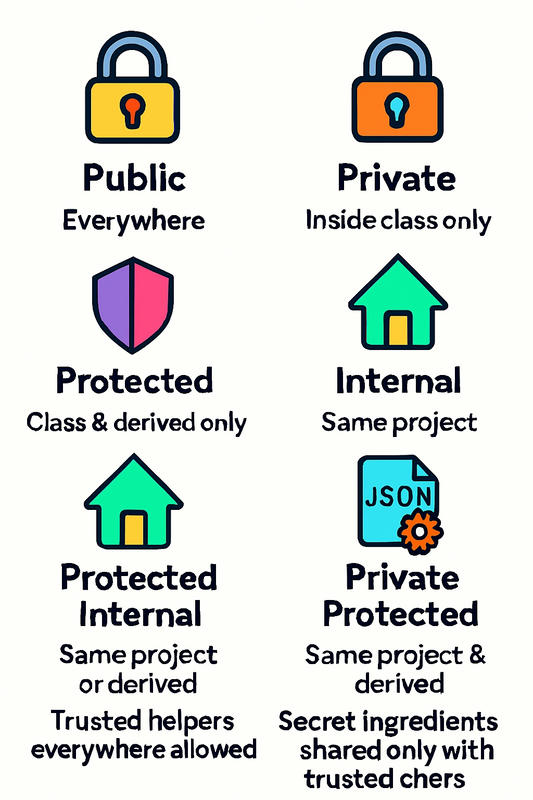
For a more detailed and precise breakdown, especially for an interview, a matrix is best. This table shows exactly what is accessible from where.

4. The Combined Modifiers: protected internal and private protected
C# also offers two combined modifiers that are often used as interview "gotcha" questions. They provide finer-grained control in complex inheritance scenarios.
protected internal: This is a permissive combination, granting access if a member isprotectedORinternal. This means it's accessible by any code within the same assembly, and by derived classes in any assembly.private protected: This is a restrictive combination, granting access only if a member isprivateANDprotectedwithin the same assembly. This means it's accessible only by derived classes that are located in the same assembly as the base class.
Let's return to Tim Corey's video, where his multi-project setup makes the distinction between these two crystal clear.
C# Access Modifiers (beyond public and private) - what they are, how to use them, and best practices
This segment clarifies the behavior of the two combined access modifiers.
Please watch the explanations for: protected internal private protected
5. Defaults and Constraints
To round out your knowledge, it's important to know the default accessibility levels and key rules the C# compiler enforces. This demonstrates a deeper understanding. The official Microsoft documentation is the best source for these rules.
Access Modifiers (C# Programming Guide) - Microsoft Learn
This official documentation provides a definitive summary table and outlines the rules for accessibility.
First, review the summary table, which includes all modifiers. Then, read the section on "Class and struct accessibility" to understand the defaults. Pay attention to the rules about default accessibility for top-level types (it's internal) and the default for members (it's private). Finally, note the constraint that the accessibility of a member generally cannot be greater than its container.
Conclusion
Mastering access modifiers is fundamental to writing clean, maintainable, and secure object-oriented code in C#. It's about being intentional with your class design, clearly separating the public "contract" from the private "implementation."
Here are your key takeaways:
- Encapsulation is Key: Access modifiers are the primary tool for achieving encapsulation. The goal is to hide implementation details and expose only what's necessary.
- The Six Modifiers: You now know the full spectrum of visibility:
public: Accessible everywhere.protected internal: Accessible within the same assembly OR from derived classes in any assembly.protected: Accessible within the class and derived classes.internal: Accessible only within the same assembly.private protected: Accessible within the class and derived classes that are in the same assembly.private: Accessible only within the class itself.
- Defaults Matter: Remember that top-level types default to
internal, while class members default toprivate. This "secure by default" behavior is an important design choice in C#.
In this lesson, we focused on hiding data by marking fields as private. But how do you provide safe and controlled access to that hidden data? In our next lesson, we will introduce properties, the elegant C# feature for creating getters and setters that builds directly on the principle of encapsulation you've learned today.