Introduction
In our last lesson, we used Flynn's taxonomy to classify parallel architectures, concluding that modern multi-core processors are a form of MIMD (Multiple Instruction, Multiple Data) system. This means they have multiple autonomous processing units, each capable of running its own instruction stream.
Now, we will delve deeper into the most prevalent type of MIMD system: the shared-memory multiprocessor. This is the architecture inside your laptop, desktop, and most servers. Today's lesson focuses on a fundamental distinction in how these processors access their shared memory.
Our learning outcome is to describe shared-memory multiprocessor architectures, specifically Symmetric Multiprocessing (SMP), Uniform Memory Access (UMA), and Non-Uniform Memory Access (NUMA). Understanding the difference between UMA and NUMA is not just an academic exercise; it has profound implications for the performance of the parallel software you will write, as the physical location of data becomes a critical factor.
The Shared-Memory Model
Before we discuss the differences, let's establish the common ground. In a shared-memory architecture, all processors have access to a single logical address space. Imagine it as multiple workers (CPUs) all looking at the same large blueprint (the memory address space). Any worker can, in principle, read from or write to any part of the blueprint. This model is what allows multiple threads within a single process to communicate simply by reading and writing to shared variables.
This is distinct from a distributed-memory model (which we'll cover later), where each processor has its own private memory, and communication must happen explicitly by sending messages—like workers in different buildings who must use a courier service.

Uniform Memory Access (UMA)
The simplest and most intuitive shared-memory design is Uniform Memory Access (UMA). The name says it all: the time it takes for any processor to access any memory location is the same, or "uniform."
This architecture is also commonly referred to as Symmetric Multiprocessing (SMP) because all processors are peers, or "symmetric," with equal access to memory and I/O devices. This is the typical architecture for most consumer multi-core CPUs in desktops and laptops.
To see how this works and to understand its primary limitation, let's watch a short video.
Apple M1 Ultra & NUMA - Computerphile
This video from the Computerphile channel provides a clear, animated explanation of the basic shared-memory model, defines UMA, and introduces its inherent scaling problem.
Watch the segment from 01:24 to 06:40. Focus on how the shared bus connects multiple CPUs to a single block of RAM and why this design is called 'uniform'. Pay special attention to the discussion of the scalability problem – what happens as you add more and more CPUs to the shared bus?
The Bottleneck of UMA/SMP
As the video explained, the elegance of the UMA model is also its Achilles' heel. All processors must contend for access to the same shared bus and memory controller.
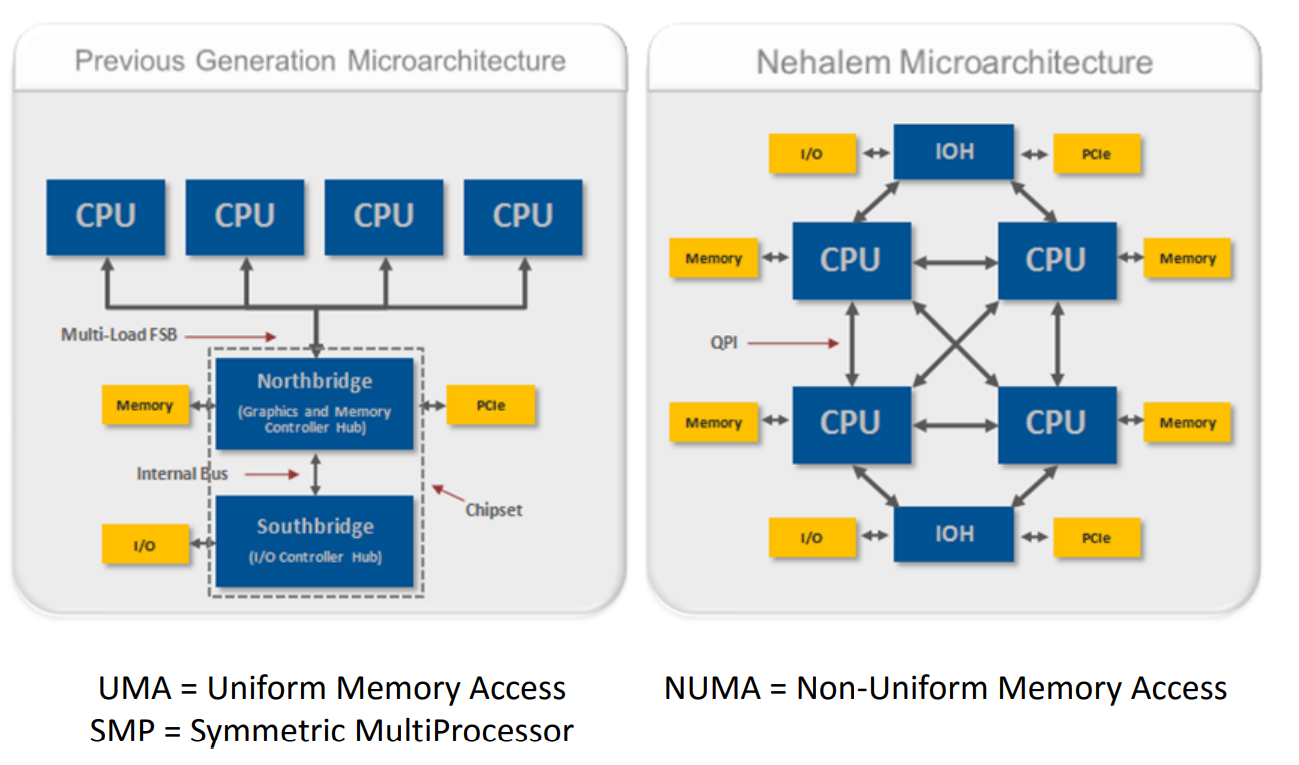
- Architecture: In a classic UMA system, multiple CPUs connect to a memory controller (historically part of a chipset called the "Northbridge") via a shared front-side bus. All memory requests go through this single point.
- Scalability Issue: With just a few cores, this works well. However, as you add more cores, the bus becomes a traffic jam. The available memory bandwidth is divided among all cores, and they spend more time waiting for the bus to be free. This contention limits the practical scalability of UMA systems to a relatively small number of processors.
For a static view of this classic architecture, examine the left side of the following diagram, which shows multiple CPUs sharing a bus to a common Northbridge.
Non-Uniform Memory Access (NUMA)
To overcome the scalability bottleneck of UMA, high-performance servers and supercomputers adopt a different architecture: Non-Uniform Memory Access (NUMA).
In a NUMA system, the memory is physically distributed. Each processor is tightly coupled with its own block of "local" memory. These processor-memory pairs form NUMA nodes. The nodes are then connected by a high-speed interconnect.
The key characteristic is that a processor can access its own local memory very quickly, but accessing "remote" memory (memory attached to another processor) incurs a higher latency because the request must traverse the interconnect. While the memory access time is no longer uniform, the system still presents a single, coherent address space to the programmer.
To solidify your understanding of this architectural shift, the following article provides excellent context and diagrams.
NUMA Deep Dive Part 1: From UMA to NUMA
This article provides a concise history of the evolution from UMA to NUMA, highlighting the key architectural changes.
Read the sections titled 'Uniform Memory Access Architecture', 'Non-Uniform Memory Access Architecture', and 'Point-to-Point interconnect'. Focus on: The description of the classic UMA system and its Northbridge. The definition of NUMA and the concepts of 'local' vs. 'remote' memory. The role of point-to-point interconnects (like Intel's QPI) in replacing the shared front-side bus.
Programming Implications of NUMA
The shift to NUMA has significant consequences for performance. A program's performance can vary dramatically depending on where its data resides relative to the thread processing it.
- Data Locality is Key: For optimal performance, a thread running on a specific CPU should primarily access data stored in that CPU's local memory.
- NUMA-Aware OS: Modern operating systems are "NUMA-aware." When a process is started, the OS tries to allocate its memory from a single NUMA node and schedule its threads to run on the CPUs of that same node.
- The Programmer's Role: While the OS helps, complex applications may require manual intervention. For example, a high-performance C++ application might explicitly control which thread runs on which core and on which node its data structures are allocated to minimize remote memory access.
Let's conclude by watching the second part of the Computerphile video, which visualizes the NUMA architecture and its performance trade-offs.
Apple M1 Ultra & NUMA - Computerphile
This segment clearly illustrates how NUMA systems are built and reinforces the performance difference between accessing local and remote memory.
Watch the segment from 08:17 to 12:45. The speaker provides a great visual explanation of NUMA nodes and the performance implications. Notice his emphasis on the need for software to be 'NUMA-aware' for optimal performance.
Comparison Summary
Let's summarize the key differences between these two fundamental shared-memory architectures.
| Feature | UMA / SMP (Symmetric Multiprocessing) | NUMA (Non-Uniform Memory Access) |
|---|---|---|
| Memory Access Time | Uniform: Latency is the same for all CPUs to all memory locations. | Non-Uniform: Latency is lower for local memory, higher for remote. |
| Architecture | Centralized memory connected to CPUs via a shared bus. | Distributed memory; each CPU has local memory, nodes connected by an interconnect. |
| Scalability | Poor. The shared bus becomes a bottleneck as more CPUs are added. | Good. Scalable to a large number of processors. |
| Common Use Case | Desktops, laptops, small servers (typically single-socket systems). | High-performance servers, supercomputers (multi-socket systems). |
| Programming Model | Simpler. The physical location of data does not affect performance. | More complex. Performance depends heavily on data locality ("NUMA-awareness"). |
Conclusion
In this lesson, we have explored the two dominant architectures for shared-memory multiprocessors. You are now equipped to describe their core designs and, more importantly, understand their trade-offs.
Key Takeaways:
- Shared-memory systems provide a single logical address space to multiple processors, simplifying parallel programming.
- UMA (or SMP) architectures offer uniform memory access times but are limited in scalability due to contention on a shared bus. They are common in today's desktop and laptop computers.
- NUMA architectures solve the scalability problem by distributing memory among nodes, creating a distinction between fast "local" and slower "remote" memory accesses. This is the standard for modern multi-socket servers.
- The transition to NUMA makes data locality a first-class concern for performance-critical parallel programming.
Preview of the Next Lesson
We have established that in these shared-memory systems, multiple processors, each likely with its own private cache, are all interacting with the same memory space. This introduces a critical new problem: if CPU 0 modifies a piece of data in its cache, how do we ensure that CPU 1, which might have an old copy of that same data in its cache, doesn't use the stale value?
This is known as the cache coherence problem. In our next lesson, we will investigate the hardware protocols, such as MESI, that are used to maintain a consistent and correct view of memory across all caches in the system.