Introduction
Welcome to your first lesson in the preparation course for DS 221: Introduction to Scalable Systems. This course is designed to build a strong foundation in computer architecture and parallel computing, which are essential for understanding how to build and optimize large-scale systems.
This first module, "Computer Organization Fundamentals," starts from the ground up. Before we can talk about scalable systems, we need to understand how a single computer works. Today's lesson focuses on the most fundamental blueprint for modern computers.
Your learning outcome is to describe the von Neumann architecture and its core components (CPU, memory, I/O, bus). We will explore the conceptual model that underpins virtually every computer you've ever used, from your laptop to the servers in a data center. Understanding this structure is the first step toward analyzing and improving software performance.
The Stored-Program Computer
At the heart of modern computing is a simple but powerful idea: a computer that stores its program instructions in the same memory as the data it operates on. This concept, primarily attributed to John von Neumann, is the defining feature of the architecture we will study today.
To get an overview of this model and its main parts, please watch the first couple of minutes of the following video from MIT OpenCourseWare.
This video introduces the von Neumann model and its three main components: the CPU, main memory, and I/O devices.
Watch the video from the beginning until the timestamp 01:37. Focus on understanding the role of main memory and how the CPU interacts with it using addresses.
As you saw, the architecture consists of three principal parts:
- A Central Processing Unit (CPU)
- A Main Memory unit
- Input/Output (I/O) devices
These components are interconnected, allowing them to work in concert to execute programs. Let's look at a diagram that puts these pieces together.
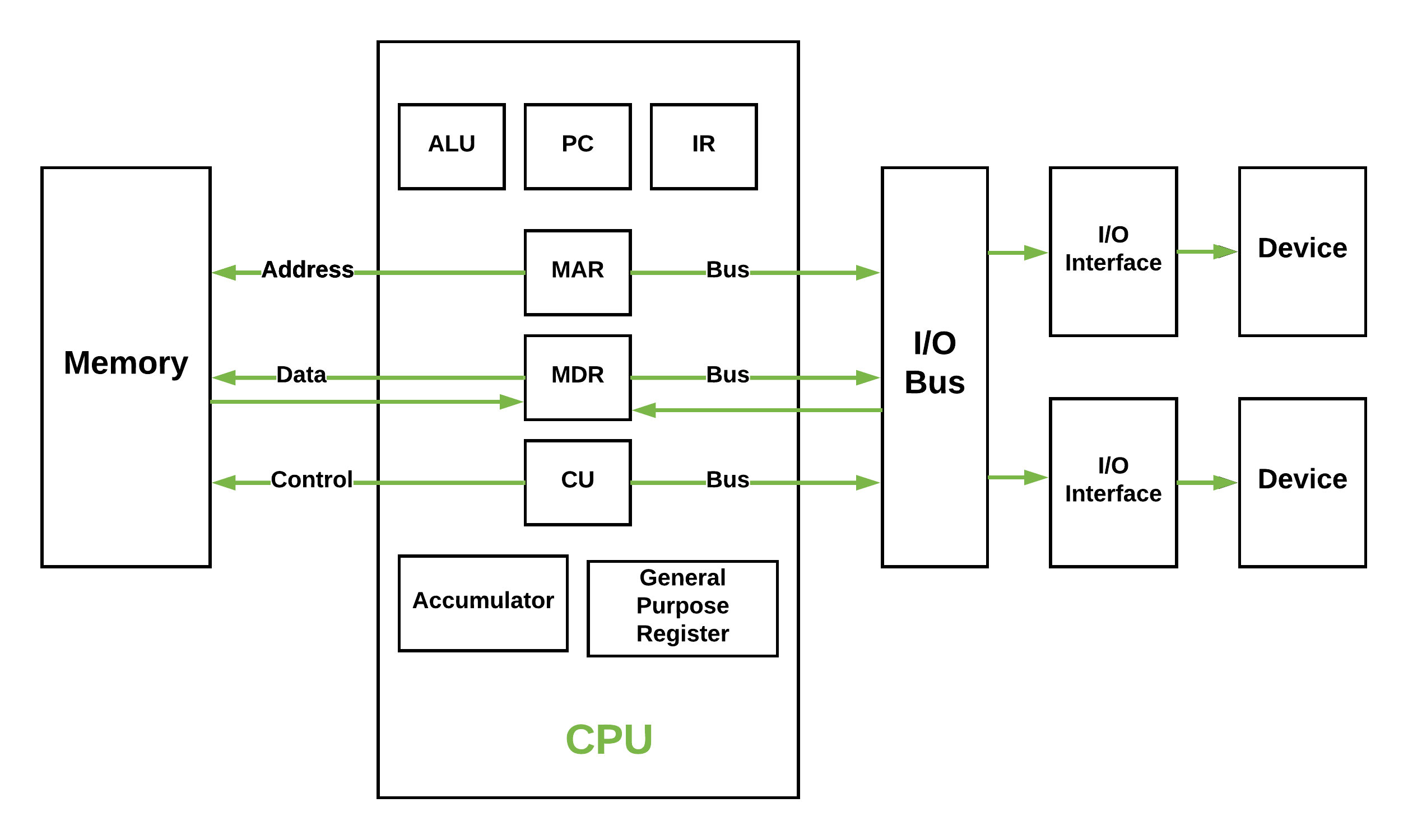
Now, we'll examine each of these components in more detail.
The Core Components
To get a comprehensive overview of each component, I'd like you to read a few sections from the following article. It provides clear definitions for the parts of the architecture we're discussing.
The Basic Structure of Computer Systems: Von Neumann Architecture
This article, 'The Basic Structure of Computer Systems: Von Neumann Architecture', provides a clear breakdown of each major component.
Please read the sections titled 'Key Components' up to (and including) 'Communication System'. Focus on the definitions of the CPU, Memory Unit, I/O Devices, and the different types of buses.
Let's consolidate and elaborate on what you've just read.
1. Central Processing Unit (CPU)
The CPU is the active part of the computer, responsible for executing program instructions. As you read, it contains three key sub-components:
- Arithmetic Logic Unit (ALU): This is the computational engine of the CPU. It performs mathematical operations (like addition and subtraction) and logical operations (like AND, OR, and NOT).
- Control Unit (CU): This unit acts as the director. It fetches instructions from memory, decodes them, and generates control signals to coordinate the other components (the ALU, registers, memory, and I/O devices).
- Registers: These are small, extremely fast storage locations inside the CPU. They are used to temporarily hold instructions, data, and memory addresses that are being actively used. The article mentioned several important ones, such as the Program Counter (PC), which we'll discuss in the next lesson.
The MIT video you watched earlier uses a helpful analogy, describing the datapath (which includes the ALU and registers) as the "brawn" and the control unit as the "brain". Let's watch a segment that elaborates on this.
This segment details the roles of the datapath and the control unit within the CPU.
Watch from timestamp 03:20 to 05:25. Pay attention to how the control unit interprets instructions and directs the datapath to perform operations.
2. Memory Unit
The memory unit, or Main Memory (commonly RAM), is a large pool of storage that is directly accessible by the CPU. In the von Neumann model, its key characteristic is that it holds both program instructions and data.
Memory is organized as a sequence of addressable locations. The CPU can read from or write to any specific location by providing its unique address. You can think of it like a vast array of mailboxes, where each mailbox has a unique address and can hold a piece of information.
3. Input/Output (I/O) Devices
I/O devices are the computer's interface to the outside world. This category is broad and includes:
- Input devices: Keyboard, mouse, microphone.
- Output devices: Monitor, printer, speakers.
- Storage devices: Hard Disk Drives (HDDs), Solid-State Drives (SSDs). While used for long-term storage, from the CPU's perspective, they are I/O devices that are much slower to access than main memory.
4. The System Bus
The components we've discussed don't exist in isolation. They communicate via the system bus, which is a set of parallel electrical wires. The system bus is divided into three parts based on its function.

- Address Bus: This is a unidirectional path. The CPU uses it to send the memory address of the instruction or data it wants to access. The width of this bus (i.e., the number of wires) determines the maximum amount of memory the system can address.
- Data Bus: This is a bidirectional path used to transfer the actual data between the CPU, memory, and I/O devices.
- Control Bus: This is a bidirectional set of lines that transmits command and timing signals from the control unit to other components, and status signals back to the CPU. For example, a "memory read" signal tells the memory unit to put data onto the data bus, while a "memory write" signal tells it to store the data from the data bus.
Instructions vs. Data: A Matter of Interpretation
A fundamental and elegant aspect of the von Neumann architecture is that there is no inherent difference between an instruction and a piece of data in memory—they are both just sequences of bits. The distinction arises from how the CPU uses them.
When you compile a C++ program, the compiler generates machine code (instructions) and lays out the data (variables). When the program runs, both are loaded into main memory.
- If the control unit fetches a value from memory, it treats that value as an instruction to be decoded and executed.
- If the ALU fetches a value from memory, it treats that value as data to be used in a calculation.
This next clip explains this critical point.
This segment explains the crucial concept that instructions and data are only distinguished by how they are used by the CPU.
Watch from timestamp 01:26 to 03:20. Focus on the question posed at the end: how do we know which words in memory are instructions and which are data?
The Von Neumann Bottleneck
The simplicity of using a single memory and a single bus for both instructions and data comes at a cost. Because the data bus is a shared resource, the CPU cannot fetch an instruction and fetch data from memory at the same time. They must happen sequentially. This limitation is known as the von Neumann bottleneck.
This bottleneck restricts the throughput of the system to the bandwidth of the bus. Watch this short video for a concise explanation.
Harvard Architecture versus Von Neumann Architecture
This video quickly explains the 'Von Neumann bottleneck' that arises from sharing a single bus for data and instructions.
Watch from timestamp 01:22 to 01:51. This clearly defines the bottleneck.
Much of modern computer architecture, which we will explore in upcoming lessons (e.g., CPU caches, pipelining), is designed to mitigate this very bottleneck.
Conclusion
In this lesson, we have laid the cornerstone for our study of scalable systems. You have learned about the fundamental structure of nearly all modern computers.
Here are the key takeaways:
- The von Neumann architecture is a computer design model where program instructions and data are stored in the same memory.
- It has three core components: the CPU (containing the Control Unit, ALU, and registers), the Memory unit, and I/O devices.
- These components communicate via a system bus, which is divided into an address bus, a data bus, and a control bus.
- A key limitation of this design is the von Neumann bottleneck, as the shared bus for instructions and data limits processing speed.
This high-level model provides the context for everything that follows.
Preview of the Next Lesson:
We will zoom in on the CPU. Your next learning outcome will be to "Explain the role of registers, ALU, and control unit in instruction execution." We will dissect how these components work together to bring your code to life, one instruction at a time.