Hello! Last time, you built Boolean conditions such as stock >= quantity && total <= budget. Those expressions answer whether a purchase can happen, but the program still prints the same sequence of messages regardless of the answer. In this lesson, you’ll use if and else to choose what the program does. Allow about 35–40 minutes to read the guide and run the examples with different values.
Act when a condition is true
An if statement places an action behind a Boolean test. Dart evaluates the condition in parentheses. If it is true, Dart runs the code inside the braces; if it is false, Dart skips that code.
Read the short If section of Dart’s official Branches guide for the syntax. Its weather example uses function calls you have not studied yet, so focus on the conditions and the blocks they select.
Read the official Dart guide to see how a Boolean condition controls an if block and an optional else block.
In the If section, start with the paragraph beginning “Dart supports” and read the opening explanation and the weather code example immediately below it. Stop before the If-case subsection. Notice the parentheses around each condition and the braces around each set of actions; you do not need to understand the weather functions yet.
Here is an if without an else. Save it as decision.dart and run it with dart run decision.dart:
void main() {
  int stock = 2;
  int quantity = 3;

  if (stock < quantity) {
    print('Only $stock items are in stock.');
  }

  print('Stock check finished.');
}
Because 2 < 3 is true, both messages print. Change stock to 4 and run it again: the shortage message disappears, but Stock check finished. still prints. That final print is outside the braces, so it runs whether or not the condition is true. Use a lone if when an action is needed only in one case.
Choose one of two actions
Often you need an action for either result. Add else to provide a block for when the if condition is false:
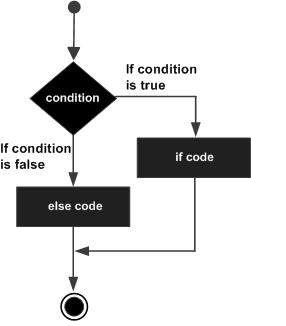
The two blocks are alternatives: exactly one runs. else does not take another condition; it covers every case in which the if condition is false.
Replace decision.dart with this purchase example. The canPurchase condition is the same kind of Boolean value you built in the previous lesson:
void main() {
  int stock = 2;
  int quantity = 3;
  int budget = 50;
  int total = 12 * quantity + 5;

  bool canPurchase = stock >= quantity && total <= budget;

  if (canPurchase) {
    print('Purchase approved. Total: $total');
  } else {
    print('Purchase cannot be completed.');
  }

  print('Decision complete.');
}
The total is 41, which is within the budget, but there are only two items for a request of three. canPurchase is therefore false, and the output is:
Purchase cannot be completed.
Decision complete.
Change stock to 3. Now both parts of canPurchase are true, so you get Purchase approved. Total: 41, followed by Decision complete. In either run, Dart selects one branch and then continues with the statement after the entire if–else.
You can also put a comparison directly in the parentheses, as in if (total <= budget). Use a named bool when it makes a combined condition easier to understand. Either way, the condition must evaluate to true or false: if (stock) does not work because stock is an int, not a bool.
Give different reasons with else if
A single else can say that a purchase failed, but it cannot say why. When there are several mutually exclusive actions, else if lets Dart test another condition if the earlier one was false:
void main() {
  int stock = 2;
  int quantity = 3;
  int budget = 50;
  int total = 12 * quantity + 5;

  if (stock < quantity) {
    print('Not enough stock.');
  } else if (total > budget) {
    print('Over budget.');
  } else {
    print('Ready to purchase.');
  }
}
With the values shown, the program prints Not enough stock. Dart does not check the budget branch after finding that the first condition is true. If you change stock to 3 and budget to 40, it prints Over budget. If you set stock to 3 and leave budget at 50, neither problem applies, so it prints Ready to purchase.
Order matters. If stock is insufficient and the total exceeds the budget, this code reports the stock problem because that test comes first. The final else means “none of the earlier conditions was true.” By contrast, two separate if statements would test both conditions independently and could print both problem messages. Choose the structure that matches the actions you intend.
Key takeaways
Use if to run a block only when its Boolean condition is true. Add else when you need a different action for the false case; use else if when you need to choose among more than two actions. Code after the branch runs once the chosen block is finished.
You can now make a console program respond to its calculated values. Next, you’ll use Dart analyzer messages to find and fix mistakes such as malformed statements and type mismatches.