Welcome to the final lesson of our first module, "Solidity Foundations."
In our previous lesson, we dove deep into arrays and mappings, focusing on how their underlying storage layout in the EVM dictates their behavior and gas costs. We saw that trying to access data that doesn't exist, like an out-of-bounds array index, can lead to problems.
Introduction
Today, we'll learn how to handle these situations gracefully. This lesson covers the learning outcome: Handle errors using require, revert, and assert with appropriate use cases for each.
These three mechanisms are the bedrock of secure and robust smart contracts. In the world of DeFi, where a single bug can lead to the loss of millions of dollars, correctly validating conditions and handling errors is not just good practice—it's non-negotiable. We'll explore not just how to use them, but also what happens at the EVM level when an error is triggered, focusing on state changes, gas consumption, and the specific error data that gets returned.
What Happens When a Transaction Reverts?
Before we look at specific functions, it's crucial to understand what it means for a transaction to "revert." When an error is triggered in Solidity, the EVM halts execution and performs two key actions:
- State Reversion: All changes made to the contract's state (i.e., modifications to state variables) within the current transaction are undone. The contract is rolled back to the state it was in before the transaction began.
- Gas Consumption: The gas that was used for the operations up to the point of the error is consumed and is not refunded. The remaining unused gas is returned to the caller.
This "all-or-nothing" atomicity is a core security feature of the EVM. It ensures that a contract can never be left in a partially updated or inconsistent state.
To see a clear explanation of this process, please watch the beginning of the following video.
Solidity Tutorial: Error Handling (throw, revert, require, assert...)
This video from EatTheBlocks gives a great overview of the consequences of an error in Solidity.
Watch from the beginning until 02:12. Focus on the three main consequences of an error: execution stops, state changes are reverted, and gas is consumed.
The Three Pillars of Error Handling
Solidity provides three main constructs for handling errors: require, revert, and assert. While they all cause a transaction to revert, they have distinct purposes.
Let's start with a quick practical overview of all three.
This video by Smart Contract Programmer provides concise examples of require, revert, and assert in action.
Watch the segments from 00:23 to 03:17 to see a simple code demonstration of each function.
Now, let's break them down in more detail.
1. require: Validating Inputs and Conditions
The require function is your primary tool for error handling. It's used to check conditions that are expected to be false under certain "normal" circumstances, especially when dealing with external inputs.
Use Cases:
- Validating user inputs: Checking that a supplied value is within an acceptable range.
- Access control: Ensuring that
msg.senderis an authorized address (e.g., the owner). - Checking state conditions: Verifying that a user has enough tokens to transfer before executing the transfer.
The syntax is require(condition, "Error message");. If the condition evaluates to false, the transaction reverts, and the optional error message is returned to the caller.
// SPDX-License-Identifier: MIT
pragma solidity ^0.8.19;

contract VendingMachine {
    address public owner;
    mapping(address => uint) public balances;

    constructor() {
        owner = msg.sender;
    }

    function withdraw(uint _amount) public {
        // Use require to validate conditions related to inputs and state.
        require(msg.sender == owner, "Only the owner can withdraw.");
        require(balances[msg.sender] >= _amount, "Insufficient balance.");

        // ... proceed with withdrawal logic
    }
}
Think of require as a gatekeeper at the entrance of your function. It ensures that all pre-conditions for successful execution are met before any state-changing logic is run.
2. revert: Unconditional and Complex Reverts
The revert statement allows you to explicitly trigger a revert. While you can achieve the same result as require using an if statement with revert, it's particularly useful for more complex conditional logic where a single require line might be less readable.
The following two code blocks are functionally identical:
// Using require
require(amount <= balance, "Insufficient balance.");
// Using if/revert
if (amount > balance) {
    revert("Insufficient balance.");
}
The revert statement gives you more structural flexibility.
Custom Errors: A Gas-Efficient Alternative
Since Solidity v0.8.4, you can define custom errors. Using a custom error with revert is significantly more gas-efficient than using a string message, especially if the string is long. This is a key optimization technique you should favor.
Let's revisit the Smart Contract Programmer video to see how to declare and use custom errors.
Watch from 04:01 to the end (05:54). Notice how a custom error is declared at the contract level and then used with revert inside a function. This is the modern, preferred way to handle errors.
Here is the pattern in code:
// SPDX-License-Identifier: MIT
pragma solidity ^0.8.19;

contract Auction {
    address public beneficiary;
    uint public auctionEndTime;

    // 1. Declare the custom error at the contract level.
    error AuctionAlreadyEnded();

    function bid() public payable {
        // 2. Use it with revert in place of a string.
        if (block.timestamp > auctionEndTime) {
            revert AuctionAlreadyEnded();
        }
        // ...
    }
}
3. assert: Checking for Bugs and Invariants
The assert function has a very specific and critical purpose: it is used to check for conditions that should never be false. If an assert fails, it signals a fundamental bug in your contract's logic or a violation of an invariant (a property that should always hold true).
Use Cases:
- Checking for arithmetic overflow/underflow in
uncheckedblocks. - Verifying that a state variable has the expected value after an operation.
- Ensuring your contract's logic has not entered an impossible state.
A failed assert is a sign that something is seriously wrong with your code and needs to be fixed.
// Example of an invariant check
uint public totalShares;
mapping(address => uint) public userShares;

function issueShares(address _to, uint _amount) public {
    uint oldTotalShares = totalShares;

    // ... logic to issue shares ...
    totalShares += _amount;
    userShares[_to] += _amount;

    // Invariant: The total shares should always equal the sum of its parts.
    // If this fails, there is a bug in the logic above.
    assert(totalShares == oldTotalShares + _amount);
}
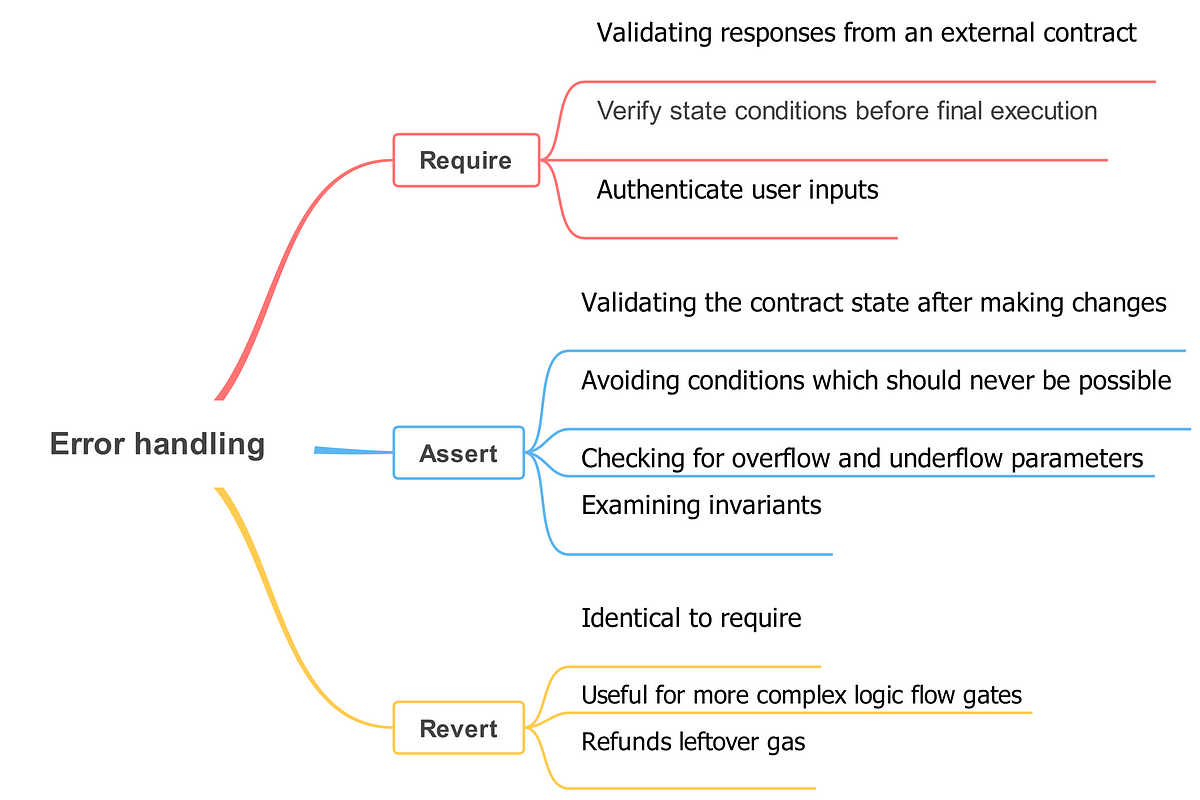
Visual Summary: require vs. revert vs. assert
This mind map provides a helpful visual summary of when to use each function.
The EVM-Level Distinction: Error vs. Panic
Your interest in low-level details makes this next part particularly important. When require or revert fail, they generate an Error(string) exception (or a custom error). When assert fails, it generates a Panic(uint256) exception. This isn't just a naming difference; they represent two distinct categories of errors at the EVM level.
Expressions and Control Structures - Solidity
The official Solidity documentation provides the definitive explanation of this distinction and the situations that trigger each type of error.
Read the section titled 'Panic via assert and Error via require'. Pay close attention to: The conceptual difference: Error for regular error conditions, Panic for bugs. The list of situations that generate a Panic and their corresponding error codes (e.g., 0x01, 0x11, 0x32). This is how the EVM communicates the specific type of internal error.
To summarize the key low-level details:
require(condition, "reason")/revert("reason")- Purpose: Handles regular, expected errors from invalid external data.
- EVM Output: Reverts with data corresponding to
Error(string). This consists of a 4-byte function selector (0x08c379a0) followed by the ABI-encoded string. Off-chain tools can decode this to show the reason.
assert(condition)- Purpose: Detects internal bugs and broken invariants.
- EVM Output: Reverts with data corresponding to
Panic(uint256). This consists of a 4-byte function selector (0x4e487b71) followed by a singleuint256error code indicating the type of panic.
Some key panic codes include:
0x01: Anassertcondition evaluated tofalse.0x11: Arithmetic overflow or underflow.0x12: Division or modulo by zero.0x32: Accessing an array at an out-of-bounds index.
Knowing these codes is invaluable for debugging, as they tell you precisely what kind of internal error occurred, even without a descriptive string.
Preview: Handling External Call Failures
So far, we've focused on errors originating within our own function. But what if we call another contract and it reverts? By default, the revert "bubbles up" and causes our transaction to fail too.
Solidity provides a try/catch statement to handle failures in external calls without reverting the entire parent transaction. This is a more advanced pattern that we'll encounter later when we discuss contract composition. It allows a contract to gracefully handle a failure in a dependency and continue its own execution.
Conclusion
This lesson concludes our foundational module on Solidity. You now understand how to build robust smart contracts by correctly handling errors.
Key Takeaways:
- Reverts are Atomic: They undo all state changes and consume gas up to the point of failure.
- Use
requirefor Validation: It's the standard for checking inputs and state conditions before execution. Use it with custom errors for gas efficiency. - Use
revertfor Complex Logic: It provides more flexibility for conditional checks withinif/elseblocks. - Use
assertfor Invariants: A failedassertsignifies a bug in your contract that must be fixed. Errorvs.Panic:require/revertproduceErrortypes for regular issues, whileassertproducesPanictypes with specific error codes for internal bugs.
We've laid a strong foundation. You can now write basic but complete smart contracts, define custom data structures, and handle errors correctly.
In our next module, EVM Architecture and Execution Model, we will peel back another layer of abstraction. We'll start by describing the EVM as a stack-based virtual machine and understanding how it actually executes the bytecode that the Solidity compiler produces. This will connect directly to the low-level error codes and gas mechanics we've touched upon today.