Hello! Welcome back to the course.
In our last lesson, we established the visual foundation for your Metroidvania by configuring the project settings for crisp, scalable pixel art. We set up the correct rendering modes, resolution, and snapping to ensure your game will look professional and authentic.
Now that the project's visual settings are in place, we'll address the next foundational pillar: organizing your project files using a scalable folder structure. For a game as complex as a Metroidvania with RPG elements, a well-thought-out folder structure is not just a matter of neatness; it's a critical component of a maintainable and scalable architecture. A good structure makes it easier to find files, understand relationships between game components, and add new features without creating a tangled mess.
Following your preference for a theory-first approach, we will begin by exploring the core philosophy behind modern project organization before diving into practical, concrete examples you can apply to your own project.
1. The Core Principle: Function Over Type
When starting a project, many developers fall into the habit of organizing their files by type. This leads to top-level folders like scripts/, scenes/, and textures/. While simple at first, this approach quickly breaks down. If you need to work on the player character, you might have to jump between three or four different folders to find the script, the scene file, the sprites, and the sound effects.
A more robust and scalable approach is to organize by function or feature. In this model, all the files related to a single game entity—like the player, an enemy, or a UI element—are grouped together.
To understand the "why" behind this shift in thinking, let's explore the architectural reasoning.
Project Structure & Architecture - Code Folders with OOP approach : Godot Tutorial
This video from Nanotech Gamedev, titled 'Project Structure & Architecture,' explains the fundamental problem with type-based organization and advocates for a functional approach, connecting it to principles from software architecture.
Watch from the beginning to 02:20. Pay close attention to the core question: 'What does your project architecture tell you at its highest level?' The video then references a talk by Robert C. Martin (a key figure in software engineering) to draw an analogy between software architecture and building architecture. You can continue watching until 07:11 if you're interested in the full clip from the talk, but the main point is established by the 2:20 mark.
As the video argues, your project structure should communicate its intent, not what it's made of. A folder structure with directories like player/, enemies/, and ui/ immediately tells you what the game is about. A structure with scripts/ and scenes/ only tells you what technologies you're using.
For a complex project, organizing by function makes your code more modular and easier to manage. If you decide to port your player controller to another project, you can just copy the player/ folder, confident that all its dependencies are contained within it.
Test your understanding!
You are given a list of files for a simple bat enemy: bat.gd (the script), bat.tscn (the scene), bat_sprite.png (the art), and bat_flap.wav (the sound).
- How would you organize these files in a type-based structure?
- How would you organize them in a function-based structure?
- Which structure makes it easier to find and modify everything related to the bat?
Show answer
- Type-based structure:
scripts/bat.gdscenes/enemies/bat.tscnart/enemies/bat_sprite.pngaudio/sfx/bat_flap.wav
- Function-based structure:
entities/enemies/bat/bat.gdentities/enemies/bat/bat.tscnentities/enemies/bat/bat_sprite.pngentities/enemies/bat/bat_flap.wav
- The function-based structure is clearly easier. Everything related to the bat is co-located in a single
bat/folder, making it a self-contained module.
2. A Practical Structure for a Metroidvania/RPG
Now that we've established the philosophy, let's look at a practical implementation. How do we apply this "function-over-type" principle to a large Godot project like the one you want to build?
How I Organize My 10k+ Line Godot Project!
The video 'How I Organize My 10k+ Line Godot Project!' by DevDuck provides an excellent real-world example of a scalable folder structure for a large RPG. Since your goal is a Metroidvania with RPG elements, this structure is highly relevant.
Watch from the beginning until 09:18. The creator outlines his two core tenets and then walks through his main folders. Pay special attention to the purpose of each top-level folder: common/: For reusable, game-agnostic code (like a state machine). entities/: For things that exist in the game world (player, NPCs, items). stages/: For the game world itself (levels, rooms, tilemaps). utilities/: For global helper logic and autoload singletons (like a GameManager or SceneManager).
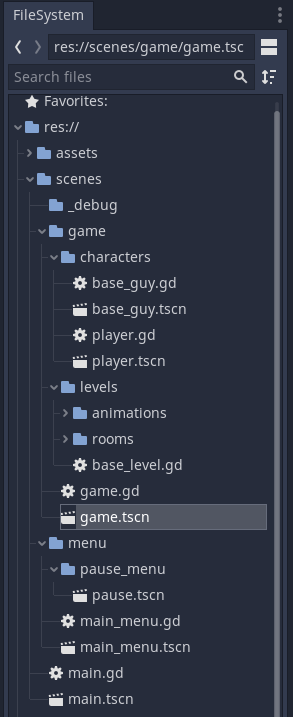
Based on the principles from both videos, here is a recommended folder structure for your project. This is a strong starting point that you can adapt as your game grows.
res://
├── addons/         # For third-party plugins
├── assets/         # For truly global assets (fonts, music)
│   ├── fonts/
│   └── music/
├── entities/       # Things that live in the world
│   ├── player/
│   ├── enemies/
│   └── items/
├── global/         # Game-agnostic, reusable systems
│   └── state_machine/
├── levels/         # The world itself: rooms, maps
│   └── tutorial_area/
├── managers/       # Autoloads/singletons for game state
│   ├── game_manager.gd
│   └── scene_manager.gd
├── ui/             # All user interface scenes and scripts
│   ├── hud/
│   └── menus/
└── main.tscn       # The main entry point scene for your game
Let's break down the key folders:
entities/: This is where most of your game-specific logic will live. It contains anything that appears in your game world: the player, enemies, NPCs, interactable objects, and items. Each entity gets its own folder containing its scene, script, art, and sounds.levels/(orstages/): This holds your game maps. For a Metroidvania, this folder would contain the scenes for each room or interconnected area, along with their associated TileSet resources.ui/: Contains all user interface elements. This includes the main menu, pause menu, inventory screen, dialogue boxes, and the in-game HUD. Keeping UI separate from game logic is a very good practice.global/(orcommon/): Your CS background will make this folder intuitive. It's for abstract, reusable code that isn't tied to your specific game's logic. A finite state machine implementation, a generic event bus, or a pathfinding algorithm would go here.managers/(orutilities/): This is the place for your autoload singletons. These are scripts that are always active and can be accessed from anywhere. They are perfect for managing global state, like which abilities the player has unlocked, handling scene transitions, or saving/loading the game. We will cover autoloads in detail in a future module.
3. Naming Conventions and Official Best Practices
Finally, to ensure your project is clean and portable, it's important to follow some standard conventions recommended by the Godot documentation.
Project organization - Godot Docs
The official Godot documentation provides a concise style guide and explanation for project organization.
Read the sections titled 'Style guide' and 'Case sensitivity'. These are short but critical. Pay attention to the recommended naming conventions and the reason behind them.
From the documentation, here are the essential rules:
- Use
snake_casefor files and folders:player_character.gd,main_menu/, etc.- Why? Windows filesystems are case-insensitive, while Linux and Godot's exported game packages are case-sensitive. Sticking to all lowercase with underscores (
snake_case) prevents bugs wherePlayer.gdandplayer.gdare treated as the same file on your development machine but as different files when you export your game.
- Why? Windows filesystems are case-insensitive, while Linux and Godot's exported game packages are case-sensitive. Sticking to all lowercase with underscores (
- Use
PascalCasefor node names:PlayerCharacter,MainMenu,TileMap, etc.- Why? This matches the naming convention of Godot's built-in nodes (e.g.,
CharacterBody2D,AnimationPlayer), creating a consistent style throughout your scene tree.
- Why? This matches the naming convention of Godot's built-in nodes (e.g.,
Conclusion
You now have a complete framework for thinking about and implementing a scalable project structure. This initial investment in organization will pay massive dividends as your Metroidvania grows in scope and complexity.
Key Takeaways:
- Organize your project by function (e.g.,
player,enemy), not by file type (e.g.,scripts,scenes). - A good starting structure includes top-level folders for
entities,levels,ui,globalsystems, andmanagers(autoloads). - Keep all assets for a specific feature (script, scene, art, audio) co-located within that feature's folder.
- Adhere to Godot's naming conventions:
snake_casefor files and folders,PascalCasefor nodes.
This lesson concludes the "Godot Editor & Project Fundamentals" module. You now have a project that is correctly configured for pixel art and organized for future growth.
In our next lesson, we will begin Module 2: GDScript Fundamentals. We'll dive into the heart of Godot development by learning how to declare and use variables with static typing in GDScript, the first step towards programming your character's movement and actions.