Hello! In the previous lesson, you gave values names with const and let and used strings, numbers, booleans, null, and undefined in a small task-status program. Now you’ll make those values do something. An expression is code that produces a value: 3 + 2 produces 5, while 3 > 2 produces true.
You’ll build calculations and yes-or-no checks for that task program, then choose sensible defaults when a value is missing. These JavaScript behaviors matter later in TypeScript: types can help you catch some mistakes, but you still need to understand what an expression does when it runs. Allow about 40 minutes, including time to edit and rerun app.js.
Calculate with arithmetic expressions
An operator acts on values called operands. In 7 - 2, the values 7 and 2 are operands; - is the operator. Watch the arithmetic demonstration before trying the same ideas in Node.js. The video uses a different count-based example, but its expressions work in app.js too.
JavaScript ARITHMETIC OPERATORS in 8 minutes! ➕
Watch “JavaScript ARITHMETIC OPERATORS in 8 minutes!” from Bro Code for the basic operators, remainder, and order of operations.
Watch basic arithmetic for addition, subtraction, multiplication, and division. Continue with remainder and powers, then skip to operator precedence. Focus on the difference between dividing a count and finding what is left over after division; you do not need to memorize a long precedence list.
Replace app.js with the following, save it, and run node app.js:
const startingTasks = 7;
const completedTasks = 2;
const minutesPerTask = 15;

const tasksRemaining = startingTasks - completedTasks;
const estimatedMinutes = tasksRemaining * minutesPerTask;
const leftoverWhenPaired = tasksRemaining % 2;

console.log("Remaining:", tasksRemaining);       // 5
console.log("Estimated minutes:", estimatedMinutes); // 75
console.log("Unpaired tasks:", leftoverWhenPaired); // 1
The first calculation produces 5. Multiplying that result by 15 produces 75. The % operator produces the remainder after division: five tasks form two pairs, with one task left over. It does not calculate a percentage. Ordinary division uses /, so 5 / 2 produces 2.5; 5 % 2 produces 1.
JavaScript also has + for addition and ** for powers: 2 ** 3 produces 8. For a negative value, -5 uses minus with a single operand. You can construct expressions from variables as well as literal numbers.
When several operators appear together, their order matters. Multiplication normally takes priority over addition, while parentheses let you state your intended grouping:
console.log(2 + 3 * 4);   // 14
console.log((2 + 3) * 4); // 20
That difference is worth making visible in real code. (startingTasks - completedTasks) * minutesPerTask clearly says to calculate the remaining count before estimating its time.
One JavaScript-specific trap is that + also joins strings. Read this short part of Basic operators, maths before changing the task program.
Read the section on string concatenation in the JavaScript.info tutorial to see why values that look like numbers do not always add as numbers.
Under “String concatenation with binary +”, start at the explanation beginning string addition. Stop at that final statement, before “Numeric conversion, unary +”. Pay particular attention to the examples mixing a number and a quoted string, and to how grouping changes what happens first.
Try these lines at the end of app.js:
console.log(2 + 3);       // 5
console.log("2" + 3);     // "23"
console.log("TASK-" + 7); // "TASK-7"
"2" is text, not a number. Joining it with 3 gives text "23". Joining "TASK-" with a task number, on the other hand, is intentional. When you mean to calculate, keep quantities as numbers rather than relying on JavaScript to interpret numeric-looking strings.
Turn values into true-or-false answers
A comparison expression asks a question and produces a boolean. Watch the relational and equality examples next. The presenter runs code in a browser; keep using Node.js for your own file.
JavaScript Comparison Operators Explained
Watch “JavaScript Comparison Operators Explained” from Future Fullstack to distinguish magnitude checks from equality checks.
Watch relational comparisons for >, <, >=, and <=. Then watch equality comparisons. Focus on the difference between assigning with = and comparing with ===, and on why comparing the number 5 with the string "5" needs care.
Add these lines after your arithmetic code:
const hasWorkLeft = tasksRemaining > 0;
const metDailyGoal = completedTasks >= 2;
const isFinished = tasksRemaining === 0;

console.log("Has work left:", hasWorkLeft);     // true
console.log("Met daily goal:", metDailyGoal);   // true
console.log("Is finished:", isFinished);         // false
> and < mean strictly greater and strictly less. >= and <= also include equality: 2 >= 2 is true. For equality, prefer strict equality === and strict inequality !==:
console.log(2 === 2);     // true
console.log(2 === "2");   // false
console.log(2 !== "2");   // true
A single = assigns a value; it does not ask whether two values match. JavaScript also has == and !=, which may convert operands before comparing them: 2 == "2" is true. That conversion can obscure a data mistake. Use === and !== for the comparisons in this course unless you have a specific reason to use the other forms.
Combine answers with logical operators
Suppose the task program should display available work only when the user is signed in and tasks remain. That requires two boolean answers, combined into one expression. The truth tables below show how && (and), || (or), and ! (not) behave with booleans.
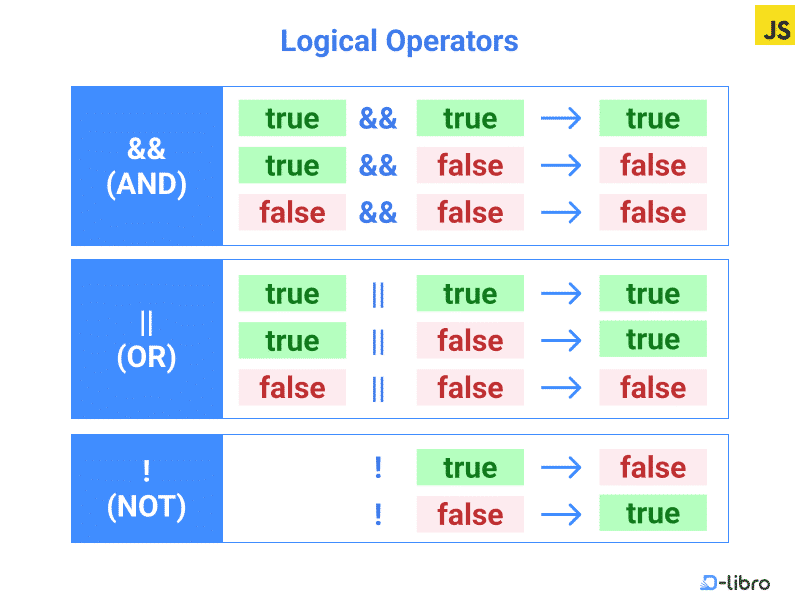
Add a signed-in state and combine it with your earlier comparison:
const isSignedIn = true;
const isSyncing = false;

const canShowTasks = isSignedIn && hasWorkLeft;
const needsAttention = hasWorkLeft || isSyncing;
const isIdle = !isSyncing;

console.log("Show tasks:", canShowTasks);        // true
console.log("Needs attention:", needsAttention); // true
console.log("Idle:", isIdle);                     // true
When both operands are booleans, && yields true only if both are true; || yields true if either is true. ! reverses a boolean. Parentheses are useful when combining several checks, even if you could rely on operator precedence:
const canWorkNow = isSignedIn && (hasWorkLeft || isSyncing);
Read MDN’s explanation for an important nuance: JavaScript’s logical operators can also work with values that are not booleans.
Expressions and operators - JavaScript - MDN Web Docs
Read MDN’s “Logical operators” section to connect the boolean truth tables with JavaScript’s actual value-selection behavior.
In “Logical operators”, begin with logical operators and continue through the subsection “Short-circuit evaluation”; stop before “BigInt operators”. Focus on the operator table, the examples using 0 and false with ??, and the rule that the right-hand expression may not be evaluated.
A value such as 0 or "" (the empty string) is falsy: JavaScript treats it like false when deciding what && or || should select. A nonempty string is truthy. Consequently, these operators do not always return booleans:
console.log("" || "Untitled");  // "Untitled"
console.log(0 && "Continue");  // 0
They also short-circuit. If the left side of && is falsy, JavaScript does not evaluate the right side; if the left side of || is truthy, it does not evaluate the right side. For example, the message here never prints:
false && console.log("This will not print");
Use boolean comparisons when you want an unambiguous boolean result, as in isSignedIn && tasksRemaining > 0. Use value selection deliberately when you actually want one of the operands returned.
Supply a default only when a value is missing
Last lesson, null meant “no task selected,” while an unassigned variable held undefined. The nullish coalescing operator ?? provides a fallback for either of those values.
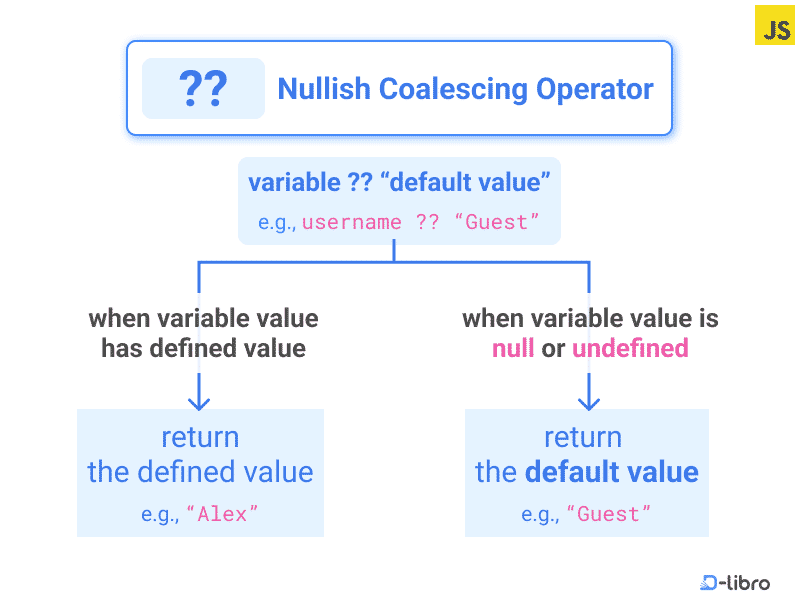
Add this to app.js:
const selectedTaskId = null;
const displayedTaskId = selectedTaskId ?? "No task selected";

console.log("Selection:", displayedTaskId); // "No task selected"
console.log(undefined ?? "No sync yet");     // "No sync yet"
The distinction between ?? and || matters when a falsy value is nevertheless a valid choice. Imagine that a daily goal of zero means taking a day off:
const preferredDailyGoal = 0;

console.log(preferredDailyGoal ?? 3); // 0
console.log(preferredDailyGoal || 3); // 3
?? keeps 0 because it is neither null nor undefined. || chooses 3 because 0 is falsy. The same distinction applies to false and "": missing does not mean falsy. When absence is what calls for a default, ?? usually expresses that intent more accurately.
What to carry forward
You can now construct expressions that calculate numbers, compare values, combine boolean answers, and provide a fallback for null or undefined. Keep quantities numeric when calculating; prefer === and !== for equality checks; and choose ?? rather than || when valid values such as 0 must be preserved.
So far, your program calculates and prints answers, but it runs the same statements every time. Next, you’ll use those boolean expressions with conditional statements and switch to make it choose what to do.