Hello! Welcome to our next lesson.
In our previous session, we explored the Critical Rendering Path, focusing on how the browser constructs the DOM tree from your HTML. We now have a static, visible page. The next logical step is to make it interactive. How does the browser respond when a user clicks a button, submits a form, or triggers any other event on one of these DOM nodes?
This lesson dives into the core mechanics of how events travel through the DOM. You'll learn that an event fired on an element doesn't just stay there; it undertakes a journey through its ancestors. Understanding this journey is crucial for writing predictable, efficient, and maintainable event-driven code.
Our learning outcome is to describe the event propagation phases (capturing and bubbling) and the role of the event target. We will dissect the complete lifecycle of a DOM event, from its creation to its journey down and back up the DOM tree.
The Three Phases of Event Propagation
When an event occurs on an element in the DOM, it doesn't just trigger the listener on that specific element. Instead, the browser initiates a three-phase process.
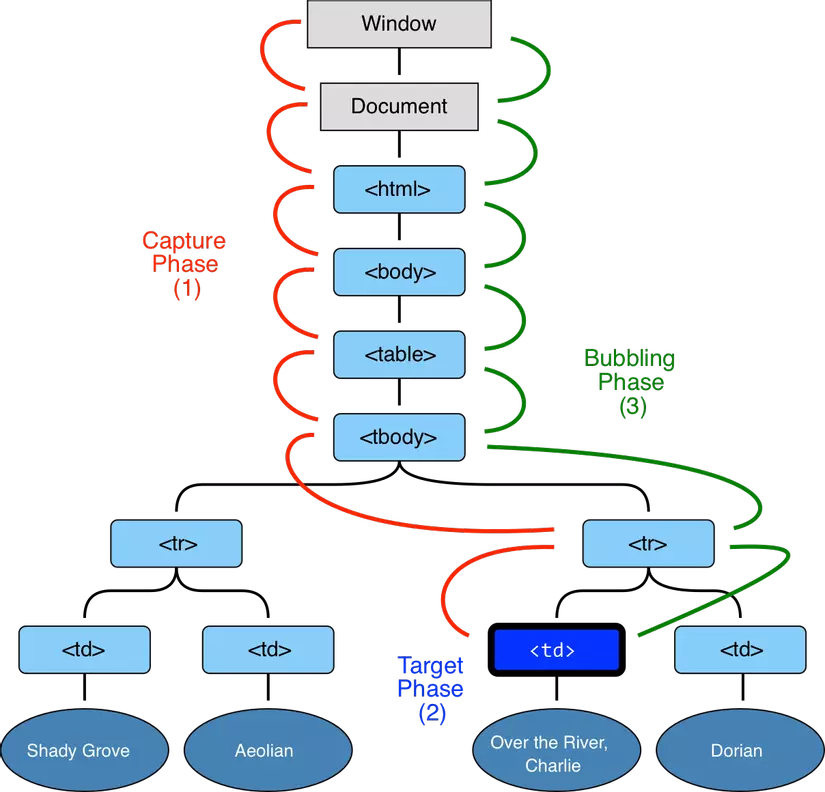
The three phases are:
- Capturing Phase: The event starts at the root of the document (
windowordocument) and travels down through the ancestor elements to reach the target. - Target Phase: The event arrives at the element where it was initiated (e.g., the specific button that was clicked).
- Bubbling Phase: After the target phase, the event reverses course and travels back up through the ancestor elements to the root.
This entire down-and-up journey is known as event propagation. To get a clear conceptual model of these phases, let's start with a comprehensive guide.
An Interactive Guide to JavaScript Events
The article 'An Interactive Guide to JavaScript Events' by Aleksandr Hovhannisyan provides an excellent, detailed breakdown of the event lifecycle. It clearly explains why this three-phase model exists.
Please read the section titled 'JavaScript Event Phases.' Focus on understanding the sequence: Capturing -> Targeting -> Bubbling. Pay attention to the diagram and the description of the event.eventPhase property, which programmatically identifies the current phase.
Event Bubbling: The Default Behavior
For most events, the bubbling phase is the one you'll encounter most often. By default, when you add an event listener using element.addEventListener('click', handler), the handler is triggered during the bubbling phase.
Let's imagine a simple DOM structure:
<div id="grandparent">
  <div id="parent">
    <button id="child">Click Me</button>
  </div>
</div>
If you attach a click listener to all three elements and then click the button, the event handlers will fire in this order: child → parent → grandparent. The event "bubbles" up from the target.
Javascript Interview Questions ( Event Propagation ) - Bubbling, Capturing, and Deligation
This video from RoadsideCoder offers a very practical, code-focused demonstration of event bubbling. It clearly shows the default bottom-up execution order.
Watch the segment on event bubbling from 02:09 to 04:18. Observe how the alerts appear from the most specific element (button) outwards to its containers (form, div).
This behavior is foundational for many powerful patterns in web development, which we will explore in the next lesson.
Event Capturing: The "Trickle-Down" Phase
While bubbling is the default, you have the option to execute your event handler during the capturing phase instead. This is sometimes called "trickling," as the event trickles down the DOM tree.
To register an event listener for the capturing phase, you pass a third argument to addEventListener:
element.addEventListener('click', handler, { capture: true });
// An older syntax, `true`, also works:
// element.addEventListener('click', handler, true);
If we modified our previous example to use capturing listeners on the grandparent and parent, a click on the child button would result in this execution order: grandparent → parent → child.
Javascript Interview Questions ( Event Propagation ) - Bubbling, Capturing, and Deligation
Let's return to the RoadsideCoder video to see how to enable event capturing.
Watch the segment on event capturing from 06:32 to 08:01. Notice how adding { capture: true } changes the execution order of the event listeners to be top-down.
The capturing phase is used less frequently than bubbling, but it can be useful in specific scenarios, such as intercepting an event before it reaches its target or for events that do not bubble (like focus or blur).
The Role of the Event Target: target vs. currentTarget
During propagation, it's essential to distinguish between where the event started and which element is currently handling it. The event object provides two key properties for this:
event.target: This is the element that initiated the event. It is the most deeply nested element that was clicked, and its value does not change throughout the propagation journey.event.currentTarget: This is the element that the event listener is currently attached to. Its value changes as the event captures or bubbles through the DOM tree. Inside an event handler,event.currentTargetis always equal to the element you calledaddEventListeneron.thisalso refers toevent.currentTargetin a standard function handler.
Understanding this distinction is critical when a single handler is used on a parent element to manage events from multiple children.
An Interactive Guide to JavaScript Events
The 'Interactive Guide to JavaScript Events' offers another clear explanation, this time on the difference between the event's origin and its current handler.
Read the section '2. Event Targeting.' Focus on the subsections for Event.target and Event.currentTarget to solidify your understanding of how they differ during event propagation.
To see this distinction in code, let's watch one more clip.
Javascript Interview Questions ( Event Propagation ) - Bubbling, Capturing, and Deligation
The RoadsideCoder video provides a side-by-side comparison of these properties.
Watch from 04:18 to 06:42. Pay close attention to the console output. Notice how event.target always refers to the button, while event.currentTarget (and this) changes to reflect the element whose listener is currently executing.
Controlling Propagation
Sometimes, you may want to prevent an event from continuing its journey. For instance, after handling a click in a child element, you might not want parent elements to react to the same click. The event object provides a method for this: event.stopPropagation().
When called, stopPropagation() prevents the event from propagating any further.
- If called during the capturing phase, it stops the event from reaching the target and from entering the bubbling phase.
- If called during the bubbling phase, it stops the event from bubbling up to any more ancestors.
However, this method should be used with caution.
The resource 'Bubbling and capturing' from The Modern JavaScript Tutorial provides an excellent discussion on stopPropagation, including an important warning about its potential downsides.
Read the section 'Stopping bubbling.' The key part here is the subsection 'Don’t stop bubbling without a need!'. This architectural advice is valuable, as indiscriminately stopping propagation can create 'dead zones' in your UI and interfere with analytics or other global listeners.
Stopping propagation can make your component architecture more brittle and harder to debug, as it breaks the expected flow of events that other parts of the application might rely on. It's often better to solve problems by checking event.target within a parent's handler rather than stopping propagation altogether.
Conclusion
In this lesson, we've unpacked the complete journey of a DOM event. You now have a precise mental model of how the browser handles user interactions within the DOM tree you learned to build in the last lesson.
Key Takeaways:
- Three Phases: Event propagation consists of the Capturing Phase (down), Target Phase, and Bubbling Phase (up).
- Default Behavior: Most events bubble by default. Event handlers are attached to the bubbling phase unless you explicitly opt into the capturing phase with
{ capture: true }. - Target vs. CurrentTarget:
event.targetidentifies the origin of the event, whileevent.currentTargetidentifies the element currently handling it. This distinction is fundamental. stopPropagation(): This method halts event propagation but should be used judiciously, as it can lead to fragile application architecture.
What's Next?
Now that you have a deep understanding of event bubbling, you are perfectly equipped to learn one of the most powerful and performant event handling patterns in JavaScript: event delegation. In our next lesson, we will see how we can leverage bubbling to manage events for a large number of elements with a single event listener, improving memory usage and performance.