Introduction
Welcome to your next lesson! In our previous session, we explored how custom hooks are a powerful pattern for encapsulating and reusing stateful logic. We made a crucial distinction: custom hooks share logic, but each call creates its own isolated state.
This raises a new question: what if we need multiple, distant components to share the exact same state? The traditional React approach is "lifting state up" to the nearest common ancestor and passing it down as props. However, in a complex application, this can lead to "prop drilling," where props are passed through many intermediate components that don't need them.
This lesson directly addresses that challenge. We'll explore React's Context API, a built-in mechanism designed to solve prop drilling. Our goal is to explain how the Context API provides a mechanism for prop drilling avoidance and its potential performance implications.
Given your interest in the underlying mechanics of frameworks, we won't just learn the API. We will dissect how it works, why it's more of a dependency injection system than a state management library, and critically, analyze the performance trade-offs inherent in its design.
Part 1: The Problem of Prop Drilling
Before we look at the solution, let's clearly define the problem. "Prop drilling" (or "prop threading") is the process of passing data from a parent component down to a child component through several layers of intermediary components.
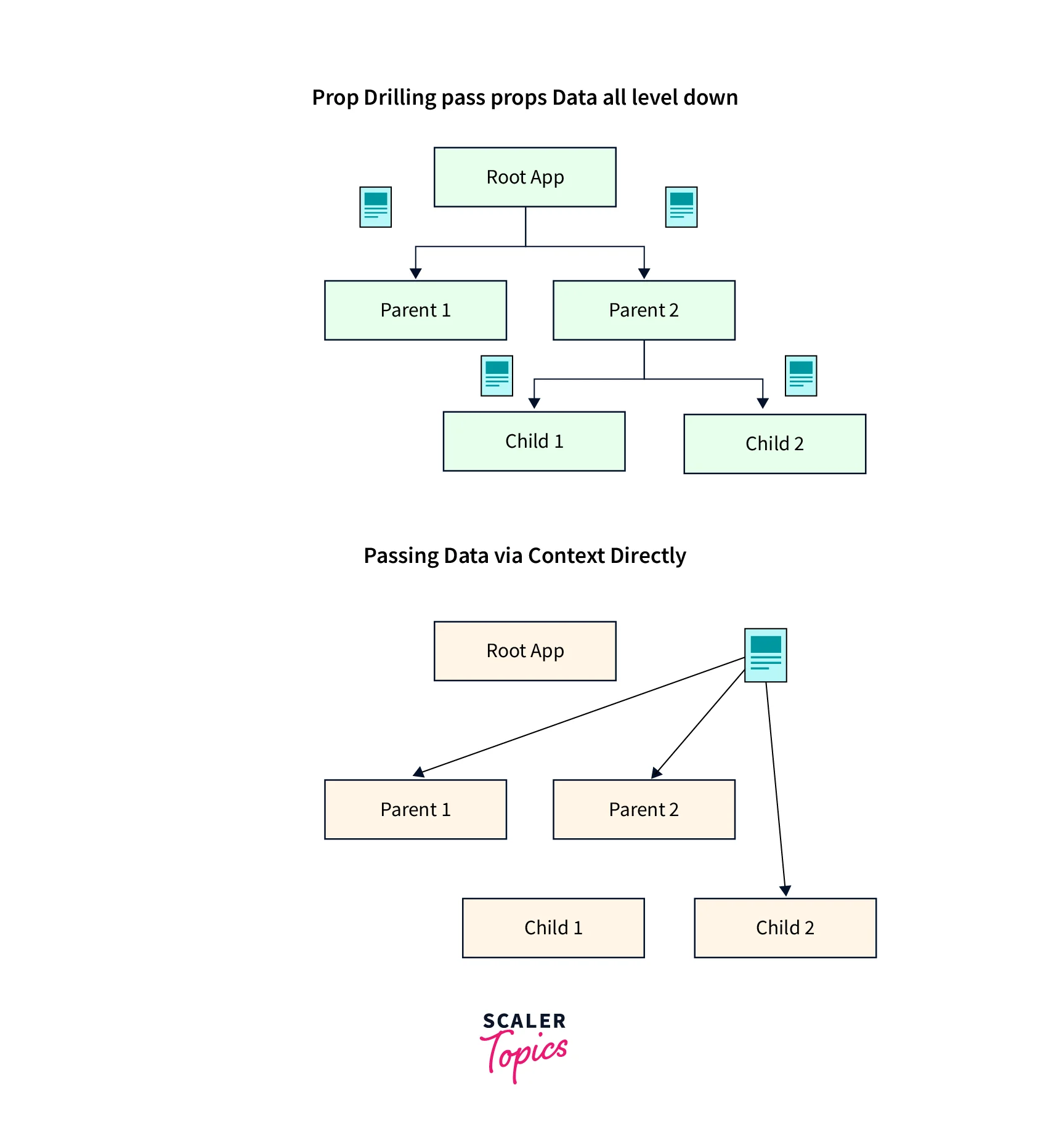
Prop drilling isn't technically an error, but it can lead to several issues in large applications:
- Code Verbosity: Components become cluttered with props they don't use, simply to pass them down.
- Maintenance Overhead: Refactoring can be difficult. If a prop's name or shape changes, you have to update it in every component in the chain.
- Reduced Component Reusability: Intermediate components become tightly coupled to the props they are passing, making them harder to reuse elsewhere.
This Context API Mistake Ruins Your Whole React App (All Components Re-Render)
The following video from the ByteGrad channel provides a quick, practical demonstration of lifting state and the resulting need to drill props, setting the stage for Context.
Watch the first 1 minute and 52 seconds. The video walks through a common scenario where state is lifted to a parent component, requiring it to be passed down to children via props, which perfectly illustrates the prop drilling problem.
Part 2: The Solution - Understanding the Context API
The Context API provides a way to make data available to a tree of components without having to pass it down explicitly at every level. It's often described as a "wormhole" or a "teleporter" for your data.
At its core, Context is best understood not as a state management tool, but as a form of dependency injection. You are "injecting" a value that child components in the tree can "depend on" and consume.
Blogged Answers: Why React Context is Not a 'State Management' Tool
This article from Mark Erikson, a Redux maintainer, provides a very clear and accurate definition of what Context is and what it is not.
Please read the sections 'What is React Context?', 'Purpose and Use Cases for Context', and 'Why Context is Not "State Management"'. Focus on these key ideas: The official documentation's description of Context as a way to pass and share data, not manage it. The analogy of Context as a 'pipe' or 'wormhole'. The definition of state management (store, read, update), and why Context itself doesn't fit this definition.
As the article clarifies, the actual state management is typically handled by useState or useReducer in a parent component. Context is merely the transport mechanism for that state.
The API consists of three main parts:
React.createContext(): Creates a Context object. This object comes with two components: aProviderand aConsumer. When a component subscribes to this context, it will read the current context value from the closest matchingProviderabove it in the tree.<MyContext.Provider value={...}>: This component accepts avalueprop. Any component descending from this Provider can subscribe to the context and will receive this value.useContext(MyContext): This is the hook used within a functional component to read the context's value. It triggers a re-render in the component whenever the Provider'svalueprop changes.
Part 3: The Performance Implications of Context
This is where your interest in the internal mechanics becomes crucial. While Context elegantly solves prop drilling, it has a significant performance characteristic you must understand: its update mechanism is based on reference identity.
Mechanism: How Context Triggers Re-renders
When a <Context.Provider>'s parent re-renders, React compares the new value prop with the old value prop using the Object.is() comparison (which is very similar to ===).
If Object.is(oldValue, newValue) returns false (meaning they are different object references), React will re-render every single component that consumes that context, regardless of whether the specific piece of data they care about has actually changed.
Let's dig into this.
State Management Architectures in Modern React: An Exhaustive ...
The article 'State Management Architectures in Modern React' offers a superb architectural analysis of this behavior.
Please read 'Chapter 2: The React Context API — Dependency Injection vs. State Management' and the section '2.1 The Mechanism of Propagation: Reference Identity'. Pay close attention to: The distinction between Context as a dependency injection mechanism and a state management library. The explanation of 'reference identity' and how Object.is is the trigger. The code example demonstrating how an update to notifications would cause a component that only uses theme to re-render. This is the core performance issue, often called 'over-rendering'.
This "over-rendering" is the most important performance implication to understand. Let's see it in action.
Ben Awad's video 'Redux or Context in React' provides a concise and clear demonstration of this exact problem.
Watch the segment from 00:01:39 to 00:04:24. In this clip, a context provides an object with likes and numComments. Notice that the Likes component only consumes the likes property. Critically, observe that when the comments are incremented, the Likes component still re-renders, even though it's wrapped in React.memo. This demonstrates that React.memo cannot prevent a re-render caused by a context value change.
Common Pitfall: Provider Structure
A related performance issue arises from how the Provider itself is structured. If you define the value object for the provider directly inside the render function of the parent component, you will create a new object reference on every single render of that parent.
This will cause all consumers to re-render, even if the underlying data hasn't changed. Worse, it can cause all children of the provider to re-render if not structured properly.
This Context API Mistake Ruins Your Whole React App (All Components Re-Render)
The ByteGrad video we saw earlier also covers this common mistake and shows the correct pattern to avoid it.
Watch the rest of the video from 00:01:52 to 00:05:24. The video highlights two key points: The Mistake (1:52 - 3:25): Shows how an incorrect provider setup causes all child components (even non-consumers) to re-render when the context value changes. The Solution (3:25 - 5:24): Demonstrates the standard pattern of creating a dedicated Context.Provider component that manages its own state and accepts children. This pattern ensures that only the provider and its actual consumers re-render, not the entire subtree.
The key to fixing this is to ensure the value object passed to the provider is stable. This is often achieved by:
- Wrapping the value creation in
useMemo. - Or, more robustly, by creating a dedicated Provider component that holds the state and passes its
childrenthrough, as shown in the video.
Part 4: Architectural Best Practices
So, when is Context the right tool? Understanding its performance characteristics allows us to make informed architectural decisions.
State Management Architectures in Modern React: An Exhaustive ...
Let's return to the 'State Management Architectures' article to see a summary of ideal use cases and the 'hidden cost' of using Context for the wrong purpose.
Please read the following sections: '2.3 Performance Bottlenecks and “The Hidden Cost”': This explains that the cost isn't file size, but the developer effort required for manual optimization (useMemo, React.memo). '2.4 Ideal Use Cases: When Context Shines': This provides a clear list of when Context is the perfect choice. 'Scenario C: The Native Purist': This reinforces the idea of using Context for dependency injection and low-frequency state.
To summarize, Context is an excellent choice for:
- Low-frequency updates: Data that doesn't change often, like a user's theme preference (dark/light mode), authentication status, or language/localization settings. The cost of a rare re-render is negligible.
- Static data & Dependency Injection: Passing down configuration objects, feature flags, or even instances of services. This aligns perfectly with its design as a DI mechanism.
Conversely, you should avoid using Context for high-frequency updates, such as mouse coordinates, form input state, or real-time data from a WebSocket. The constant re-renders will cause noticeable performance degradation.
Conclusion
In this lesson, we dissected the React Context API, moving beyond its surface-level utility to understand its core mechanics and performance profile.
Key Takeaways:
- Primary Purpose: Context is React's built-in solution for avoiding prop drilling, acting as a dependency injection mechanism to pass data deep into the component tree.
- Not State Management: Context itself does not manage state; it is a transport system for state that is typically managed by hooks like
useStateoruseReducer. - Performance Bottleneck: Updates are triggered by changes in the
valueprop's reference identity. A new object reference will cause all consuming components to re-render, even if the data they use is unchanged. - Best Use Cases: It excels for low-frequency or static data like theming, authentication status, and localization, where the cost of re-renders is minimal.
What's Next?
We've established that the state provided by Context is often managed by useState. However, as state logic grows, useState can become unwieldy with complex setter logic scattered across event handlers. What if we could centralize all the possible state transitions in one place, similar to a classic Redux pattern?
In our next lesson, we will explore the useReducer hook. You'll learn how it provides a more robust and scalable alternative to useState for managing complex component state, and see how it pairs perfectly with the Context API to create powerful, self-contained state management solutions.