Introduction
In our last lesson, we delved into useMemo and useCallback, hooks designed to optimize performance by controlling when re-renders happen. We learned that their primary purpose is to provide stable references for non-primitive props, making them work effectively with React.memo.
Now, we'll shift our focus to a hook that allows you to escape the render cycle entirely: useRef. While useState is for data that drives your UI, useRef is for values that you need to hold onto but which shouldn't trigger a re-render when they change.
Our learning outcome for this lesson is to explain how useRef provides a mutable reference that persists across renders without causing a re-render. By the end, you will understand:
- The fundamental difference in behavior between
useStateanduseRef. - The internal mechanism that allows
useRefto persist its value. - The two primary use cases for
useRef: accessing DOM elements and storing mutable instance-like variables. - The important distinction between
useRef's synchronous updates anduseState's asynchronous updates.
Part 1: The Core Concept — A Silent Partner to State
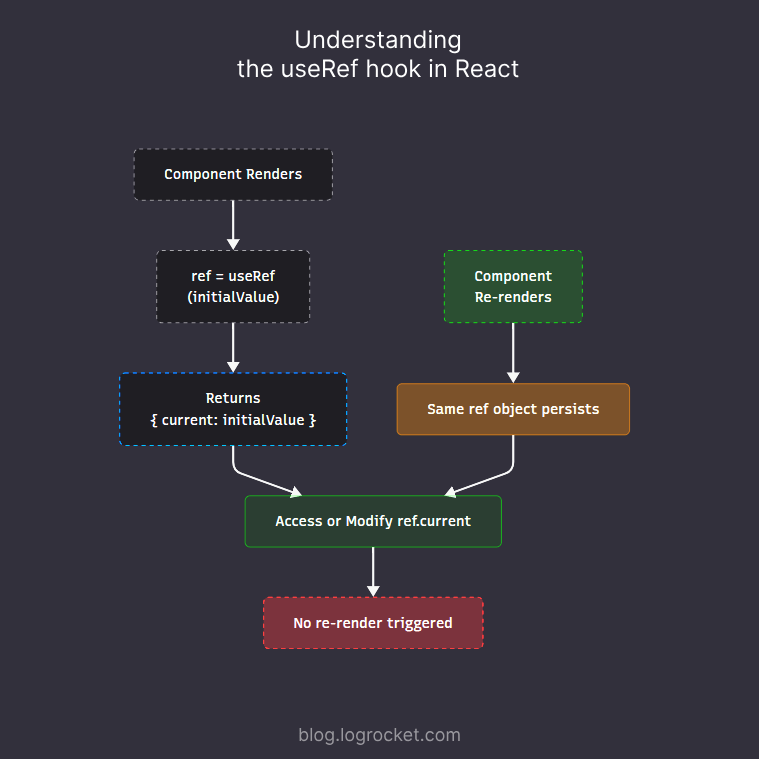
The most crucial thing to understand about useRef is what it doesn't do: it doesn't trigger a re-render. When you create a ref, React gives you a plain JavaScript object with a single property: current. You can change this current property as much as you want, and your component won't re-render. However, the value you set will be there the next time your component renders for any other reason (like a state or prop change).
Let's see this in action. The following video provides a crystal-clear demonstration of this behavior by contrasting a useState counter with a useRef counter.
useState vs useRef - You’re Using the WRONG One
The video 'useState vs useRef - You’re Using the WRONG One' by Austin Davis provides excellent, practical examples that highlight the key differences between these two hooks.
Please watch the following two segments: useRef Doesn't Trigger Renders (01:39 - 03:47): Pay close attention to what happens (or rather, doesn't happen) to the UI when the button is clicked after converting the counter from useState to useRef. The console log is key here. useRef Persists Across Renders (04:18 - 05:31): This part demonstrates that even though the ref update didn't cause a re-render, its value was preserved. Notice how a re-render forced by a different piece of state reveals the ref's updated value.
As you saw, a regular variable declared with let or const gets reset on every render. A useState variable persists and triggers a re-render when updated. useRef hits the sweet spot in between: it persists across renders, but does so silently without triggering a new one.
Part 2: How It Works Under the Hood
Your interest in the internal mechanics of frameworks will be useful here. The reason useRef behaves this way is elegant and simple. As you may recall from our discussion on the Rules of Hooks, React maintains an internal array of hook data for each component instance.
When useRef(initialValue) is called for the first time, React does the following:
- Creates an object:
{ current: initialValue }. - Stores this object in the component's internal
hookStatesarray at the current hook index. - Returns this object.
On every subsequent render, when useRef is called at the same position, React simply retrieves and returns the exact same object from the hookStates array.
Because it's the same object reference every time, its value persists. And since modifying the current property is just a direct mutation of a JavaScript object—with no call to a state dispatch function—React's rendering engine is never notified, so no re-render is scheduled.
The following article provides a fantastic, simplified implementation that makes this concept tangible.
How React Hooks Work Under the Hood: Recreating useState ...
The article 'How React Hooks Work Under the Hood' gives us a peek into a simplified model of React's internals. We'll focus on its recreation of useRef.
Please read the section titled 'Recreating useRef'. Pay close attention to the simplified code implementation. Notice how it checks if a value already exists at hookStates[currentIndex]—if so, it just returns it. This is the core of persistence. If not, it creates it. This simple logic is all that's needed to achieve the behavior we've discussed.
This underlying mechanism also explains a key difference from useState: updates to a ref are synchronous. When you write myRef.current = newValue, the value is updated immediately and is available on the very next line of code. Conversely, setState(newValue) is asynchronous and schedules a re-render; the new state value is only available in the next render cycle.
Part 3: The Primary Use Cases
Now that we understand the 'how' and 'why', let's explore the 'when'. There are two main scenarios where useRef is the right tool.
Use Case 1: Accessing DOM Elements
This is the most common use of useRef. You can pass a ref to a JSX element's ref attribute to get a direct handle to its underlying DOM node. This allows you to "escape React" and perform imperative actions like managing focus, triggering animations, or integrating with third-party DOM-based libraries.
The login form example you encountered earlier demonstrates this perfectly. By attaching refs to the input elements, we can read their values on form submission without needing to cause a re-render on every single keystroke, which is what would happen if we used useState. This is the essence of an uncontrolled component.
useState vs useRef - You’re Using the WRONG One
Let's revisit the Austin Davis video to see a practical demonstration of using useRef to manage DOM elements.
Please watch the segment from 14:57 to 19:43. Observe how the form is initially built with useState (triggering re-renders on every keystroke) and then refactored to use useRef. Notice how refs are passed directly to the input elements and how ref.current.value is used to get the input's value imperatively during the submit handler.
Use Case 2: Storing Mutable Instance Variables
Sometimes, you need to keep track of a value across renders that is not part of the component's visual output. Think of it like an instance field in a class-based component. Common examples include:
- Storing a timer ID from
setIntervalso you can clear it later. - Tracking whether the component is mounted to prevent state updates after unmounting.
- Keeping a reference to a previous state or prop value.
This last example is captured in a very popular custom hook, usePrevious. Understanding how it works provides deep insight into the interplay between useRef and useEffect, and the React render lifecycle.
Understanding useEffect, useRef and Custom Hooks - Persson Dennis
The article 'Understanding useEffect, useRef and Custom Hooks' by Dennis Persson uses the usePrevious hook to dissect React's execution order. This will solidify your conceptual understanding of the render and effect phases.
Please read through the article, focusing on these parts: The Premise: Understand the usePrevious hook's code and the author's question about why it works. The Logged Code: Examine the App.js and usePrevious.js examples with console.log statements. The Walkthrough: Follow the step-by-step analysis of the console output. This is the most critical part. It clearly shows that the component renders first (returning the old ref.current value), and only after the render is complete does the useEffect callback run to update ref.current for the next render. The Conclusion: The final sections summarize this key takeaway about the execution order.
The crucial insight from this article is that the render phase and the effect phase are distinct and sequential. useRef allows a value to be read during the render phase and updated later in the effect phase, without triggering another render, making it the perfect tool for remembering a value from the "past".
Conclusion
In this lesson, we've unpacked useRef and seen that it's more than just a way to grab DOM nodes; it's a fundamental tool for managing data that lives outside React's declarative, state-driven render cycle.
Key Takeaways:
- Core Function:
useRefreturns a mutable ref object ({ current: ... }) whose identity is stable across renders. - No Re-renders: Modifying the
ref.currentproperty does not cause the component to re-render. This is its key distinction fromuseState. - Persistence: The value stored in
ref.currentpersists for the lifetime of the component instance. - Synchronous Updates: Unlike
useStatesetters, assignments toref.currentare synchronous and the new value is available immediately. - Primary Uses:
- Gaining direct, imperative access to DOM elements.
- Storing instance-like mutable variables (e.g., timer IDs, previous props) that don't need to trigger UI updates.
What's Next?
The login form example provided a glimpse into an important pattern: the uncontrolled component. We saw how using useRef allowed the HTML <input> element to manage its own state, with React only reading the value when needed. In our next lesson, we will formalize this concept, contrasting it directly with the controlled component pattern (using useState) to understand the trade-offs and decide which approach is best for different scenarios.