Hello! Welcome back to our deep dive into JavaScript's core mechanics.
In our last lesson, we established the critical difference between primitive and reference types, grounding our understanding in the concept of mutability. We saw that while the "stack vs. heap" model is a useful simplification, the real behaviors of variable assignment and function arguments are governed by whether a value can be changed in place.
Today, we'll build directly on that foundation to tackle one of JavaScript's most misunderstood features: type coercion. This is what happens when you use operators like + or == with values of different types. By the end of this lesson, you will be able to describe how JavaScript's type coercion works in equality comparisons (== vs ===) and arithmetic operations.
Rather than memorizing a list of quirks, we'll go under the hood to understand the algorithms defined in the ECMAScript specification that dictate these conversions. This conceptual approach will allow you to predict JavaScript's behavior in any situation.
The Foundation: Explicit vs. Implicit Conversion
Type conversion is the process of changing a value from one data type to another. It comes in two flavors:
- Explicit Conversion (Type Casting): You, the developer, explicitly instruct JavaScript to convert a type using functions like
Number(),String(), orBoolean(). - Implicit Conversion (Coercion): JavaScript automatically converts a type when it encounters mixed types in an operation, such as
5 + "5". This is the "coercion" we'll be focusing on.
Coercion and Type Conversion in JavaScript, Simplified
To see a quick demonstration of both explicit and implicit conversion, watch the first part of this video from the Deeecode channel.
Watch from the beginning to 03:02. Pay attention to: The distinction between implicit (coercion) and explicit conversion (type casting). How the + operator behaves differently from the * operator when a string is involved.
The video shows that the + operator with a string leads to concatenation, while the * operator attempts a numeric conversion. This isn't arbitrary; it's the result of a specific, rule-based process. Let's dig into that process now.
Under the Hood: The ToPrimitive Algorithm
At the heart of all coercion is an internal abstract operation called ToPrimitive. When JavaScript needs to convert a non-primitive type (an object, array, etc.) into a primitive, it calls this operation.
Crucially, ToPrimitive is called with a "hint" about the preferred final type: either 'number' or 'string'.
- Operations like
*,/,-provide a'number'hint. - Operations like template literals (
'string'hint. - Operators like
+and==are neutral and use a'default'hint, which for most objects behaves like'number'.
The ToPrimitive operation, in turn, usually calls another internal operation, OrdinaryToPrimitive, which does the actual work by trying to call two methods on the object in a specific order: toString() and valueOf().
- If the hint is
'string': It triestoString()first, thenvalueOf(). - If the hint is
'number'or'default': It triesvalueOf()first, thentoString().
The first method that returns a primitive value wins, and that value is used for the coercion.
Type Coercion In JavaScript: A Deep Dive
The article 'Type Coercion In JavaScript: A Deep Dive' from CodeLit provides an excellent, technically precise explanation of this process with simplified pseudo-code.
Please read sections 2 ('JavaScript uses a function to convert anything to either number or string') and its subsections. Focus on: The pseudo-code for ToPrimitive and OrdinaryToPrimitive. This is the core logic. How the hint determines the order of toString() and valueOf(). The hands-on example with the custom b object, which demonstrates how different operators (* vs. `${b}`) trigger different conversion paths.
Coercion in Arithmetic Operations
With ToPrimitive in mind, let's see how arithmetic operations work.
Most arithmetic operators (*, /, -, %) are straightforward: they always provide a 'number' hint and attempt to convert all operands to numbers. If a conversion results in NaN (Not a Number), the result of the entire operation will be NaN.
The addition operator (+) is the special case. Its behavior depends on the types of the primitives after the initial ToPrimitive conversion.
The CodeLit article you just read also provides the pseudo-code for the addition algorithm. Here's a summary:
- First, both operands are converted to primitives using
ToPrimitive(with a'default'hint for objects). - If either operand is a string, the other operand is also converted to a string, and they are concatenated.
- Otherwise, both operands are converted to numbers and added.
Type Coercion In JavaScript: A Deep Dive
Let's return to the same article to see the specific algorithm for addition.
Read section 3.1, 'Addition'. The pseudo-code in 'Listing 8' and the subsequent examples clearly explain the decision logic that makes + unique.
Coercion in Equality Comparisons
This is where understanding coercion becomes essential to avoid bugs.
Strict Equality (===)
Let's start with the easy one. The strict equality operator (===) is often called the "triple equals." Its rule is simple: no coercion.
If the types of the operands are different, it immediately returns false. If they are the same type, it compares their values. This is predictable and almost always what you want.
There are two minor edge cases with ===:
NaN === NaNisfalse.NaNis the only value in JavaScript that is not equal to itself. The correct way to check forNaNisNumber.isNaN().+0 === -0istrue. Positive and negative zero are considered strictly equal.
Loose Equality (==)
The loose equality operator (==), or "double equals," attempts to be "helpful" by coercing operands of different types before comparing them. This is governed by the Abstract Equality Comparison Algorithm in the ECMAScript spec.
The article 'Equality: == vs ===' from 33 JavaScript Concepts provides a definitive breakdown of both algorithms. We'll use it to understand the rules of loose and strict equality.
First, read section 'Loose Equality (==): The Relaxed Comparison' to understand the complex rules of ==. Then, read section 'Strict Equality (===): The Reliable Choice' to contrast it with the simpler ===. For ==, focus on these key rules from the algorithm: Rule 2: null == undefined is true. This is a special case. Rule 3: If comparing a Number and a String, the String is converted to a Number. Rule 5: If either operand is a Boolean, it's converted to a Number (true -> 1, false -> 0). Rule 6: If an Object is compared with a primitive, the Object is converted to a primitive using ToPrimitive (with a 'default' hint, which prefers valueOf()).
To see just how complex and unintuitive loose equality can be, let's analyze a classic "gotcha": [] == ![].
- Evaluate
![]: The logical NOT operator (!) coerces its operand to a boolean. An empty array[]is an object, and all objects are "truthy." So,![]becomesfalse. The expression is now[] == false. - Boolean Coercion: The
==algorithm sees a boolean. It convertsfalseto a number, which is0. The expression is now[] == 0. - Object-to-Primitive Coercion: The algorithm sees an object (
[]) and a number (0). It callsToPrimitiveon the array with a'default'hint. This meansvalueOf()is tried first.[].valueOf()returns the array itself, which is not a primitive. So, it triestoString().[].toString()returns an empty string"". The expression is now"" == 0. - String-to-Number Coercion: The algorithm sees a string and a number. It converts the empty string
""to a number, which is0. The expression is now0 == 0. - Final Comparison:
0 == 0istrue.
This demonstrates why relying on loose equality can lead to code that is very difficult to reason about.
This table provides a great visual summary of the differences between the two operators.
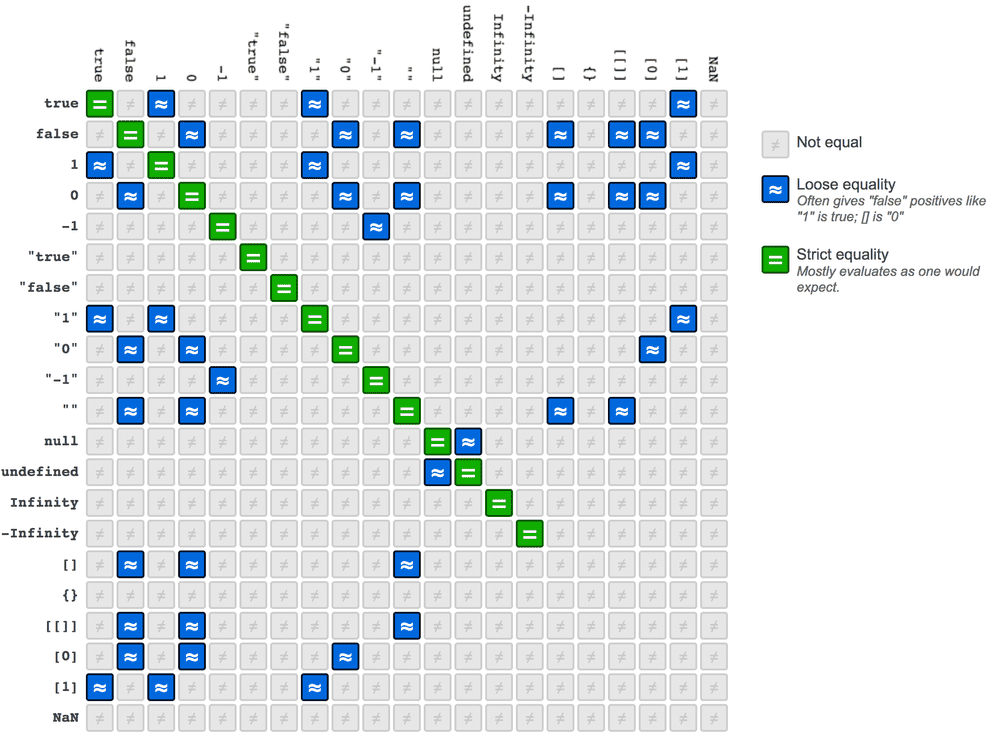
Recommendations and Best Practices
Given the complexity and potential for bugs, the community consensus is clear:
Always use === for comparisons.
The only widely accepted exception is when you need to check if a value is either null or undefined. Because null == undefined is true (and they don't loosely equal any other values), you can use value == null as a concise check for both.
The 'Equality: == vs ===' article also covers these practical recommendations and common mistakes.
Quickly read the sections 'When == Might Be Useful' and 'Decision Guide: Which to Use?' to solidify the recommended best practices.
Conclusion
Type coercion is not random; it follows a strict set of rules defined in the ECMAScript specification. By understanding the underlying algorithms, you can move from being confused by its behavior to predicting it with confidence.
Key Takeaways:
- Coercion is driven by the internal
ToPrimitiveoperation, which uses a'number'or'string'hint to guide conversion. - The
+operator is unique: it performs string concatenation if any operand becomes a string, otherwise it performs numeric addition. Other arithmetic operators always coerce to numbers. - Strict equality (
===) compares value and type without performing any coercion, making it predictable and safe. - Loose equality (
==) performs complex type coercion according to the Abstract Equality Comparison Algorithm, which can lead to unintuitive results ([] == ![]istrue). - The best practice is to always use
===, with the single exception ofvariable == nullto check for bothnullandundefined.
What's Next?
We've now covered JavaScript's data types and how they are handled in operations. In the next lesson, we will continue our exploration of the language's foundations by examining variable declarations. We will explore the differences between var, let, and const, focusing on their scoping rules, hoisting behavior, and the concept of the Temporal Dead Zone (TDZ).