Welcome to the fourth lesson of our foundational module on LLMs. In our last session, we distinguished between base, instruction-tuned, and chat models, clarifying which type serves as the foundation for the intelligent agents we aim to build. We've chosen our tool; now it's time to learn how to wield it.
Today, we shift from the what to the how. We'll explore the critical parameters that allow you to control and shape the output of a language model during inference. This lesson will explain temperature, top-p, top-k, and max tokens, and demonstrate how manipulating these "dials" can mean the difference between a predictable, factual response and a creative, novel one. Mastering these controls is a fundamental skill for building reliable and effective AI agents.
The Anatomy of a Choice: How a Model Picks the Next Token
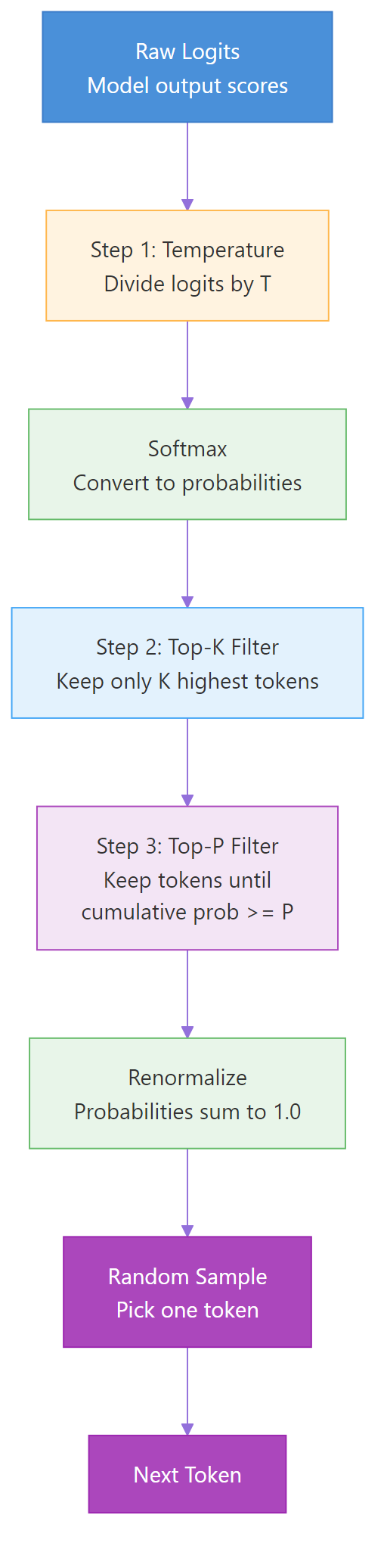
Before we can control the model's output, we need to understand the process it uses to generate text. As we've learned, at its core, an LLM is a next-token predictor. But it doesn't just pick the single "best" next token. Instead, it computes a probability score for every single token in its vast vocabulary. This raw output is a list of numbers called logits.
These logits are then converted into a probability distribution using a function called softmax. The result is a list where every token has a probability, and all probabilities sum to 1.0. The final step is to sample from this probability distribution to pick the next token.
If we always picked the token with the highest probability (a method called greedy decoding), the model's output would be highly repetitive and deterministic. To generate more interesting and human-like text, we introduce randomness into the sampling process. The parameters we'll discuss today are the levers we use to control this randomness.
The following flowchart illustrates this entire pipeline, from raw model scores to the final selected token. We will walk through each of the key control steps shown here.
Temperature: The Creativity Dial
The first and most common parameter is temperature. Temperature directly influences the shape of the probability distribution generated by the softmax function.
- A low temperature (e.g., 0.1) makes the distribution "sharper." It increases the probability of the most likely tokens and decreases the probability of less likely ones. This leads to more deterministic, focused, and predictable outputs.
- A high temperature (e.g., 1.0 or higher) makes the distribution "flatter." It gives less likely tokens a higher chance of being selected, leading to more random, creative, and sometimes surprising outputs.
This short video provides an excellent technical and visual explanation of how temperature scales the logits before the softmax function is applied.
LLM Prompt Engineering with Random Sampling: Temperature, Top-k, Top-p
This video from DataMListic, titled "LLM Prompt Engineering with Random Sampling," gives a clear walkthrough of the sampling techniques.
Watch the segment explaining temperature from 01:48 to 03:59. Pay close attention to how the value of theta (temperature) in the exponent changes the final probability distribution for the words "sunny," "rainy," and "dull."
For a simple visual metaphor, consider the image below.

When to adjust temperature:
- Low Temperature (e.g., 0.0 - 0.3): Use for tasks that require factual, predictable, and reliable outputs. This is ideal for building agents that perform tasks like data extraction, classification, or generating code, where creativity is undesirable.
- High Temperature (e.g., 0.8 - 1.2): Use for creative tasks like brainstorming ideas, writing marketing copy, or creating fictional narratives.
For a concise textual definition, please read the following.
Gemini has entered the chat: Understanding basic LLM settings
This article provides clear definitions for the main generation parameters.
Read the section on Temperature. It summarizes the concept and provides clear use cases for both low and high settings.
Top-K and Top-P: Pruning the Possibilities
While temperature adjusts the relative probabilities of all tokens, Top-K and Top-P work by filtering the candidate list before sampling. They offer different strategies for creating a smaller, more sensible pool of tokens to choose from.
Top-K: The Word Count Limit
Top-K is the simpler of the two. It instructs the model to only consider the K most probable tokens for the next step. For example, if K=3, the model discards all but the top three most likely tokens and then samples from that reduced set (using the temperature-adjusted probabilities).
- Benefit: It's a straightforward way to prevent the model from picking bizarre or nonsensical tokens that might have a tiny but non-zero probability, especially at high temperatures.
- Drawback: It's a fixed-size filter. Sometimes the probability is concentrated in just two tokens, and sometimes it's spread thinly across ten. A fixed
Kdoesn't adapt to this.
Top-P (Nucleus Sampling): The Probability Threshold
Top-P, also known as nucleus sampling, is a more dynamic approach. Instead of a fixed number of tokens, you set a cumulative probability threshold P. The model then creates a candidate pool of the most likely tokens whose probabilities sum up to at least P.
For example, if P=0.9, the model lists tokens from most to least probable, adding their probabilities until the sum is >= 0.9. It then samples from this list.
- Benefit: The size of the candidate pool is adaptive. If the model is very confident about the next token (e.g., one token has a probability of 0.95), the candidate pool might only contain that one token. If the model is uncertain, the pool will be larger, allowing for more diversity.
- General consensus: Top-P is often preferred over Top-K because it adapts more intelligently to the context.
These two techniques are explained very clearly with simple visuals in the following video.
What are the LLM’s Top-P + Top-K ?
This video from New Machina, "What are the LLM’s Top-P + Top-K ?", breaks down these concepts with easy-to-follow examples.
Watch the following segments: The explanation of Top-P from 02:17 to 02:55. The explanation of Top-K from 02:56 to 03:36. The final summary comparing Temperature, Top-P, and Top-K from 03:37 to 04:29. This part does a great job clarifying that temperature scales probabilities while Top-P/K filters the candidates.
It's common to use Temperature in combination with Top-P. For example, setting temperature=0.7 and top_p=0.9 is a common starting point for balanced, creative-yet-coherent responses. Most APIs recommend using either Top-P or Top-K, but not both at the same time.
Max Tokens: Setting the Boundary
Finally, max_tokens (or max_output_tokens in some APIs) is the most straightforward parameter. It defines the absolute maximum number of tokens the model is allowed to generate for a given response.
This is a safeguard, not a target. The model will still stop generating tokens naturally if it determines the response is complete (by generating an end-of-sequence token). max_tokens simply cuts it off if it reaches that limit first.
When to use max_tokens:
- Cost Control: Since you are billed per token, this prevents unexpectedly long (and expensive) responses.
- Latency Control: Longer responses take more time to generate.
- Application Constraints: Ensuring the output fits within a specific UI element or buffer.
For your goal of building production-grade agents, setting a sensible max_tokens is a crucial part of creating predictable and robust systems.
Gemini has entered the chat: Understanding basic LLM settings
Let's return to the article one last time for the definition of max_output_tokens.
Read the section on Max_output_tokens. Note the important point that it is a suggestion, and you may still need to truncate the output yourself if a hard limit is required.
From Theory to C# Code
These concepts are not just abstract theory. They map directly to properties you will set in your .NET code when using Semantic Kernel to interact with Google's Gemini models. The settings are typically grouped in a class that you pass along with your prompt.
For the Google AI connector in Semantic Kernel, these are found in the GeminiPromptExecutionSettings class. This is the tangible connection between the concepts we've discussed and the code you'll write.
GeminiPromptExecutionSettings Class (Microsoft.SemanticKernel.Connectors.Google) | Microsoft Learn
This is the official Microsoft documentation for the execution settings you will use with Gemini models in Semantic Kernel.
Take a look at the "Properties" table. You don't need to read everything, but locate the following properties and their descriptions: MaxTokens Temperature TopK TopP Familiarizing yourself with where these live in the C# class will make it much easier to apply this knowledge in future modules.
Conclusion
You now have a solid understanding of the primary controls for shaping an LLM's output. By tuning these parameters, you can guide the model to produce text that is precisely suited to your application's needs, whether it's for rigid, factual tool use or for creative, open-ended generation.
Here are the key takeaways:
- Temperature adjusts the randomness of the output, acting as a creativity dial.
- Top-K limits the candidate pool to a fixed number of the most likely tokens.
- Top-P (Nucleus Sampling) creates a dynamic candidate pool based on a cumulative probability threshold, and is often preferred over Top-K.
- Max Tokens provides a hard limit on the length of the response, which is essential for managing cost and latency.
- These parameters correspond directly to properties in C# classes like
GeminiPromptExecutionSettingsthat you will use in your agentic applications.
In our next lesson, we will explore a completely different but equally powerful concept: embeddings. We'll learn what they are and how vector similarity allows us to perform "semantic search," a technique that forms the backbone of giving LLMs knowledge about your private documents and data.