Welcome back. In our previous lessons, we've built a solid model of how the V8 engine handles your code and data. You've seen how objects get organized in memory via Hidden Classes and how V8 achieves blazing-fast property access using Inline Caches. We've covered allocation and access; now it's time to address the final, critical part of the memory lifecycle: reclamation.
This lesson tackles how V8 automatically cleans up memory that is no longer in use, a process known as Garbage Collection (GC). You'll learn that V8 doesn't use a single, one-size-fits-all approach. Instead, it employs a sophisticated, multi-layered strategy based on a key insight about how most programs behave. We will dissect V8's generational garbage collector, explaining the different algorithms it uses for brand-new objects versus long-lived ones.
Why This Matters at a Senior Level
[Always asked]
Mid-level engineers often think of garbage collection as a black box that "just works" until it causes a catastrophic memory leak. Senior engineers understand that GC is a constant, influential process. They know that suboptimal code doesn't just leak memory; it can also create excessive "GC pressure"—forcing the engine to work too hard, too often, resulting in UI jank, high server latency, and a generally sluggish application. Knowing how V8 distinguishes between short-lived and long-lived objects allows you to write code that works with the collector, not against it. This knowledge is fundamental to diagnosing performance issues that aren't about algorithmic complexity but about the cost of memory management over an application's lifetime.
Core Concepts: The Generational Hypothesis
Before diving into specific algorithms, we need to understand the single most important principle guiding V8's GC design: the Generational Hypothesis.
Orinoco: The new V8 Garbage Collector Peter Marshall
Peter Marshall's talk on Orinoco, V8's GC project, provides a concise explanation of this core principle.
Watch the segment from the generational hypothesis. He explains that most objects die young, while the few that survive tend to live for a very long time.
This observation is profound. It suggests that treating all objects the same would be inefficient. Why spend a lot of effort tracking an object that is likely to become garbage in a few milliseconds? V8 leverages this by splitting the heap into two main "generations":
- The Young Generation (or New Space): A small, fast area where all new objects are born. It's optimized for objects that have a short lifespan.
- The Old Generation (or Old Space): A much larger area for objects that have proven their longevity by surviving a few collection cycles in the Young Generation.
This split allows V8 to use different, highly specialized garbage collectors for each generation.
The Young Generation and the "Scavenger"
The garbage collector for the Young Generation is called the Scavenger. Its design is a brilliant example of optimizing for the common case: most objects dying young.
The V8 Heap: How Node.js Organises Memory Behind the Scenes
This article uses an excellent analogy to explain how the Scavenger works.
Read the section "The Young Generation: Two Tables and a Clever Trick". Focus on the "two desks" analogy and the description of "bump-pointer allocation." This will build a strong mental model for why this process is so fast.
As the article explains, the Young Generation is divided into two equal halves: from-space and to-space. The process, an implementation of Cheney's algorithm, works like this:
- Allocation: New objects are allocated in
from-spaceusing an incredibly fast "bump-pointer" method. V8 just increments a pointer to the next free spot. - Trigger: When
from-spaceis full, the Scavenge cycle begins. - Evacuation: The GC starts from the "roots" (the call stack, global objects) and traverses the object graph to find all live objects in
from-space. - Copying: Every live object it finds is copied into the empty
to-space. Dead objects are never touched. - Swap: Once all live objects are copied, the roles of the two spaces are swapped. The new
from-space(the oldto-space) is now compacted with live objects, and the oldfrom-spaceis completely wiped, ready for new allocations.
The key insight is that the Scavenger's work is proportional to the number of surviving objects, not the amount of garbage. Since most objects die young, this process is remarkably efficient.
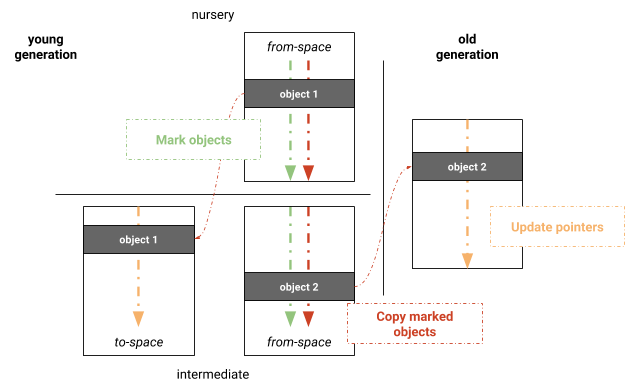
An object that survives one Scavenge cycle is now in the new from-space. If it survives a second Scavenge, V8 assumes it might be long-lived. Instead of copying it again, it gets promoted to the Old Generation.
The Old Generation and Mark-Sweep-Compact
The Old Generation can be hundreds of megabytes, so the Scavenger's copying approach is not feasible—it would require doubling the memory usage. Instead, V8 uses a different algorithm: Mark-Sweep-Compact.
Visualised guide to memory management in JavaScript - Kateryna Porshnieva | JSHeroes 2023
Kateryna Porshnieva's talk provides a clear, visual walkthrough of the Mark-Sweep-Compact algorithm.
Watch the segment from the old generation. She explains the marking, sweeping (with free lists), and compaction phases step-by-step.
This major garbage collection process has three main phases:
-
Marking: This is the same initial step as the Scavenger. The GC traverses the heap from the root objects and marks every reachable object as "live". To do this efficiently, it uses a three-color system (white, grey, black) to keep track of its progress. All objects start as white (undiscovered). When an object is discovered, it becomes grey (discovered, but its children haven't been scanned). When its children have also been scanned, it becomes black (fully processed).
-
Sweeping: After marking, the GC sweeps through the entire Old Generation. Any object still marked "white" is unreachable garbage. The memory these objects occupy is reclaimed and added to a free list—a data structure that keeps track of available memory chunks of different sizes. This is different from the Scavenger, which just wipes the whole space. Sweeping can leave the memory fragmented, like Swiss cheese.
-
Compacting: To combat fragmentation, V8 periodically performs compaction. It moves surviving objects into contiguous blocks of memory, freeing up larger, continuous chunks for future allocations. This is an expensive operation, so V8 uses heuristics to decide when and where to do it, focusing only on the most fragmented parts of memory.

To avoid the long "stop-the-world" pauses that old garbage collectors were infamous for, modern V8 performs much of this work concurrently and incrementally, breaking the work into small pieces that are interleaved with your JavaScript execution.
A tour of V8: Garbage Collection - jayconrod.com
For a deeper technical dive, Jay Conrod's article is the definitive source.
Read the section on Mark-sweep and Mark-compact for a detailed breakdown of the marking, sweeping, and compacting phases. Then, skim the next section, "Incremental marking and lazy sweeping", to understand how V8 avoids long pauses.
Mental Model: The Restaurant Kitchen
Imagine a busy restaurant kitchen to model V8's GC strategy.
-
The Prep Station (Young Generation): This is a small, stainless-steel countertop (
from-space). A chef is rapidly chopping vegetables, creating lots of scraps (garbage) and a few bowls of prepped ingredients (survivors).- Scavenge: At the end of each order, instead of picking out every little scrap, an assistant takes a second, clean countertop (
to-space), moves the few bowls of good ingredients over, and then uses a squeegee to wipe the entire prep station into the bin in one motion. This is fast and efficient. - Promotion: If a bowl of special sauce survives a couple of these clean-ups, the assistant moves it to the main pantry instead of just to the other countertop.
- Scavenge: At the end of each order, instead of picking out every little scrap, an assistant takes a second, clean countertop (
-
The Main Pantry (Old Generation): This is a large, walk-in pantry where long-term supplies are stored. It gets messy over time.
- Mark-Sweep: Once a week, the manager comes in with a clipboard (the Mark phase). They go through and put a "KEEP" sticker on every ingredient that's part of an active recipe. Then, a cleaning crew comes in and throws out everything without a sticker (the Sweep phase). This leaves empty shelves all over the place.
- Compact: Every few months, a team reorganizes the entire pantry, moving all the "KEEP" items together onto shelves at the front to make space for a big new delivery (the Compact phase). This is a lot of work and shuts down the pantry for a while, so they only do it when absolutely necessary.
Common Misconceptions
-
Myth: "All object allocations are equally expensive."
- Reality: Short-lived objects that are collected by the Scavenger are incredibly cheap. Their allocation is a simple pointer bump, and their cleanup cost is near zero because they are never even visited by the collector. The real cost is paid by objects that survive and need to be copied or promoted.
-
Myth: "Garbage collection means my app will inevitably freeze for long periods."
- Reality: This was true a decade ago. Modern V8 uses highly advanced parallel, incremental, and concurrent techniques. The Scavenger pause is a few milliseconds. Major GC marking and sweeping happens mostly in the background. The "stop-the-world" pauses are minimized to a point where they are often unnoticeable in well-structured applications.
-
Myth: "I can, and should, manually trigger garbage collection to free up memory."
- Reality: There is no
gc()function in standard JavaScript. While some environments (like Node.js) offer flags to expose it for debugging, you should almost never use it in production code. V8's heuristics for triggering GC are finely tuned based on allocation rates and memory pressure. Forcing a GC cycle is more likely to harm performance by messing with these heuristics than to help.
- Reality: There is no
Senior Insight
A senior engineer thinks about the flow of objects between generations. They understand that a primary source of GC-related performance problems isn't a memory leak, but a high promotion rate. This happens when code creates many objects that aren't short-lived enough for the Scavenger but aren't truly long-lived either. These "medium-lived" objects constantly get promoted to the Old Generation, only to become garbage shortly after. This churn fills up the Old Generation, triggering frequent and expensive major GCs. A senior engineer designs APIs, manages caches, and structures UI components to minimize this promotion rate, for example by using immutable data structures or object pooling in performance-critical paths.
Production War Story
A team built a Node.js API endpoint for processing large file uploads. For each incoming chunk of the file, the code would create a temporary buffer, wrap it in an object with some metadata, and push it into an array. Once the file was complete, this array of chunk-objects would be processed, and a response sent.
Under load, the service's response times became erratic and sometimes spiked into multiple seconds. Memory usage was high but didn't seem to be leaking permanently. Profiling showed the event loop was being blocked by long, frequent Major GC cycles.
The problem was the chunk-object lifecycle. Each object lived just long enough to survive the Scavenge cycles while the file was uploading, causing tens of thousands of them to be promoted to the Old Generation for every large file. Once the request was complete, all of them became garbage at once, triggering a massive Mark-Sweep operation.
The fix was to change the data structure. Instead of creating a new wrapper object for each chunk, the engineers used a single, pre-allocated buffer and Buffer.concat() to append the incoming data. This created only one or two large objects in the Old Generation per request, instead of thousands. The promotion rate plummeted, Major GC cycles became infrequent and short, and the API's performance stabilized.
Conclusion
You now have a robust mental model of V8's sophisticated, two-tiered garbage collection system. You can confidently explain why short-lived objects are cheap and how V8 handles the different lifecycles of objects in your application.
Key Takeaways:
- Generational Hypothesis: V8 assumes most objects die young and optimizes for this.
- Young Generation & Scavenger: Fast, copy-based collection for new objects. Its cost is proportional to the number of survivors.
- Old Generation & Mark-Sweep-Compact: Slower, more thorough collection for long-lived objects. Its cost is proportional to the size of the heap. It marks live objects, sweeps away garbage, and occasionally compacts to fight fragmentation.
- Promotion: Objects that survive two Scavenge cycles are promoted from the Young to the Old Generation. A high promotion rate is a common cause of performance issues.
We've now seen how V8 allocates, accesses, and reclaims memory. In our next lesson, we will build directly on this foundation to explore what happens when this process goes wrong: Identifying common memory leak patterns in production JavaScript. You'll learn how to spot and debug scenarios where objects that should be garbage are accidentally kept alive.