Welcome to the final lesson of our first module on JavaScript's internals. Over the past few lessons, we've journeyed deep inside the V8 engine, exploring its compilation pipeline, how it optimizes code with hidden classes and inline caches, and how it manages memory through garbage collection. Most recently, you learned the practical, hands-on techniques to debug memory leaks—a critical skill for maintaining the health of any long-running application.
Today, we're zooming out. We've spent our time inside the JavaScript engine, but now we need to understand its place in the wider universe of the browser. This lesson addresses a fundamental point of confusion for many developers: the distinction between the JavaScript runtime itself and the powerful browser environment it lives in. Mastering this separation is the key to truly understanding asynchronous behavior, performance bottlenecks, and the full capabilities of the web platform.
Why This Matters at Senior Level
[Always asked]
A mid-level developer often sees the browser environment as one monolithic entity. To them, setTimeout, document.getElementById, and a for loop are all just "JavaScript." A senior engineer, however, sees the boundaries. They understand that calling fetch is not executing a JavaScript function in the traditional sense, but rather delegating a task from the JS engine to a separate, powerful browser subsystem. This precise mental model is a superpower. It allows you to reason accurately about performance ("Is my code slow, or am I waiting on the network?"), predict the exact order of asynchronous operations, and debug complex timing issues that leave others baffled. In an interview, explaining this separation signals that you've moved beyond simply using the language to truly understanding the platform.
Core Concepts: Two Worlds, One Thread
Let's start with a classic "wait, what?" moment. Consider this code:
console.log('Script start');

setTimeout(() => {
  console.log('setTimeout callback');
}, 0);

Promise.resolve().then(() => {
  console.log('Promise resolved');
});

console.log('Script end');
What do you predict will be logged to the console, and in what order? A naive reading might suggest the setTimeout with a zero-millisecond delay should fire immediately. The actual output is:
Script start
Script end
Promise resolved
setTimeout callback
Why does the promise resolve before the "immediate" timeout? And why do both run after Script end? The answer lies in understanding that these operations belong to two different worlds, coordinated by the event loop.
World 1: The JavaScript Runtime
This is the core "island" where your JavaScript code actually executes. As we've learned, it consists of two main parts:
- The JS Engine (e.g., V8): This is the heart of the operation. It contains:
- The Call Stack: Where your functions are executed, one at a time.
- The Heap: The memory where your objects, arrays, and functions are stored.
- The Event Loop & Queues: These act as the engine's scheduling department.
- The Task Queue (or Macrotask Queue): A list of "larger" tasks to be run, such as callbacks from
setTimeout, user interaction events (clicks, keypresses), and I/O. - The Microtask Queue: A high-priority list of "smaller" tasks, primarily for callbacks from Promises (
.then/.catch/.finally).
- The Task Queue (or Macrotask Queue): A list of "larger" tasks to be run, such as callbacks from
The JavaScript runtime itself is synchronous and single-threaded. It executes one command from the call stack at a time until the stack is empty.
World 2: The Browser (Host) Environment
This is the vast "ocean" surrounding the JavaScript island. The browser is not just a blank canvas; it's a sophisticated application with its own set of powerful tools and systems that run independently, often on separate threads or processes. JavaScript is given a way to communicate with these systems via globally available objects and functions. These are the Web APIs.
Key parts of the Browser Environment include:
- Web APIs: These are the functions and features the browser exposes to JavaScript. They are not part of the JavaScript language specification. Examples include:
- The DOM API (
document,window) - Timers (
setTimeout,setInterval) - Networking (
fetch,XMLHttpRequest) - Storage (
localStorage,IndexedDB) - Graphics (
Canvas,WebGL) - Device APIs (
Geolocation,WebRTC)
- The DOM API (
- The Rendering Pipeline: This is the browser's system for turning HTML and CSS into pixels on the screen. It involves parsing, style calculation, layout, painting, and compositing.
- Other Processes: Modern browsers are multi-process. There's a main browser process, a GPU process, network processes, and multiple renderer processes (where our JS runs).
This video provides an excellent visual walkthrough of how these components fit together.
JavaScript Visualized - Event Loop, Web APIs, (Micro)task Queue
This video from Lydia Hallie provides a clear, animated explanation of the entire JavaScript runtime environment.
Watch the whole video to see a visual representation of the call stack, Web APIs, task queue, microtask queue, and the event loop working in concert. Pay close attention to how setTimeout hands off its callback to a Web API and how it ends up in the task queue, whereas a Promise's handler is sent to the microtask queue. The final quiz and recap are particularly useful for cementing the concept.
Mental Model: The CEO and the Departments
Imagine the JavaScript runtime as a very busy, single-minded CEO working at their desk.
- The CEO is the Call Stack. They can only focus on one task at a time. Their desk must be clear before they can start something new.
- The company is the Browser Environment. It has many specialized departments: the Networking department (
fetch), the Scheduling department (setTimeout), and the massive Factory Floor where things are built (the Rendering Pipeline). - Calling a Web API is the CEO delegating. The CEO picks up the phone, calls the head of Scheduling, and says, "Please call me back about this
setTimeouttask in 100ms." Crucially, the CEO immediately hangs up and continues with their own work. They don't sit by the phone waiting. - The department does its work in the background. The Scheduling department sets a timer. The Networking department makes a request. This happens independently of the CEO.
- When a department finishes, it sends a memo (a callback function) to an inbox. Memos from
setTimeoutorfetchgo to the main Task Queue (the "Macrotask" inbox). Memos from Promises go to the high-priority Microtask Queue (the "Urgent" inbox). - The Event Loop is the CEO's executive assistant. The assistant constantly monitors the CEO. The moment the CEO finishes all their work and their desk (the Call Stack) is empty, the assistant follows a strict rule:
- First, check the "Urgent" inbox (Microtask Queue). Process every single memo in it, one after another, until it's completely empty.
- Only when the urgent inbox is empty, check the main inbox (Task Queue) and give the CEO just one memo to work on.
- After the CEO finishes that one task, repeat the process: go back to step 1 and check the urgent inbox again.
This model explains our code example:
console.log('Script start')andconsole.log('Script end')are synchronous tasks the CEO does immediately.setTimeoutandPromise.resolve()are delegations. The memos are sent to their respective inboxes.- The CEO's desk is now clear. The assistant (Event Loop) checks the "Urgent" inbox first, finds the
Promisecallback, and gives it to the CEO.Promise resolvedis logged. - The "Urgent" inbox is now empty. The assistant checks the main inbox, finds the
setTimeoutcallback, and gives it to the CEO.setTimeout callbackis logged.
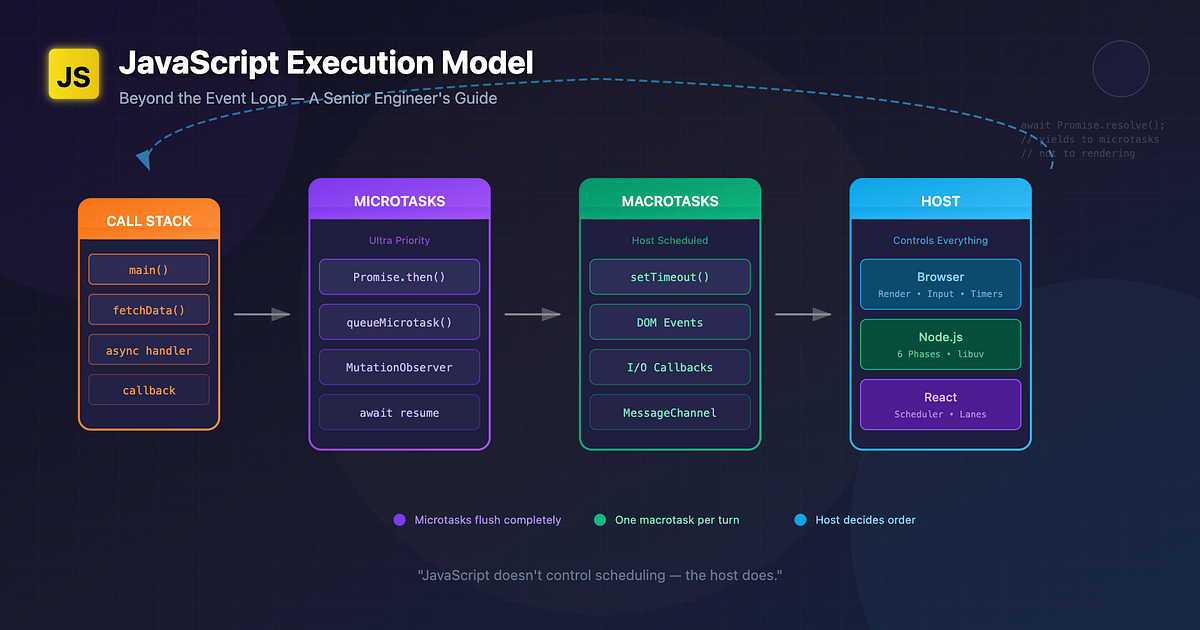
For a deeper dive into the specific components and their roles, the "End-to-end browser event architecture" article is an invaluable resource.
End-to-end browser and accessibility event architecture - Max Design
This article provides a detailed breakdown of the different layers within the browser. We'll focus on the parts relevant to our discussion.
Start by reading the descriptions for the JavaScript engine, Browser APIs, the Microtask queue, and the Task queue. Finally, and most importantly, read the section on the Event loop. Pay close attention to the lists explaining what it controls and what it does not control. This directly addresses the core of today's lesson.
Common Misconceptions
-
Myth: "JavaScript is asynchronous."
- Reality: The JavaScript language itself is synchronous and single-threaded. The environment it runs in (the browser or Node.js) provides asynchronous capabilities through Web APIs, which the JS runtime can invoke. The asynchronicity comes from the host environment, not the language.
-
Myth: "
setTimeout(fn, 0)runsfnon the next tick."- Reality: This is imprecise. It schedules
fnto be added to the task queue (macrotask) after a minimum of 0ms. It will only execute after the call stack is empty AND the entire microtask queue has been completely drained. If there are many pending microtasks, thesetTimeoutcallback could be delayed significantly.
- Reality: This is imprecise. It schedules
-
Myth: "Rendering is paused while my JavaScript runs."
- Reality: This is mostly true but with a critical exception. Long-running JavaScript on the main thread will block style, layout, and paint, causing "jank." However, modern browsers can offload certain operations, like animations on CSS
transformandopacity, to a separate Compositor Thread. This allows for smooth scrolling and animations even if the main thread is blocked, proving that the rendering system is not entirely beholden to the JS engine.
- Reality: This is mostly true but with a critical exception. Long-running JavaScript on the main thread will block style, layout, and paint, causing "jank." However, modern browsers can offload certain operations, like animations on CSS

Senior Insight
A mid-level engineer, faced with a janky UI, might focus on optimizing the JavaScript function causing the slowdown. A senior engineer takes a step back and analyzes the entire system. They understand the fundamental trade-off: any time spent on the Call Stack is time the browser cannot spend on rendering or responding to user input.
Their thinking shifts from "How can I make this JS faster?" to "How can I get this work off the main thread entirely?"
- Can a heavy data-processing task be moved to a Web Worker, another browser API that runs JS in a completely separate thread?
- Can a complex animation be rewritten using declarative CSS transforms to run on the compositor thread instead of being manually calculated in JS with
requestAnimationFrame? - Can I batch multiple state updates into a single render instead of letting every small change trigger a synchronous, blocking re-render?
A senior engineer acts as an orchestrator of all the browser's parallel systems, using the JS runtime as just one—albeit powerful—instrument. Their goal is to keep the main thread as free as possible, allowing the browser to do what it does best: create a smooth, responsive experience for the user.
Conclusion
We have now completed our survey of the JavaScript engine and its place within the browser. You understand that the V8 engine is a sophisticated machine for executing code, but it's just one piece of a much larger puzzle. The browser provides a rich host environment full of Web APIs that allow JavaScript to delegate tasks like networking, timers, and DOM manipulation. The event loop acts as the master coordinator, ensuring these two worlds can work together without chaos.
Key Takeaways:
- Two Worlds: There is a clear line between the JS Runtime (Engine, Call Stack, Heap, Queues, Event Loop) and the Browser Environment (Web APIs, Rendering Pipeline, Networking).
- JS is Synchronous: The JavaScript language itself is synchronous and single-threaded. Asynchronicity comes from the browser's Web APIs.
- Delegation, Not Waiting: When you call an asynchronous Web API like
fetchorsetTimeout, you are delegating a task to the browser. The JS engine does not wait; it continues executing your code. - The Event Loop is the Coordinator: When the Call Stack is empty, the Event Loop moves callbacks from the queues (microtasks first, then one macrotask) to the stack for execution.
- Microtasks > Macrotasks: Promise callbacks (microtasks) will always execute before
setTimeoutor event handler callbacks (macrotasks).
In our next module, we will dive deep into Execution Context, Scope, and the Closure Deep Dive. We'll leave the browser environment behind for a while and focus intently on what happens inside the JS engine every time a function is called, setting the stage to truly master closures—the powerful mechanism that so often bridges these two worlds.