Hello! Let's dive into the next crucial topic in our system design journey.
In our last lesson, we tackled the complex problem of resolving concurrent edits in a file synchronization service, focusing on strategies like "reject and reconcile" and the trade-offs between Operational Transformation (OT) and CRDTs. We now have a solid foundation for systems that handle user-generated files.
Today, we shift our focus from generic files to a highly specialized and demanding type of content: video. Your learning outcome is to design a video ingestion and processing pipeline for a streaming platform. This is a classic, large-scale system design problem frequently asked in senior engineering interviews at companies like Netflix, YouTube, and Amazon. It tests your ability to think about distributed processing, scalability, and asynchronous workflows—all hallmarks of a senior backend engineer.
We will break down the journey of a video file from the moment a creator clicks "upload" to the point where it's fully processed and ready to be streamed to millions of viewers.
Why Do We Need a Processing Pipeline?
First, a crucial question: why can't we just take the .mp4 file a user uploads and store it for others to download? Answering this demonstrates a foundational understanding of the problem space.
A raw uploaded video file is unsuitable for direct streaming at scale due to three main problems:
- Massive File Sizes: A single, high-quality video can be gigabytes in size. Streaming this directly would lead to huge bandwidth costs and terrible user experience due to long load times.
- Device and Browser Incompatibility: The world is full of different devices (phones, TVs, laptops) and browsers, each supporting different video formats (codecs like H.264, H.265, AV1) and containers (like MP4, WebM). A single uploaded file won't work for everyone.
- Varying Network Conditions: A user on a fast fiber connection can handle a 4K stream, while someone on a slow mobile network needs a lower-quality version to avoid constant buffering. The system must adapt to the viewer's bandwidth.
The solution to these problems is Adaptive Bitrate Streaming (ABR). ABR works by having multiple versions of the same video at different quality levels (bitrates) and breaking them into small chunks. The video player on the user's device intelligently requests the best quality chunks their network can handle at any given moment.
Our processing pipeline is the factory that creates these ABR-ready video assets.
High-Level Architecture
Let's start with a bird's-eye view. A video platform has two major, distinct workflows: the upload/processing flow and the playback/delivery flow. Today, we're focusing on the former.

The Ingestion and Processing Pipeline: A Step-by-Step Breakdown
We'll trace the path of a video through a modern, scalable pipeline.
Step 1: Ingestion - Secure and Scalable Uploads
The creator's journey begins with uploading the video file and its metadata (title, description). A naive approach would be to have the client upload the large file directly to our backend servers. This is a poor design because it ties up server resources, creates a bottleneck, and doesn't scale.
A much better, industry-standard pattern is to offload the upload to a dedicated object store like Amazon S3 using presigned URLs.
To understand this crucial ingestion pattern, let's read an article that details how a YouTube-like system would handle uploads efficiently.
Read the sections 'Key Components and Initial APIs' and 'Upload API: Efficient Video Uploads for a Global Audience'. Focus on: The initial API call that sends only the video metadata. The concept of a 'presigned URL' and why it's used. How this pattern decouples the application servers from the heavy lifting of the file transfer.
To summarize the flow:
- Client sends metadata: The user's browser/app makes an API call to your backend with the video's title, description, etc.
- Backend prepares for upload: Your service creates a record in a metadata database (e.g., DynamoDB or Cassandra) with a unique video ID and sets its status to
UPLOADING. - Backend generates presigned URL: Your service asks the object store (e.g., S3) to generate a secure, temporary URL that grants the client write-only permission to a specific path (e.g.,
s3://raw-uploads/{video-id}). - Client uploads directly to S3: The backend returns this presigned URL to the client. The client then uses this URL to upload the large video file directly to the object store, bypassing your servers entirely.
This pattern is highly scalable and is a fundamental technique for handling large file uploads in modern backend systems.
Step 2: Triggering the Processing Workflow
Once the raw video file lands in our S3 bucket, the processing pipeline needs to be triggered. A robust way to do this is through an event-driven mechanism.
- S3 Event Notifications: The S3 bucket is configured to send an event notification (e.g.,
s3:ObjectCreated:Put) whenever a new file is uploaded. - Message Queue: This notification is typically sent to a message queue, like Amazon SQS. Using a queue decouples the upload from the processing system, provides durability (if the processing system is down, the message waits in the queue), and allows you to absorb sudden spikes in uploads.
- Processing Workers: A fleet of worker nodes (or serverless functions) polls the queue for new messages, ready to begin work.
Step 3: The Video Processing Workflow
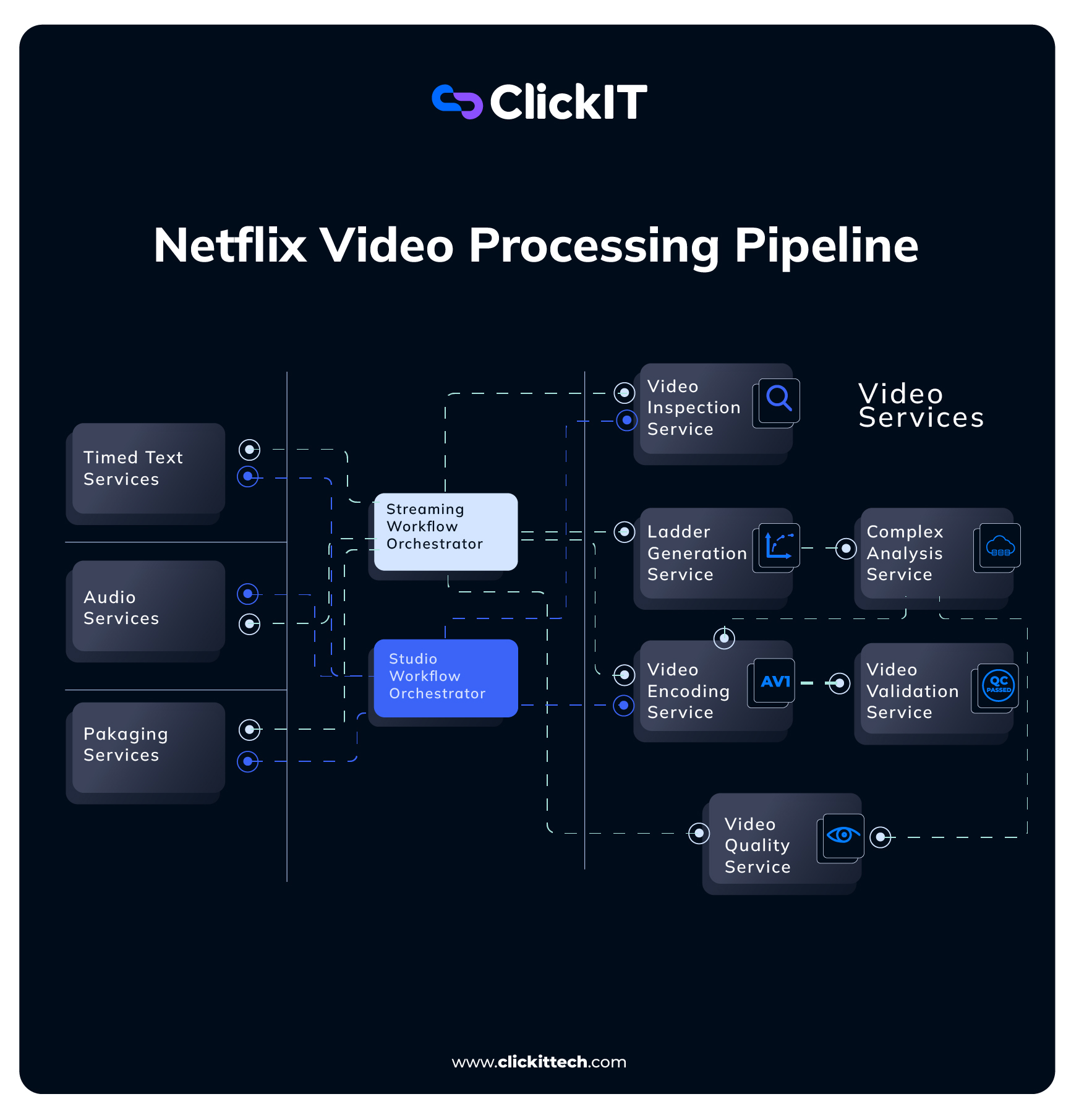
This is the core of our pipeline, where the raw video is transformed into streamable assets. This is not a single, monolithic process. It's a series of independent steps best modeled as a workflow of microservices. Each service has a single responsibility, can be scaled independently, and can be developed by different teams.
Netflix's journey in rebuilding their video pipeline provides an excellent real-world example of this microservice architecture.
Rebuilding Netflix Video Processing Pipeline with Microservices
Let's look at how a market leader thinks about this problem. This Netflix TechBlog post describes their move from a monolithic system to a microservice-based one, which is the exact pattern we are designing.
Please read the sections 'From Reloaded to Cosmos', 'Building the Video Processing Pipeline in Cosmos', and 'Video Services'. You don't need to memorize the service names, but focus on the reasoning behind breaking a complex process into smaller, independent services.
As the Netflix article shows, breaking down the pipeline into distinct services is key. Here are the essential services in our workflow:
1. Transcoding and Segmentation Service: This is the most compute-intensive step.
- Transcoding: The service takes the raw video and re-encodes it into multiple formats and resolutions (e.g., H.264 1080p, H.264 720p, AV1 1080p, etc.). This set of files is called a bitrate ladder.
- Segmentation: Each of these transcoded files is then broken into small, few-second-long chunks. These chunks, along with a manifest file (a playlist), form the basis for ABR protocols like HLS and DASH.
Netflix YouTube Prime Video System Design on AWS | Video On Demand System Design Interview
Let's watch a clear explanation of why videos are encoded into different resolutions and delivered in chunks.
Watch the following two segments from the 'Cloud With Raj' video on designing a video-on-demand system: Encoding: From 07:55 to 10:25. This explains the need for multiple resolutions (the bitrate ladder). Chunking (HLS): From 18:46 to 20:20. This explains why videos are broken into chunks for streaming.
2. Thumbnail Generation Service: This service extracts keyframes from the video to create preview images. This is a much lighter task than transcoding and can run in parallel.
3. Quality Control / Content Moderation Service: In parallel, you can run other analyses.
- Technical Quality: A service can analyze the video for artifacts or issues.
- Content Moderation: You can use ML services (like Amazon Rekognition) to scan for explicit or copyrighted content and flag the video accordingly. This is a critical feature for any platform with user-generated content.
Step 4: Orchestrating the Workflow
With all these independent services, how do we manage the overall process? We need an orchestrator to define the workflow, handle retries, and manage parallel execution.
For example, transcoding to 1080p, 720p, and 480p can all happen in parallel. Thumbnail generation can also happen in parallel. Only after all transcoding is complete can we finalize the manifest.
This is a perfect use case for a workflow engine like AWS Step Functions.
Netflix YouTube Prime Video System Design on AWS | Video On Demand System Design Interview
The same video provides a great, practical example of using a workflow engine to orchestrate these parallel tasks.
Watch the clip from 11:59 to 13:31. The presenter explains how AWS Step Functions can be triggered by the S3 upload and then manage the parallel execution of the encoding and content recognition tasks. This demonstrates how to tie all the microservices together.
Step 5: Finalization
Once the orchestrator confirms that all processing steps have successfully completed:
- The URLs of all the generated assets (the different resolution video chunks, the manifest files, the thumbnails) are saved to the video's record in the metadata database.
- The status of the video in the database is updated from
PROCESSINGtoREADY.
The video is now available for the delivery and playback system to serve to users.
Conclusion
We've designed a robust, scalable video ingestion and processing pipeline by breaking it down into logical, decoupled stages.
Key Takeaways:
- Decouple Ingestion: Use presigned URLs to allow clients to upload large files directly to object storage, protecting your application servers from being a bottleneck.
- Embrace Asynchronicity: Use message queues to trigger the processing workflow from an upload event. This creates a resilient, scalable architecture.
- Think in Microservices: Decompose the complex processing task into small, single-responsibility services (transcoding, thumbnailing, validation). This allows for independent scaling and development.
- Orchestrate the Workflow: Use a workflow engine (like AWS Step Functions) to manage the execution, parallelism, and error handling of your microservices.
- The Goal is ABR: The entire purpose of the pipeline is to generate a bitrate ladder of video files, segmented into small chunks, to enable Adaptive Bitrate Streaming.
Next Lesson Preview:
Our video is now processed and ready. But how do we deliver it with low latency to millions of viewers around the globe? In our next lesson, we will design the other half of the system: the content delivery and playback system for a streaming platform, diving deep into CDNs, caching strategies, and the player's interaction with our backend.