Hello! Welcome back.
In our previous lesson, we established the high-level architecture for a file synchronization service. We identified the core components—client, backend services, metadata database, and blob storage—and outlined the basic API for uploads and downloads.
However, we ended on a critical observation: our simple POST /files API is fundamentally flawed for a real-world service. It cannot reliably handle large files, which was one of our key non-functional requirements. This lesson is a deep dive that directly addresses that problem and fulfills our current learning outcome: Design client-side logic for file chunking and synchronization.
We will focus entirely on the intelligence we need to build into the client application. As a senior backend engineer, understanding the client's role and its contract with the backend is crucial for designing a robust and efficient end-to-end system. We'll explore how the client breaks down large files, manages uploads, and efficiently synchronizes changes.
1. The Case for Chunking
Our previous design assumed a client would upload a file in a single HTTP request. Let's analyze why this approach fails for a 50 GB file.
Design a File Storage Service Like Dropbox - Hello Interview
The article 'Design a File Storage Service Like Dropbox' from Hello Interview provides a concise breakdown of the issues with single-request uploads. This section clearly articulates the 'why' behind chunking.
Please read the first four paragraphs of the section 'How can you support large files?'. Start from 'The first thing you should consider...' and end just before 'To address these limitations...'. Pay attention to the four specific limitations mentioned.
As the article highlights, a single large upload suffers from four major problems:
- Timeouts: A 50 GB upload could take over an hour, far exceeding typical server or load balancer timeout limits.
- Server/Gateway Limits: Most web infrastructure components, like API Gateways, have hard limits on request body size (e.g., 10 MB for AWS API Gateway), making a large upload impossible.
- Network Interruptions: A dropped connection midway through would force the entire upload to restart, leading to a terrible user experience.
- Lack of Progress Indication: The user has no visibility into the upload's progress or remaining time.
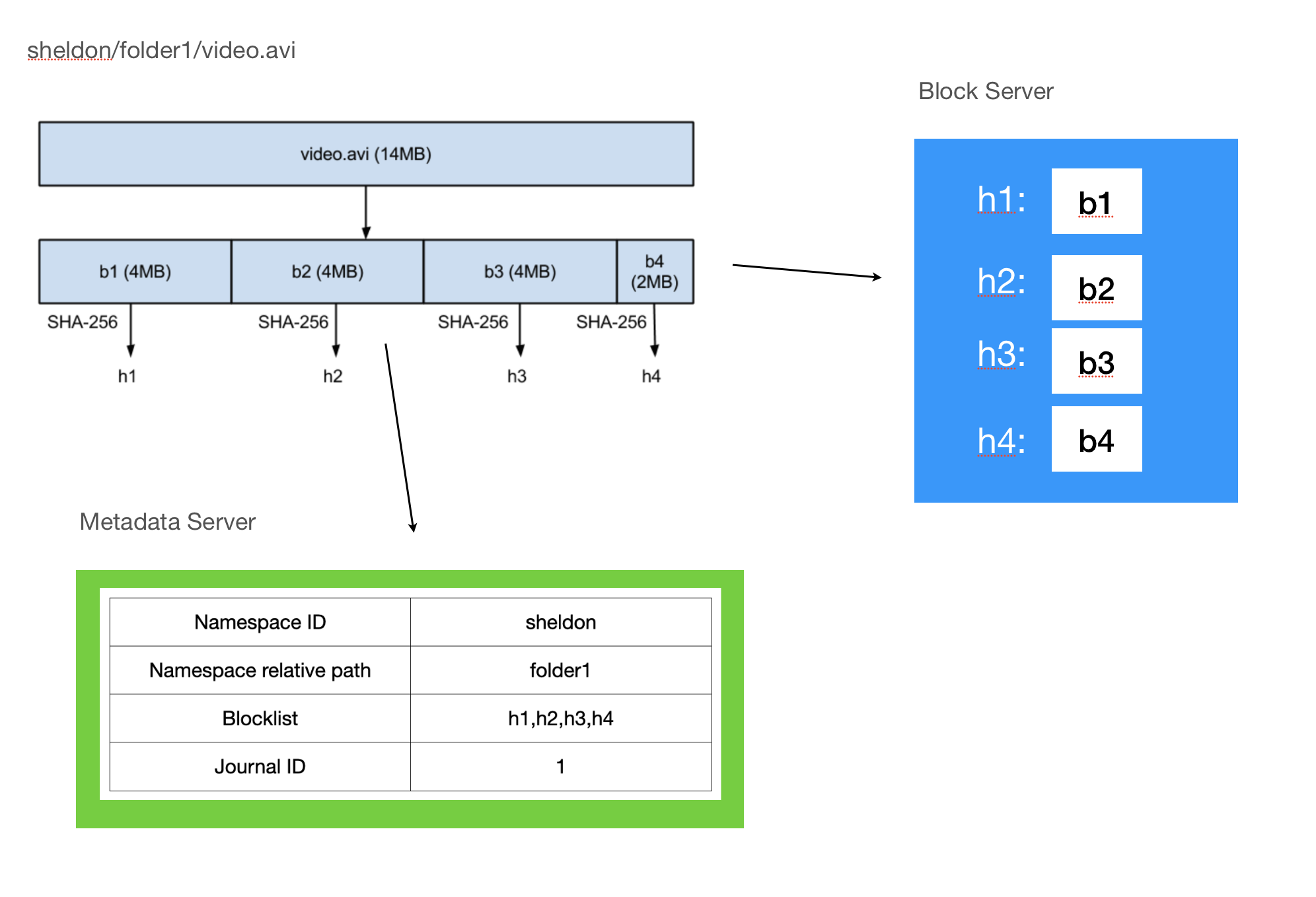
The solution to all these problems is chunking: the process of breaking a large file into smaller, independent pieces on the client before uploading.
2. Implementing Client-Side Chunking and Uploads
With chunking, the client's responsibility changes significantly. Instead of one large upload, it orchestrates the upload of many small chunks. This approach is what enables resumable uploads and efficient retries.
The video below provides an excellent deep dive into how you would explain this process in an interview. It covers not just the chunking itself, but also how the client interacts with the backend to manage the process.
Design Dropbox or Google Drive w/ a Ex-Meta Staff Engineer System Design Interview
Let's return to the 'Design Dropbox or Google Drive' interview with the ex-Meta Staff Engineer. This segment explains the entire chunking and resumable upload flow from a practical, implementation-focused perspective.
Watch the segment from 29:05 to 37:25. Focus on these key steps in the client-side logic: Why chunking must happen on the client. How the client uses pre-signed URLs to upload chunks directly to blob storage. How chunk status is tracked to enable resumable uploads. The concept of 'fingerprinting' to uniquely identify chunks.
Let's break down the process described in the video:
- Chunk the File: The client reads the large file and splits it into smaller, fixed-size chunks (e.g., 4-10 MB).
- Calculate Fingerprints: For each chunk, the client computes a unique hash (e.g., SHA-256) of its content. This hash, or "fingerprint," serves as a unique ID for the chunk. This is critical for tracking and deduplication.
- Initiate Upload: The client makes an initial API call to your backend (e.g.,
POST /uploads), sending the file metadata and the list of all chunk fingerprints. - Track State: The backend creates a record in the
FileMetadatadatabase, marking the file's status as "uploading" and storing the list of chunk fingerprints, each with a status like "not-uploaded". - Upload Chunks: For each chunk that isn't yet uploaded, the client requests a pre-signed URL from the backend. It then uses this temporary, secure URL to upload the chunk directly to blob storage (S3). This is highly efficient as it bypasses your backend service for the heavy data transfer.
- Update Chunk Status: After a chunk is successfully uploaded, the client notifies the backend. The backend verifies the upload with S3 and updates the chunk's status to "uploaded" in the metadata database.
- Resume on Failure: If the process is interrupted, the client can restart by fetching the file's metadata, checking which chunk statuses are "not-uploaded", and resuming from that point.
- Finalize Upload: Once all chunks are marked as "uploaded", the backend updates the file's main status to "complete".
This flow robustly handles large files and provides a much better user experience.
3. Advanced Chunking: Content-Defined Chunking (CDC)
For a senior engineering role, demonstrating deeper knowledge is key. While fixed-size chunking works, it has a major inefficiency when it comes to synchronizing updates.
Imagine you insert a single byte at the beginning of a 50 GB text file. With fixed-size chunks, every single subsequent byte in the file is shifted. This means every single chunk after the insertion point has changed, and the client would need to re-upload almost the entire 50 GB file.
This is where Content-Defined Chunking (CDC) comes in. Instead of cutting chunks at fixed intervals, CDC uses the content of the file itself to determine the chunk boundaries.
Design Dropbox/Google Drive - System Design | Softiu
The article 'Design Dropbox/Google Drive' from Softiu explains CDC and the Rabin Fingerprinting algorithm used to implement it. This is a powerful concept to bring up in an interview.
Read the section 'File Chunking Strategy', focusing on the table comparing 'Fixed vs Content-Defined Chunking' and the description of the 'Chunking Algorithm (Rabin Fingerprinting)'.
The core idea of CDC, often implemented with an algorithm called Rabin Fingerprinting, is to slide a window across the file's data, calculate a rolling hash at each position, and create a chunk boundary when the hash matches a specific pattern (e.g., the last N bits are zero).

The advantage is that if you insert a byte at the start of a file, only the first chunk (and possibly the second) will change. The algorithm will find the same "natural" cut-points for the rest of the file, meaning all subsequent chunks remain identical to their previous versions. This allows the sync process to be incredibly efficient.
4. Efficient Synchronization Logic
Now that we have a robust chunking strategy, we can design the client's synchronization logic. The goal is to minimize data transfer by only sending or receiving what has actually changed. This is often called Delta Syncing.
First, let's look at the components inside a typical sync client.
Cracking the Dropbox / Google Drive System Design Interview Part 1 of 2
The video 'Cracking the Dropbox / Google Drive System Design Interview' provides a clear breakdown of the logical components within the client application.
Watch the segment from 30:55 to 36:01. This will give you a mental model of the different modules inside the client and their responsibilities: Chunker, Watcher, Indexer, Synchronizer, and the local metadata database.
These components work together to perform delta sync.
The Delta Sync Protocol
When a user modifies and saves a file in their local sync folder, the following happens:
- Detect Change: The Watcher component detects the file modification using native OS APIs (e.g.,
FSEventson macOS,FileSystemWatcheron Windows). - Re-chunk and Fingerprint: The Chunker reads the modified file, re-chunks it (ideally using CDC), and generates a new ordered list of chunk fingerprints.
- Compare and Identify Delta: The Synchronizer compares the new list of chunk hashes against the old list stored in its local metadata database. It identifies which chunks are new or modified.
- Upload Delta: The client executes the upload flow we discussed earlier, but only for the new/modified chunks. Chunks whose fingerprints are already known to the server are not re-uploaded.
- Commit Metadata: Once the new chunks are uploaded, the client sends a final API call to the backend to update the file's metadata with the new version number and the new ordered list of chunk hashes.
This process is mirrored for downloading changes. When the client is notified of a remote change, it fetches the new chunk list from the server, compares it to the chunks it has locally, and downloads only the chunks it's missing before reconstructing the file.
Design Dropbox/Google Drive - System Design | Softiu
The 'Design Dropbox/Google Drive' article clearly outlines this delta sync process. This reinforces the steps and provides a concise summary.
Read the section 'Delta Sync' for a step-by-step summary of how the client uses chunk lists to perform efficient updates.
By using content-defined chunking and delta syncing, the client ensures that even for huge files, a small edit results in a very small amount of data transfer, making the system fast and bandwidth-efficient.
Conclusion
In this lesson, we performed a crucial deep dive into the client-side logic that makes a file synchronization service work at scale. We moved beyond our initial, naive upload API to a sophisticated system capable of handling large files and synchronizing changes efficiently.
Key Takeaways:
- Client-Side Chunking is Non-Negotiable: To support large files, resumable uploads, and efficient retries, files must be broken into chunks on the client before any upload begins.
- Fingerprinting Uniquely Identifies Content: Hashing chunks provides a unique fingerprint, which is the foundation for tracking upload status, resuming, and deduplicating data.
- Content-Defined Chunking (CDC) Optimizes Syncing: For a senior-level design, CDC is a superior alternative to fixed-size chunking because it minimizes the impact of local edits, leading to much smaller data transfers during synchronization.
- Delta Sync Minimizes Bandwidth: The core of efficient synchronization is the "delta" approach: the client identifies exactly which chunks have changed and only transmits those, rather than the entire file.
Next Lesson Preview:
We've now designed the high-level architecture and the client-side logic for chunking and syncing. Throughout this lesson, we've seen how the client relies heavily on reading and writing metadata (file versions, lists of chunk fingerprints, statuses). This puts enormous pressure on the backend metadata service. In our next lesson, we will design the metadata service including its database schema and scaling strategy to handle the demands of millions of users and billions of files.