In our previous lesson, we explored how attractor systems can create complex, responsive patterns by using distance to drive geometric transformations. We saw this as a form of data-driven design, where relationships between objects generate form. Today, we shift to another powerful generative technique: creating form directly from mathematical functions.
This lesson will focus on applying trigonometric functions, particularly the sine function, to generate the elegant, undulating forms and patterns that are staples in parametric architecture. Given your background in mathematics, you'll recognize the core principles immediately. We will translate the familiar sine wave equation into a generative algorithm in Grasshopper, giving you precise control over rhythmic and flowing geometries.
By the end of this lesson, you will be able to construct parametric curves and surfaces using sinusoidal functions, and you will understand how to manipulate their parameters to control the final architectural form.
The Sine Function as a Design Tool
The sine function is fundamental to describing oscillations and waves in physics, and in design, it provides a perfect tool for creating natural, flowing curves. The general form of a sine function gives us a set of parameters to control its shape:
Each parameter corresponds to a specific geometric transformation of the basic sine wave. Understanding these will be key to using the function creatively.
How to Create a Sine Curve in Grasshopper – Step-by-step Tutorial
This article from Hopific.com provides an excellent review of the sine function and breaks down the role of each parameter in its general formula.
First, read the section What is a Sine Function? for a quick refresher on its mathematical basis. Then, jump to the section Controlling the Sine Curve. Pay close attention to the formula y=Asin(Bx+C)+D and the explanation of what A (Amplitude), B (Frequency), C (Horizontal Shift), and D (Vertical Shift) represent.
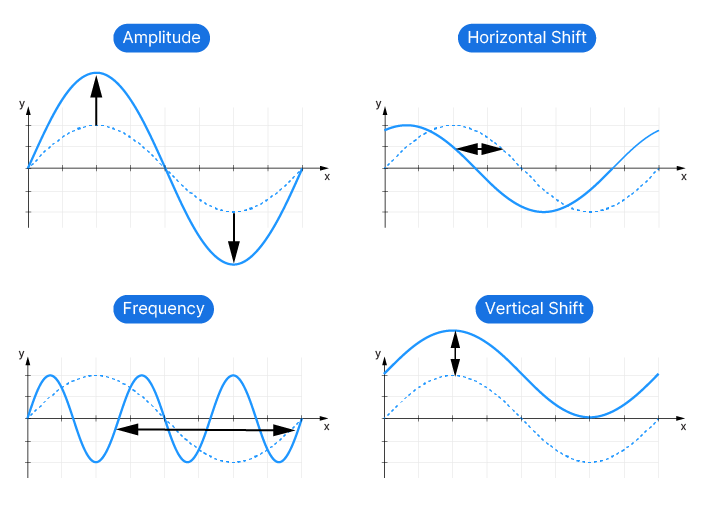
The image below provides a clear visual summary of how each parameter modifies the baseline sine wave (the dotted line).
Your background in calculus and physics has likely made you very familiar with these parameters.
- Amplitude (A) controls the "height" or intensity of the wave.
- Frequency (B) controls the period or density of the wave cycles. The period is .
- Phase Shift (C) shifts the wave horizontally along its axis.
- Vertical Shift (D) moves the entire wave up or down.
These four parameters are the levers we will pull in Grasshopper to sculpt our forms.
Building a Parametric Sine Curve in Grasshopper
Now, let's translate this mathematical knowledge into a generative Grasshopper definition. The process involves creating a series of points whose coordinates are determined by the sine function and then drawing a curve through them.
How to Create a Sine Curve in Grasshopper – Step-by-step Tutorial
This next section of the same article provides a concise, step-by-step guide to building a basic sine curve generator. It uses the powerful Expression component, which is ideal for implementing mathematical formulas directly.
Follow the four steps in the section Basic Sine Curve Setup. As you build the definition, take note of the logic: A Series component generates the input values (our 'x' values). A Construct Point component prepares to create the points. An Expression component computes sin(x) to generate the 'y' values. An Interpolate curve component connects the points into a smooth curve. This simple structure is the foundation for all function-driven curve generation.
A crucial detail, especially given your math background, is the use of radians. Trigonometric functions in most programming and computational environments, including Grasshopper, expect inputs in radians, not degrees. While the Expression component sin(x) handles this conversion automatically, if you were to use the dedicated Sin component from the "Maths" tab, you would first need to convert your input values from degrees to radians using the Radians component. This is an important principle to remember when working with trigonometric functions in any computational context.
From 2D Curves to 3D Undulating Surfaces
The real power of this technique in architecture becomes apparent when we move into three dimensions. A simple and effective way to do this is to use our sine function to define the Z-coordinate (height) of points, rather than the Y-coordinate. By creating two such curves and lofting a surface between them, we can generate an undulating roof or wall panel.
The following video provides a clear demonstration of this process, and also introduces more advanced controls within the Expression component.
Grasshopper 10 - Sine Functions
This tutorial, "Grasshopper 10 - Sine Functions" by Daniel Christev, effectively demonstrates how to build a flexible sine function generator and extend it into a 3D surface.
We'll focus on three key parts: Expression Setup: Watch how the initial expression A * sin(T) is created from the start. This introduces parametric control over the amplitude (A) right away. The input T is generated by a Range of numbers, which serves the same purpose as the Series component we used earlier. Parametric Control: See how the curve responds to changes in amplitude and domain in the segment from this section. This highlights the "parametric" nature of the setup. Creating a 3D Surface: The most important part is from this segment. Notice how the Z-coordinate is used for the amplitude, and a second, parametrically distinct curve is created. Finally, the Loft component generates the 3D surface between them. This is a classic parametric facade or roof technique.
Advanced Application: Generating Surfaces from 2D Functions
We can extend this idea further to define a surface where the height at any point is a function of both its x and y coordinates, or . This is analogous to plotting functions of two variables, which you've encountered in multivariable calculus.
A common technique is to multiply two sine functions together, one for each axis, like . This generates a field of peaks and valleys, often referred to as an "egg-carton" or waffle pattern.
The image below shows a Grasshopper definition that implements this exact idea.
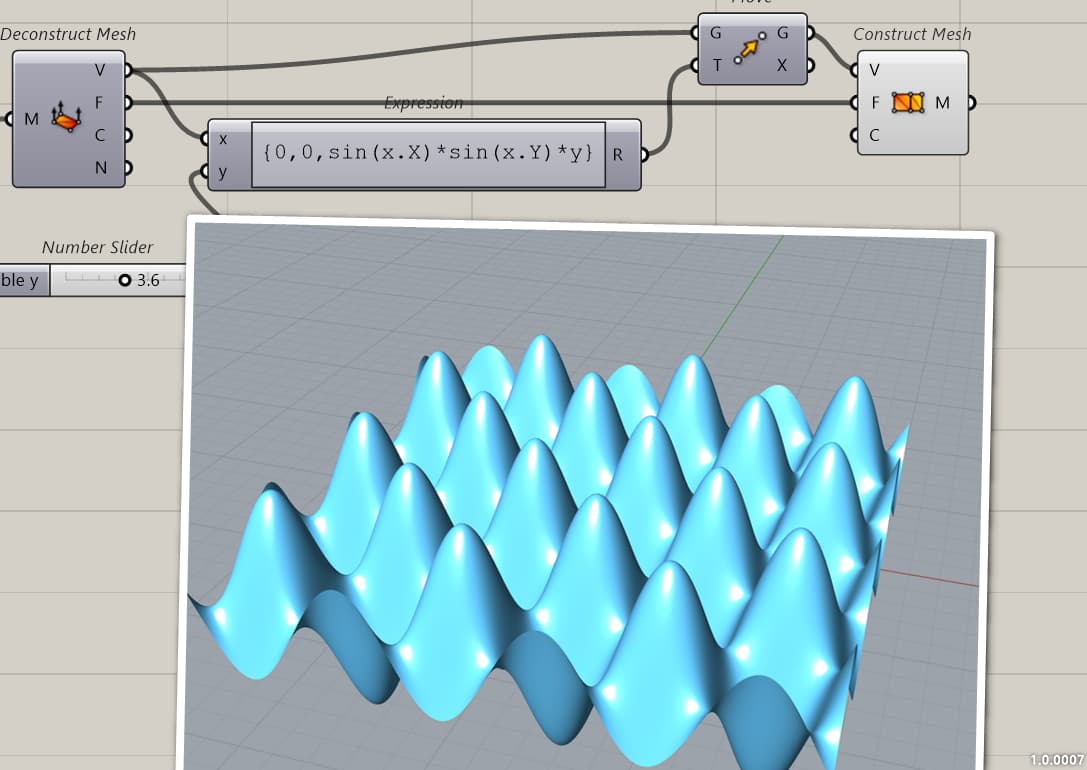
Here, a mesh is deconstructed into its vertices (points). For each vertex, its X and Y coordinates are fed into the expression, which calculates a new Z value. A new mesh is then constructed from these displaced vertices. This is a very direct and powerful method for generating complex, mathematically defined surfaces and provides a glimpse into how parametric surfaces are constructed, a topic we will explore in more detail later.
Conclusion
In this lesson, you've learned how to harness the power of trigonometric functions to generate dynamic, undulating forms. We've seen that the same mathematical principles that describe waves in the natural world can be used as a sophisticated tool for architectural design.
Key Takeaways:
- The sine function, , offers four distinct parameters (Amplitude, Frequency, Phase, and Vertical Shift) for precise control over wave-like geometry.
- In Grasshopper, this is implemented by generating a series of input numbers, applying the function using components like
ExpressionorSin, and constructing points to define a curve or surface. - By applying the function's output to the Z-coordinate of points, you can easily generate 3D curves and loft them into undulating surfaces.
- More complex surfaces can be generated by using functions of two variables, such as , to define the height of every point on a grid.
You now have two distinct generative strategies in your toolkit: data-driven methods like attractors, and function-driven methods like the one we covered today. In our next lesson, we will build upon this foundation and look more formally at how to create a surface from a grid of points or a network of curves, unifying what you've learned into a robust workflow for surface modeling.