Hello! Welcome back to our module on Networking Fundamentals.
In our previous lesson, we built a mental map of network communication using the seven-layer OSI model. We learned that each layer has a specific job, and we identified Layer 3, the Network Layer, as being responsible for logical addressing and routing. The key concept at this layer is the IP address.
Today, we're going to zoom in on that concept. Our learning outcome is to explain the structure of IPv4 addresses and the purpose of public vs. private IP ranges. Understanding this is not just academic; it's fundamental to nearly everything you'll do in DevOps. Every server, container, and cloud resource you manage needs an address to communicate, and you'll be the one designing and managing these address spaces.
Let's begin by dissecting what an IP address actually is.
Part 1: The Structure of an IPv4 Address
An IP (Internet Protocol) address is a unique numerical label assigned to each device connected to a computer network that uses the Internet Protocol for communication. Think of it as a street address for your computer or server.
The most common version you'll encounter is IPv4 (Internet Protocol version 4). To understand its structure, let's start with a foundational article.
This article from Fortinet gives a clear, concise introduction to the structure of an IPv4 address. We will use it to understand the 32-bit format and the familiar dotted-decimal notation.
Please read the short section titled 'What is IPv4?'. Focus on how the 32-bit binary number is represented as four sets of numbers separated by periods.
As the article explained, an IPv4 address has two key characteristics:
- It's a 32-bit number. This means it's composed of 32 ones and zeros in binary. Here's an example:
11000000101010000000000100000001 - It's written in dotted-decimal notation. To make that long binary string readable for humans, we divide it into four 8-bit chunks (called octets), convert each octet to its decimal value, and separate them with dots.
Let's break down the example:
11000000= 19210101000= 16800000001= 100000001= 1
So, the binary address 11000000101010000000000100000001 becomes the much friendlier 192.168.1.1.
Since each octet is 8 bits, its value can range from 00000000 (0) to 11111111 (255). This is why you'll only ever see numbers between 0 and 255 in an IPv4 address.
A 32-bit address space allows for , or approximately 4.3 billion, unique addresses. In the 1980s, this seemed like an enormous number. But as we'll see, it wasn't nearly enough.
Part 2: Public vs. Private IP Addresses
The explosion of the internet, with billions of computers, smartphones, servers, and IoT devices coming online, created a problem: we were running out of IPv4 addresses. To solve this, the Internet Engineering Task Force (IETF) came up with a clever solution: splitting IP addresses into two main categories: Public and Private.
Let's read a clear definition of each.
Public IP address vs. Private IP address
This article clearly defines the difference between a public and a private IP address. Understanding this distinction is crucial for network design.
Read the two sections, 'Public IP address' and 'Private IP address'. Focus on where each type is used and its scope of uniqueness (global vs. local).
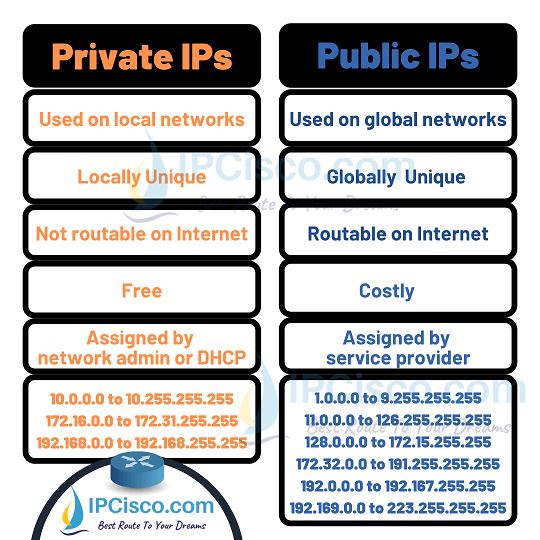
Let's summarize the key differences:
-
Public IP Address:
- Scope: Globally unique across the entire internet.
- Routable: Can be reached from anywhere on the public internet.
- Assignment: Assigned by an Internet Service Provider (ISP). There's a cost associated with them, and they are managed by global authorities.
- Analogy: Your home's postal address. It's unique in the world, and anyone can use it to send you a letter.
-
Private IP Address:
- Scope: Only unique within a specific local network (e.g., your home Wi-Fi, an office network, or a cloud VPC).
- Routable: Cannot be reached directly from the public internet.
- Assignment: Assigned by a local device, typically a router.
- Analogy: The name on a door inside an apartment building (e.g., "John's Room"). It's only meaningful inside that building. Many different buildings can have a "John's Room."
Your router acts as the gatekeeper. It has one public IP address that faces the internet, but it assigns many private IP addresses to all the devices connected to it (your laptop, phone, etc.). When your laptop wants to access Google, it sends the request through the router, which translates the private source address into its public address. This process is called Network Address Translation (NAT), and it's the key mechanism that allows millions of private networks to share a limited pool of public IPs.
Part 3: The Reserved Private IP Ranges
The IETF didn't just create the concept of private addresses; they formally reserved specific blocks of the IPv4 address space for this purpose. Any IP address falling within these ranges is automatically considered private.
The following article from DevOpsCube lists these ranges.
This article explains why private IP ranges were created and explicitly lists the addresses reserved by the IETF for private use.
Start reading from 'Internet Protocol version 4 (IPV4 Addressing)' and continue through the 'Private IP Ranges' section. Pay close attention to the three main blocks of IP addresses listed.
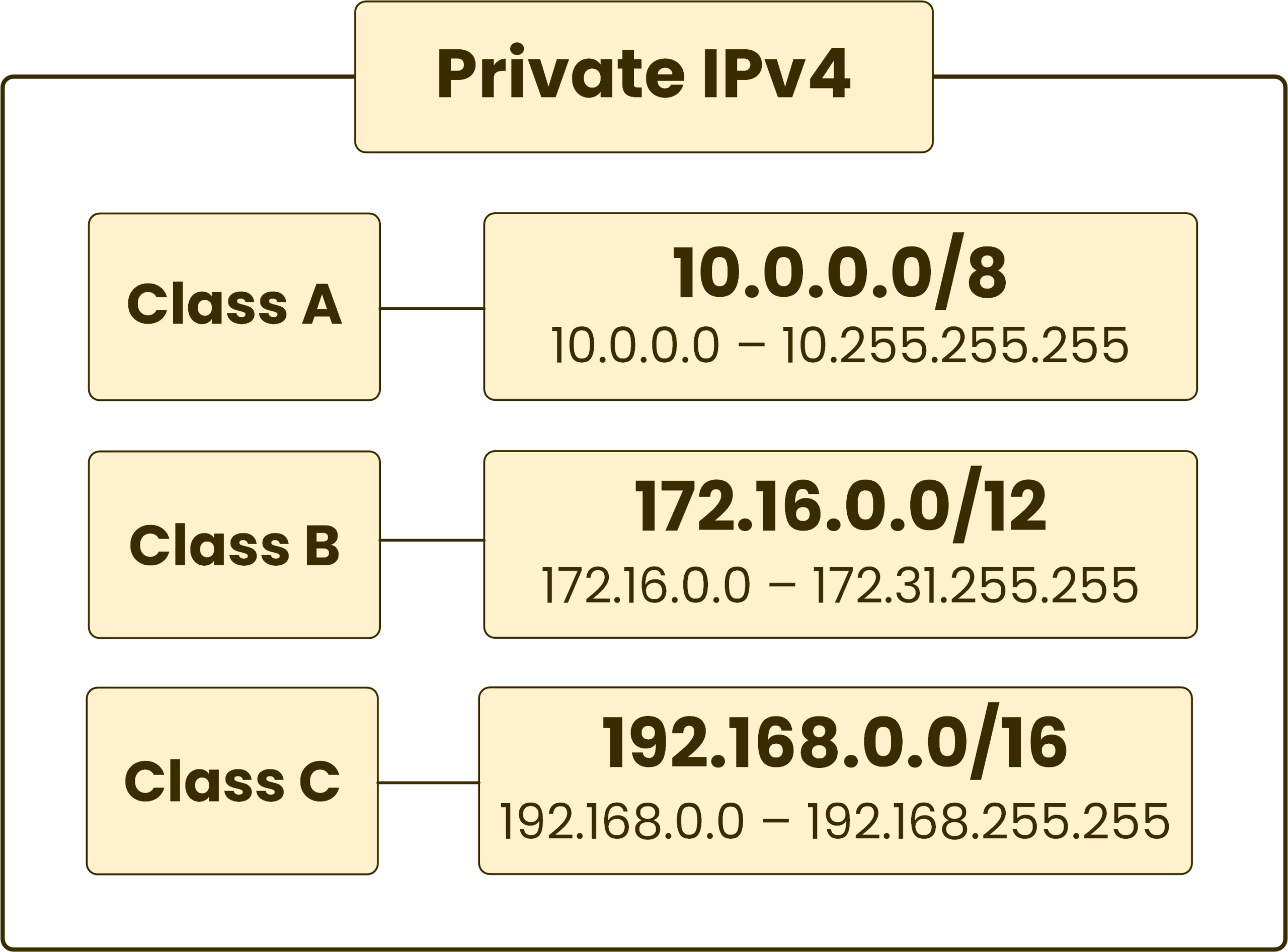
To summarize, the three main blocks reserved for private networks (as defined in RFC 1918) are:
- 10.0.0.0 to 10.255.255.255 (A single large block, often used in large corporate or cloud networks)
- 172.16.0.0 to 172.31.255.255 (A medium-sized block)
- 192.168.0.0 to 192.168.255.255 (A smaller block, commonly used by home routers)
Any IP address not in these ranges is generally considered a public IP.
The two images below provide excellent visual summaries of these ranges and the overall public vs. private concept.
Test your understanding!
For each of the following IP addresses, determine if it is a Public or Private IP.
172.25.10.2008.8.8.810.1.1.1192.168.1.54139.162.130.5
Show answer
- Private. It falls within the
172.16.0.0to172.31.255.255range. - Public. This is Google's public DNS server and does not fall into any private range.
- Private. It falls within the
10.0.0.0to10.255.255.255range. - Private. It falls within the
192.168.0.0to192.168.255.255range. - Public. It does not fall into any of the reserved private ranges.
Why This Matters for DevOps
As a DevOps engineer, you are constantly working with IP addresses.
- When you set up a Virtual Private Cloud (VPC) in AWS or another cloud provider, the very first thing you do is choose a private IP range for it (e.g.,
10.0.0.0/16). All the virtual machines, databases, and other resources you launch inside that VPC will get private IPs from this range. - When you configure Docker or Kubernetes, the containers and pods need IP addresses to communicate. These are typically assigned from a private range.
- When you set up firewall rules, you'll be writing rules that say "allow traffic from this private IP to that private IP on port 3306" or "allow traffic from the public internet to this public IP on port 443."
A firm grasp of public vs. private IP addressing is not optional; it's essential for building secure, scalable, and functional infrastructure.
Conclusion
In this lesson, we've dissected the IPv4 address and understood the critical distinction between public and private address spaces. This separation is a foundational concept that makes the modern internet, and modern cloud infrastructure, possible.
Key Takeaways:
- An IPv4 address is a 32-bit number, commonly written in dotted-decimal notation (four numbers from 0-255, separated by dots).
- Public IPs are globally unique, routable on the internet, and are assigned by ISPs.
- Private IPs are for use on local networks, are not routable on the internet, and use specific reserved address ranges (
10.0.0.0/8,172.16.0.0/12,192.168.0.0/16). - The use of private IPs, combined with NAT, is the primary solution to the scarcity of IPv4 addresses.
Now that we understand the structure of an individual address and the different types, our next lesson will explore how we can group these addresses into networks. We will learn how to calculate subnet masks, network addresses, and broadcast addresses for a given network block. This will give you the tools to start carving up those large private IP ranges into smaller, manageable networks for your applications.