Hello! Welcome back to our exploration of Django REST Framework.
In the last lesson, we discussed the "why" behind generic views. You learned that DRF provides a hierarchy of abstractions (GenericAPIView, Mixins, and Concrete Views) designed to eliminate the boilerplate code associated with common CRUD operations. We saw how a verbose APIView could be reduced to just a few lines of code in theory.
Today, we move from theory to practice. Your learning outcome is to implement a list/create endpoint using ListCreateAPIView. We'll take the concepts from our previous discussion and apply them to build a functional API endpoint that can both display a list of items and accept new items, all from a single URL and a single, concise view class. This is a foundational pattern for building any RESTful API.
The Problem Revisited: Verbose APIViews
Before we jump into the solution, let's quickly refresh our memory on the problem we're solving. A view that handles both listing a collection of objects (GET) and creating a new object in that collection (POST) requires a fair amount of code when using a standard APIView.
The following resource provides a clear example of this.
Django REST Framework ListCreateAPIView
This article from Agiliq sets up a scenario with a Question model and then shows how you would build a view to list and create questions using a standard APIView.
Read the 'Setup' section. Pay close attention to the QuestionsView class. Notice how it needs separate, explicit get() and post() methods, each containing logic for database queries, serializer handling, and response creation. This is the boilerplate we are about to eliminate.
As you can see, the get method fetches all objects and serializes them, while the post method validates incoming data and saves a new object. While functional, this pattern is so common that DRF provides a much more efficient way to handle it.
The Solution: ListCreateAPIView
Now, let's apply the power of concrete generic views. ListCreateAPIView is a class that inherits from GenericAPIView and includes both ListModelMixin and CreateModelMixin. This pre-built combination gives us all the functionality of the view above with a fraction of the code.
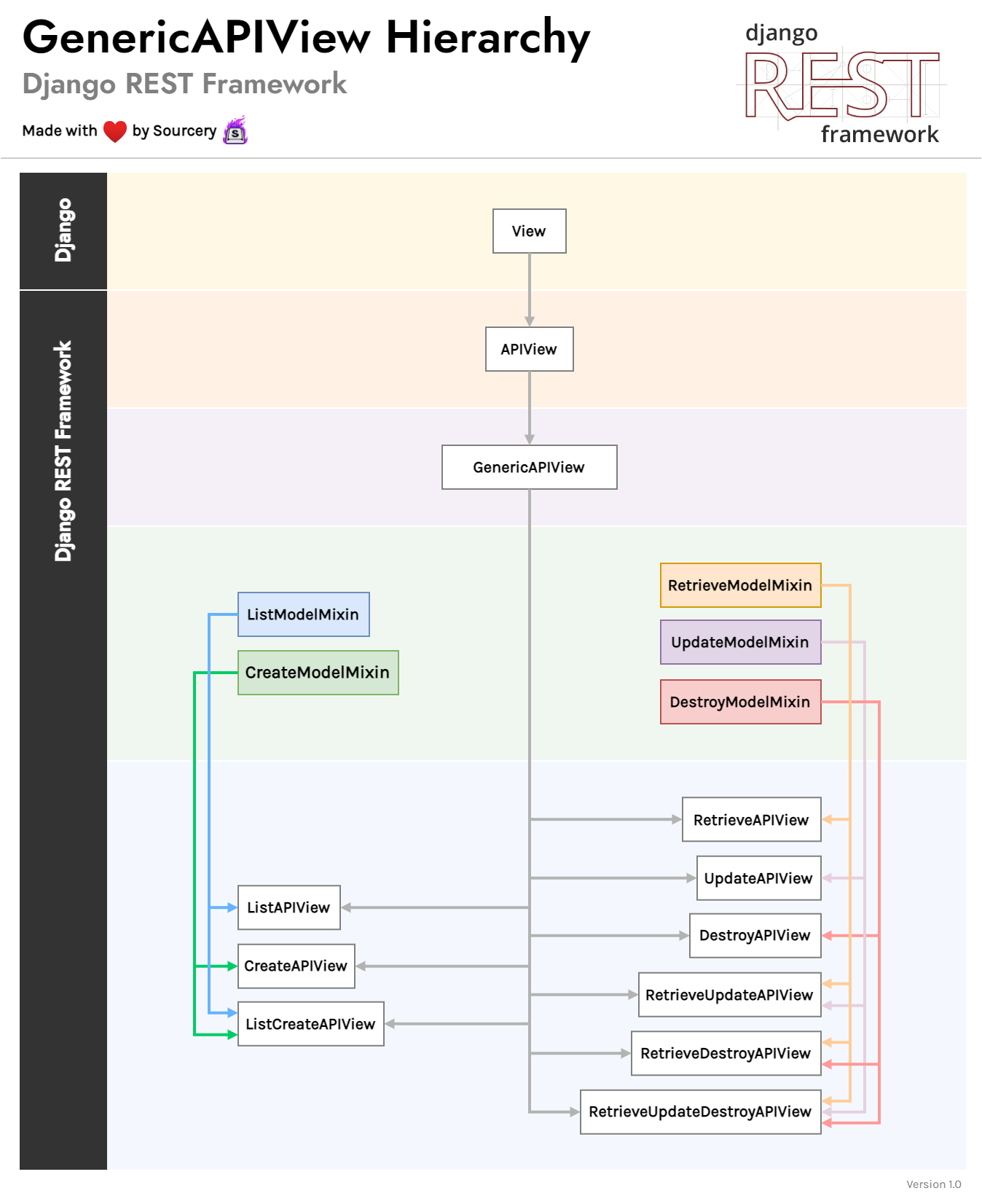
Let's see the refactoring in action, both in text and in a video demonstration.
Django REST Framework ListCreateAPIView
The same Agiliq article perfectly demonstrates the refactoring process. You'll see the verbose APIView replaced by the very concise ListCreateAPIView.
Now, read the 'ListCreateAPIView' section. Compare the new QuestionsView with the one from the 'Setup' section. The get() and post() methods are completely gone, replaced by just two class attributes: queryset and serializer_class. The article briefly explains how DRF handles the GET and POST calls internally.
That's a dramatic reduction in code! The view now simply declares what data it operates on (queryset) and how that data should be represented (serializer_class), leaving the implementation details to DRF.
Now, let's watch a practical demonstration of this process to solidify your understanding.
Django REST Framework - Creating Data | ListCreateAPIView and Generic View Internals
This video from the BugBytes channel provides a great walkthrough of implementing and testing a ListCreateAPIView.
First, watch from 07:15 to 08:24. This part introduces ListCreateAPIView and explains how it serves a read-write endpoint for a collection of model instances. Then, skip ahead and watch from 14:38 to 17:05. This segment shows the actual refactoring—replacing separate views with the single ListCreateAPIView—and then demonstrates its behavior in the browsable API. Notice how the same /products/ endpoint now shows a list of items (for GET requests) and a form to create a new one (for POST requests).
By defining just two attributes, we've created a single view that:
- Handles
GETrequests by querying all objects defined inqueryset, serializing them withserializer_class, and returning a200 OKresponse with the JSON data. - Handles
POSTrequests by usingserializer_classto validate the incoming request body, saving a new object to the database if valid, and returning a201 Createdresponse with the new object's data.
Customizing the Behavior
ListCreateAPIView is powerful because it's not a rigid black box. While the default behavior is often what you need, DRF provides "hook" methods that you can override to inject custom logic. This aligns with your interest in understanding the framework's internal workings and gives you fine-grained control when you need it.
Dynamic Filtering with get_queryset()
The queryset attribute is great for simple cases where you always want to list all objects. But what if you need to filter the list based on the user making the request or some other dynamic condition? For this, you can override the get_queryset() method.
Django REST Framework ListCreateAPIView
Let's return to the Agiliq article, which demonstrates how to use get_queryset() to dynamically filter the list of results.
Read the section that begins with 'Suppose we only want to show Questions published in last two days...'. This shows how you can define a get_queryset() method to return a dynamically filtered queryset instead of relying on a static class attribute. When you define this method, the queryset attribute is no longer needed.
This is an extremely common and useful pattern. For example, in a multi-user application, you might use get_queryset() to return only the objects that belong to the currently logged-in user: return Book.objects.filter(owner=self.request.user).
Using Different Serializers with get_serializer_class()
Another common requirement is to use different serializers for different actions. For example, your "create" action might need to accept more fields than your "list" action displays. You can handle this by overriding get_serializer_class().
Django REST Framework ListCreateAPIView
The final section of the Agiliq article covers this exact scenario, showing how to return a different serializer class depending on the HTTP method.
Read the section starting from 'Now we want to allow creating choices...'. It shows how to inspect self.request.method inside get_serializer_class() to return one serializer for GET requests and another for POST requests. When you define this method, the serializer_class attribute is no longer needed.
Test your understanding!
You are building an API for a Task model. You need to create a ListCreateAPIView.
Your Task model has a boolean field named is_completed. Your API should have a special requirement: the list view (GET) should only display tasks that are not completed (is_completed=False). The create view (POST) should be able to create any task, regardless of its completion status.
Given the following TaskSerializer, how would you write the TaskListCreateView to meet this requirement?
# serializers.py
from rest_framework import serializers
from .models import Task

class TaskSerializer(serializers.ModelSerializer):
    class Meta:
        model = Task
        fields = ['id', 'title', 'description', 'is_completed']
Show answer
You would need to override the get_queryset() method to implement the custom filtering for the list view. The POST functionality will work correctly by default.
Here is the correct implementation:
# views.py
from rest_framework import generics
from .models import Task
from .serializers import TaskSerializer

class TaskListCreateView(generics.ListCreateAPIView):
    # This serializer will be used for both list and create actions.
    serializer_class = TaskSerializer

    # This method is only called for the list (GET) view.
    def get_queryset(self):
        """
        This view should return a list of all non-completed tasks.
        """
        return Task.objects.filter(is_completed=False)
By defining get_queryset(), you ensure that any GET request to this endpoint will only ever see the filtered list of non-completed tasks. The POST action, handled by the CreateModelMixin, doesn't use get_queryset(), so it remains unaffected and can create tasks with any is_completed value.
Conclusion
You have now successfully implemented one of the most common API endpoints. By leveraging ListCreateAPIView, you created a robust, read-write endpoint for a collection of resources with minimal, clean, and declarative code.
Key Takeaways:
ListCreateAPIViewis the go-to concrete generic view for endpoints that need to handle both listing a collection of objects (GET) and creating a new object (POST).- It works out-of-the-box by simply defining the
querysetandserializer_classattributes. - This approach drastically reduces boilerplate and follows the Don't Repeat Yourself (DRY) principle.
- For more advanced use cases, you can override hook methods like
get_queryset()for dynamic filtering andget_serializer_class()for using different serializers per action.
Preview of the Next Lesson:
We've handled the collection endpoint (e.g., /api/tasks/). But what about interacting with a single, specific task (e.g., /api/tasks/1/)? In the next lesson, we will complete our CRUD functionality by learning how to implement a detail/update/delete endpoint using RetrieveUpdateDestroyAPIView.