Hello! Let's continue our exploration of Django REST Framework by building on what you learned about API views.
In our last lesson, you successfully created your first API endpoints using function-based views (FBVs) and the @api_view decorator. This approach is excellent for its simplicity and explicitness. However, as you start handling more HTTP methods for a single resource (like GET, POST, PUT, and DELETE), you'll find that the if/elif structure within a single function can become lengthy and harder to manage.
Today, we'll address this by moving to a more organized, object-oriented pattern. Your learning outcome is to build flexible API endpoints using the APIView class to handle different HTTP methods. This class is the foundation of all Class-Based Views (CBVs) in DRF and aligns naturally with your Python background in object-oriented programming.
From Functions to Classes: Introducing APIView
APIView is a DRF class that inherits from Django's standard View class but enhances it with crucial API functionality. Instead of one function handling all HTTP methods, APIView allows you to define separate methods for each one, such as get(), post(), put(), and so on.
The video below gives an excellent overview of APIView and its advantages.
Django REST Framework - APIView class
Watch the first part of this video from BugBytes to understand what APIView is and the benefits it provides over a standard Django View.
Watch from the beginning to 02:16. The key takeaways are: The Request and Response objects are the same ones you used with function-based views. APIView handles content negotiation (e.g., serving JSON or the browsable API) for you. It provides a built-in framework for authentication and permission checks (which we'll cover in a future module). Incoming requests are automatically dispatched to a handler method named after the HTTP verb (e.g., a GET request calls the get() method).
As the video explained, APIView provides a clean structure where the logic for each HTTP method is neatly encapsulated in its own method within the class.
Refactoring a View: From @api_view to APIView
Let's see this in action. The most effective way to understand APIView is to refactor a function-based view into a class-based one.
The process involves three main steps:
- Define a class that inherits from
rest_framework.views.APIView. - Move the logic for each HTTP method from your
if/elifblock into a corresponding method in the class (e.g.,get,post). - Update your
urls.pyto point to the new class using the.as_view()method.
This next segment of the video demonstrates this refactoring process for a GET endpoint.
Django REST Framework - APIView class
Now, continue with the BugBytes video to see a practical demonstration of converting a function-based view to an APIView.
Watch from 02:16 to 05:15. Follow along as the presenter: Creates a new class inheriting from APIView. Defines a get() method and moves the existing logic into it. Updates the urls.py file to use YourViewClassName.as_view(). Tests the new class-based view in the browser.
Handling Multiple HTTP Methods
The real power of APIView shines when you need to handle a full set of CRUD (Create, Retrieve, Update, Delete) operations. The official DRF tutorial provides a canonical example of this.
Let's study the official documentation to see how to implement views for both listing/creating items and retrieving/updating/deleting a single item.
Read the section 'Rewriting our API using class-based views'. You'll see two classes: SnippetList: Handles GET (list all) and POST (create new) for the /snippets/ endpoint. SnippetDetail: Handles GET (retrieve one), PUT (update one), and DELETE (delete one) for the /snippets/<pk>/ endpoint. Notice how clean the separation of concerns is. Each HTTP verb has its own dedicated method.
As you can see from the documentation, the pattern is consistent and scalable. The SnippetList class neatly groups the get and post logic, while SnippetDetail groups the get, put, and delete logic for a specific instance.
Test your understanding!
In the previous lesson, you created a function-based view called contact_form_view that accepted POST requests. Refactor that view into a class-based view named ContactFormView that inherits from APIView.
Show answer
from rest_framework.views import APIView
from rest_framework.response import Response
from rest_framework import status

# The new Class-Based View
class ContactFormView(APIView):
    """
    Accepts POST requests for the contact form.
    """
    def post(self, request, format=None):
        email = request.data.get('email')
        message = request.data.get('message')

        if not email or not message:
            return Response(
                {"error": "Both email and message are required."},
                status=status.HTTP_400_BAD_REQUEST
            )

        response_data = {
            "status": "success",
            "message": f"Thanks for your message, we'll contact you at {email}"
        }

        return Response(response_data, status=status.HTTP_200_OK)

# In your urls.py, you would change the path to:
# path('contact/', ContactFormView.as_view(), name='contact-form')
This class structure is much more extensible. If you later decided to allow users to GET information about the contact form endpoint, you could simply add a get() method to the class without touching the existing post() logic.
How APIView Works & Where It Fits
Your preference for understanding the theory behind the practice is important. So, how does APIView actually work?
When a request arrives, Django's URL resolver calls the .as_view() class method. This creates an instance of your view class and calls its .dispatch() method. The dispatch method inspects the request's HTTP verb (e.g., 'get', 'post') and calls the method on the class with the corresponding name. This is how a GET request ends up executing your get() method.
Django REST Framework Views - APIViews
This article from TestDriven.io provides a concise explanation of the view dispatch process.
Read the section 'How Do DRF Views Work?'. Pay special attention to the code snippet showing the dispatch method. It clearly illustrates how the handler method is looked up dynamically based on the request method.
APIView is the most fundamental building block for class-based views in DRF. It gives you complete control but also requires you to write all the logic yourself. As you'll see later, DRF provides higher-level generic views that build upon APIView to reduce boilerplate code for common scenarios.
This table gives you a great overview of where APIView sits in the hierarchy of DRF views.
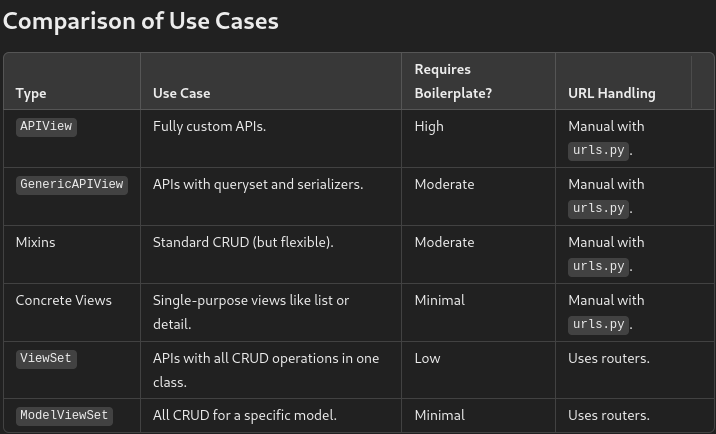
As the table and video suggest, APIView is the perfect choice when:
- Your endpoint logic doesn't map directly to a single database model.
- You need to aggregate data from multiple sources or call external services.
- You require full control over every step of the request/response process.
Conclusion
You've taken a significant step from simple functions to structured, object-oriented API views. This approach will be the foundation for building more complex and maintainable APIs.
Key Takeaways:
APIViewis the base class for DRF's class-based views.- It organizes endpoint logic by mapping HTTP methods (GET, POST, etc.) to class methods (
get,post, etc.). - It provides a cleaner, more scalable alternative to a single function with many
if/elifbranches. - You connect a class-based view to a URL using the
.as_view()method in yoururls.py. APIViewis ideal for custom, non-standard API endpoints where you need maximum control.
Preview of the Next Lesson:
While APIView is powerful, you probably noticed in the SnippetList and SnippetDetail examples that the code for listing, creating, retrieving, updating, and deleting objects is very repetitive. In our next lesson, we will learn how to describe the role of DRF's generic views and mixins in reducing boilerplate code, which will allow us to implement these common patterns with just a few lines of code.