Hello! Welcome to the final lesson of our course on the Django framework.
In our last lesson, we configured our project to handle static files in production using collectstatic and WhiteNoise. This was a crucial step in preparing our application to be deployed. However, there's one final, critical component we need to understand: the server that will actually run our Django code.
So far, we've been using Django's built-in development server (manage.py runserver). As we've discussed, this server is not suitable for a live production environment. Today, we'll explore its production-ready replacements: WSGI and ASGI servers like Gunicorn and Uvicorn. You will learn about their essential role in bridging the gap between the wider internet and your Django application.
1. The Problem with the Development Server
You've built your application, tested it, and everything works perfectly using runserver. So why can't you just use that on your live server?
The development server is designed for one developer, one user at a time. It prioritizes convenience and debugging features over performance, security, and scalability. Using it for a live application would be like running a restaurant kitchen with a single microwave. It works for one meal, but it will fail spectacularly when multiple orders come in.
Fine Tuning Python WSGI and ASGI applications for Flask, Django, and FastAPI
This article from Anthony Shaw provides a perfect analogy for why the development server isn't enough and introduces the need for a production-grade server.
Read the first few sections, starting from 'A recap of Python Web Application architecture' and stopping just before 'WSGI or ASGI which one is it?'. Pay close attention to the 'lemonade stand' vs. 'commercial kitchen' analogy—it beautifully illustrates the difference between Django's runserver and a real application server.
To handle real-world traffic with many concurrent users, we need a dedicated "commercial kitchen"—a robust application server designed for production. This is where WSGI and ASGI servers come in.
2. WSGI: The Universal Language for Python Web Apps
Before servers like Gunicorn existed, connecting a Python web application to a web server (like Apache or Nginx) was complex. Each server and framework had its own way of communicating. The Python community solved this by creating the Web Server Gateway Interface (WSGI).
Think of WSGI as a standardized contract or a universal language.
- The Web Server (e.g., Gunicorn) is the "waiter." It takes orders (HTTP requests) from customers.
- The Python Application (e.g., Django) is the "chef." It prepares the food (the HTTP response).
WSGI defines exactly how the waiter should pass the order to the chef and how the chef should hand the food back. This standard means any WSGI-compliant server can run any WSGI-compliant application.
To understand why this was such a big step forward, let's watch a brief history.
WSGI for Web Developers (Ryan Wilson-Perkin)
This video by Ryan Wilson-Perkin provides an excellent historical context, explaining the problems with the older CGI standard and how WSGI was designed to solve them.
Watch the segment from 08:09 to 10:49. The key takeaway is understanding the inefficiency of CGI (starting a new process for every request) and how WSGI introduced the idea of a long-running application process to improve performance.
The core innovation of WSGI was moving from a model where the server had to start your Python script from scratch for every single request to a model where a dedicated server starts your application once and then efficiently feeds requests into it. This is far more performant.
Your Django project is already set up for this. The wsgi.py file in your project's configuration directory contains an application callable. This is the entry point that a WSGI server like Gunicorn will use to communicate with your Django project.
3. Gunicorn: The WSGI Workhorse
Gunicorn (Green Unicorn) is one of the most popular and battle-tested WSGI servers for Python. Its job is to run and manage your Django application in a production environment.
Here’s how it fits into a typical deployment:
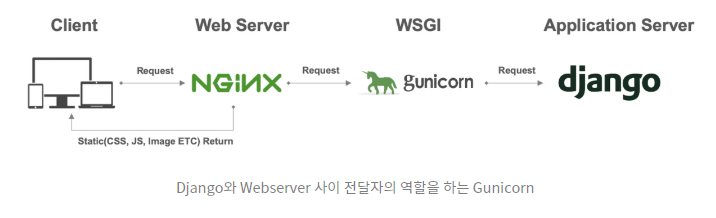
Gunicorn's main responsibilities are:
- Receiving HTTP requests forwarded from a reverse proxy like Nginx.
- Managing Processes: It uses a "pre-fork" model, where a master process starts multiple "worker" processes. This allows your application to handle multiple requests concurrently, using multiple CPU cores.
- Resilience: If a worker process crashes, the Gunicorn master process will automatically start a new one, making your application more robust.
- Interfacing with Django: It calls the
applicationobject in yourwsgi.pyfile, passing it the request data.
Essentially, Gunicorn acts as the process manager and HTTP-to-WSGI translator for your Django application.
4. ASGI: The Asynchronous Successor
WSGI was designed in a synchronous world. However, modern web applications often benefit from asynchronous programming, especially for I/O-bound tasks like waiting for a database query or an external API call to complete. Python's async and await features are perfect for this, but WSGI can't take advantage of them.
This led to the creation of ASGI (Asynchronous Server Gateway Interface). ASGI is the spiritual successor to WSGI, designed from the ground up to support asynchronous Python applications.
Django has supported ASGI since version 3.0, allowing you to write async views. This is particularly useful for applications with long-lived connections, like chat applications using WebSockets.
Fine Tuning Python WSGI and ASGI applications for Flask, Django, and FastAPI
Let's return to the 'Fine Tuning' article to understand the differences between WSGI and ASGI and when to use each.
Read the sections 'WSGI or ASGI which one is it?' and 'Django and async'. Pay attention to the table showing which frameworks support which interface. This clarifies Django's dual support.
5. Uvicorn: The ASGI Powerhouse
Just as Gunicorn is a popular WSGI server, Uvicorn is a premier ASGI server. It is extremely fast and designed to run asynchronous Python applications.
If you are building an application with a lot of async views, or using features like Django Channels for WebSockets, Uvicorn is the server you would use. It performs the same role as Gunicorn—managing processes and interfacing with your application—but it speaks the asynchronous ASGI language instead of WSGI.
It's also common to use Gunicorn to manage Uvicorn workers, giving you Gunicorn's robust process management with Uvicorn's high-performance async capabilities.
Test your understanding!
You are deploying a new Django application that functions as a real-time chat service using WebSockets. Which interface (WSGI or ASGI) and which application server (Gunicorn or Uvicorn) would be the most appropriate choice, and why?
Show answer
The most appropriate choice would be ASGI and Uvicorn.
- Why ASGI? WebSockets require long-lived, bidirectional connections. The synchronous request/response model of WSGI is not designed for this. ASGI, being asynchronous, can handle these types of connections natively.
- Why Uvicorn? Uvicorn is a high-performance ASGI server built specifically for running asynchronous applications and has native support for protocols like WebSockets.
Conclusion
Congratulations on completing the final lesson! You now have a complete, high-level view of what it takes to deploy a Django application.
Key Takeaways:
- Django's
runserveris only for development; it is insecure and cannot handle concurrent traffic. - WSGI is a standard interface that allows a server like Gunicorn to communicate with synchronous Python web applications like Django.
- ASGI is the modern, asynchronous successor to WSGI, enabling high-concurrency applications and features like WebSockets.
- Uvicorn is a high-performance ASGI server designed for running asynchronous Python applications.
- The role of an application server (Gunicorn/Uvicorn) is to manage your application's processes, handle concurrent requests efficiently, and translate HTTP requests into a format your Django application can understand.
This lesson completes your foundational journey through the Django framework. You've gone from creating a project and building models, views, and templates all the way to understanding the core principles of deploying your application to production. The next step is to put all this knowledge into practice. A great way to solidify what you've learned is to build a complete project from scratch and deploy it. Well done, and best of luck with your future Django projects