Welcome to our next lesson! We previously explored how Rust's shadowing feature allows you to rebind a variable name within a specific scope, even to a different type. This concept of scope is central to how Rust manages code, and today we'll see it in action as we delve into the fundamental building blocks of program logic: control flow.
This lesson will guide you through Rust's constructs for making decisions (if/else) and performing repetition (loop, while, and for). Given your background in Python and Swift, the basic ideas will be familiar. However, we'll focus on what makes Rust's approach distinct. A key theme will be how many control flow constructs are expressions, meaning they evaluate to a value. This powerful feature, which we first touched on when distinguishing expressions from statements, leads to more concise and often more readable code.
1. Conditional Branching: if Expressions
In Rust, like in most languages, if is used to execute code based on a condition. The basic syntax is straightforward.
let number = 7;

if number < 5 {
    println!("condition was true");
} else {
    println!("condition was false");
}
One important detail is that the condition must be a bool. Unlike some languages, Rust will not automatically convert non-boolean types. For example, if number { ... } where number is an integer will cause a compile-time error.
You can also handle multiple conditions with else if:
let number = 6;

if number % 4 == 0 {
    println!("number is divisible by 4");
} else if number % 3 == 0 {
    println!("number is divisible by 3"); // This will be printed
} else if number % 2 == 0 {
    println!("number is divisible by 2");
} else {
    println!("number is not divisible by 4, 3, or 2");
}
Rust executes the block for the first true condition it finds and then skips the rest. If you find yourself with a long chain of else if statements, Rust provides a more powerful construct called match, which we will cover in detail in a future module on enums.
if is an Expression
Here is where Rust's philosophy shines. Because if is an expression, you can use it on the right side of a let statement to assign its result to a variable. This often eliminates the need for temporary mutable variables.
To understand the design principle behind this, the following article provides excellent context.
Thinking in Expressions | corrode Rust Consulting
This article from the corrode blog explains the ergonomic benefits of treating control flow constructs as expressions.
Please read the first two sections, from the beginning and the section titled Expressions In Rust vs other languages. This will solidify why Rust's design choice is so powerful.
With that conceptual foundation, let's look at the practical rules in the official Rust documentation.
Control Flow - The Rust Programming Language
This chapter from the official Rust book covers the syntax and rules for if expressions in detail.
Focus on two key parts: The introductory section, if Expressions, for a general overview. The section Using if in a let Statement. This is crucial. Pay close attention to the rule that both the if and else blocks must evaluate to a value of the same type.
Here's an example of using if in a let binding:
let condition = true;
let number = if condition { 5 } else { 10 }; // number is 5

println!("The value of number is: {number}");
This is concise and leverages Rust's type system to ensure correctness at compile time. The following would fail to compile because the arms have incompatible types:
// This code does NOT compile!
let number = if condition { 5 } else { "ten" };
2. Repetition with Loops
Rust provides three looping constructs, each suited for different situations: loop, while, and for.
The loop Keyword
The loop keyword creates an infinite loop. You continue executing the code within it until you explicitly tell it to stop using the break keyword.
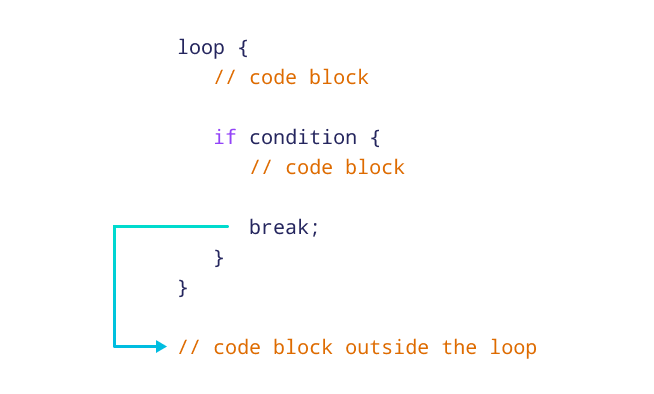
A loop can also be used as an expression to return a value. You provide the return value after the break keyword. This is useful for retrying operations that might fail.
Control Flow - The Rust Programming Language
This section from the Rust book explains how to create infinite loops, exit them, and return values.
Read the part titled Returning Values from Loops. The example shows how to assign the result of a loop expression to a variable.
Here is the example from the book, which demonstrates this feature:
let mut counter = 0;

let result = loop {
    counter += 1;

    if counter == 10 {
        break counter * 2; // The loop ends, and `counter * 2` is returned.
    }
};

println!("The result is {result}"); // Prints "The result is 20"
The while Conditional Loop
When you need to loop as long as a condition is true, a while loop is a more direct tool than a loop with an if-break. Since you're familiar with while from Python and Swift, we'll just focus on its form in Rust.
let mut number = 3;

while number != 0 {
    println!("{number}!");
    number -= 1;
}

println!("LIFTOFF!!!");
This is cleaner and less error-prone than manually managing the break condition inside an infinite loop.
The for Loop: The Idiomatic Choice for Iteration
The for loop is used to iterate over a collection of items, such as an array, a range, or any other type that implements the Iterator trait (which we'll explore in depth later). In idiomatic Rust, it is the most common and preferred loop.
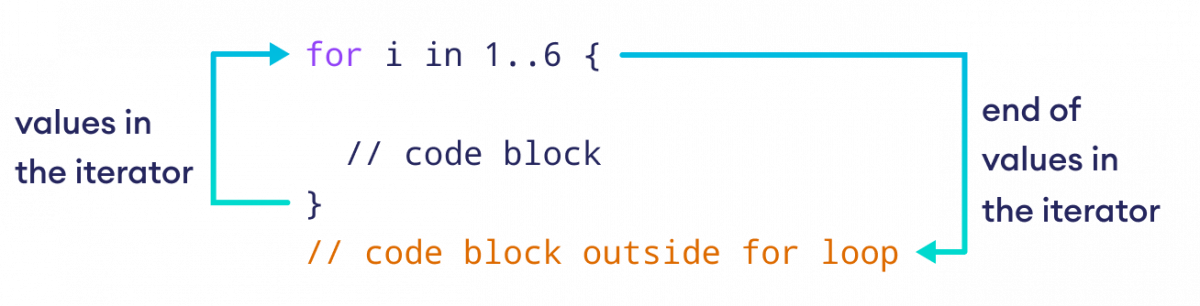
Your experience with Python's for item in sequence: construct maps directly to Rust's for loop.
Control Flow - The Rust Programming Language
This section highlights why for loops are safer and more concise than while loops for iterating over collections.
Please read the entire section Looping Through a Collection with for. Note the comparison between the while loop with a manual index and the much safer for loop.
The key advantages of using a for loop for iteration are:
- Safety: It eliminates the possibility of off-by-one errors or trying to access an index that is out of bounds, as the compiler handles the iteration logic.
- Clarity: The intent to iterate over every element is explicit.
- Performance: The compiler can often optimize
forloops better than manual index-basedwhileloops because it doesn't need to add runtime checks for bounds on every iteration.
Here are two common ways to use a for loop:
// Looping over an array's elements
let a = [10, 20, 30, 40, 50];

for element in a {
    println!("the value is: {element}");
}

// Looping over a range of numbers
// Note: `1..4` is a range that includes 1, 2, and 3, but excludes 4.
for number in 1..4 {
    println!("{number}!");
}
3. Seeing it All in Action
Now that we've covered the concepts and idiomatic usage, let's watch a video that provides a quick, practical demonstration of all these control flow constructs.
Control flow in Rust: If, Match, loop, while, for - Full Crash Rust Tutorial for Beginners
This video from Francesco Ciulla's "Full Crash Rust Tutorial" provides a concise tour of Rust's control flow statements.
You can follow along with these segments: if/else: Watch from the start to see basic if, if as an expression, and logical operators. loop: The segment from here demonstrates loop, break, and returning a value. while: From this point, you'll see a while loop in action. for: The section on for loops from here shows iteration over collections and ranges. FizzBuzz Example: Finally, the segment from here combines loops and if/else to solve a classic problem. Try pausing the video and solving it yourself first!
Conclusion
In this lesson, we've explored Rust's essential tools for controlling the flow of execution. While the concepts are universal in programming, Rust's implementation has some distinct characteristics that encourage writing safe, concise, and expressive code.
Here are the key takeaways:
- Control flow constructs like
ifandloopare expressions in Rust, allowing them to return values that can be assigned to variables. - All branches of an
if/elseexpression must evaluate to the same type. - Rust has three kinds of loops:
loopfor infinite loops, which canbreakwith a value.whilefor looping as long as a condition is true.forfor iterating over a collection, which is the safest and most idiomatic choice for that task.
In our next lesson, we will learn how to define our own functions. You'll see how Rust's expression-oriented nature extends to function bodies, allowing for elegant and implicit return values.