Welcome to the final lesson in our module on NAT! In the last session, we saw how dynamic NAT uses a pool of public IPs, but we also identified its main weakness: NAT pool exhaustion. If you have more devices than public IPs, someone gets left out. This lesson introduces the solution that makes the modern internet work for most businesses and homes: Port Address Translation (PAT), also known as NAT Overload.
PAT is a "many-to-one" translation mechanism. It allows hundreds or even thousands of devices on a private network to share a single public IP address for outbound communication. This incredible efficiency is why PAT is the most common form of NAT deployed today.
By the end of this lesson, you will be able to configure and verify PAT, mapping multiple private IP addresses to a single public IP, a skill that is essential for your upcoming project.
How PAT Achieves Many-to-One Translation
PAT builds upon the concepts of dynamic NAT but adds a crucial element: it translates not only the source IP address but also the source port number.
Think of it like an office building. The public IP address is the building's street address. The port numbers are the unique suite or office numbers inside. When a packet leaves an internal computer, the router acts as the front desk, assigning it a unique combination of the public street address and an available office number. When a reply comes back to that specific address and office number, the router knows exactly which internal computer to deliver it to.
This process is managed in the router's NAT translation table, which tracks the mapping between the inside private address and port (Inside local) and the outside public address and port (Inside global).
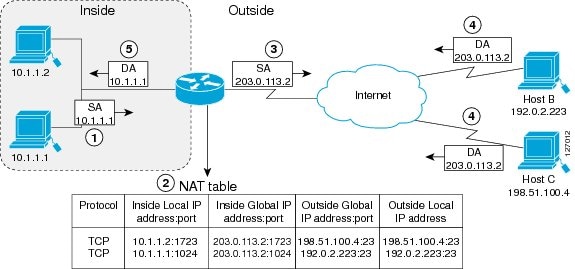
The following video explains how the router handles this translation, especially in cases where two internal devices might coincidentally use the same source port.
Free CCNA | NAT (part 2) | Day 45 | CCNA 200-301 Complete Course
This clip from Jeremy's IT Lab's "NAT (part 2)" video clearly explains the theory behind PAT.
Watch the segment from PAT explained. Pay close attention to the example where two PCs send traffic using the same source port. Notice how the router modifies the port for the second PC to ensure each translation is unique.
Configuring PAT on a Cisco Router
Configuring PAT is very similar to dynamic NAT, but with one key difference: the overload keyword. This single keyword tells the router to enable PAT and use port numbers to track sessions, rather than consuming one public IP per private IP.
The most common method is to configure the router to use the IP address of its own outside-facing interface for all translations.
The steps are:
- Define NAT Interfaces: Use
ip nat insideon the internal interface andip nat outsideon the external (internet-facing) interface. - Define Traffic to Translate: Create a standard Access Control List (ACL) to
permitthe source IP address range of your internal network. - Enable PAT: Use the command
ip nat inside source list <ACL_NUMBER> interface <INTERFACE_NAME> overload.
Let's walk through a full lab configuration.
FREE CCNA Lab 039: PAT (Port Address Translation)
This hands-on lab from Jeremy's IT Lab will guide you through a complete PAT configuration.
Watch the following sections to see the full process: Recap: Concept Review Pre-check: Test Connectivity to confirm that pings fail before NAT is configured. Configuration Steps: Define Interfaces Create ACL Enable PAT with the overload command.
For a text-based summary of these commands, you can refer to the following guide. It's a useful reference to have handy for your project.
Port Address Translation (PAT) configuration
The article "Port Address Translation (PAT) configuration" on Study CCNA provides a clear, command-by-command guide.
Review the section starting with "Here is how we would configure PAT for the network picture above." Notice how the ip nat inside source list 1 interface Gi0/1 overload command brings together the ACL (list 1) and the outside interface (Gi0/1) with the critical overload keyword.
Verifying and Troubleshooting PAT
Once PAT is configured, you need to verify that it's working as expected. The primary command for this is show ip nat translations. With PAT, you should see multiple different Inside local addresses all mapped to the same Inside global address, but with different port numbers.
Let's see this in action and learn a few other useful verification and troubleshooting commands.
FREE CCNA Lab 039: PAT (Port Address Translation)
Continuing with the lab video from Jeremy's IT Lab.
Watch these final segments on verification: Show Translations: Observe the show ip nat translations output. Note how all three PCs (192.168.1.1, 1.2, and 1.3) are mapped to the same public IP. Clear Translations: The clear ip nat translation * command is very useful during troubleshooting to clear out old entries and see new translations as they are created.
The article from Firewall.cx also provides excellent examples of the verification command outputs and their interpretation.
Configuring NAT Overload On A Cisco Router - Firewall.cx
This section from Firewall.cx provides detailed output examples for verification.
Read the section "Verifying NAT Overload Operation". Pay attention to the sample output of show ip nat translations and show ip nat statistics. The statistics command can give you a high-level view of how many translations are active and whether the router is successfully translating packets.
Conclusion
In this lesson, you've learned how to configure and verify Port Address Translation (PAT), the most scalable and widely used form of NAT. By translating both IP addresses and port numbers, PAT allows an entire network of devices to share a single public IP address, conserving the limited IPv4 address space.
Key Takeaways:
- PAT (NAT Overload) is a "many-to-one" NAT, mapping multiple private IPs to a single public IP.
- It works by using unique port numbers to track individual communication sessions.
- Configuration is similar to dynamic NAT but uses the
overloadkeyword. The most common command isip nat inside source list <ACL> interface <INTERFACE> overload. - Verification with
show ip nat translationswill show multiple inside local addresses mapped to the same inside global address. - Commands like
show ip nat statisticsandclear ip nat translation *are essential for monitoring and troubleshooting.
With a solid understanding of IP addressing, subnetting, and now the full suite of NAT types, you have powerful tools for building and connecting networks. However, configuration is only half the battle. In the next module, we will shift our focus to troubleshooting, learning systematic methods and commands like ping and traceroute to diagnose and resolve common IP connectivity issues.