Hello! In our previous lesson, we compared the Layer 4 protocols TCP and UDP, focusing on the trade-off between reliability and speed. Now, we'll move down the stack to Layer 3 to begin our study of IP addressing, a topic that is absolutely fundamental to your project and CCNA success.
Today's lesson focuses on a core IP addressing concept: how to distinguish between network, host, and broadcast addresses for a given IP address and subnet mask. Mastering this skill is the first essential step toward understanding and implementing subnetting, which you'll need to design an efficient network.
1. The Anatomy of a Subnet: Three Special Addresses
Every IP network or subnet has a range of addresses. Within this range, three types of addresses have special meanings and functions. A device on a network needs to be able to identify all three to communicate properly.
The following short video provides an excellent introduction to these concepts.
CCNA - Network, Host and Broadcast Addresses
This video from NetITGeeks clearly defines the network, host, and broadcast addresses.
Watch the first part of the video, which covers the fundamental concepts. As you watch, focus on the definitions of: Network Address: The first address in the range, used to identify the network itself. Broadcast Address: The last address in the range, used to send messages to all devices on the network simultaneously. Usable Host Range: The addresses in between the network and broadcast addresses that can be assigned to devices like PCs and servers.
2. Identifying the Network and Host Portions
An IPv4 address is a 32-bit number, but it's not a single flat value. It's divided into two parts: a network portion and a host portion. The subnet mask is the tool that tells us where this division occurs.
- The network portion is the part of the address that is common to all devices in the same network.
- The host portion is the part that uniquely identifies a specific device within that network.

The key to finding these special addresses lies in manipulating the host bits of a given IP address.
3. Calculating the Network Address with Binary ANDing
To programmatically determine the network address for any given IP, a device performs a bitwise AND operation between the IP address and its subnet mask.
The rules for a binary AND operation are simple:
- 1 AND 1 = 1
- 1 AND 0 = 0
- 0 AND 1 = 0
- 0 AND 0 = 0
Essentially, the result is 1 only if both bits are 1. Because the subnet mask has all 1s in the network portion and all 0s in the host portion, this operation effectively preserves the network bits of the IP address and sets all the host bits to 0.
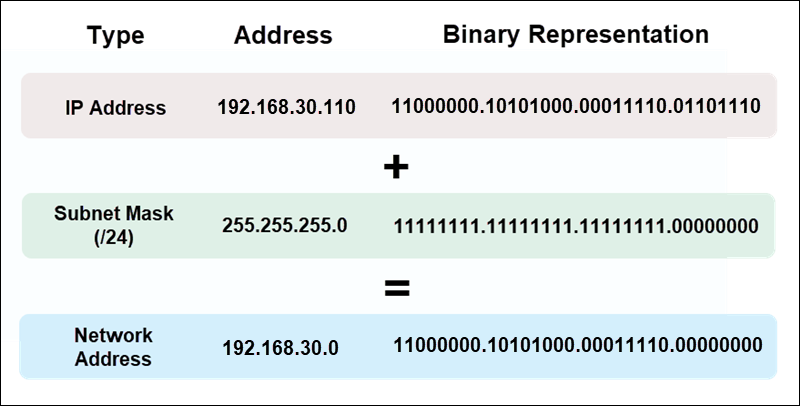
Let's see this process in action and learn how to find the other addresses as well.
CCNA - Network, Host and Broadcast Addresses
Let's return to the NetITGeeks video to see a complete example.
Continue watching from where you left off: Binary ANDing: This section demonstrates how to calculate the network address for 192.168.2.38 /24. Broadcast and Host Range: This part shows how to find the broadcast address (all host bits set to 1) and the first and last usable host addresses. Recap: A quick summary of the key points.
To summarize the rules:
- Network Address: All host bits are set to 0.
- Broadcast Address: All host bits are set to 1.
- First Usable Host Address: The network address plus one (the last host bit is 1, the rest are 0).
- Last Usable Host Address: The broadcast address minus one (the last host bit is 0, the rest are 1).
4. Practice with a Non-Byte-Aligned Example
The /24 example is straightforward because the network/host boundary falls neatly between octets. Things get more interesting when the boundary is within an octet, which is common in real-world network design. Let's work through an example with a /26 subnet mask.
A /26 mask means the first 26 bits are for the network, and the remaining 6 bits (32 - 26 = 6) are for the host.
Calculate Network, Broadcast and host addresses
This video from ciscoKim provides a clear, step-by-step walkthrough for a /26 network.
Watch the entire video. The presenter does an excellent job of: Identifying the split between network and host bits for a /26 mask. Calculating the network address by setting the host bits to zero. Calculating the broadcast address by setting the host bits to one. Determining the usable host range.
5. Reinforcement and Common Mistakes
It's critical to remember that the network and broadcast addresses are reserved and cannot be assigned to hosts. Forgetting this is a common error when planning IP address allocation.
This article from IPCisco provides another worked example and highlights a common pitfall.
Read "IP Subnetting Examples: Example 1" for another look at the ANDing process with a /24 network. Then, read the section "Forgetting the Network Address and Broadcast Addresses" under "Common Subnetting Mistakes". This reinforces the rule that you always lose two addresses per subnet for the network and broadcast addresses.
6. Self-Assessment
To solidify your understanding, let's walk through one more detailed example from a comprehensive guide and then you can try some exercises on your own.
This document provides a very detailed breakdown of subnetting calculations.
Find the section titled "Subnet Example #1" (it starts on page 11). Carefully read through this example. It details how to take a /24 network, subnet it with a /27 mask, and then defines the resulting subnet numbers, host addresses for Subnet #2, and its broadcast address. Pay close attention to how the binary values correspond to the final decimal addresses.
Now, test your skills with these exercises from the same document. Try to solve them on paper first before checking the solutions.
These exercises will test your ability to apply what you've learned.
Navigate to "Appendix C - Subnetting Exercises" (page 59). Attempt to solve all the questions in Subnetting Exercise #1 and Subnetting Exercise #2. The solutions are provided on the following pages (61 and 62) for you to check your work. Focus on understanding the process, not just getting the right answer.
Conclusion
In this lesson, we established the fundamental building blocks of an IP subnet. You learned how the subnet mask divides an IP address and how to identify the three crucial address types within any subnet.
Here are the key takeaways:
- Every IP subnet contains a network address (to identify the subnet), a broadcast address (to contact all hosts), and a range of usable host addresses.
- The network address is found by performing a binary AND between the IP address and the subnet mask, which results in all host bits being set to
0. - The broadcast address is found by setting all host bits to
1. - Usable host addresses are all the addresses that lie between the network and broadcast addresses. These are the only addresses that can be assigned to devices.
In our next lesson, we will build directly on this knowledge. You will learn how to use the subnet mask's CIDR prefix to quickly calculate the total number of subnets you can create and the number of usable hosts available in each one.