Hello! Last time, you paired your curiosities with possible viewer needs and drafted three content directions. You do not need to choose a permanent niche yet. Today, you’ll make one of those directions easier to try by choosing a video format you can make with a phone—including formats that never show your face.
A format is how you present an idea, not the idea itself. A question about organizing saved photos, for example, could become a screen recording, a spoken explanation to camera, or a short sequence of phone footage with text. Allow about 35–40 minutes for this lesson and a small private format test.
What does the viewer need to see?
The useful starting question is not “Should I be on camera?” It is “What would help a viewer understand or enjoy this particular idea?” If you are demonstrating a phone setting, the screen matters more than your face. If you are sharing your reaction to an experience, speaking to camera might help—but narration over relevant footage could also work.
Watch the phone-made and face-free visual options in Junius Ong’s 5 Faceless Video Ideas to Grow on TikTok in 2024. Treat the view counts mentioned in the video as examples from that creator, not predictions for your own posts. You need only the options you can try with your phone; you do not need stock footage, animation, or extra equipment.
5 Faceless Video Ideas to Grow on TikTok in 2024
Junius Ong’s 5 Faceless Video Ideas to Grow on TikTok in 2024 shows several ways to pair spoken audio with visuals other than a presenter’s face.
Watch visual options. Notice the phone-shot clips, screen recordings, and paper-based explanations. Ask which of those would actually help a viewer follow one of your three directions, rather than which looks most elaborate.
A faceless video simply keeps the creator’s face off screen. It can still feel personal: your choice of subject, what you notice, the way you explain it, and what you show all communicate a point of view. Faceless does not necessarily mean anonymous, however. A voice, a recognizable space, or information visible on a screen can reveal things about you. You’ll set deliberate sharing boundaries in the next lesson.
Consider this screenshot of a TikTok post. The visible image centers an art print held in someone’s hands, while the accompanying caption discusses new prints. The screenshot cannot tell us how the full video moves or performs. It does show one useful framing choice: a creator can put the object at the center of a post instead of their face.
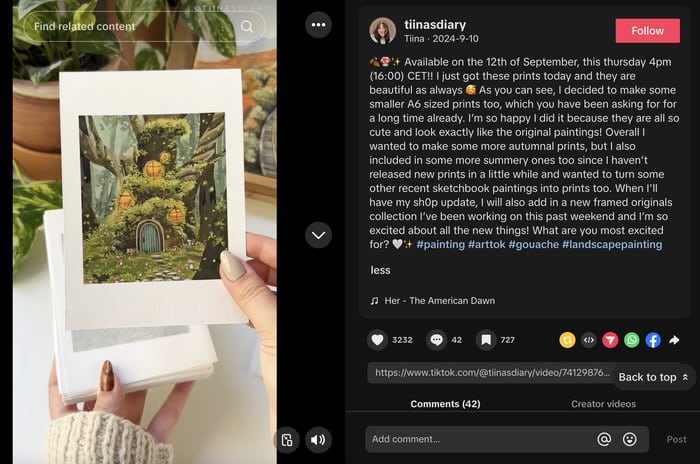
You do not need a product to use that approach. Hands arranging a workspace, turning pages in a notebook, or testing a small routine can give viewers something concrete to watch.
Match a format to the idea
A format is useful when it makes your intended viewer benefit easier to deliver. For a quick comparison, read a few short sections of Hootsuite’s 15 Unique Instagram Reels Ideas for Your Business. It discusses Reels and businesses, but the visual approaches also apply to a beginner’s TikTok trial. You can skip its embedded posts and promotional suggestions.
15 Unique Instagram Reels Ideas for Your Business
Hootsuite’s article offers three relevant ways to present an idea: showing a process, showing a change, and teaching something specific.
In “15 Instagram Reel ideas that will boost engagement,” find “4. Go behind the scenes” and read the process idea. Then find “10. Show a before and after” and read the change idea. Finally, find “13. Create a tutorial” and read the teaching idea. Focus on what a viewer needs to see in each case, not on the article’s claims about engagement.
Here are five formats you can attempt with a phone. None requires you to be an expert or to buy equipment.
| Format | What the viewer sees and hears | Good fit when… |
|---|---|---|
| Speaking to camera | Your face and a brief spoken explanation | Your reaction or direct explanation is central, and you’re comfortable appearing. |
| Hands-only demonstration | Your hands doing an activity, with optional spoken explanation or on-screen text | The process or object is more useful to see than your face. |
| Screen recording | Actions on your phone screen, with optional narration or text | You’re showing how you tried something on a phone. |
| Phone footage with voice-over | A few relevant scenes, with your explanation recorded separately | You want to tell viewers what you noticed while showing the experience. |
| Text over phone footage | Footage of the subject and a small amount of readable text | The idea is simple enough to follow without speech. |
A before-and-after or a tutorial describes the shape of an idea; it can be made in several formats. A workspace change, for instance, could be shown through hands-only footage with a brief view of the space before and after. A phone-photo organization experiment could be shown as a screen recording. Neither requires you to speak to camera.
Now return to your three directions from the previous lesson. Choose one that you would be willing to try first, without declaring it your niche. Then use these questions to narrow the format:
- What must a viewer see to get the benefit? An action, a screen, a place, a result, or perhaps your reaction?
- What can you show with your phone and what you already have? Prefer a format you can repeat without a complicated setup.
- How do you want to communicate for this trial? To camera, through a voice-over, through short on-screen text, or through visuals alone?
For a first attempt, choose clarity over production complexity. Text over footage can work for one simple observation, but it may struggle to explain a multi-step process. A screen recording can make a phone task clear, but unrelated notifications or personal details could distract from it. No format is inherently the “best” TikTok format; its job is to serve this idea and viewer need.
Make a tiny, private format test
Spend 10–15 minutes testing the choice rather than planning a finished post. In your phone’s notes, write one line:
I’ll try [content direction] as a [format], because the viewer needs to see [specific thing].
Then make a 5–10-second rough sample on your phone if you can. For a hands-only format, capture part of the activity. For a screen-recording format, use a harmless example rather than exposing personal information. For a talking-to-camera format, record a sentence you can keep private. This is only a way to feel what making the format involves; it does not need to be edited or posted.
After watching it once, note whether the format makes the subject visible and feels manageable to make again. You may switch formats if it does not. Keep the rough sample private—you have not yet decided what you will share publicly.
What to take forward
You have chosen a phone-friendly presentation method for one possible content direction. The key distinction is that your direction joins your curiosity with a viewer need, while your format determines what the viewer sees and hears. Showing your face is one option, not a requirement; hands-only footage, screen recordings, narration over phone footage, and text-led visuals can all carry a clear idea.
Next, you’ll define what you will and will not share publicly. That decision will help you use your chosen format with confidence before you plan a full trial video.