Introduction
In our last lesson, we categorized CRM systems into three strategic types: operational, analytical, and collaborative. We identified marketing automation as a key component of operational CRM, focused on process efficiency. Your own experience with marketing automation software gives you a practical grounding in its capabilities.
Today, we will build on that foundation to address the final learning outcome of this module: to distinguish CRM from marketing automation and identify critical points of integration. While they are often discussed together, they are distinct systems with different core functions. Understanding this distinction from a strategic and architectural perspective—not just a user's—is crucial for defining the boundaries and data flows within your enterprise technology stack. This lesson will equip you to lead technical discussions on how these two powerful systems should work in concert to support your financial group's revenue goals.
The Strategic Divide: System of Record vs. System of Engagement
At its heart, the difference between a CRM and a Marketing Automation Platform (MAP) is one of purpose and scope.
- A Customer Relationship Management (CRM) system is fundamentally a system of record for the entire customer lifecycle. It is the central truth for all customer data, relationships, and sales activities. Its primary users are sales and customer service teams.
- A Marketing Automation Platform (MAP) is a system of engagement, designed to manage and automate marketing interactions at scale, primarily at the top of the sales funnel. Its main goal is to attract prospects, nurture them, and identify those who are ready for a sales conversation.
This diagram visually represents this relationship. CRM and MAPs are distinct, specialized systems that both revolve around a central pool of "Customer data." They are peers, each with a specific job to do.
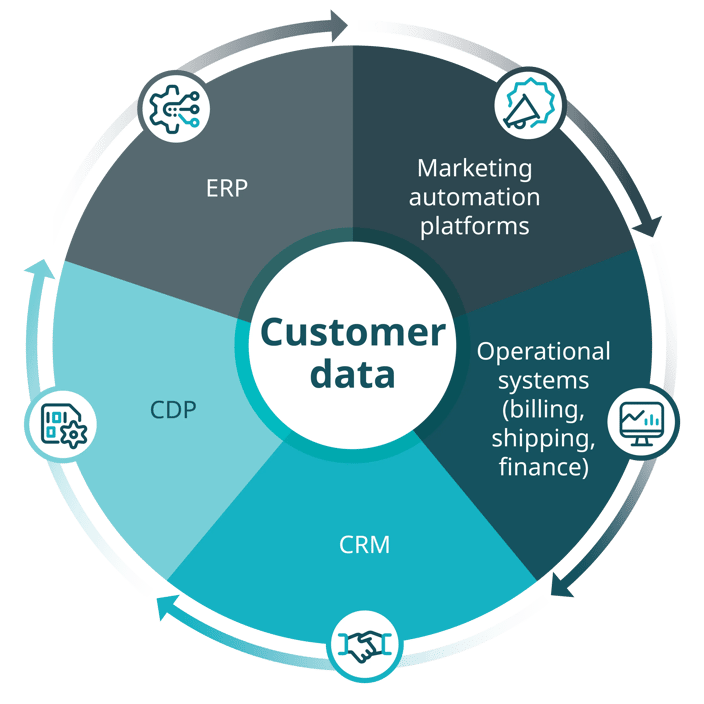
To see this distinction in action, the following video provides a clear, practical explanation using the Zoho ecosystem as an example. The concepts, however, are universal to any CRM/MAP combination.
Zoho Marketing Automation 2.0 FULL Training Tutorial | Masterclass
This segment from a training video by Brockbank Consulting clearly defines the "buyer's journey" stage that each system is designed to manage.
Watch the section from the buyer's journey. The presenter crisply explains that a MAP is designed to take a "raw lead" to "sales ready," while the CRM is designed to manage the journey from "leadin to deal closed one." This is the core strategic distinction.
When these two systems are not properly integrated, the result is what the Logarithmic Perspectives article calls "Data Asymmetry"—sales and marketing teams operate with incomplete, different pictures of the same prospect. A sales representative can't see the digital body language captured by the MAP, and the marketing team keeps sending top-of-funnel content to a prospect already in a late-stage sales conversation. This is the strategic problem that integration solves.
Critical Integration Points
For your role, understanding the technical and process-level integration points is key. This is where you will guide your development team to ensure a seamless flow of information between marketing and sales. The integration is not just a "data sync"; it is the digital representation of your lead management process.
Let's break down the three most critical points of integration.
1. Data and Object Synchronization
This is the foundational layer. You must decide precisely what data flows between the two systems, in which direction, and who has the authority to change it. A poorly planned sync can lead to data conflicts, duplicates, and slow performance.
A robust integration plan involves mapping objects and fields between the two systems. To give you a concrete example of what this looks like, the following reading provides an excellent template.
This guide from Vantage Point is tailored to financial services and provides a practical framework for integration architecture.
In the section "How Do You Design the Future State Architecture? (Step 2 — Week 2)", please focus on the subsection Map Data Architecture. Pay close attention to the Object-Level Mapping and Field-Level Mapping tables. These are excellent, practical examples of the level of detail your team needs to document.
As you can see, this involves defining which system is the "master" for certain fields and the direction of the sync (MA → CRM, CRM → MA, or Bidirectional). This is a critical architectural decision to prevent data chaos. The goal should be what the Logarithmic Perspectives article calls "Bidirectional Real-Time Synchronization," ensuring both teams are always working with the most current data.
2. Lead Lifecycle Management and Handoff
This is the process layer that sits on top of the data sync. The integration's primary job is to manage the handoff of a lead from marketing to sales. This process is typically orchestrated by a lead scoring model and a set of handoff triggers.
- Lead Scoring: The MAP assigns points to leads based on demographic data (e.g., job title, company size) and behavioral data (e.g., website visits, content downloads, email clicks). This is a core function of the MAP, which you are likely familiar with.
- Handoff Trigger: When a lead's score reaches a predefined threshold (making them a "Marketing Qualified Lead" or MQL), the integration automates the handoff. This typically involves:
- Syncing the lead to the CRM if it doesn't already exist.
- Creating a task for a sales representative to follow up.
- Changing the lead's status in both systems to "Sales Accepted Lead" (SAL).
This automated handoff is the most critical workflow in the entire integration. It prevents qualified leads from "falling through the cracks."
3. Sales & Marketing Activity Logging
To eliminate "Data Asymmetry," the integration must make marketing activities visible to the sales team directly within the CRM. This is more than just showing a lead score; it's about providing a rich timeline of the prospect's engagement.
When a sales rep opens a contact record in the CRM, they should be able to see:
- Which emails the prospect has opened and clicked.
- Which whitepapers or case studies they've downloaded.
- If they attended a webinar.
- If they visited the pricing page on your website yesterday.
This context is invaluable. It allows the sales representative to have a much more relevant and effective conversation, transforming a cold call into a warm, informed follow-up. This flow of information must also go the other way, allowing marketing to see which leads are being actively worked by sales so they can be suppressed from general marketing campaigns.
From Your Perspective: Questions to Ask Your Team
As the leader overseeing this project, your role is to ensure these strategic concepts are translated into a robust technical architecture. Here are key questions, based on common integration failures, to ask your development team:
-
On Data Synchronization:
- "What is our strategy for data ownership and conflict resolution? Which system is the source of truth for core fields like phone number, email, and company name? How will we prevent duplicates?"
-
On Lead Lifecycle Management:
- "How will the integration enforce our Service Level Agreement (SLA) for lead follow-up? What happens automatically if a lead passed to sales isn't actioned within 24 hours? What is the automated process for sales to return a lead to marketing for more nurturing?"
-
On Activity Logging:
- "What specific marketing engagement activities will be logged on the contact's timeline in the CRM? Will sales reps see a full, detailed history, or just summary data? How close to real-time will this activity log be?"
-
On Revenue Attribution:
- "How does our proposed integration architecture allow us to connect a closed-won deal in the CRM all the way back to the marketing campaign that generated the original lead? Can we report on the marketing ROI?"
This last question is critical. As the Zoho video pointed out, many MAPs can't track a lead past the "sales ready" stage. A proper integration, often involving a central data repository or business intelligence platform, is required to bridge this gap and connect marketing efforts directly to revenue. The diagram below shows how an integration platform can connect different systems (in this case ERP and CRM) to a central database, which is analogous to how you might achieve full-funnel attribution.

Conclusion
You have now examined the crucial relationship between CRM and Marketing Automation Platforms. This completes our first module on CRM strategy.
Key Takeaways:
- CRM is the system of record, focused on the entire customer lifecycle and primarily used by sales and service teams.
- Marketing Automation is the system of engagement, focused on the top of the funnel to nurture leads and identify sales-readiness.
- Effective integration is a strategic imperative to align sales and marketing, not just a technical task.
- The three critical integration points are data synchronization (the foundation), lead lifecycle management (the process), and activity logging (the context).
- Your role is to ensure the architecture supports these points and provides end-to-end revenue attribution.
Preview of the Next Module:
We've just discussed how vital a shared understanding of customer data is. In our next lesson, we will begin Module 2: "Multi-Entity Data Architecture & Governance." We'll dive deep into the heart of your CRM by learning how to model the core CRM data entities (like Customer, Account, and Interaction) and their relationships, specifically within the complex context of your multi-entity financial group.