Hello! Welcome to your next lesson in the "Advanced Database Operations & Transactions" module.
In our previous lesson, we established a robust process for managing database schema changes using Flyway. Now, we'll turn our attention back to data retrieval, focusing on a critical performance issue that can silently cripple your application's speed.
Today's lesson addresses the learning outcome: Explain the N+1 query problem and solve it using fetch joins. This is one of the most common performance bottlenecks in applications that use an ORM like Hibernate, and learning to spot and solve it is a vital skill for any backend developer.
1. What is the N+1 Query Problem?
Imagine you ask a system for a list of 20 meals. The system makes one trip to the database to get the meals. Then, for each of the 20 meals, it makes a separate trip to the database to find out what drink comes with it. Instead of one or two efficient queries, you've just executed 21 queries (1 for the meals + 20 for the drinks). This is the N+1 query problem.
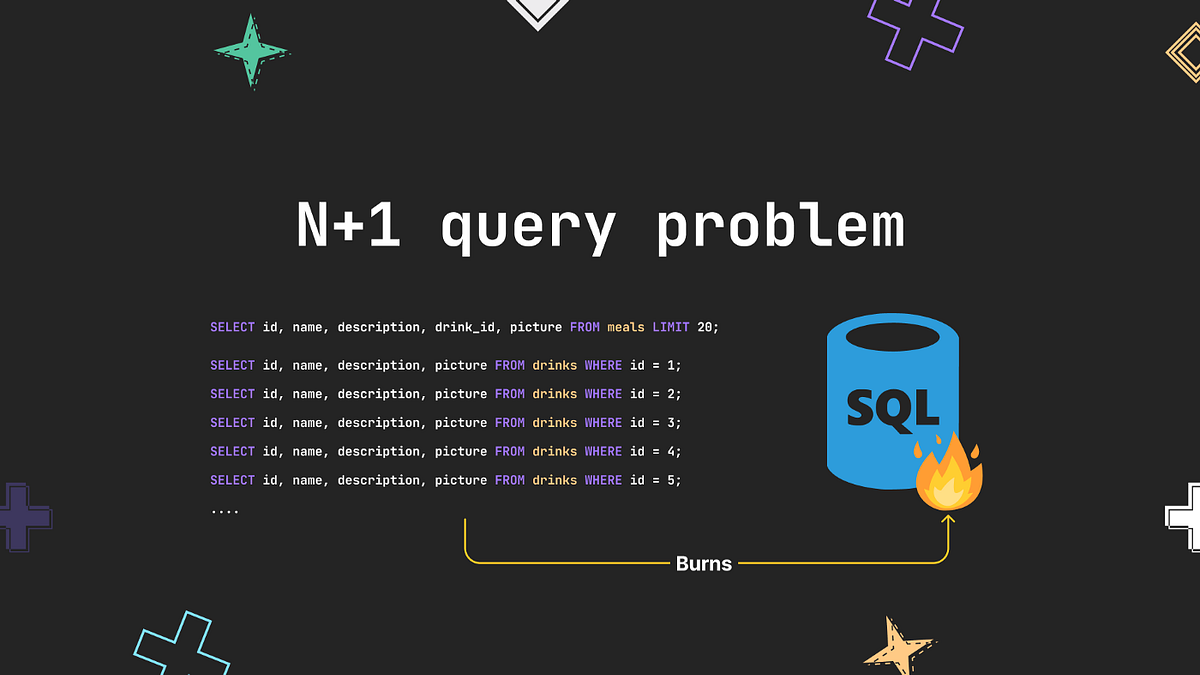
This issue often goes unnoticed during development with a small test dataset but can cause severe performance degradation in production when 'N' becomes large.
To see how this manifests in a Spring Data JPA application, let's examine a common scenario.
Solving the N+1 Problem in Spring Data JPA
The article "Solving the N+1 Problem in Spring Data JPA" by Ashish Kumar provides an excellent, practical demonstration of this issue. It uses a simple Author and Book entity relationship.
Please read the first part of the article, up to the section titled "Solving the N+1 Problem Using EntityGraph". Focus on: The definitions of the Author and Book entities. Notice the @OneToMany relationship on Author which is set to FetchType.EAGER. The test_fetchAllAuthors test method, which fetches all authors and then iterates through them to print their books (author.getBooks()). The SQL logs under "Test Execution with N+1 issue". You'll see one SELECT statement for all authors, followed by two separate SELECT statements, one for each author's books. This is the N+1 problem in action.
As you saw in the article, fetching two authors resulted in three queries:
SELECT * FROM author(The "1" query)SELECT * FROM book WHERE author_id=?(The first of "N" queries)SELECT * FROM book WHERE author_id=?(The second of "N" queries)
While the example used FetchType.EAGER, this problem can also occur with FetchType.LAZY (which is generally recommended). If you fetch a list of authors and then loop through them to access the lazily-loaded getBooks() collection, Hibernate will execute a new query for each author inside the loop.
2. Solving the N+1 Problem with Fetch Joins
The solution is to tell JPA, "When you fetch the authors, please also fetch their books at the same time in a single, combined query." This is achieved using a fetch join. A fetch join instructs the ORM to retrieve an association (like the books collection) along with its parent entity in one database roundtrip.
In Spring Data JPA, you have two primary ways to implement this.
Method 1: JPQL and JOIN FETCH
The most direct way to specify a fetch join is by writing a custom JPQL query using the JOIN FETCH clause. This gives you explicit control over the query.
N+1 query problem with JPA and Hibernate
Both of our reference articles demonstrate this classic solution. Let's start with the one from Vlad Mihalcea, a leading expert on Hibernate performance.
Please read the sections "FetchType.EAGER" and "FetchType.LAZY". In both sections, notice how the problem is solved by adding JOIN FETCH to the JPQL query. The key is this query: SELECT pc FROM PostComment pc JOIN FETCH pc.post p. This tells Hibernate to fetch the PostComment and its associated Post together.
To apply this to our Author and Book example, you would modify the AuthorRepo as shown in the "Solving the N+1 Problem in Spring Data JPA" article:
@Repository
public interface AuthorRepo extends JpaRepository<Author, UUID> {

    // The original findAll() would cause the N+1 problem.
    // List<Author> findAll();

    // The solution using JOIN FETCH
    @Query("SELECT a FROM Author a JOIN FETCH a.books")
    List<Author> findAll();
}
When this method is called, JPA will generate a single SQL query with a JOIN (typically a LEFT JOIN) to fetch both the Author and Book data together, completely eliminating the N+1 problem.
Method 2: @EntityGraph
Writing JPQL queries is powerful, but for the common case of fetching a related entity, Spring Data JPA provides a cleaner, more type-safe annotation: @EntityGraph. This annotation lets you specify a "graph" of associations to be fetched eagerly for a given query, without having to write JPQL.
Solving the N+1 Problem in Spring Data JPA
Let's return to the first article, "Solving the N+1 Problem in Spring Data JPA", to see how @EntityGraph simplifies things.
Read the section "Solving the N+1 Problem Using EntityGraph". The author modifies the findAll() method in the repository by simply adding one annotation. Observe the resulting SQL log, which now shows a single SELECT statement with a LEFT JOIN.
Here is the modified repository method using @EntityGraph:
@Repository
public interface AuthorRepo extends JpaRepository<Author, UUID> {

    @EntityGraph(attributePaths = {"books"})
    List<Author> findAll();
}
Here, attributePaths = {"books"} tells Spring Data to include the books attribute in the fetch plan. This approach is often preferred because it avoids string-based queries and clearly declares the data-fetching requirements on the repository method itself.
Test your understanding!
You have a Post entity that has a @OneToMany relationship with a Comment entity via a comments field. Your PostRepository has a List<Post> findAll() method. When you call this method and later access the comments for each post, you see an N+1 query problem.
Show two different ways to modify the findAll() method in PostRepository to solve this using fetch joins.
Show answer
Here are two correct solutions:
1. Using @Query with JOIN FETCH:
@Repository
public interface PostRepository extends JpaRepository<Post, Long> {
    @Query("SELECT p FROM Post p JOIN FETCH p.comments")
    List<Post> findAll();
}
2. Using @EntityGraph:
@Repository
public interface PostRepository extends JpaRepository<Post, Long> {
    @EntityGraph(attributePaths = {"comments"})
    List<Post> findAll();
}
Both approaches instruct JPA to fetch the posts and their associated comments in a single query.
3. Alternative Strategies
While fetch joins are the primary solution for the N+1 problem, it's good to be aware of other strategies that can help in different scenarios.
Solving the N+1 Problem in Spring Data JPA
The "Solving the N+1 Problem..." article briefly touches on two other useful techniques. These aren't fetch joins, but they are related optimization strategies.
Quickly read the sections "Solving the N+1 Problem Using Batch Fetching" and "Solving the N+1 Problem Using DTO Projections". Note how batching reduces, but doesn't eliminate, the extra queries, and how DTO projections can be highly efficient if you don't need the full entity objects.
- Batch Fetching (
@BatchSize): This is a compromise. Instead of N additional queries, Hibernate groups them into batches. If you have 100 authors and a batch size of 10, you'd have 1 query for authors + 10 queries for books (100 / 10), for a total of 11 queries instead of 101. It mitigates the problem but doesn't solve it. - DTO Projections: If your API only needs a subset of data (e.g., author name and book titles, but not the full entities), you can write a query that projects the results directly into a Data Transfer Object (DTO). This is extremely efficient as it only selects the columns you need. We will explore DTOs in more detail in a future module.
Conclusion
You have now learned to identify and resolve one of the most common performance issues in ORM-based applications. Understanding the N+1 problem and knowing how to apply fetch joins is a mark of a proficient backend developer who cares about application performance and scalability.
Key Takeaways:
- The N+1 query problem occurs when one query to fetch a list of entities results in N additional queries to fetch their related data.
- It is a serious performance anti-pattern that can go unnoticed in development but cause major issues in production.
- It can be caused by iterating over lazily-loaded collections or by default
FetchType.EAGERassociations. - The most effective solution is to use a fetch join, which retrieves the parent entities and their associated collections in a single SQL query.
- In Spring Data JPA, you can implement fetch joins using:
@Querywith theJOIN FETCHclause for explicit control.@EntityGraphfor a cleaner, annotation-based approach.
What's Next?
While JPQL and criteria queries (which power repository methods) are incredibly powerful, there are times when you need to break out of the JPA abstraction and use the full power of your database's native SQL dialect. In our next lesson, we will cover how to use native SQL queries with @Query(nativeQuery = true) for complex scenarios. This will complete your toolkit for database querying in Spring.