Hello! Welcome to your fifth lesson on Java backend development.
In our last lesson, we explored the servlet lifecycle. You learned how the servlet container manages a single servlet instance, calling init() once for setup, service() for every request, and destroy() once for cleanup. This gave you a clear picture of how a servlet operates "under the hood."
Today, we'll address a new question: What if you need to execute code before a request reaches a servlet, or after the servlet has finished but before the response is sent to the client? This is a common requirement for tasks like logging, authentication, or data compression.
This lesson covers the learning outcome: Implement a Servlet Filter to intercept and process requests. We will learn about Servlet Filters, which are powerful, pluggable components designed for this exact purpose. Understanding filters is crucial because they are a cornerstone of how modern frameworks like Spring handle cross-cutting concerns.
What is a Servlet Filter?
A Servlet Filter is an object that can intercept and process HTTP requests before they reach a servlet and can modify the response after the servlet has done its work. You can think of it like a series of checkpoints or security gates that a request must pass through on its way to its final destination (the servlet).
Filters are an implementation of the Intercepting Filter design pattern. They help you centralize common processing steps that apply to multiple resources, avoiding code duplication and making your application easier to maintain.
Common use cases for filters include:
- Authentication: Checking if a user is logged in before allowing access to protected pages.
- Logging: Recording details about incoming requests for auditing or debugging.
- Data Compression: Compressing response data to reduce bandwidth usage.
- Character Encoding: Setting the character encoding for requests and responses to prevent data corruption.
The diagram below perfectly illustrates how filters change the request-response flow.
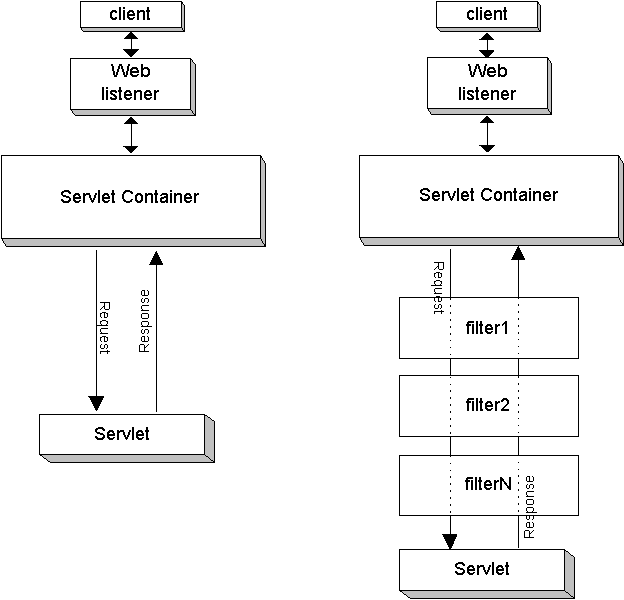
The Filter API and Lifecycle
Just like servlets, filters have a well-defined lifecycle managed by the servlet container. To create a filter, you implement the javax.servlet.Filter interface, which has three key methods.
To understand the core concepts, let's start with a reading from DigitalOcean's tutorial.
Java Servlet Filter Example Tutorial
The article 'Java Servlet Filter Example Tutorial' provides an excellent introduction to why we need filters and the API used to create them.
Please read the sections 'Why do we have Servlet Filter?' and 'Servlet Filter interface'. Focus on understanding the purpose of the three lifecycle methods: init(), doFilter(), and destroy().
As you've just read, the filter lifecycle is very similar to the servlet lifecycle:
init(FilterConfig config): Called once by the container when the filter is instantiated. Use this for one-time setup tasks, like loading resources or reading configuration parameters fromFilterConfig.doFilter(ServletRequest request, ServletResponse response, FilterChain chain): This is the heart of the filter. The container calls this method for every request that maps to the filter. Your interception logic goes here.destroy(): Called once when the filter is taken out of service. Use this to release any resources acquired in theinit()method.
The image below shows the lifecycle stages, which should look familiar after our last lesson on servlets.

The FilterChain
The most critical part of the doFilter method is the FilterChain parameter. This object represents the chain of filters that the request must pass through.
When you call chain.doFilter(request, response), you are telling the container to pass the request and response objects to the next filter in the chain. If there are no more filters, the request is passed to the target servlet.
This mechanism is what allows for both pre-processing and post-processing:
- Pre-processing: Any code you write before calling
chain.doFilter(). - Post-processing: Any code you write after calling
chain.doFilter(). This code will execute after the servlet (and all subsequent filters) have completed.
Implementing and Configuring Filters
Now, let's put theory into practice. We'll build two common filters: one for logging and one for authentication. The same article we used before provides a complete, working example.
Java Servlet Filter Example Tutorial
This part of the 'Java Servlet Filter Example Tutorial' provides the full source code for an application that uses two filters for logging and authentication. It's a great practical example.
Read the section 'Servlet Filter Example for Logging and session validation'. You don't need to copy and run all the code right now. Instead, focus on understanding the implementation of the two filter classes: RequestLoggingFilter and AuthenticationFilter, and how they are configured in web.xml.
Let's break down the key parts of that example.
Example 1: RequestLoggingFilter
This filter demonstrates simple pre-processing. Its goal is to log information about the request before passing it on.
// A simplified version based on the example
public class RequestLoggingFilter implements Filter {

    private ServletContext context;

    public void init(FilterConfig fConfig) throws ServletException {
        this.context = fConfig.getServletContext();
        this.context.log("RequestLoggingFilter initialized");
    }

    public void doFilter(ServletRequest request, ServletResponse response, FilterChain chain)
            throws IOException, ServletException {

        HttpServletRequest req = (HttpServletRequest) request;

        // Pre-processing: Log the remote address
        this.context.log("Request from " + req.getRemoteAddr());

        // Pass the request along the filter chain
        chain.doFilter(request, response);

        // Post-processing could go here, e.g., logging response status
    }

    public void destroy() {
        this.context.log("RequestLoggingFilter destroyed");
    }
}
Notice how the code logs the address and then immediately calls chain.doFilter().
Example 2: AuthenticationFilter
This filter is more complex. It intercepts the request and decides whether to continue the chain or redirect the user to a login page.
// A simplified version based on the example
public class AuthenticationFilter implements Filter {

    private ServletContext context;

    public void init(FilterConfig fConfig) throws ServletException {
        this.context = fConfig.getServletContext();
        this.context.log("AuthenticationFilter initialized");
    }

    public void doFilter(ServletRequest request, ServletResponse response, FilterChain chain)
            throws IOException, ServletException {

        HttpServletRequest req = (HttpServletRequest) request;
        HttpServletResponse res = (HttpServletResponse) response;

        String uri = req.getRequestURI();
        this.context.log("Requested Resource::" + uri);

        HttpSession session = req.getSession(false); // false = do not create new session

        // Check if user is logged in (session exists and has a 'user' attribute)
        // Also, don't block access to the login page itself!
        if (session == null && !(uri.endsWith("login.html") || uri.endsWith("LoginServlet"))) {
            this.context.log("Unauthorized access request");
            res.sendRedirect("login.html"); // Redirect to login page
        } else {
            // User is authenticated or is accessing a public page, so continue.
            chain.doFilter(request, response);
        }
    }

    // ... destroy() method
}
This is a powerful pattern. By not calling chain.doFilter(), the filter effectively stops the request from ever reaching the servlet.
Configuration Methods
As you saw in the resources, there are two ways to register a filter and map it to URLs:
-
web.xmlDeployment Descriptor:- You define the filter with a
<filter>tag. - You map it to a URL pattern or servlet name with a
<filter-mapping>tag. - The order of
<filter-mapping>elements inweb.xmldetermines the execution order of the filters.
<!-- Define the filters --> <filter> <filter-name>RequestLoggingFilter</filter-name> <filter-class>com.journaldev.servlet.filters.RequestLoggingFilter</filter-class> </filter> <filter> <filter-name>AuthenticationFilter</filter-name> <filter-class>com.journaldev.servlet.filters.AuthenticationFilter</filter-class> </filter> <!-- Map the filters to URLs (order matters here!) --> <filter-mapping> <filter-name>RequestLoggingFilter</filter-name> <url-pattern>/*</url-pattern> </filter-mapping> <filter-mapping> <filter-name>AuthenticationFilter</filter-name> <url-pattern>/*</url-pattern> </filter-mapping> - You define the filter with a
-
@WebFilterAnnotation (Servlet 3.0+):- This is a more modern, convenient approach. You add the annotation directly to your filter class.
- You can specify the URL patterns directly in the annotation.
- Note: The execution order is not guaranteed when using annotations alone. For strict ordering,
web.xmlis more reliable.
@WebFilter(urlPatterns = "/*")
public class RequestLoggingFilter implements Filter {
    // ...
}
Test your understanding!
Using the web.xml configuration above, the RequestLoggingFilter runs before the AuthenticationFilter.
- An unauthenticated user tries to access
/profile.jsp. What happens? - If you swapped the order of the
<filter-mapping>blocks, would the log message fromRequestLoggingFilterstill appear for the unauthenticated request to/profile.jsp?
Show answer
- The request first hits
RequestLoggingFilter, which logs the request. Then it hitsAuthenticationFilter, which finds no session and redirects the user tologin.html. The request never reaches/profile.jsp. - If you swapped the order, the request would first hit
AuthenticationFilter. It would find no session and immediately issue a redirect. TheRequestLoggingFilterwould not be executed for this request, so nothing would be logged. This demonstrates why filter order is critical.
Key Takeaways
- Servlet Filters intercept requests and responses, allowing you to implement cross-cutting concerns like logging, authentication, and data transformation.
- A filter is a Java class that implements the
javax.servlet.Filterinterface and itsinit(),doFilter(), anddestroy()methods. - The
FilterChainis used to pass control to the next filter or to the servlet. Callingchain.doFilter()is essential for the request to proceed. - You can stop the request from reaching the servlet by simply not calling
chain.doFilter(). - Filters are configured either in the
web.xmldeployment descriptor or with the@WebFilterannotation.web.xmlgives you explicit control over the filter execution order.
What's Next?
We've now covered the fundamental building blocks of a Java web application: servlets that handle requests and filters that intercept them. This ability to centralize request processing is a powerful concept.
In our next lesson, we will explore the Model-View-Controller (MVC) design pattern. You'll see how this pattern provides a high-level structure for organizing your entire web application and how filters often play a key role in the "Controller" part of MVC. This will take us one step closer to understanding the architecture of frameworks like Spring.